
react-native-step-controller
v1.0.5
Published
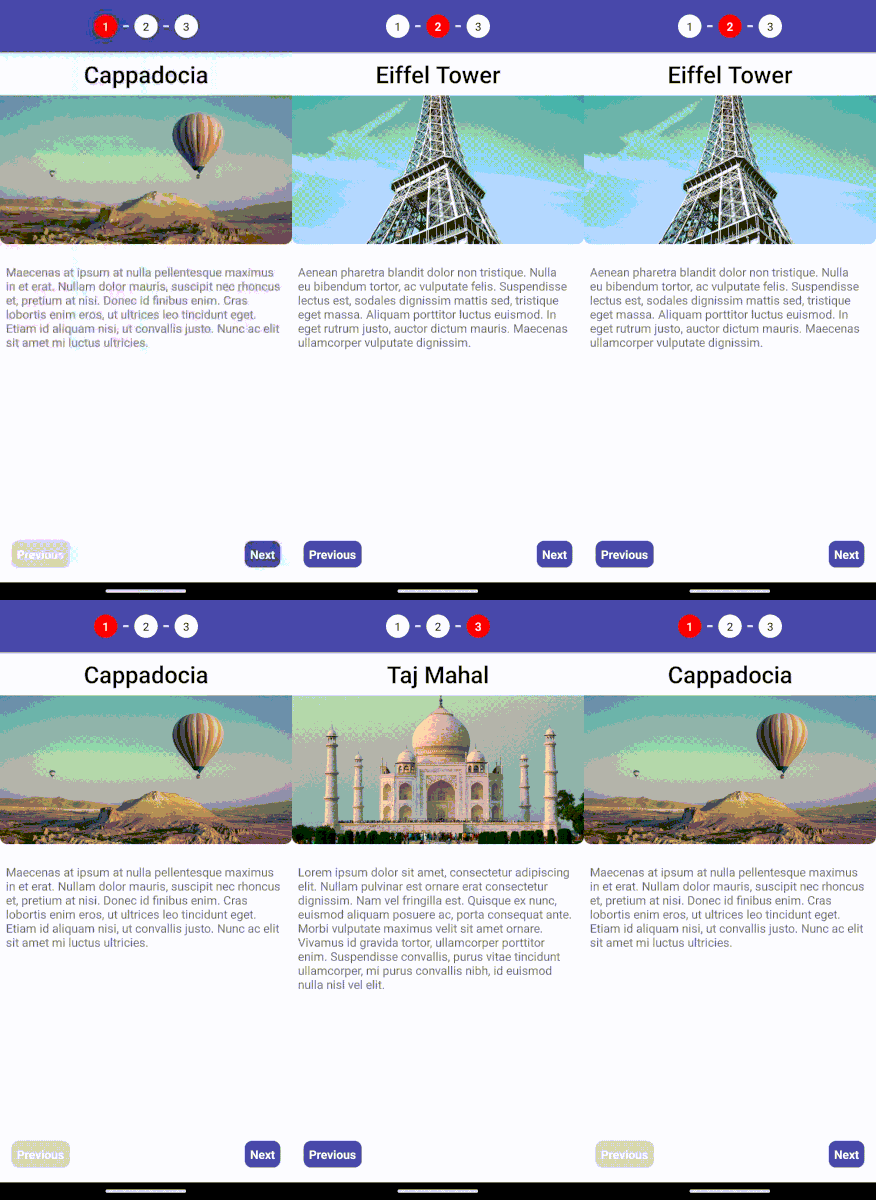
A simple and customizable stepper component for React Native applications.
Downloads
7


Readme
react-native-step-controller
A simple and customizable stepper component for React Native applications.
Installation
You can install react-native-step-controller using npm or yarn:
npm install react-native-step-controlleror
yarn add react-native-step-controllerUsage
Import the Stepper and StepperItem components into your project:
import { Stepper, StepperItem } from 'react-native-step-controller';
import { Text } from 'react-native';

export default function App() {
  return (
    <Stepper>
      <StepperItem title="First Step">
        <Text>This is the first step.</Text>
      </StepperItem>
      <StepperItem title="Second Step">
        <Text>This is the second step.</Text>
      </StepperItem>
      <StepperItem title="Third Step">
        <Text>This is the third step.</Text>
      </StepperItem>
    </Stepper>
  );
}
Stepper Props
| Prop | Type | Description | Optional |
| ------------------------------ | ------------------------------------ | -------------------------------------------------------------------------------------------------------------------------------- | -------- |
| children | React.ReactNode, React.ReactNode[] | StepperItem as an array or a single component. | No |
| footer | boolean, React.ReactNode | Used to determine footer visibility. | Yes |
| activeStep | number | The index of the current step (starting from 1) | Yes |
| pagination | boolean | Visibility of top pagination. | Yes |
| containerStyle | any | Style of main container of Stepper. | Yes |
| paginationContainerStyle | any | Style of pagination header container of Stepper. | Yes |
| footerContainerStyle | any | Style of footer container of Stepper. | Yes |
| nextButtonContainerStyle | any | Next button's container style. | Yes |
| previousButtonContainerStyle | any | Previous button's container style. | Yes |
| nextButtonTextStyle | any | Next button's text style. | Yes |
| circleOptions | CircleColorProps | The circle options for styling. | Yes |
| circleItemStyle | any | Style of circle step item header. The style of each circle's container. | Yes |
| circleItemTextStyle | any | Style of circle step item text. The style of each circle's text. | Yes |
| previousButtonTextStyle | any | Previous button's text style. | Yes |
| nextButtonDisabled | boolean | Disable the next button. | Yes |
| backButtonDisabled | boolean | Disable the previous button. | Yes |
| onActiveStepChange | Function | This function will trigger on active step changed. | Yes |
| LastStepFooterComponent | React.ReactNode | Last step footer component. This will automatically applies in the footer. However, in the future it will perhaps be deprecated. | Yes |
| canClickStepNumber | boolean | Normally, user can't click step number as default. But, you can make it clickable. | Yes |
| previousButtonTitle | string | Previous button's title. | Yes |
| nextButtonTitle | string | Next button's title. | Yes |
| dividerColor | string | Divider color of circles. | Yes |
| dividerSize | number | Size of divider. | Yes |
| attachedDivider | boolean | Determines whether the Divider is attached or not. | Yes |
| transformActiveCircle | boolean | Transforms the active circle. | Yes |
| animated | boolean | Completed step's circle will be animated color. | Yes |
| completedColor | string | Completed color of circles. | Yes |
CircleColorProps
| Prop | Type | Description | Optional |
| ----------------- | ------------ | ----------------------------------------------- | -------- |
| textColor | ColorProps | You can change your circle's text style. | Yes |
| backgroundColor | ColorProps | Background color of active or inactive circles. | Yes |
| borderColor | ColorProps | Border color of active or inactive circles. | Yes |
ColorProps
| Prop | Type | Description | Optional |
| --------------- | -------- | ------------ | -------- |
| activeColor | string | Active Color | Yes |
| inactiveColor | string | Active Color | Yes |
Stepper Item Props
| Prop | Type | Description | Optional |
| ----------------------- | ----------------- | ---------------------------------------------- | -------- |
| children | React.ReactNode | Component that will be inside the StepperItem. | No |
| title | string | Every stepper item has a title. | Yes |
| contentContainerStyle | any | Container style of the stepper item. | Yes |
| completed | any | Is completed step? | Yes |
Ref Usage
If you assign a ref to the Stepper component, you can access the following methods:
| Method | Parameters | Description |
| ------------ | ---------------------- | --------------------------- |
| goToStep() | (stepNumber: number) | It goes to a specific step. |
Example Usage with Ref
import React, { useRef } from 'react';
import { View, Button } from 'react-native';
import { Stepper, StepperItem } from 'react-native-step-controller';

export default App = () => {
  const stepperRef = useRef(null);

  return (
    <View>
      <Stepper ref={stepperRef}>
        <StepperItem title="First Step">
          <Text>This is the first step.</Text>
        </StepperItem>
        <StepperItem title="Second Step">
          <Text>This is the second step.</Text>
        </StepperItem>
        <StepperItem title="Third Step">
          <Text>This is the third step.</Text>
        </StepperItem>
      </Stepper>
      <Button
        title="Go To Step"
        onPress={() => stepperRef.current?.goToStep(1)}
      />
    </View>
  );
};
Customization
You can customize the styles of the stepper using the styling props:
<Stepper
  previousButtonTitle="Example Previous"
  nextButtonTitle="Example Next"
  containerStyle={{ backgroundColor: 'red' }}
  previousButtonContainerStyle={{ backgroundColor: '#3a498d' }}
  paginationContainerStyle={{
    backgroundColor: '#3a498d',
    elevation: 2,
  }}
  circleItemTextStyle={{ color: 'white', fontSize: 30 }}
>
  <StepperItem title="First Step">
    <Text>This is the first step.</Text>
  </StepperItem>
  <StepperItem title="Second Step">
    <Text>This is the second step.</Text>
  </StepperItem>
  <StepperItem title="Third Step">
    <Text>This is the third step.</Text>
  </StepperItem>
</Stepper>
License
This project is licensed under the MIT License.