
react-native-telebirr-payment
v1.0.0
Published
telebirr inAppSDK payment module

Maintainers
 yonas-getahun
Readme
React Native Telebirr Payment
A react native telebirr inAppSDK payment module which is mainly intended for applications which require telebirr inapp payment.
Installation
npm install react-native-telebirr-paymentDemo
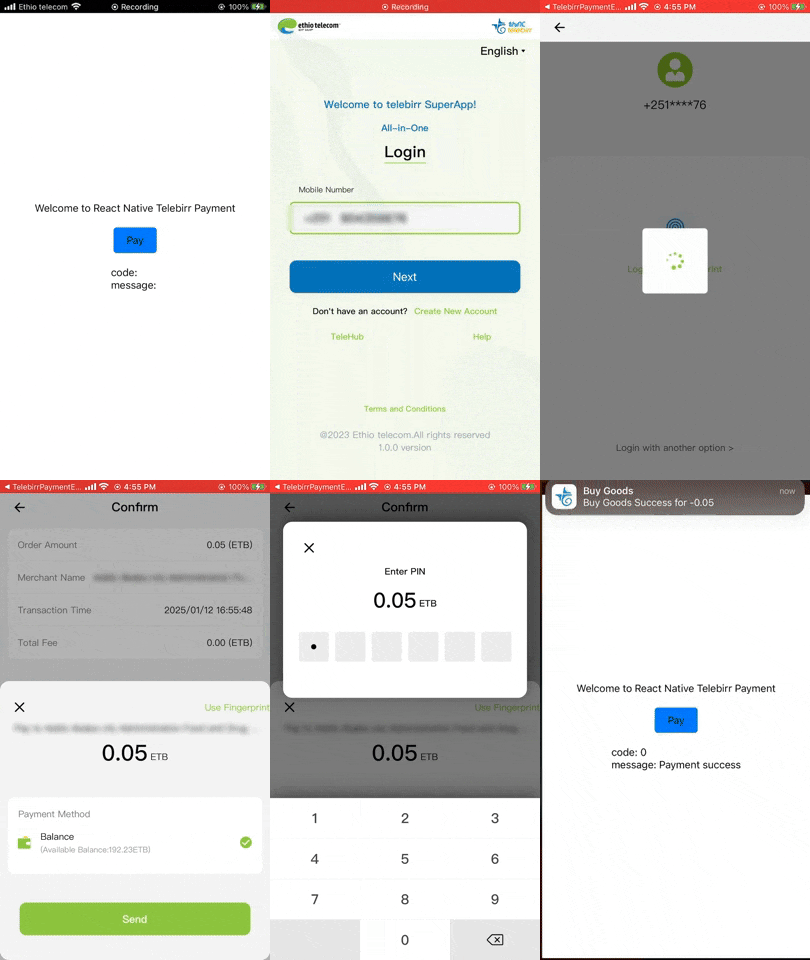
Usage/Examples
import TelebirrPayment from 'react-native-telebirr-payment';

// ...

export default function App() {
  const [resultCode, setResultCode] = useState(null);
  const [resultMessage, setresultMessage] = useState(null);
  const handlePayment = async () => {
    try {
      const appId = '**************';// your own telebirr provided appId
      const shortCode = '****'; // your own telebirr provided shortcode
      const receiveCode =  'TELEBIRR$BUYGOODS$5510$0.05$10527506c5822051eae86ffbeba60036387009$120m'; // the receiveCode is the response you get from /payment/v1/merchant/inapp/createOrder

      const result = await TelebirrPayment.startPay(
        appId,
        shortCode,
        receiveCode
      );
      const { code, message } = result;
      setResultCode(code);
      setresultMessage(message);
      if (result) {
        if (code === -3) {
          console.log('User canceled the payment.', message);
        } else if (code === 0) {
          console.log('Successful Payment.');
        } else if (code === -10) {
          console.log('Telebirr Payment is not installed.', message);
        } else {
          console.log(`Error Code: ${code}, Message: ${message}`);
        }
      } else {
        console.log('Unexpected log format:', result);
      }
    } catch (error) {
      console.error('Payment initiation failed:', error);
    }
  };

  return (
    <SafeAreaView style={styles.container}>
      <View style={styles.subcontainer}>
        <Text style={styles.textStyle}>
          Welcome to React Native Telebirr Payment
        </Text>
        <View style={styles.payment}>
          <TouchableOpacity style={styles.buttonStyle} onPress={handlePayment}>
            <Text style={styles.textStyle}>Pay</Text>
          </TouchableOpacity>
        </View>
        <View style={styles.payment}>
          <Text style={styles.textStyle}>code: {resultCode}</Text>
          <Text style={styles.textStyle}>message: {resultMessage}</Text>
        </View>
      </View>
    </SafeAreaView>
  );
}
API Reference
| Parameter | Type | Required | Description | Default |
| :------------------ | :-------------- | :------- | :------------------------------------------------------------------------------- | :-------------------------- |
| appId | string | true | a telebirr provided appId for the merchant | |
| shortCode | string | true | a telebirr provided shortCode for the merchant | |
| receiveCode | string | true | a concatenated response data from /payment/v1/merchant/inapp/createOrder, "TELEBIRR$BUYGOODS$merch_code$total_amount $prepay_id$timeout_express" | |
Result Return Codes
| Code | Description |
| :------------------ | :------------------------------------------------------------------------------- |
| -2 | Parameter error. (all the three parameters should be passed other wise will give this error) |
| -3 | Cancellation of payment ( when the user is taken to the telebirr superapp and the user cancels the payment |
| -10 | The Payment is not installed. (if the telebirr superapp apk is not installed (testbed or production apk) |
UAT Usage
for android UAT(test) you have to change the android archive (aar) inside node_modules\react-native-telebirr-payment\android\build.gradle from 'libs/EthiopiaPaySdkModule-prod-release.aar' to 'libs/EthiopiaPaySdkModule-uat-release.aar' this will launch the telebirr testbed app and make the transction
Contributing
See the contributing guide to learn how to contribute to the repository and the development workflow.
License
MIT
Made with create-react-native-library