
react-native-text-stream
v0.2.1
Published
A native React Native text view that renders a streamed response as it arrives, without JS per chunk

Maintainers
 pioner92
Readme
StreamText renders a streaming HTTP response in a native text view. Its own streamFetch writes the
response into native memory; the view reads and lays out the new text without sending each chunk
through JavaScript.
import { StreamText } from 'react-native-text-stream';

export function Answer({ url }: { url: string }) {
  return <StreamText request={{ url }} fontSize={16} lineHeight={24} />;
}
By default your endpoint returns plain UTF-8 text. StreamText handles the native request
and rendering. Select a native SSE/NDJSON parser with parser: { provider: 'openai-chat' };
see the protocol guide for providers and custom fields. Opt into native Markdown with
format="markdown" markdownFlavor="gfm" for styled text, table grids, async images and fenced-code highlighting; see the Markdown guide
for supported elements and performance limits.
Why StreamText?
- No JavaScript callbacks per chunk. No per-chunk
setState, React render, or JS text decoding. - Streaming continues when JS is busy. Network delivery, text updates, and growing the view happen natively.
- Built for chat layouts. Set the width; the component grows with its content and supports native text selection.
- A built-in fetcher. URLSession on iOS and React Native’s OkHttp client on Android. No extra streaming library.
- Control the lifetime. Use a request prop for a single view, a
streamIdfor remounting list items, or an imperative ref.
Watch the rich Markdown demo · Watch the JS-blocking demo · Explore the architecture
Quick start
Experimental preview. The API may change before a stable release.
npm install react-native-text-streamThen install iOS pods and rebuild the native app. Follow the installation guide for platform steps, or the example setup to run the repository demo. The library itself has no runtime dependencies beyond React and React Native.
Stream a response
Pass a URL that returns a plain-text stream. For a POST request, supply a body and headers:
import { StreamText } from 'react-native-text-stream';

type AnswerProps = {
  endpoint: string;
  prompt: string;
};

export function StreamingAnswer({ endpoint, prompt }: AnswerProps) {
  return (
    <StreamText
      request={{
        url: endpoint,
        method: 'POST',
        headers: { 'Content-Type': 'application/json' },
        body: JSON.stringify({ prompt }),
      }}
      fontSize={16}
      lineHeight={24}
      color="#EDE9FE"
      style={{ padding: 16, borderRadius: 16, backgroundColor: '#181426' }}
    />
  );
}
Without a streamId, the request belongs to the mounted view and is aborted on unmount.
Equivalent request values do not restart it, so an inline request object is supported.
Start a stream, render it anywhere
Use streamFetch to start the request separately and connect a view with the same streamId:
import { StreamText, streamFetch } from 'react-native-text-stream';

// Start in your send-message handler.
streamFetch(url, { streamId: message.id });

// Render anywhere using the same ID.
<StreamText streamId={message.id} />
The stream keeps running when the view unmounts. Remount with the same ID to reconnect.
Cancellation and completion · Lists and persistent streams · All props
Performance
100 KB of streaming text, with JavaScript busy: StreamText recorded an estimated 9 ms p95 update delay and 0 UI stutters in the measured scenario.
iOS Simulator · Release · median of 3 runs. Streaming uses a 100 KB answer plus a 40 ms JS task every 100 ms. Mount is a separate test with 20 finished messages of approximately 5 KB each.
Timings estimate UI progress. streamdown also parses Markdown and may finish after its timing marker.
See how we measure delay and UI stutters for definitions and limitations.
Full results and methodology · Raw streaming data · Raw mount data
Choose an integration
| Your use case | Start here |
| --- | --- |
| One view owns one request | <StreamText request={{ url }} /> |
| A message may scroll offscreen and remount | streamFetch(url, { streamId }) + <StreamText streamId={streamId} /> |
| Start or replace a stream from an event handler | streamFetch() + useStreamTextRef().attach() |
| Another native module produces the bytes | Pass a native-owned TSB1 buffer through source |
Integration guides cover each approach, including cleanup, cancellation, and retained-stream behavior.
How it works
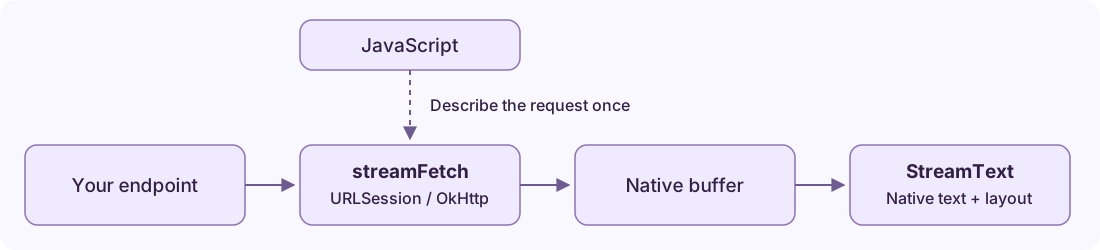
The native renderer consumes newly committed bytes and updates its text and Fabric layout state. Streaming work is spread across frames; JS receives lifecycle events rather than every text chunk.
Architecture · Native buffer contract
Compatibility
| Requirement | Current scope | | --- | --- | | React Native | Developed and tested with 0.86.0, New Architecture required | | iOS | Example targets 15.1+; the podspec follows React Native's minimum deployment target | | Android | API 24+; viewport drawing optimizations use API 29+ | | Expo | Requires a custom native build; unavailable in Expo Go. Expo integration is not yet validated. | | Web / old architecture | Not supported |
The example and benchmark tools use Nitro Modules and Reanimated. The StreamText package does not require them. See setup and compatibility details.
Documentation
| Guide | What you will find |
| --- | --- |
| Getting started | Requirements, npm installation, and backend response format |
| Usage and recipes | POST requests, completion, cancellation, refs, and list lifecycles |
| API reference | Component props, streamFetch, stream handles, and status semantics |
| Protocol parsing | Native SSE/NDJSON, provider presets and custom JSON fields |
| Markdown | CommonMark/GFM support and rendering limits |
| Architecture | Native transport, rendering, layout, and custom producers |
| Benchmarks | Workloads, all results, limitations, and reproducibility |
| Example app | Run the demo, freeze JS, and explore the benchmark screens |
| Changelog | Release notes and current scope |
Roadmap
- A JavaScript chunk-input API for existing SDKs and other transports.
- A broader validated compatibility matrix.
These are planned directions, not currently supported features or release commitments.
Contributing
Bug reports, reproductions, and pull requests are welcome. Read the contribution guide for local checks and native test workflows.
Report a bug · Discuss a feature
License
MIT © Alex Shumihin