
react-native-threadforge
v1.1.9
Published
React Native multithreading toolkit for executing JavaScript functions on background threads using a native C++ worker pool with Hermes and JSI compatibility.

Maintainers
 alexrus28996
Readme
🚀 React Native ThreadForge
ThreadForge brings real multi-threading to React Native.
It executes serializable JavaScript functions on background threads using a high-performance C++ worker pool — keeping your main thread fast, fluid, and responsive.
Crafted by Abhishek Kumar
📘 Table of Contents
- Overview
- Features
- Installation
- Demo
- Hermes Setup
- Quick Start Example
- Dual Background Task Example
- New “run()” API (v1.1.8+)
- Comparison with Other Libraries
- Common Errors & Fixes
- Architecture
- Best Practices
- License
🧩 Overview
react-native-threadforge bridges the gap between React Native’s single-threaded JavaScript runtime and native multi-core performance.
It allows you to execute serializable JS functions in isolated background threads powered by a native C++ worker pool and dedicated Hermes VMs.
This helps developers offload heavy computation without affecting UI performance — ideal for:
- Mathematical or data-intensive calculations
- File or image processing
- Encryption, compression, or decompression
- Long-running background tasks
⚙️ Features
- True Background Multi-Threading — Run heavy JS logic off the main thread.
- Hermes & JSC Compatible — Works across Debug and Release builds.
- Progress & Cancellation APIs — Real-time control and tracking.
- Configurable Thread Pool — Customizable concurrency and task priority.
- TypeScript-First Design — Clean typings and IntelliSense.
- Native C++ Core — Low-latency, high-stability runtime.
- New
run()Helper (v1.1.8+) — Clean, async/await-friendly API for background tasks.
⚡ Installation
npm install react-native-threadforge
# or
yarn add react-native-threadforge
Then link native modules:
npx pod-installRequirements
- React Native 0.70+
- Android NDK / Xcode
- Hermes enabled (recommended)
🎬 Demo
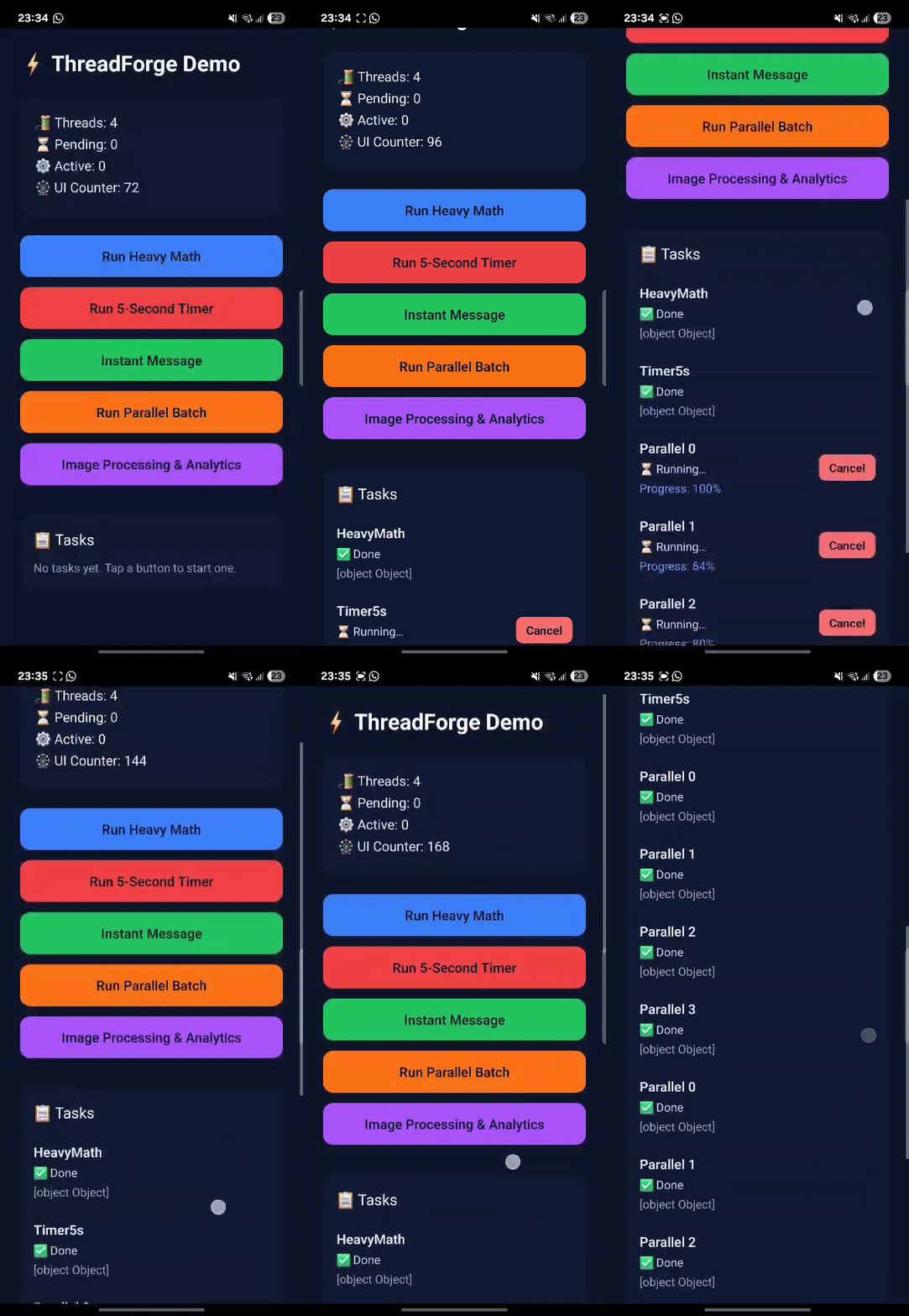
Try the demo app:
git clone https://github.com/alexrus28996/react-native-threadforge.git
cd react-native-threadforge
npm install
npm run android   # or npm run ios
🧠 Hermes Setup
ThreadForge supports both Hermes and JSC, but Hermes removes function source text in Release builds.
To ensure proper execution, provide function source manually via __threadforgeSource.
Check Hermes Status
console.log('Hermes enabled:', !!global.HermesInternal);Enable / Disable Hermes
Android → android/gradle.properties
hermesEnabled=trueiOS → Podfile
use_react_native!(
  :hermes_enabled => true
)
Then rebuild your project:
cd android && ./gradlew clean && cd ..
npx react-native run-android
⚡ Quick Start Example
This example works in Debug & Release, with Hermes ON or OFF.
import React, { useEffect, useState } from 'react';
import { SafeAreaView, Text, Button, Alert, StyleSheet } from 'react-native';
import {
  threadForge,
  TaskPriority,
  ThreadForgeCancelledError,
} from 'react-native-threadforge';

const App = () => {
  const [ready, setReady] = useState(false);

  useEffect(() => {
    const init = async () => {
      await threadForge.initialize();
      setReady(true);
    };
    init();
    return () => threadForge.shutdown();
  }, []);

  const runHeavyTask = async () => {
    if (!ready) return Alert.alert('Wait', 'ThreadForge not initialized');

    // ✅ Full Hermes-safe function with explicit source
    const fn: any = () => {
      let sum = 0;
      for (let i = 0; i < 1e6; i++) {
        sum += Math.sqrt(i);
        if (i % 100000 === 0) globalThis.reportProgress?.(i / 1e6);
      }
      globalThis.reportProgress?.(1);
      return { message: 'Worker Done', sum: sum.toFixed(2) };
    };

    fn.__threadforgeSource = `
      () => {
        let sum = 0;
        for (let i = 0; i < 1e6; i++) {
          sum += Math.sqrt(i);
          if (i % 100000 === 0) globalThis.reportProgress?.(i / 1e6);
        }
        globalThis.reportProgress?.(1);
        return { message: 'Worker Done', sum: sum.toFixed(2) };
      }
    `;

    try {
      const { id, result } = await threadForge.run(fn, TaskPriority.HIGH, { idPrefix: 'heavy' });
      Alert.alert('Task Complete', `Task ID: ${id}\n${JSON.stringify(result, null, 2)}`);
    } catch (err) {
      if (err instanceof ThreadForgeCancelledError)
        Alert.alert('Cancelled', 'Task was cancelled');
      else Alert.alert('Error', String(err));
    }
  };

  return (
    <SafeAreaView style={styles.container}>
      <Text style={styles.title}>ThreadForge Demo (v1.1.7)</Text>
      <Button title="Run Background Task" onPress={runHeavyTask} disabled={!ready} />
    </SafeAreaView>
  );
};

const styles = StyleSheet.create({
  container: {
    flex: 1,
    justifyContent: 'center',
    alignItems: 'center',
    backgroundColor: '#0f172a',
  },
  title: {
    fontSize: 20,
    color: '#61dafb',
    marginBottom: 8,
  },
});

export default App;
🧮 Dual Background Task Example
Run two independent background threads concurrently.
import React, { useEffect, useState } from 'react';
import { SafeAreaView, Text, Button, View, StyleSheet, Alert } from 'react-native';
import { threadForge, TaskPriority } from 'react-native-threadforge';

const App = () => {
  const [ready, setReady] = useState(false);
  const [progress, setProgress] = useState<{ [key: string]: number }>({});

  useEffect(() => {
    let unsub: any = null;

    const init = async () => {
      try {
        await threadForge.initialize(4);
        unsub = threadForge.onProgress((id, value) => {
          setProgress(prev => ({ ...prev, [id]: value }));
        });
        setReady(true);
      } catch (e) {
        Alert.alert('Init failed', String(e));
      }
    };

    init();
    return () => {
      unsub?.remove?.();
      threadForge.shutdown();
    };
  }, []);

  const createHeavyMathTask = () => {
    const fn: any = () => {};
    fn.__threadforgeSource = `
      () => {
        let total = 0;
        for (let i = 0; i < 1e6; i++) {
          total += Math.sqrt(i);
          if (i % 100000 === 0) globalThis.reportProgress?.(i / 1e6);
        }
        globalThis.reportProgress?.(1);
        return { task: 'Heavy Math', sum: total.toFixed(2) };
      }
    `;
    return fn;
  };

  const createTimerTask = (durationMs = 5000) => {
    const fn: any = () => {};
    fn.__threadforgeSource = `
      () => {
        const start = Date.now();
        while (Date.now() - start < ${durationMs}) {
          const elapsed = Date.now() - start;
          globalThis.reportProgress?.(elapsed / ${durationMs});
        }
        globalThis.reportProgress?.(1);
        return { task: 'Timer', waited: ${durationMs} };
      }
    `;
    return fn;
  };

  const runBoth = async () => {
    if (!ready) return Alert.alert('Wait', 'ThreadForge not initialized');

    try {
      const [mathRes, timerRes] = await Promise.all([
        threadForge.runFunction('math', createHeavyMathTask(), TaskPriority.HIGH),
        threadForge.runFunction('timer', createTimerTask(5000), TaskPriority.NORMAL),
      ]);
      Alert.alert('Both Done', JSON.stringify({ mathRes, timerRes }, null, 2));
    } catch (e) {
      Alert.alert('Error', String(e));
    }
  };

  return (
    <SafeAreaView style={styles.container}>
      <Text style={styles.title}>ThreadForge — Dual Tasks</Text>
      <Button title="Run Two Background Tasks" onPress={runBoth} disabled={!ready} />
      <View style={{ marginTop: 24 }}>
        <Text style={styles.progress}>
          Heavy Math: {Math.round((progress['math'] ?? 0) * 100)}%
        </Text>
        <Text style={styles.progress}>
          Timer: {Math.round((progress['timer'] ?? 0) * 100)}%
        </Text>
      </View>
    </SafeAreaView>
  );
};

const styles = StyleSheet.create({
  container: { flex: 1, justifyContent: 'center', alignItems: 'center', backgroundColor: '#111827' },
  title: { fontSize: 20, color: '#f9fafb', marginBottom: 16 },
  progress: { color: '#a5b4fc', marginTop: 6, fontSize: 16 },
});

export default App;
✨ New run() API (v1.1.8)
The new run() method is a simpler wrapper over runFunction() — it keeps all power but removes the boilerplate.
Before
const id = 'task-123';
const result = await threadForge.runFunction(id, () => heavyWork(), TaskPriority.HIGH);
After (v1.1.7)
const { id, result } = await threadForge.run(() => heavyWork());| Feature | runFunction() | run() |
|----------|------------------|---------|
| Requires task ID | ✅ Yes | ❌ Auto-generated |
| Returns only result | ✅ Yes | ✅ { id, result } |
| Supports cancellation | ✅ Yes | ✅ Easier |
| Readability | ⚠️ Verbose | ✅ Clean and async/await-friendly |
| Performance | ⚡ Same | ⚡ Same |
Why no “sync” method?
A true synchronous API isn’t possible in React Native — it would block the JS thread and freeze the UI.run() gives you the same “sync-like” developer experience safely through await.
🧩 Comparison with Other Libraries
| Library | True Native Worker Threads | Hermes Safe | Progress API | Cancellation | TypeScript | Notes | |----------|----------------------------|--------------|---------------|--------------|-------------|--------| | react-native-threadforge | ✅ C++ thread pool + Hermes VM | ✅ Full | ✅ Built-in | ✅ Yes | ✅ Full | Modern, stable, production-ready | | react-native-worklets | ⚠️ Runs on JS/UI thread (not real native threads) | ✅ Full | ❌ None | ❌ No | ✅ Yes | Great for UI animations and frame-bound logic, not for heavy CPU work | | react-native-multithreading | ✅ JSI threads | ⚠️ Partial | ⚠️ Limited | ⚠️ No | ✅ Yes | Experimental and less maintained | | react-native-threads | ✅ Separate JS processes | ❌ No | ❌ None | ❌ No | ✅ Basic | Legacy approach, heavy overhead | | react-native-multithreads | ✅ Multi-process | ❌ No | ❌ None | ❌ No | ✅ Yes | Heavy resource usage, not Hermes-safe |
🧠 Why ThreadForge Leads
- Native C++ thread pool for real multithreading
- Hermes VM isolation per worker → safe concurrent execution
- Built-in progress and cancellation APIs
- TypeScript-first API surface
- Designed for production-grade React Native apps (AI, data, I/O, CPU tasks)
🧱 Common Errors & Fixes
| Error | Cause | Fix |
|-------|--------|-----|
| ThreadForge has not been initialized | Function called before init | Use await threadForge.initialize() |
| could not serialize the provided function | Hermes stripped function | Add fn.__threadforgeSource |
| ReadableNativeMap error | Passing objects to Alert | Wrap with JSON.stringify(result) |
| Property 'console' doesn't exist | No console in worker VM | Use reportProgress() |
🧬 Architecture
JavaScript Layer     → TypeScript interface for tasks
Bridge Layer         → JSON serialization & communication
Native Core (C++)    → Thread pool + Hermes VM per worker
Platform Bridges     → Kotlin (Android), Obj-C++ (iOS)
Each worker runs in an isolated Hermes VM — ensuring safe, predictable concurrency with minimal overhead.
🧠 Best Practices
- Always call
threadForge.shutdown()on unmount. - Keep worker functions pure (no closures / React hooks).
- Use
getStats()for monitoring. - Prefer small JSON outputs for speed.
- For Hermes builds, always include
__threadforgeSource. - Use
threadForge.run()for cleaner async syntax.
📦 License
MIT License
Developed by Abhishek Kumar
🚧 Coming Next (v1.2)
- Persistent worker threads for faster repeated tasks
- Improved progress event batching
- Task retry and timeout configuration
- Enhanced memory tracking for long-running jobs
ThreadForge — Real native multi-threading for React Native, built for performance, stability, and scale.