
react-native-video-library
v1.0.5
Published
React Native Video Library

Maintainers
 shariq_ahmed
Readme
React Native Video Library


A highly customized video component for React Native that has a rich set of features. It enables the developers to customize the component as per the requirements.
Features :
- Video thumbnail at the start of the video.
- Customized video progress bar.
- Customzied video controls
- Ability to Fast-Forward and Fast-Backward the video via controls.
- Customized sound controls.
- Enhanced UX.
- Full control over the component design.
- On load video error handling.
Demo :
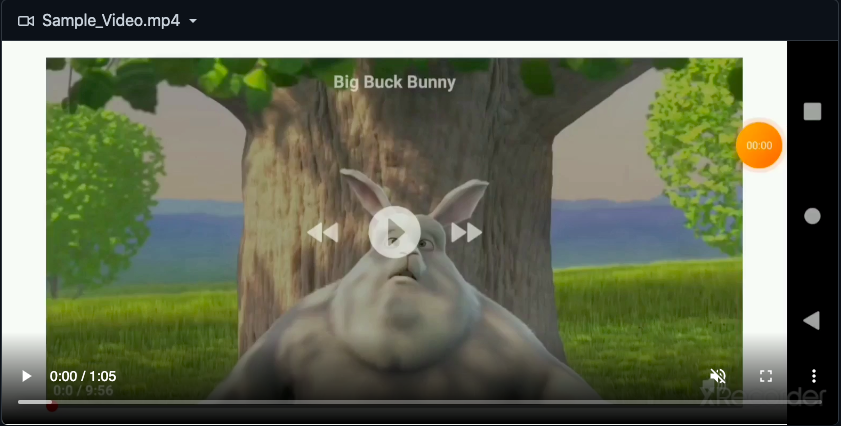
.png?raw=true)
.png?raw=true)
.png?raw=true)
.png?raw=true)
.png?raw=true)
.png?raw=true)
Installation :
npm install react-native-video-library
                or
yarn add react-native-video-library
Importing NPM Package
import { VideoPlayer } from 'react-native-video-library'Props:
| Sl. No | Prop | Type |Required| Value |-|-|-|-|-| |1|videoTitle|String|No|""| |2|videoTitleStyle|Object|No|{ color: 'white',fontSize: 14,fontWeight: 'bold'}| |3|videoThumbnailImg|String OR Object|NO|' OR {}| |4|videoSource|String OR Object|Yes|"" OR {}| |5|videoWidth|Number|No|width = Dimensions.get("window").width| |6|videoHeight|Number|No|height = width * .5625| |7|videoLoadingBackgroundColor|String|No|grey| |8|videoLoadingBackgroundOpacity|Number|No|0.55| |9|videoLoadingSpinnerColor|String|No|red| |10|videoLoadingSpinnerSize|enum('large','small')|No|large| |11|videoErrorIconSize|Number|No|35| |12|videoErrorIconColor|String|No|red| |13|videoErrorTextStyles|Object|No|{ fontSize: 14,fontWeight: 'bold' }| |14|videoErrorText|String|No|Oops, could not load the video.| |15|resumeVideoFrom|Number|No|0| |16|fastForwardIconSize|Number|No|40| |17|fastForwardIconColor|String|No|white| |18|fastForwardRate|Number|No|4 (in seconds)| |19|fastBackwardIconSize|Number|No|40| |20|fastBackwardIconColor|String|No|white| |21|fastBackwardRate|Number|No|4 (in seconds)| |22|pauseIconSize|Number|No|45| |23|pauseIconColor|String|No|white| |24|reloadIconSize|Number|No|45| |25|reloadIconColor|String|No|white| |26|playIconSize|Number|No|45| |27|playIconColor|String|No|white| |28|volumeIconSize|Number|No|23| |29|volumeIconColor|String|No|white| |30|videoProgressMaximumTrackTintColor|String|No|grey| |31|videoProgressMinimumTrackTintColor|String|No|red| |32|videoProgressThumbTintColor|String|No|red| |33|volumeMaximumTrackTintColor|String|No|grey| |34|volumeMinimumTrackTintColor|String|No|red| |35|volumeThumbTintColor|String|No|red| |36|volumeSliderWidth|Number|No|80| |37|volumeOverlayWidth|Number|No|300| |38|volumeOverlayBackgroundColor|String|No|black| |39|volumeOverlayOpacity|Number|No|0.7|
Callback/Methods :
|Sl. No| Name | Type |Required| Value| Description |
|-|-|-|-|-|-|
|1|onVideoPlay|Function|-|(time) => ()|This fuction is called when the user taps on the play button. It returns a time argument that has the actual value/position of the video being played. |
|2|onVideoPause|Function|-|(time) => ()| This function is called when the user taps on the pause button. It returns a time argument that has the actual value/position when the video is paused |
|3|onVideoReload|Function|-|(time) => ()| Callback function that returns the time duration whenever the reload button is clicked after the end of video |
|4|onVideoFastFordward|Function|-|(time) => ()| This function is called when the user taps on the fast-forward icon. It returns a time arugument that has the actual value/position of the video being played. |
|5|onVideoFastBackward|Function|-|(time) => ()| This function is called when the user taps on the fast-backward icon. It returns a time arugument that has the actual value/position of the video being played. |
|6|onVideoEnd|Function|-|(time) => ()| This function is called at the end of video. It returns a time arugument that has the actual length of the video. |
|7|onVideoProgress|Function|-|(videoObj, time) => ()| "This function is called whenever the video is being played or rendered. It returns two arguments named videoObj & time. * videoObj : Refer this link https://github.com/react-native-video/react-native-video#onprogress* time : It returns the present position of the video being played in time." |
|8|onVideoError|Function|-|(errorObject) => ()| "This function is called whenever the video can not be loaded due to network or any other issues. It returns an error object." |
|9|onVideoLoadStart|Function|-|(VideoLoadStartObject) => ()| "This callback function is called when the media starts loading. For more details please refer the following link : https://github.com/react-native-video/react-native-video#source" |
|10|videoProgressOnThumbSlide|Function|-|(time) => ()| This prop returns a time argument when the video progress-bar thumb(track ball) is moved/slided to the desired position. |
|11|volumeOnSlide|Function|-|(volume) => ()| Whenever the the volume track bar ball is moved/slided for the change of volume, then this function is called |
Description with Examples :
.png?raw=true)
.png?raw=true)
.png?raw=true)
.png?raw=true)
.png?raw=true)
videoTitle :
It is used to display the title of the video.
import React, { Component } from 'react';
import { View, Text, StyleSheet, Dimensions } from 'react-native';
import VideoPlayer from './VideoPlayer/videoPlayer';

const { width } = Dimensions.get('window')

class App extends Component {
  constructor() {
    super();
  }
  render() {
    return (
      <View style={styles.container}>
        <View>
          <Text style={styles.textStyles}>
            React Native Video Library
          </Text>
        </View>
        <VideoPlayer
          videoTitle={"Big Bug Bunny"} // Video Title
          videoTitleStyle={styles.videoTitleStyles}
          videoThumbnailImg={{ uri: 'https://i.ytimg.com/vi/YE7VzlLtp-4/maxresdefault.jpg' }}
          videoSource={{ uri: 'http://commondatastorage.googleapis.com/gtv-videos-bucket/sample/BigBuckBunny.mp4' }}
        />
      </View>
    );
  }
}
export default App;

const styles = StyleSheet.create({
    container: { flex: 1, justifyContent: 'center' },
    textStyles: { textAlign: 'center', fontSize: 17, fontWeight: 'bold',paddingBottom:25 },
    videoTitleStyles: { fontSize: 15, color: 'white', fontWeight: 'bold' },
})
videoTitleStyle :
It is used to add styles to the video title text-field.
import React, { Component } from 'react';
import { View, Text, StyleSheet, Dimensions } from 'react-native';
import VideoPlayer from './VideoPlayer/videoPlayer';

const { width } = Dimensions.get('window')

class App extends Component {
  constructor() {
    super();
  }
  render() {
    return (
      <View style={styles.container}>
        <View>
          <Text style={styles.textStyles}>
            React Native Video Library
          </Text>
        </View>
        <VideoPlayer
          videoTitle={"Big Bug Bunny"}
          videoTitleStyle={styles.videoTitleStyles} // Video Title Styles
          videoThumbnailImg={{ uri: 'https://i.ytimg.com/vi/YE7VzlLtp-4/maxresdefault.jpg' }}
          videoSource={{ uri: 'http://commondatastorage.googleapis.com/gtv-videos-bucket/sample/BigBuckBunny.mp4' }}
        />
      </View>
    );
  }
}
export default App;

const styles = StyleSheet.create({
    container: { flex: 1, justifyContent: 'center' },
    textStyles: { textAlign: 'center', fontSize: 17, fontWeight: 'bold',paddingBottom:25 },
    videoTitleStyles: { fontSize: 15, color: 'white', fontWeight: 'bold' },
})
videoThumbnailImg :
This prop accepts either a remote URL or a local file resource. This prop is used to add an Image(Thumbnail) at the start of the video.
Asset Loaded via require: Example: const bunny = require('./bigBunny.png'); videoThumbnailImg={bunny}
URI string: A number of URI schemes are supported by passing an object with a uri attribute. Example: Local File Path videoThumbnailImg={{ uri: 'file:///sdcard/photos/bigBunny.png' }}
Remote URL: videoThumbnailImg={{uri: 'https://i.ytimg.com/vi/YE7VzlLtp-4/maxresdefault.jpg' }}
import React, { Component } from 'react';
import { View, Text, StyleSheet, Dimensions } from 'react-native';
import VideoPlayer from './VideoPlayer/videoPlayer';

const { width } = Dimensions.get('window')

class App extends Component {
  constructor() {
    super();
  }
  render() {
    return (
      <View style={styles.container}>
        <View>
          <Text style={styles.textStyles}>
            React Native Video Library
          </Text>
        </View>
        <VideoPlayer
          videoTitle={"Big Bug Bunny"}
          videoTitleStyle={styles.videoTitleStyles}
          videoThumbnailImg={{ uri: 'https://i.ytimg.com/vi/YE7VzlLtp-4/maxresdefault.jpg' }} // Video Thumbnail Image
          videoSource={{ uri: 'http://commondatastorage.googleapis.com/gtv-videos-bucket/sample/BigBuckBunny.mp4' }}
        />
      </View>
    );
  }
}
export default App;

const styles = StyleSheet.create({
    container: { flex: 1, justifyContent: 'center' },
    textStyles: { textAlign: 'center', fontSize: 17, fontWeight: 'bold',paddingBottom:25 },
    videoTitleStyles: { fontSize: 15, color: 'white', fontWeight: 'bold' },
})
videoSource :
This prop is used to set the media source. You can pass an asset loaded via require or an object with URI.
Asset Loaded via require: Example: const sintel = require('./sintel.mp4'); videosSource={sintel}
URI string: A number of URI schemes are supported by passing an object with a uri attribute.
Example: Local File Path videoSource={{ uri: 'file:///sdcard/Movies/sintel.mp4' }}
Remote URL: videoSource={{uri: 'https://www.sample-videos.com/video/mp4/720/big_buck_bunny_720p_10mb.mp4' }}
import React, { Component } from 'react';
import { View, Text, StyleSheet, Dimensions } from 'react-native';
import VideoPlayer from './VideoPlayer/videoPlayer';

const { width } = Dimensions.get('window')

class App extends Component {
  constructor() {
    super();
  }
  render() {
    return (
      <View style={styles.container}>
        <View>
          <Text style={styles.textStyles}>
            React Native Video Library
          </Text>
        </View>
        <VideoPlayer
          videoTitle={"Big Bug Bunny"}
          videoTitleStyle={styles.videoTitleStyles}
          videoThumbnailImg={{ uri: 'https://i.ytimg.com/vi/YE7VzlLtp-4/maxresdefault.jpg' }} // Video Thumbnail
          videoSource={{ uri: 'http://commondatastorage.googleapis.com/gtv-videos-bucket/sample/BigBuckBunny.mp4' }} // Video Source
        />
      </View>
    );
  }
}
export default App;

const styles = StyleSheet.create({
    container: { flex: 1, justifyContent: 'center' },
    textStyles: { textAlign: 'center', fontSize: 17, fontWeight: 'bold',paddingBottom:25 },
    videoTitleStyles: { fontSize: 15, color: 'white', fontWeight: 'bold' },
})
videoWidth :
It is used to set the width of the video component.
import React, { Component } from 'react';
import { View, Text, StyleSheet, Dimensions } from 'react-native';
import VideoPlayer from './VideoPlayer/videoPlayer';

const { width } = Dimensions.get('window')

class App extends Component {
  constructor() {
    super();
  }
  render() {
    return (
      <View style={styles.container}>
        <View>
          <Text style={styles.textStyles}>
            React Native Video Library
          </Text>
        </View>
        <VideoPlayer
          videoTitle={"Big Bug Bunny"}
          videoTitleStyle={styles.videoTitleStyles}
          videoWidth={width} // Video Width
          videoThumbnailImg={{ uri: 'https://i.ytimg.com/vi/YE7VzlLtp-4/maxresdefault.jpg' }}
          videoSource={{ uri: 'http://commondatastorage.googleapis.com/gtv-videos-bucket/sample/BigBuckBunny.mp4' }}
        />
      </View>
    );
  }
}
export default App;

const styles = StyleSheet.create({
    container: { flex: 1, justifyContent: 'center' },
    textStyles: { textAlign: 'center', fontSize: 17, fontWeight: 'bold',paddingBottom:25 },
    videoTitleStyles: { fontSize: 15, color: 'white', fontWeight: 'bold' },
})
videoHeight :
It is used to set the height of the video component. This prop is optional. Based on the passed videoWidth value videoHeigth will be set."
import React, { Component } from 'react';
import { View, Text, StyleSheet, Dimensions } from 'react-native';
import VideoPlayer from './VideoPlayer/videoPlayer';

const { width } = Dimensions.get('window')

class App extends Component {
  constructor() {
    super();
  }
  render() {
    return (
      <View style={styles.container}>
        <View>
          <Text style={styles.textStyles}>
            React Native Video Library
          </Text>
        </View>
        <VideoPlayer
          videoTitle={"Big Bug Bunny"}
          videoTitleStyle={styles.videoTitleStyles}
          videoWidth={width}
          videoHeight={240} // Video Height
          videoThumbnailImg={{ uri: 'https://i.ytimg.com/vi/YE7VzlLtp-4/maxresdefault.jpg' }} // Video Thumbnail
          videoSource={{ uri: 'http://commondatastorage.googleapis.com/gtv-videos-bucket/sample/BigBuckBunny.mp4' }}
        />
      </View>
    );
  }
}
export default App;

const styles = StyleSheet.create({
    container: { flex: 1, justifyContent: 'center' },
    textStyles: { textAlign: 'center', fontSize: 17, fontWeight: 'bold',paddingBottom:25 },
    videoTitleStyles: { fontSize: 15, color: 'white', fontWeight: 'bold' },
})
videoLoadingBackgroundColor :
This prop is used to set the background color of the video player when the onVideoLoad prop is called.
The backgorund color will be removed when the video is loaded successfully.
import React, { Component } from 'react';
import { View, Text, StyleSheet, Dimensions } from 'react-native';
import VideoPlayer from './VideoPlayer/videoPlayer';

const { width } = Dimensions.get('window')

class App extends Component {
  constructor() {
    super();
  }
  render() {
    return (
      <View style={styles.container}>
        <View>
          <Text style={styles.textStyles}>
            React Native Video Library
          </Text>
        </View>
        <VideoPlayer
          videoTitle={"Big Bug Bunny"}
          videoTitleStyle={styles.videoTitleStyles}
          videoWidth={width}
          videoHeight={240}
          videoThumbnailImg={{ uri: 'https://i.ytimg.com/vi/YE7VzlLtp-4/maxresdefault.jpg' }} // Video Thumbnail
          videoSource={{ uri: 'http://commondatastorage.googleapis.com/gtv-videos-bucket/sample/BigBuckBunny.mp4' }}
          videoLoadingBackgroundColor={'grey'} // Video Loading background color
        />
      </View>
    );
  }
}
export default App;

const styles = StyleSheet.create({
    container: { flex: 1, justifyContent: 'center' },
    textStyles: { textAlign: 'center', fontSize: 17, fontWeight: 'bold',paddingBottom:25 },
    videoTitleStyles: { fontSize: 15, color: 'white', fontWeight: 'bold' },
})
videoLoadingBackgroundOpacity :
This prop is used to set the opacity of the background color.
import React, { Component } from 'react';
import { View, Text, StyleSheet, Dimensions } from 'react-native';
import VideoPlayer from './VideoPlayer/videoPlayer';

const { width } = Dimensions.get('window')

class App extends Component {
  constructor() {
    super();
  }
  render() {
    return (
      <View style={styles.container}>
        <View>
          <Text style={styles.textStyles}>
            React Native Video Library
          </Text>
        </View>
        <VideoPlayer
          videoTitle={"Big Bug Bunny"}
          videoTitleStyle={styles.videoTitleStyles}
          videoWidth={width}
          videoHeight={240}
          videoThumbnailImg={{ uri: 'https://i.ytimg.com/vi/YE7VzlLtp-4/maxresdefault.jpg' }} // Video Thumbnail
          videoSource={{ uri: 'http://commondatastorage.googleapis.com/gtv-videos-bucket/sample/BigBuckBunny.mp4' }}
          videoLoadingBackgroundColor={'grey'}
          videoLoadingBackgroundOpacity={0.65} // Video Loading Background Opacity
        />
      </View>
    );
  }
}
export default App;

const styles = StyleSheet.create({
    container: { flex: 1, justifyContent: 'center' },
    textStyles: { textAlign: 'center', fontSize: 17, fontWeight: 'bold',paddingBottom:25 },
    videoTitleStyles: { fontSize: 15, color: 'white', fontWeight: 'bold' },
})
videoLoadingSpinnerColor :
This props is used to set the color of the spinner.
import React, { Component } from 'react';
import { View, Text, StyleSheet, Dimensions } from 'react-native';
import VideoPlayer from './VideoPlayer/videoPlayer';

const { width } = Dimensions.get('window')

class App extends Component {
  constructor() {
    super();
  }
  render() {
    return (
      <View style={styles.container}>
        <View>
          <Text style={styles.textStyles}>
            React Native Video Library
          </Text>
        </View>
        <VideoPlayer
          videoTitle={"Big Bug Bunny"}
          videoTitleStyle={styles.videoTitleStyles}
          videoWidth={width}
          videoHeight={240}
          videoThumbnailImg={{ uri: 'https://i.ytimg.com/vi/YE7VzlLtp-4/maxresdefault.jpg' }} // Video Thumbnail
          videoSource={{ uri: 'http://commondatastorage.googleapis.com/gtv-videos-bucket/sample/BigBuckBunny.mp4' }}
          videoLoadingBackgroundColor={'grey'}
          videoLoadingBackgroundOpacity={0.65}
          videoLoadingSpinnerColor={'red'} // Video Loading Spinner Color
        />
      </View>
    );
  }
}
export default App;

const styles = StyleSheet.create({
    container: { flex: 1, justifyContent: 'center' },
    textStyles: { textAlign: 'center', fontSize: 17, fontWeight: 'bold',paddingBottom:25 },
    videoTitleStyles: { fontSize: 15, color: 'white', fontWeight: 'bold' },
})
videoLoadingSpinnerSize :
This prop is used to set the size of the spinner.
import React, { Component } from 'react';
import { View, Text, StyleSheet, Dimensions } from 'react-native';
import VideoPlayer from './VideoPlayer/videoPlayer';

const { width } = Dimensions.get('window')

class App extends Component {
  constructor() {
    super();
  }
  render() {
    return (
      <View style={styles.container}>
        <View>
          <Text style={styles.textStyles}>
            React Native Video Library
          </Text>
        </View>
        <VideoPlayer
          videoTitle={"Big Bug Bunny"}
          videoTitleStyle={styles.videoTitleStyles}
          videoWidth={width}
          videoHeight={240}
          videoThumbnailImg={{ uri: 'https://i.ytimg.com/vi/YE7VzlLtp-4/maxresdefault.jpg' }} // Video Thumbnail
          videoSource={{ uri: 'http://commondatastorage.googleapis.com/gtv-videos-bucket/sample/BigBuckBunny.mp4' }}
          videoLoadingBackgroundColor={'grey'}
          videoLoadingBackgroundOpacity={0.65}
          videoLoadingSpinnerColor={'red'}
          videoLoadingSpinnerSize={'large'} // Video Loading Spinner Size
        />
      </View>
    );
  }
}
export default App;

const styles = StyleSheet.create({
    container: { flex: 1, justifyContent: 'center' },
    textStyles: { textAlign: 'center', fontSize: 17, fontWeight: 'bold',paddingBottom:25 },
    videoTitleStyles: { fontSize: 15, color: 'white', fontWeight: 'bold' },
})
videoErrorIconSize :
This prop is used to set the size of the video error icon.
import React, { Component } from 'react';
import { View, Text, StyleSheet, Dimensions } from 'react-native';
import VideoPlayer from './VideoPlayer/videoPlayer';

const { width } = Dimensions.get('window')

class App extends Component {
  constructor() {
    super();
  }
  render() {
    return (
      <View style={styles.container}>
        <View>
          <Text style={styles.textStyles}>
            React Native Video Library
          </Text>
        </View>
        <VideoPlayer
          videoTitle={"Big Bug Bunny"}
          videoTitleStyle={styles.videoTitleStyles}
          videoWidth={width}
          videoHeight={240}
          videoThumbnailImg={{ uri: 'https://i.ytimg.com/vi/YE7VzlLtp-4/maxresdefault.jpg' }} // Video Thumbnail
          videoSource={{ uri: 'http://commondatastorage.googleapis.com/gtv-videos-bucket/sample/BigBuckBunny.mp4' }}
          videoLoadingBackgroundColor={'grey'}
          videoLoadingBackgroundOpacity={0.65}
          videoLoadingSpinnerColor={'red'}
          videoLoadingSpinnerSize={'large'}
          videoErrorIconSize={25} // Video Error Icon Size
        />
      </View>
    );
  }
}
export default App;

const styles = StyleSheet.create({
    container: { flex: 1, justifyContent: 'center' },
    textStyles: { textAlign: 'center', fontSize: 17, fontWeight: 'bold',paddingBottom:25 },
    videoTitleStyles: { fontSize: 15, color: 'white', fontWeight: 'bold' },
})
videoErrorIconColor :
This prop is used to set the color of the video error icon.
import React, { Component } from 'react';
import { View, Text, StyleSheet, Dimensions } from 'react-native';
import VideoPlayer from './VideoPlayer/videoPlayer';

const { width } = Dimensions.get('window')

class App extends Component {
  constructor() {
    super();
  }
  render() {
    return (
      <View style={styles.container}>
        <View>
          <Text style={styles.textStyles}>
            React Native Video Library
          </Text>
        </View>
        <VideoPlayer
          videoTitle={"Big Bug Bunny"}
          videoTitleStyle={styles.videoTitleStyles}
          videoWidth={width}
          videoHeight={240}
          videoThumbnailImg={{ uri: 'https://i.ytimg.com/vi/YE7VzlLtp-4/maxresdefault.jpg' }} // Video Thumbnail
          videoSource={{ uri: 'http://commondatastorage.googleapis.com/gtv-videos-bucket/sample/BigBuckBunny.mp4' }}
          videoLoadingBackgroundColor={'grey'}
          videoLoadingBackgroundOpacity={0.65}
          videoLoadingSpinnerColor={'red'}
          videoLoadingSpinnerSize={'large'}
          videoErrorIconSize={25}
          videoErrorIconColor={'red'} // Video Error Icon Color
        />
      </View>
    );
  }
}
export default App;

const styles = StyleSheet.create({
    container: { flex: 1, justifyContent: 'center' },
    textStyles: { textAlign: 'center', fontSize: 17, fontWeight: 'bold',paddingBottom:25 },
    videoTitleStyles: { fontSize: 15, color: 'white', fontWeight: 'bold' },
})
videoErrorTextStyles :
This prop is used to set the styles for the video error text field.
import React, { Component } from 'react';
import { View, Text, StyleSheet, Dimensions } from 'react-native';
import VideoPlayer from './VideoPlayer/videoPlayer';

const { width } = Dimensions.get('window')

class App extends Component {
  constructor() {
    super();
  }
  render() {
    return (
      <View style={styles.container}>
        <View>
          <Text style={styles.textStyles}>
            React Native Video Library
          </Text>
        </View>
        <VideoPlayer
          videoTitle={"Big Bug Bunny"}
          videoTitleStyle={styles.videoTitleStyles}
          videoWidth={width}
          videoHeight={240}
          videoThumbnailImg={{ uri: 'https://i.ytimg.com/vi/YE7VzlLtp-4/maxresdefault.jpg' }} // Video Thumbnail
          videoSource={{ uri: 'http://commondatastorage.googleapis.com/gtv-videos-bucket/sample/BigBuckBunny.mp4' }}
          videoLoadingBackgroundColor={'grey'}
          videoLoadingBackgroundOpacity={0.65}
          videoLoadingSpinnerColor={'red'}
          videoLoadingSpinnerSize={'large'}
          videoErrorIconSize={25}
          videoErrorIconColor={'red'}
          videoErrorTextStyles={styles.errorTextStyles} // Video Error Text Styles
        />
      </View>
    );
  }
}
export default App;

const styles = StyleSheet.create({
    container: { flex: 1, justifyContent: 'center' },
    textStyles: { textAlign: 'center', fontSize: 17, fontWeight: 'bold',paddingBottom:25 },
    videoTitleStyles: { fontSize: 15, color: 'white', fontWeight: 'bold' },
    errorTextStyles: { fontSize:14, color:'white', fontWeight:'bold'}
})
videoErrorText :
This prop is used to display an error text whenever the inital video load fails due to network connectivity or other issues.
import React, { Component } from 'react';
import { View, Text, StyleSheet, Dimensions } from 'react-native';
import VideoPlayer from './VideoPlayer/videoPlayer';

const { width } = Dimensions.get('window')

class App extends Component {
  constructor() {
    super();
  }
  render() {
    return (
      <View style={styles.container}>
        <View>
          <Text style={styles.textStyles}>
            React Native Video Library
          </Text>
        </View>
        <VideoPlayer
          videoTitle={"Big Bug Bunny"}
          videoTitleStyle={styles.videoTitleStyles}
          videoWidth={width}
          videoHeight={240}
          videoThumbnailImg={{ uri: 'https://i.ytimg.com/vi/YE7VzlLtp-4/maxresdefault.jpg' }} // Video Thumbnail
          videoSource={{ uri: 'http://commondatastorage.googleapis.com/gtv-videos-bucket/sample/BigBuckBunny.mp4' }}
          videoLoadingBackgroundColor={'grey'}
          videoLoadingBackgroundOpacity={0.65}
          videoLoadingSpinnerColor={'red'}
          videoLoadingSpinnerSize={'large'}
          videoErrorIconSize={25}
          videoErrorIconColor={'red'}
          videoErrorTextStyles={styles.errorTextStyles}
          videoErrorText={'Network Error, Please try again'} // Video Error Text
        />
      </View>
    );
  }
}
export default App;

const styles = StyleSheet.create({
    container: { flex: 1, justifyContent: 'center' },
    textStyles: { textAlign: 'center', fontSize: 17, fontWeight: 'bold',paddingBottom:25 },
    videoTitleStyles: { fontSize: 15, color: 'white', fontWeight: 'bold' },
    errorTextStyles: { fontSize:14, color:'white', fontWeight:'bold'}
})
resumeVideoFrom :
When this prop is set, it starts/resumes the video from the specified position. This props accepts the
timeinseconds.
import React, { Component } from 'react';
import { View, Text, StyleSheet, Dimensions } from 'react-native';
import VideoPlayer from './VideoPlayer/videoPlayer';

const { width } = Dimensions.get('window')

class App extends Component {
  constructor() {
    super();
  }
  render() {
    return (
      <View style={styles.container}>
        <View>
          <Text style={styles.textStyles}>
            React Native Video Library
          </Text>
        </View>
        <VideoPlayer
          videoTitle={"Big Bug Bunny"}
          videoTitleStyle={styles.videoTitleStyles}
          videoWidth={width}
          videoThumbnailImg={{ uri: 'https://i.ytimg.com/vi/YE7VzlLtp-4/maxresdefault.jpg' }} // Video Thumbnail
          videoSource={{ uri: 'http://commondatastorage.googleapis.com/gtv-videos-bucket/sample/BigBuckBunny.mp4' }}
         resumeVideoFrom={120.23} // Resumes video from particular position.
        />
      </View>
    );
  }
}
export default App;

const styles = StyleSheet.create({
    container: { flex: 1, justifyContent: 'center' },
    textStyles: { textAlign: 'center', fontSize: 17, fontWeight: 'bold',paddingBottom:25 },
    videoTitleStyles: { fontSize: 15, color: 'white', fontWeight: 'bold' }
})
fastForwardIconSize :
This prop is used the set the size of the Fast-Forward Icon.
import React, { Component } from 'react';
import { View, Text, StyleSheet, Dimensions } from 'react-native';
import VideoPlayer from './VideoPlayer/videoPlayer';

const { width } = Dimensions.get('window')

class App extends Component {
  constructor() {
    super();
  }
  render() {
    return (
      <View style={styles.container}>
        <View>
          <Text style={styles.textStyles}>
            React Native Video Library
          </Text>
        </View>
        <VideoPlayer
          videoTitle={"Big Bug Bunny"}
          videoTitleStyle={styles.videoTitleStyles}
          videoWidth={width}
          videoThumbnailImg={{ uri: 'https://i.ytimg.com/vi/YE7VzlLtp-4/maxresdefault.jpg' }} // Video Thumbnail
          videoSource={{ uri: 'http://commondatastorage.googleapis.com/gtv-videos-bucket/sample/BigBuckBunny.mp4' }}
         fastForwardIconSize={40} // Fast-Forward Icon Size
        />
      </View>
    );
  }
}
export default App;

const styles = StyleSheet.create({
    container: { flex: 1, justifyContent: 'center' },
    textStyles: { textAlign: 'center', fontSize: 17, fontWeight: 'bold',paddingBottom:25 },
    videoTitleStyles: { fontSize: 15, color: 'white', fontWeight: 'bold' }
})
fastForwardIconColor :
This prop is used the set the color of the Fast-Forward Icon.
import React, { Component } from 'react';
import { View, Text, StyleSheet, Dimensions } from 'react-native';
import VideoPlayer from './VideoPlayer/videoPlayer';

const { width } = Dimensions.get('window')

class App extends Component {
  constructor() {
    super();
  }
  render() {
    return (
      <View style={styles.container}>
        <View>
          <Text style={styles.textStyles}>
            React Native Video Library
          </Text>
        </View>
        <VideoPlayer
          videoTitle={"Big Bug Bunny"}
          videoTitleStyle={styles.videoTitleStyles}
          videoWidth={width}
          videoThumbnailImg={{ uri: 'https://i.ytimg.com/vi/YE7VzlLtp-4/maxresdefault.jpg' }} // Video Thumbnail
          videoSource={{ uri: 'http://commondatastorage.googleapis.com/gtv-videos-bucket/sample/BigBuckBunny.mp4' }}
         fastForwardIconColor={'red'} // Fast-Forward Icon Color
        />
      </View>
    );
  }
}
export default App;

const styles = StyleSheet.create({
    container: { flex: 1, justifyContent: 'center' },
    textStyles: { textAlign: 'center', fontSize: 17, fontWeight: 'bold',paddingBottom:25 },
    videoTitleStyles: { fontSize: 15, color: 'white', fontWeight: 'bold' }
})
fastForwardRate :
This prop is used to move forward the position of the video to the specified time. Example: Suppose a video is been played at a position of 0.35, then on-click of fastForwardIcon the position of the video will be moved to 0.39.
import React, { Component } from 'react';
import { View, Text, StyleSheet, Dimensions } from 'react-native';
import VideoPlayer from './VideoPlayer/videoPlayer';

const { width } = Dimensions.get('window')

class App extends Component {
  constructor() {
    super();
  }
  render() {
    return (
      <View style={styles.container}>
        <View>
          <Text style={styles.textStyles}>
            React Native Video Library
          </Text>
        </View>
        <VideoPlayer
          videoTitle={"Big Bug Bunny"}
          videoTitleStyle={styles.videoTitleStyles}
          videoWidth={width}
          videoThumbnailImg={{ uri: 'https://i.ytimg.com/vi/YE7VzlLtp-4/maxresdefault.jpg' }} // Video Thumbnail
          videoSource={{ uri: 'http://commondatastorage.googleapis.com/gtv-videos-bucket/sample/BigBuckBunny.mp4' }}
         fastForwardRate={4} // Fast Forward Rate (in Seconds)
        />
      </View>
    );
  }
}
export default App;

const styles = StyleSheet.create({
    container: { flex: 1, justifyContent: 'center' },
    textStyles: { textAlign: 'center', fontSize: 17, fontWeight: 'bold',paddingBottom:25 },
    videoTitleStyles: { fontSize: 15, color: 'white', fontWeight: 'bold' }
})
fastBackwardIconSize :
This props is used the set the size of the Fast-Backward Icon.
import React, { Component } from 'react';
import { View, Text, StyleSheet, Dimensions } from 'react-native';
import VideoPlayer from './VideoPlayer/videoPlayer';

const { width } = Dimensions.get('window')

class App extends Component {
  constructor() {
    super();
  }
  render() {
    return (
      <View style={styles.container}>
        <View>
          <Text style={styles.textStyles}>
            React Native Video Library
          </Text>
        </View>
        <VideoPlayer
          videoTitle={"Big Bug Bunny"}
          videoTitleStyle={styles.videoTitleStyles}
          videoWidth={width}
          videoThumbnailImg={{ uri: 'https://i.ytimg.com/vi/YE7VzlLtp-4/maxresdefault.jpg' }} // Video Thumbnail
          videoSource={{ uri: 'http://commondatastorage.googleapis.com/gtv-videos-bucket/sample/BigBuckBunny.mp4' }}
         fastBackwardIconSize={40} // Fast Backward Icon Size
        />
      </View>
    );
  }
}
export default App;

const styles = StyleSheet.create({
    container: { flex: 1, justifyContent: 'center' },
    textStyles: { textAlign: 'center', fontSize: 17, fontWeight: 'bold',paddingBottom:25 },
    videoTitleStyles: { fontSize: 15, color: 'white', fontWeight: 'bold' }
})
fastBackwardIconColor :
This prop is used to set the color of the Fast-Backward Icon.
import React, { Component } from 'react';
import { View, Text, StyleSheet, Dimensions } from 'react-native';
import VideoPlayer from './VideoPlayer/videoPlayer';

const { width } = Dimensions.get('window')

class App extends Component {
  constructor() {
    super();
  }
  render() {
    return (
      <View style={styles.container}>
        <View>
          <Text style={styles.textStyles}>
            React Native Video Library
          </Text>
        </View>
        <VideoPlayer
          videoTitle={"Big Bug Bunny"}
          videoTitleStyle={styles.videoTitleStyles}
          videoWidth={width}
          videoThumbnailImg={{ uri: 'https://i.ytimg.com/vi/YE7VzlLtp-4/maxresdefault.jpg' }} // Video Thumbnail
          videoSource={{ uri: 'http://commondatastorage.googleapis.com/gtv-videos-bucket/sample/BigBuckBunny.mp4' }}
         fastBackwardIconColor={'red'} // Fast Backward Icon Color
        />
      </View>
    );
  }
}
export default App;

const styles = StyleSheet.create({
    container: { flex: 1, justifyContent: 'center' },
    textStyles: { textAlign: 'center', fontSize: 17, fontWeight: 'bold',paddingBottom:25 },
    videoTitleStyles: { fontSize: 15, color: 'white', fontWeight: 'bold' }
})
fastBackwardRate :
This prop is used to move backward the position of the video to the specified time. Example: Suppose a video is been played at a position of 0.35, then on-click of fastBackwardIcon the position of the video will be moved to 0.31.
import React, { Component } from 'react';
import { View, Text, StyleSheet, Dimensions } from 'react-native';
import VideoPlayer from './VideoPlayer/videoPlayer';

const { width } = Dimensions.get('window')

class App extends Component {
  constructor() {
    super();
  }
  render() {
    return (
      <View style={styles.container}>
        <View>
          <Text style={styles.textStyles}>
            React Native Video Library
          </Text>
        </View>
        <VideoPlayer
          videoTitle={"Big Bug Bunny"}
          videoTitleStyle={styles.videoTitleStyles}
          videoWidth={width}
          videoThumbnailImg={{ uri: 'https://i.ytimg.com/vi/YE7VzlLtp-4/maxresdefault.jpg' }} // Video Thumbnail
          videoSource={{ uri: 'http://commondatastorage.googleapis.com/gtv-videos-bucket/sample/BigBuckBunny.mp4' }}
         fastBackwardRate={4} // Fast Backward Rate (in seconds)
        />
      </View>
    );
  }
}
export default App;

const styles = StyleSheet.create({
    container: { flex: 1, justifyContent: 'center' },
    textStyles: { textAlign: 'center', fontSize: 17, fontWeight: 'bold',paddingBottom:25 },
    videoTitleStyles: { fontSize: 15, color: 'white', fontWeight: 'bold' }
})
pauseIconSize :
This prop is used to set the size of the Pause Icon.
import React, { Component } from 'react';
import { View, Text, StyleSheet, Dimensions } from 'react-native';
import VideoPlayer from './VideoPlayer/videoPlayer';

const { width } = Dimensions.get('window')

class App extends Component {
  constructor() {
    super();
  }
  render() {
    return (
      <View style={styles.container}>
        <View>
          <Text style={styles.textStyles}>
            React Native Video Library
          </Text>
        </View>
        <VideoPlayer
          videoTitle={"Big Bug Bunny"}
          videoTitleStyle={styles.videoTitleStyles}
          videoWidth={width}
          videoThumbnailImg={{ uri: 'https://i.ytimg.com/vi/YE7VzlLtp-4/maxresdefault.jpg' }} // Video Thumbnail
          videoSource={{ uri: 'http://commondatastorage.googleapis.com/gtv-videos-bucket/sample/BigBuckBunny.mp4' }}
         pauseIconSize={45} //Pause Icon Size
        />
      </View>
    );
  }
}
export default App;

const styles = StyleSheet.create({
    container: { flex: 1, justifyContent: 'center' },
    textStyles: { textAlign: 'center', fontSize: 17, fontWeight: 'bold',paddingBottom:25 },
    videoTitleStyles: { fontSize: 15, color: 'white', fontWeight: 'bold' }
})
pauseIconColor :
This prop is used to set the color of the Pause Icon.
import React, { Component } from 'react';
import { View, Text, StyleSheet, Dimensions } from 'react-native';
import VideoPlayer from './VideoPlayer/videoPlayer';

const { width } = Dimensions.get('window')

class App extends Component {
  constructor() {
    super();
  }
  render() {
    return (
      <View style={styles.container}>
        <View>
          <Text style={styles.textStyles}>
            React Native Video Library
          </Text>
        </View>
        <VideoPlayer
          videoTitle={"Big Bug Bunny"}
          videoTitleStyle={styles.videoTitleStyles}
          videoWidth={width}
          videoThumbnailImg={{ uri: 'https://i.ytimg.com/vi/YE7VzlLtp-4/maxresdefault.jpg' }} // Video Thumbnail
          videoSource={{ uri: 'http://commondatastorage.googleapis.com/gtv-videos-bucket/sample/BigBuckBunny.mp4' }}
         pauseIconSize={45}
         pauseIconColor={'red'} // Pause Icon Color
        />
      </View>
    );
  }
}
export default App;

const styles = StyleSheet.create({
    container: { flex: 1, justifyContent: 'center' },
    textStyles: { textAlign: 'center', fontSize: 17, fontWeight: 'bold',paddingBottom:25 },
    videoTitleStyles: { fontSize: 15, color: 'white', fontWeight: 'bold' }
})
reloadIconSize :
This prop is used to set the size of the reoload Icon.
import React, { Component } from 'react';
import { View, Text, StyleSheet, Dimensions } from 'react-native';
import VideoPlayer from './VideoPlayer/videoPlayer';

const { width } = Dimensions.get('window')

class App extends Component {
  constructor() {
    super();
  }
  render() {
    return (
      <View style={styles.container}>
        <View>
          <Text style={styles.textStyles}>
            React Native Video Library
          </Text>
        </View>
        <VideoPlayer
          videoTitle={"Big Bug Bunny"}
          videoTitleStyle={styles.videoTitleStyles}
          videoWidth={width}
          videoThumbnailImg={{ uri: 'https://i.ytimg.com/vi/YE7VzlLtp-4/maxresdefault.jpg' }} // Video Thumbnail
          videoSource={{ uri: 'http://commondatastorage.googleapis.com/gtv-videos-bucket/sample/BigBuckBunny.mp4' }}
         reloadIconSize={45} // Reload Icon Size
        />
      </View>
    );
  }
}
export default App;

const styles = StyleSheet.create({
    container: { flex: 1, justifyContent: 'center' },
    textStyles: { textAlign: 'center', fontSize: 17, fontWeight: 'bold',paddingBottom:25 },
    videoTitleStyles: { fontSize: 15, color: 'white', fontWeight: 'bold' }
})
reloadIconColor :
This prop is used to set the color of the Pause Icon.
import React, { Component } from 'react';
import { View, Text, StyleSheet, Dimensions } from 'react-native';
import VideoPlayer from './VideoPlayer/videoPlayer';

const { width } = Dimensions.get('window')

class App extends Component {
  constructor() {
    super();
  }
  render() {
    return (
      <View style={styles.container}>
        <View>
          <Text style={styles.textStyles}>
            React Native Video Library
          </Text>
        </View>
        <VideoPlayer
          videoTitle={"Big Bug Bunny"}
          videoTitleStyle={styles.videoTitleStyles}
          videoWidth={width}
          videoThumbnailImg={{ uri: 'https://i.ytimg.com/vi/YE7VzlLtp-4/maxresdefault.jpg' }} // Video Thumbnail
          videoSource={{ uri: 'http://commondatastorage.googleapis.com/gtv-videos-bucket/sample/BigBuckBunny.mp4' }}
         reloadIconSize={45}
         reloadIconSize={'red'} // Reload Icon Color
        />
      </View>
    );
  }
}
export default App;

const styles = StyleSheet.create({
    container: { flex: 1, justifyContent: 'center' },
    textStyles: { textAlign: 'center', fontSize: 17, fontWeight: 'bold',paddingBottom:25 },
    videoTitleStyles: { fontSize: 15, color: 'white', fontWeight: 'bold' }
})
playIconSize :
This prop is used to set the size of the Play Icon.
import React, { Component } from 'react';
import { View, Text, StyleSheet, Dimensions } from 'react-native';
import VideoPlayer from './VideoPlayer/videoPlayer';

const { width } = Dimensions.get('window')

class App extends Component {
  constructor() {
    super();
  }
  render() {
    return (
      <View style={styles.container}>
        <View>
          <Text style={styles.textStyles}>
            React Native Video Library
          </Text>
        </View>
        <VideoPlayer
          videoTitle={"Big Bug Bunny"}
          videoTitleStyle={styles.videoTitleStyles}
          videoWidth={width}
          videoThumbnailImg={{ uri: 'https://i.ytimg.com/vi/YE7VzlLtp-4/maxresdefault.jpg' }} // Video Thumbnail
          videoSource={{ uri: 'http://commondatastorage.googleapis.com/gtv-videos-bucket/sample/BigBuckBunny.mp4' }}
         playIconSize={45} // Play Icon Size
        />
      </View>
    );
  }
}
export default App;

const styles = StyleSheet.create({
    container: { flex: 1, justifyContent: 'center' },
    textStyles: { textAlign: 'center', fontSize: 17, fontWeight: 'bold',paddingBottom:25 },
    videoTitleStyles: { fontSize: 15, color: 'white', fontWeight: 'bold' }
})
playIconColor :
This prop is used to set the color of the Pause Icon.
import React, { Component } from 'react';
import { View, Text, StyleSheet, Dimensions } from 'react-native';
import VideoPlayer from './VideoPlayer/videoPlayer';

const { width } = Dimensions.get('window')

class App extends Component {
  constructor() {
    super();
  }
  render() {
    return (
      <View style={styles.container}>
        <View>
          <Text style={styles.textStyles}>
            React Native Video Library
          </Text>
        </View>
        <VideoPlayer
          videoTitle={"Big Bug Bunny"}
          videoTitleStyle={styles.videoTitleStyles}
          videoWidth={width}
          videoThumbnailImg={{ uri: 'https://i.ytimg.com/vi/YE7VzlLtp-4/maxresdefault.jpg' }} // Video Thumbnail
          videoSource={{ uri: 'http://commondatastorage.googleapis.com/gtv-videos-bucket/sample/BigBuckBunny.mp4' }}
         playIconSize={45}
         playIconColor={'red'} // Play Icon Color
        />
      </View>
    );
  }
}
export default App;

const styles = StyleSheet.create({
    container: { flex: 1, justifyContent: 'center' },
    textStyles: { textAlign: 'center', fontSize: 17, fontWeight: 'bold',paddingBottom:25 },
    videoTitleStyles: { fontSize: 15, color: 'white', fontWeight: 'bold' }
})
volumeIconSize :
This prop is used to set the size of the Volume Icon.
import React, { Component } from 'react';
import { View, Text, StyleSheet, Dimensions } from 'react-native';
import VideoPlayer from './VideoPlayer/videoPlayer';

const { width } = Dimensions.get('window')

class App extends Component {
  constructor() {
    super();
  }
  render() {
    return (
      <View style={styles.container}>
        <View>
          <Text style={styles.textStyles}>
            React Native Video Library
          </Text>
        </View>
        <VideoPlayer
          videoTitle={"Big Bug Bunny"}
          videoTitleStyle={styles.videoTitleStyles}
          videoWidth={width}
          videoThumbnailImg={{ uri: 'https://i.ytimg.com/vi/YE7VzlLtp-4/maxresdefault.jpg' }} // Video Thumbnail
          videoSource={{ uri: 'http://commondatastorage.googleapis.com/gtv-videos-bucket/sample/BigBuckBunny.mp4' }}
         volumeIconSize={23} // Volume Icon Size
        />
      </View>
    );
  }
}
export default App;

const styles = StyleSheet.create({
    container: { flex: 1, justifyContent: 'center' },
    textStyles: { textAlign: 'center', fontSize: 17, fontWeight: 'bold',paddingBottom:25 },
    videoTitleStyles: { fontSize: 15, color: 'white', fontWeight: 'bold' }
})
volumeIconColor :
This prop is used to set the color of the Volume Icon.
import React, { Component } from 'react';
import { View, Text, StyleSheet, Dimensions } from 'react-native';
import VideoPlayer from './VideoPlayer/videoPlayer';

const { width } = Dimensions.get('window')

class App extends Component {
  constructor() {
    super();
  }
  render() {
    return (
      <View style={styles.container}>
        <View>
          <Text style={styles.textStyles}>
            React Native Video Library
          </Text>
        </View>
        <VideoPlayer
          videoTitle={"Big Bug Bunny"}
          videoTitleStyle={styles.videoTitleStyles}
          videoWidth={width}
          videoThumbnailImg={{ uri: 'https://i.ytimg.com/vi/YE7VzlLtp-4/maxresdefault.jpg' }} // Video Thumbnail
          videoSource={{ uri: 'http://commondatastorage.googleapis.com/gtv-videos-bucket/sample/BigBuckBunny.mp4' }}
         volumeIconSize={23}
         volumeIconColor={'white'} // Volume Icon Color
        />
      </View>
    );
  }
}
export default App;

const styles = StyleSheet.create({
    container: { flex: 1, justifyContent: 'center' },
    textStyles: { textAlign: 'center', fontSize: 17, fontWeight: 'bold',paddingBottom:25 },
    videoTitleStyles: { fontSize: 15, color: 'white', fontWeight: 'bold' }
})
videoProgressMaximumTrackTintColor :
The color used for the video progress-bar track to the right of the button.
import React, { Component } from 'react';
import { View, Text, StyleSheet, Dimensions } from 'react-native';
import VideoPlayer from './VideoPlayer/videoPlayer';

const { width } = Dimensions.get('window')

class App extends Component {
  constructor() {
    super();
  }
  render() {
    return (
      <View style={styles.container}>
        <View>
          <Text style={styles.textStyles}>
            React Native Video Library
          </Text>
        </View>
        <VideoPlayer
          videoTitle={"Big Bug Bunny"}
          videoTitleStyle={styles.videoTitleStyles}
          videoWidth={width}
          videoThumbnailImg={{ uri: 'https://i.ytimg.com/vi/YE7VzlLtp-4/maxresdefault.jpg' }} // Video Thumbnail
          videoSource={{ uri: 'http://commondatastorage.googleapis.com/gtv-videos-bucket/sample/BigBuckBunny.mp4' }}
         videoProgressMaximumTrackTintColor={'grey'} // Video Progress Max track color
        />
      </View>
    );
  }
}
export default App;

const styles = StyleSheet.create({
    container: { flex: 1, justifyContent: 'center' },
    textStyles: { textAlign: 'center', fontSize: 17, fontWeight: 'bold',paddingBottom:25 },
    videoTitleStyles: { fontSize: 15, color: 'white', fontWeight: 'bold' }
})
videoProgressMinimumTrackTintColor :
The color used for the video progress-bar track to the left of the button.
import React, { Component } from 'react';
import { View, Text, StyleSheet, Dimensions } from 'react-native';
import VideoPlayer from './VideoPlayer/videoPlayer';

const { width } = Dimensions.get('window')

class App extends Component {
  constructor() {
    super();
  }
  render() {
    return (
      <View style={styles.container}>
        <View>
          <Text style={styles.textStyles}>
            React Native Video Library
          </Text>
        </View>
        <VideoPlayer
          videoTitle={"Big Bug Bunny"}
          videoTitleStyle={styles.videoTitleStyles}
          videoWidth={width}
          videoThumbnailImg={{ uri: 'https://i.ytimg.com/vi/YE7VzlLtp-4/maxresdefault.jpg' }} // Video Thumbnail
          videoSource={{ uri: 'http://commondatastorage.googleapis.com/gtv-videos-bucket/sample/BigBuckBunny.mp4' }}
         videoProgressMinimumTrackTintColor={'red'} // Video Progress Min track color
        />
      </View>
    );
  }
}
export default App;

const styles = StyleSheet.create({
    container: { flex: 1, justifyContent: 'center' },
    textStyles: { textAlign: 'center', fontSize: 17, fontWeight: 'bold',paddingBottom:25 },
    videoTitleStyles: { fontSize: 15, color: 'white', fontWeight: 'bold' }
})
videoProgressThumbTintColor :
The color used for the thumb(slider ball)
import React, { Component } from 'react';
import { View, Text, StyleSheet, Dimensions } from 'react-native';
import VideoPlayer from './VideoPlayer/videoPlayer';

const { width } = Dimensions.get('window')

class App extends Component {
  constructor() {
    super();
  }
  render() {
    return (
      <View style={styles.container}>
        <View>
          <Text style={styles.textStyles}>
            React Native Video Library
          </Text>
        </View>
        <VideoPlayer
          videoTitle={"Big Bug Bunny"}
          videoTitleStyle={styles.videoTitleStyles}
          videoWidth={width}
          videoThumbnailImg={{ uri: 'https://i.ytimg.com/vi/YE7VzlLtp-4/maxresdefault.jpg' }} // Video Thumbnail
          videoSource={{ uri: 'http://commondatastorage.googleapis.com/gtv-videos-bucket/sample/BigBuckBunny.mp4' }}
         videoProgressThumbTintColor={'red'} // Video Progress Thumb(track ball) color
        />
      </View>
    );
  }
}
export default App;

const styles = StyleSheet.create({
    container: { flex: 1, justifyContent: 'center' },
    textStyles: { textAlign: 'center', fontSize: 17, fontWeight: 'bold',paddingBottom:25 },
    videoTitleStyles: { fontSize: 15, color: 'white', fontWeight: 'bold' }
})
volumeMaximumTrackTintColor :
The color used for the volume track to the right of the button.
import React, { Component } from 'react';
import { View, Text, StyleSheet, Dimensions } from 'react-native';
import VideoPlayer from './VideoPlayer/videoPlayer';

const { width } = Dimensions.get('window')

class App extends Component {
  constructor() {
    super();
  }
  render() {
    return (
      <View style={styles.container}>
        <View>
          <Text style={styles.textStyles}>
            React Native Video Library
          </Text>
        </View>
        <VideoPlayer
          videoTitle={"Big Bug Bunny"}
          videoTitleStyle={styles.videoTitleStyles}
          videoWidth={width}
          videoThumbnailImg={{ uri: 'https://i.ytimg.com/vi/YE7VzlLtp-4/maxresdefault.jpg' }} // Video Thumbnail
          videoSource={{ uri: 'http://commondatastorage.googleapis.com/gtv-videos-bucket/sample/BigBuckBunny.mp4' }}
         volumeMaximumTrackTintColor={'grey'} // Volume max tint color
        />
      </View>
    );
  }
}
export default App;

const styles = StyleSheet.create({
    container: { flex: 1, justifyContent: 'center' },
    textStyles: { textAlign: 'center', fontSize: 17, fontWeight: 'bold',paddingBottom:25 },
    videoTitleStyles: { fontSize: 15, color: 'white', fontWeight: 'bold' }
})
volumeMinimumTrackTintColor :
The color used for the volume track to the left of the button.
import React, { Component } from 'react';
import { View, Text, StyleSheet, Dimensions } from 'react-native';
import VideoPlayer from './VideoPlayer/videoPlayer';

const { width } = Dimensions.get('window')

class App extends Component {
  constructor() {
    super();
  }
  render() {
    return (
      <View style={styles.container}>
        <View>
          <Text style={styles.textStyles}>
            React Native Video Library
          </Text>
        </View>
        <VideoPlayer
          videoTitle={"Big Bug Bunny"}
          videoTitleStyle={styles.videoTitleStyles}
          videoWidth={width}
          videoThumbnailImg={{ uri: 'https://i.ytimg.com/vi/YE7VzlLtp-4/maxresdefault.jpg' }} // Video Thumbnail
          videoSource={{ uri: 'http://commondatastorage.googleapis.com/gtv-videos-bucket/sample/BigBuckBunny.mp4' }}
         volumeMinimumTrackTintColor={'red'} // Volume min tint color
        />
      </View>
    );
  }
}
export default App;

const styles = StyleSheet.create({
    container: { flex: 1, justifyContent: 'center' },
    textStyles: { textAlign: 'center', fontSize: 17, fontWeight: 'bold',paddingBottom:25 },
    videoTitleStyles: { fontSize: 15, color: 'white', fontWeight: 'bold' }
})
volumeThumbTintColor :
The color used for the thumb(slider ball)
import React, { Component } from 'react';
import { View, Text, StyleSheet, Dimensions } from 'react-native';
import VideoPlayer from './VideoPlayer/videoPlayer';

const { width } = Dimensions.get('window')

class App extends Component {
  constructor() {
    super();
  }
  render() {
    return (
      <View style={styles.container}>
        <View>
          <Text style={styles.textStyles}>
            React Native Video Library
          </Text>
        </View>
        <VideoPlayer
          videoTitle={"Big Bug Bunny"}
          videoTitleStyle={styles.videoTitleStyles}
          videoWidth={width}
          videoThumbnailImg={{ uri: 'https://i.ytimg.com/vi/YE7VzlLtp-4/maxresdefault.jpg' }} // Video Thumbnail
          videoSource={{ uri: 'http://commondatastorage.googleapis.com/gtv-videos-bucket/sample/BigBuckBunny.mp4' }}
         volumeThumbTintColor={'red'} // Volume thumb(track ball) color
        />
      </View>
    );
  }
}
export default App;

const styles = StyleSheet.create({
    container: { flex: 1, justifyContent: 'center' },
    textStyles: { textAlign: 'center', fontSize: 17, fontWeight: 'bold',paddingBottom:25 },
    videoTitleStyles: { fontSize: 15, color: 'white', fontWeight: 'bold' }
})
volumeSliderWidth :
Width of the volume track
import React, { Component } from 'react';
import { View, Text, StyleSheet, Dimensions } from 'react-native';
import VideoPlayer from './VideoPlayer/videoPlayer';

const { width } = Dimensions.get('window')

class App extends Component {
  constructor() {
    super();
  }
  render() {
    return (
      <View style={styles.container}>
        <View>
          <Text style={styles.textStyles}>
            React Native Video Library
          </Text>
        </View>
        <VideoPlayer
          videoTitle={"Big Bug Bunny"}
          videoTitleStyle={styles.videoTitleStyles}
          videoWidth={width}
          videoThumbnailImg={{ uri: 'https://i.ytimg.com/vi/YE7VzlLtp-4/maxresdefault.jpg' }} // Video Thumbnail
          videoSource={{ uri: 'http://commondatastorage.googleapis.com/gtv-videos-bucket/sample/BigBuckBunny.mp4' }}
         volumeSliderWidth={80} // Width of the volume slider
        />
      </View>
    );
  }
}
export default App;

const styles = StyleSheet.create({
    container: { flex: 1, justifyContent: 'center' },
    textStyles: { textAlign: 'center', fontSize: 17, fontWeight: 'bold',paddingBottom:25 },
    videoTitleStyles: { fontSize: 15, color: 'white', fontWeight: 'bold' }
})
volumeOverlayWidth :
Width of the volume overlay.
import React, { Component } from 'react';
import { View, Text, StyleSheet, Dimensions } from 'react-native';
import VideoPlayer from './VideoPlayer/videoPlayer';

const { width } = Dimensions.get('window')

class App extends Component {
  constructor() {
    super();
  }
  render() {
    return (
      <View style={styles.container}>
        <View>
          <Text style={styles.textStyles}>
            React Native Video Library
          </Text>
        </View>
        <VideoPlayer
          videoTitle={"Big Bug Bunny"}
          videoTitleStyle={styles.videoTitleStyles}
          videoWidth={width}
          videoThumbnailImg={{ uri: 'https://i.ytimg.com/vi/YE7VzlLtp-4/maxresdefault.jpg' }} // Video Thumbnail
          videoSource={{ uri: 'http://commondatastorage.googleapis.com/gtv-videos-bucket/sample/BigBuckBunny.mp4' }}
         volumeOverlayWidth={300} // Width of the volume overlay
        />
      </View>
    );
  }
}
export default App;

const styles = StyleSheet.create({
    container: { flex: 1, justifyContent: 'center' },
    textStyles: { textAlign: 'center', fontSize: 17, fontWeight: 'bold',paddingBottom:25 },
    videoTitleStyles: { fontSize: 15, color: 'white', fontWeight: 'bold' }
})
volumeOverlayBackgroundColor :
This prop is used to set the background color of the volume overlay.
import React, { Component } from 'react';
import { View, Text, StyleSheet, Dimensions } from 'react-native';
import VideoPlayer from './VideoPlayer/videoPlayer';

const { width } = Dimensions.get('window')

class App extends Component {
  constructor() {
    super();
  }
  render() {
    return (
      <View style={styles.container}>
        <View>
          <Text style={styles.textStyles}>
            React Native Video Library
          </Text>
        </View>
        <VideoPlayer
          videoTitle={"Big Bug Bunny"}
          videoTitleStyle={styles.videoTitleStyles}
          videoWidth={width}
          videoThumbnailImg={{ uri: 'https://i.ytimg.com/vi/YE7VzlLtp-4/maxresdefault.jpg' }} // Video Thumbnail
          videoSource={{ uri: 'http://commondatastorage.googleapis.com/gtv-videos-bucket/sample/BigBuckBunny.mp4' }}
         volumeOverlayBackgroundColor={'black'} // Background color for volume overlay
        />
      </View>
    );
  }
}
export default App;

const styles = StyleSheet.create({
    container: { flex: 1, justifyContent: 'center' },
    textStyles: { textAlign: 'center', fontSize: 17, fontWeight: 'bold',paddingBottom:25 },
    videoTitleStyles: { fontSize: 15, color: 'white', fontWeight: 'bold' }
})
volumeOverlayOpacity :
This prop is used to set the opacity of the background color of the volume overlay.
import React, { Component } from 'react';
import { View, Text, StyleSheet, Dimensions } from 'react-native';
import VideoPlayer from './VideoPlayer/videoPlayer';

const { width } = Dimensions.get('window')

class App extends Component {
  constructor() {
    super();
  }
  render() {
    return (
      <View style={styles.container}>
        <View>
          <Text style={styles.textStyles}>
            React Native Video Library
          </Text>
        </View>
        <VideoPlayer
          videoTitle={"Big Bug Bunny"}
          videoTitleStyle={styles.videoTitleStyles}
          videoWidth={width}
          videoThumbnailImg={{ uri: 'https://i.ytimg.com/vi/YE7VzlLtp-4/maxresdefault.jpg' }} // Video Thumbnail
          videoSource={{ uri: 'http://commondatastorage.googleapis.com/gtv-videos-bucket/sample/BigBuckBunny.mp4' }}
         volumeOverlayBackgroundColor={'black'}
         volumeOverlayOpacity={0.5} // Opacity for the volume overlay
        />
      </View>
    );
  }
}
export default App;

const styles = StyleSheet.create({
    container: { flex: 1, justifyContent: 'center' },
    textStyles: { textAlign: 'center', fontSize: 17, fontWeight: 'bold',paddingBottom:25 },
    videoTitleStyles: { fontSize: 15, color: 'white', fontWeight: 'bold' }
})