
react-notion-table
v0.1.1
Published
React Notion Table is a flexible and modern editable table library for React, inspired by Notion, with full TypeScript support

Maintainers
 askold_astakhov
Readme
React Notion Table
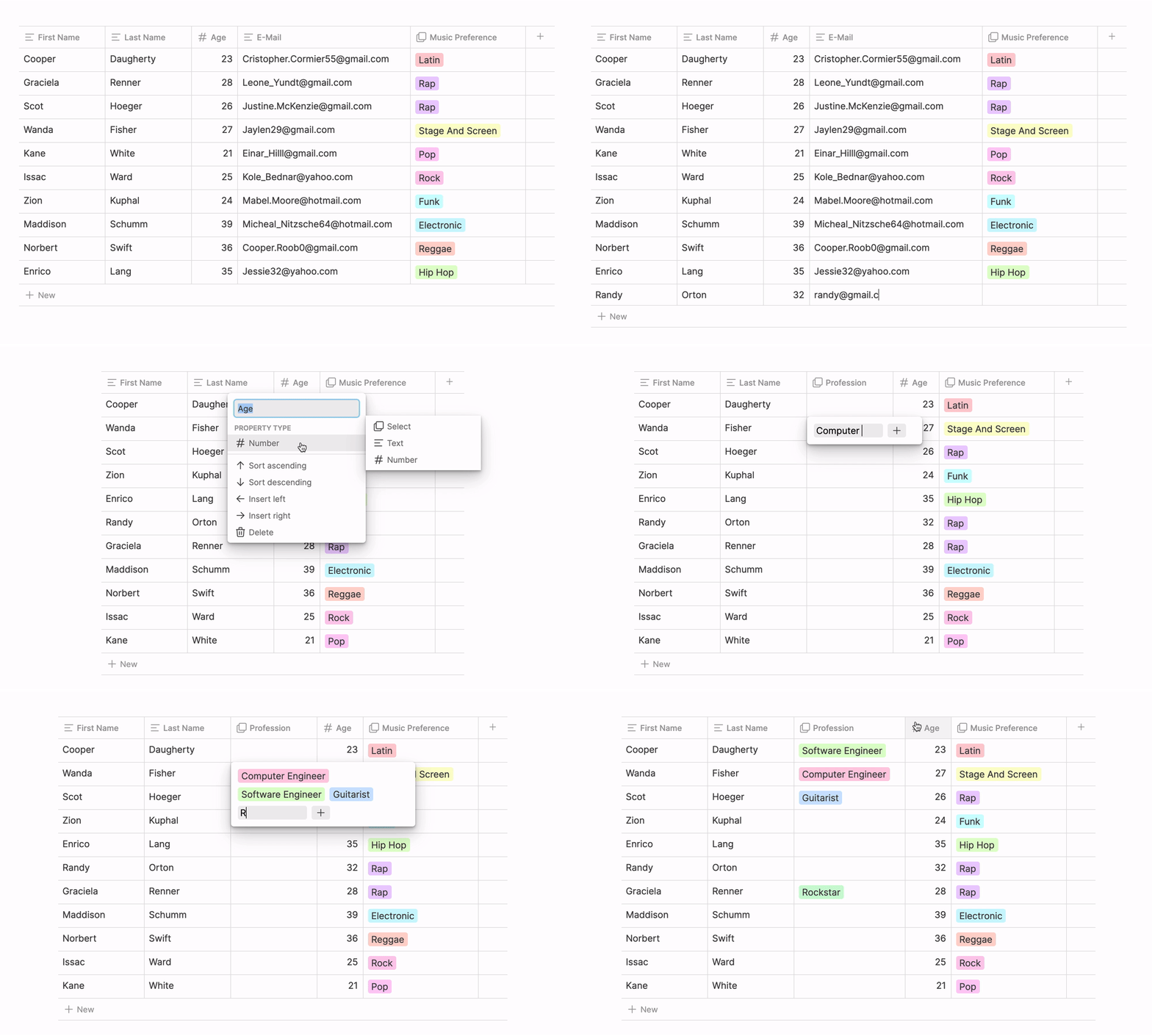
React Notion Table is a modern and flexible editable table library for React with TypeScript support.
[!NOTE] Implementation of editable tables with a rich user interface and intuitive features inspired by Notion.
Installation
npm install react-notion-table
# or
yarn add react-notion-table
Key Features
- ✅ Resizable columns
- ✅ Cell data types: text, number, select
- ✅ Rename column headers
- ✅ Sort individual columns
- ✅ Add columns to the left or right
- ✅ Add a new column to the end
- ✅ Edit data in cells
- ✅ Add a new row of data
- ✅ Delete a column
- ✅ Change column data types
- ✅ Add options for select-type cells
- ✅ Support for virtualized rows
- ✅ Full TypeScript support
Quick Start
import { NotionTable } from 'react-notion-table';
import 'react-notion-table/dist/style.css'; // optional, if you want to use basic styles

// Example data and columns
const columns = [
  {
    id: 'name',
    label: 'Name',
    accessor: 'name',
    dataType: 'text',
  },
  {
    id: 'age',
    label: 'Age',
    accessor: 'age',
    dataType: 'number',
  },
  {
    id: 'status',
    label: 'Status',
    accessor: 'status',
    dataType: 'select',
    options: ['Active', 'Blocked', 'Pending'],
  },
];

const data = [
  { id: '1', name: 'Ivan', age: 25, status: 'Active' },
  { id: '2', name: 'Maria', age: 30, status: 'Pending' },
];

function App() {
  const [tableData, setTableData] = useState(data);
  const [tableColumns, setTableColumns] = useState(columns);

  return (
    <NotionTable
      columns={tableColumns}
      data={tableData}
      onDataChange={setTableData}
      onColumnsChange={setTableColumns}
      virtualized={true}
      height={500}
    />
  );
}
API
TableProps
| Property | Type | Default | Description | |-----------------|------------------------------|--------------|-------------------------------------| | columns | Column[] | required | Array of column definitions | | data | Row[] | required | Array of row data | | onDataChange | (data: Row[]) => void | undefined | Callback when data changes | | onColumnsChange | (columns: Column[]) => void | undefined | Callback when columns change | | height | number | undefined | Table height (px) | | width | number | undefined | Table width (px) | | rowHeight | number | 35 | Row height (px) | | virtualized | boolean | false | Enable row virtualization | | editable | boolean | true | Allow table editing |
Column
| Property | Type | Description | |----------|---------------------------------|-------------------------------------------------| | id | string | Unique identifier for the column | | label | string | Displayed column header | | accessor | string | Key to access the property in the data object | | dataType | 'text' | 'number' | 'select' | Data type of the column | | options | string[] | Options for the 'select' type | | width | number | Column width (px) | | minWidth | number | Minimum column width (px) | | maxWidth | number | Maximum column width (px) |
Row
interface Row {
  id: string;
  [key: string]: any;
}
Roadmap
- [x] Support for virtualized rows
- [x] Full TypeScript typing
- [ ] Date data type
- [ ] Multi-select data type
- [ ] Checkbox data type
- [ ] Animated dropdowns
- [ ] Performance - support for 100,000+ rows
Contributing
Contributions are welcome! Feel free to pick an item from the roadmap or open a new issue!
- Fork the repository
- Create a branch for your feature (
git checkout -b feature/amazing-feature) - Commit your changes (
git commit -m 'Added an amazing feature') - Push to the branch (
git push origin feature/amazing-feature) - Open a Pull Request
License
Distributed under the MIT License. See LICENSE.md for more information.