
react-open-dialog
v1.2.1
Published
Open Dialog as function call or react component.

Maintainers
 prabink
Readme
react-open-dialog
Open Dialog as function call or react component.


Features
- Easy to use
- Open Dialog as function call.
- Open Dialog as react component.
- Get nice and user friendly confirm dialog.
- Create your own custom Dialog with jsx
Demo
Install
npm install --save react-open-dialogPeer Dependency
This package has a peer dependency with @material-ui/core package so make sure to install this also.
npm install --save @material-ui/coreUsage
Open Confirm Dialog as function
As Function
import React from 'react'

import { DialogUtils } from 'react-open-dialog'

const App = () => {
  return (
    <div>
      <button
        onClick={() => {
          DialogUtils.openConfirmDialog({
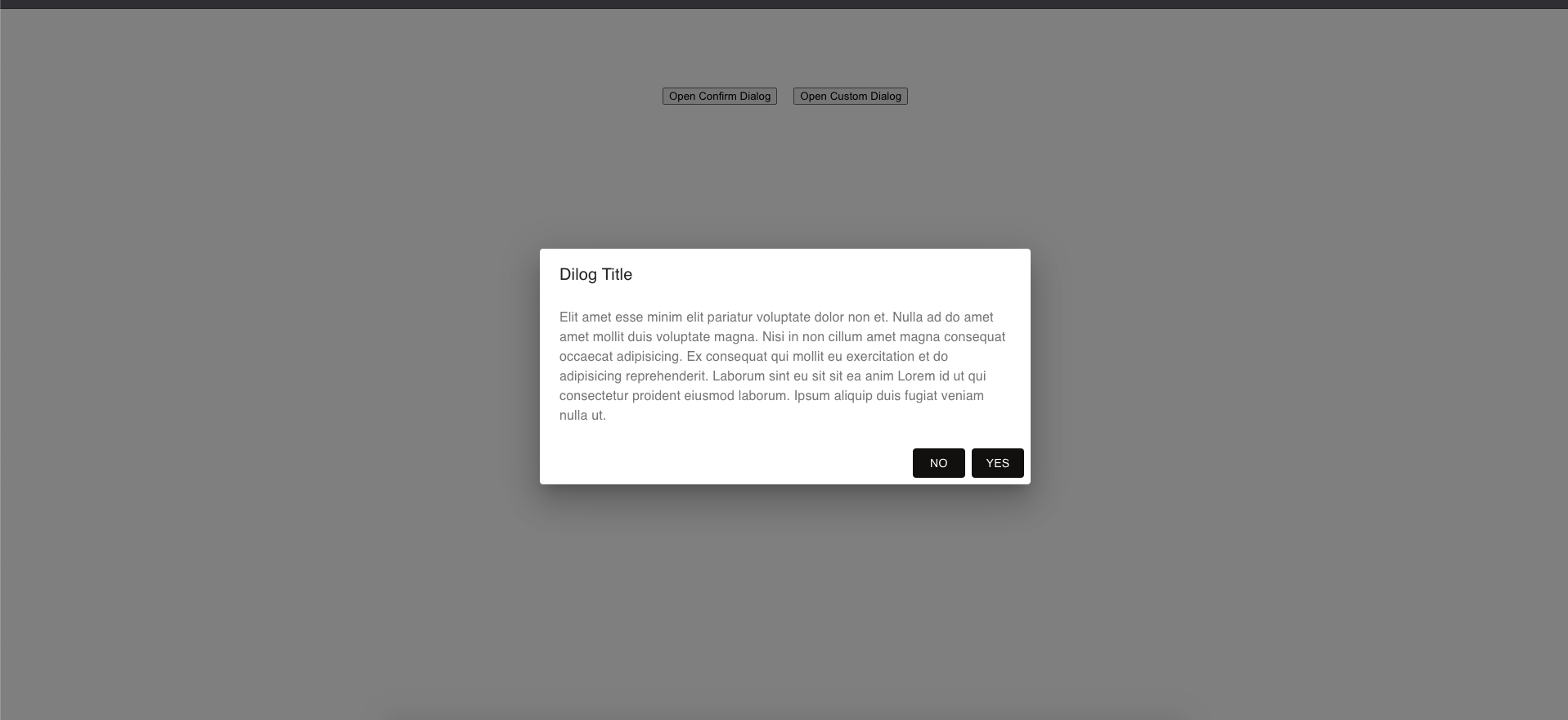
            title: 'Dilog Title',
            message:
              'Elit amet esse minim elit pariatur voluptate dolor non et. Nulla ad do amet amet mollit duis voluptate magna. Nisi in non cillum amet magna consequat occaecat adipisicing. Ex consequat qui mollit eu exercitation et do adipisicing reprehenderit. Laborum sint eu sit sit ea anim Lorem id ut qui consectetur proident eiusmod laborum. Ipsum aliquip duis fugiat veniam nulla ut.'
          })
        }}
      >
        Open Confirm Dialog
      </button>
    </div>
  )
}

export default App
Open Confirm Dialog as component
As Component
<ConfirmDialog
  anchorElement={
    <div
      style={{
        border: '1px solid black',
        padding: 3,
        marginRight: 20
      }}
    >
      Open Confirm Dialog
    </div>
  }
  title='Dilog Title'
  message='Elit amet esse minim elit pariatur voluptate dolor non et. Nulla ad do amet amet mollit duis voluptate magna. Nisi in non cillum amet magna consequat occaecat adipisicing. Ex consequat qui mollit eu exercitation et do adipisicing reprehenderit. Laborum sint eu sit sit ea anim Lorem id ut qui consectetur proident eiusmod laborum. Ipsum aliquip duis fugiat veniam nulla ut.'
/>
Options For Confirm Dialog
| Name | Type | Description | | --------------------------- | -------------- | ------------------------------------------------------------------------------------- | | title | string or node | Title of dialog | | message | string or node | Message for user to confirm something. | | onClickYes | function | Trigger when use clicked on YES button | | onClickNo | function | Trigger when use clicked on NO button | | yesText | string | To change the text from YES to something else | | noText | string | To change the text from NO to something else | | disableBackdropClick | boolean | Whether to close dialog when user clicks outside (Default-false) | | closeOnButtonClicked | boolean | Whether to close dialog when user clicks any of the button(Yes/NO) (Default-true) | | yesButtonProps | object | Material UI button props | | noButtonProps | object | Material UI button props | | dialogProps | object | Material UI Dialog props | | titleProps | object | Material UI DialogTitle props | | anchorElement | string or node | Anchor Element to hold dialog (Only available when using as a component) | | anchorElementContainerStyle | object | css as a object (Only available when using as a component) | | defaultOpen | boolean | make dialog open by default (Default-false) (Only available when using as a component)|
Open Custom Dialog as function
As Function
import React from 'react'

import { DialogUtils } from 'react-open-dialog'

const App = () => {
  return (
    <div>
      <button
        onClick={() => {
          DialogUtils.openCustomDialog({
            title: 'Custom Dialog',
            customRender: ({ closeDialog }) => {
              return (
                <div>
                  <p>My very first custom dialog </p>
                  <button
                    onClick={() => {
                      closeDialog()
                    }}
                  >
                    Close
                  </button>
                </div>
              )
            }
          })
        }}
      >
        Open Custom Dialog
      </button>
    </div>
  )
}

export default App
Open Confirm Dialog as component
As Component
<CustomDialog
  anchorElement={
    <div style={{ border: '1px solid black', padding: 3 }}>
      Open Custom Dialog
    </div>
  }
  title='Dilog Title'
>
  {({ closeDialog }) => {
    return (
      <div>
        <p>My very first custom dialog </p>
        <button
          onClick={() => {
            closeDialog()
          }}
        >
          Close
        </button>
      </div>
    )
  }}
</CustomDialog>
Options For Custom Dialog
| Name | Type | Description |
| --------------------------- | ----------------- | ----------------------------------------------------------------------------- |
| title | string or node | Title of dialog |
| customRender | callback function | function that returns valid JSX (eg: ({closeDialog})=><div>Hello JSX</div>) |
| disableBackdropClick | boolean | Whether to close dialog when user clicks outside (Default-false) |
| dialogProps | object | Material UI Dialog props |
| titleProps | object | Material UI DialogTitle props |
| anchorElement | string or node | Anchor Element to hold dialog (Only available when using as a component)|
| anchorElementContainerStyle | object | css as a object (Only available when using as a component)|
| defaultOpen | boolean | make dialog open by default (Default-false)(Only available when using as a component)|
Screenshots
Confirm Dialog
Custom Dialog

License
MIT © githubprabin143