
react-perfscope
v1.0.0
Published
Zero-config React performance profiler with an in-app panel.
Downloads
84

Maintainers
 rayforvideos
Readme
react-perfscope
Performance debugging tool for React 18+ apps. Records forced reflows, layout shifts, long tasks, web vitals, network, interactions, and React component renders during development.
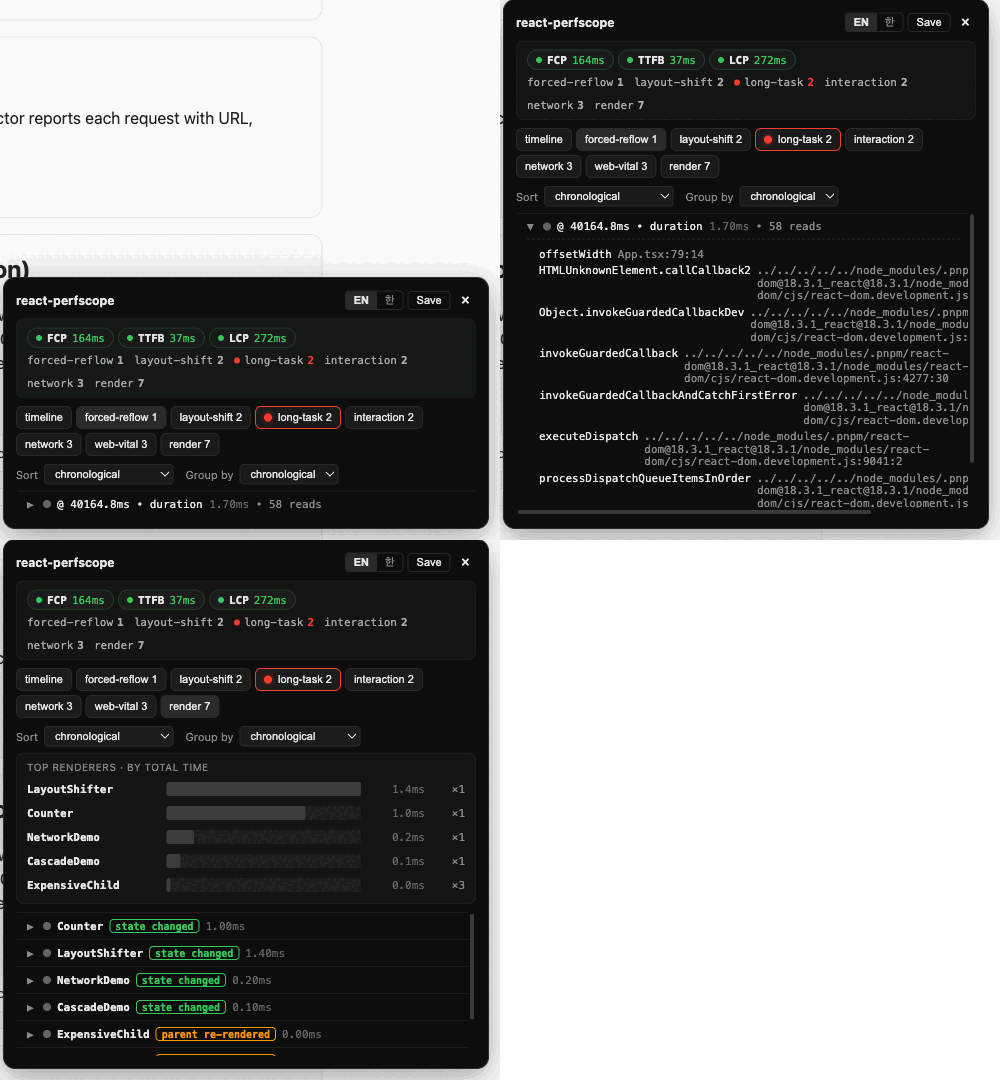
This meta package re-exports everything from @react-perfscope/core, @react-perfscope/react, and @react-perfscope/ui, plus a side-effect react-perfscope/auto entry that bootstraps the full UI in one import.
Quickstart
The simplest way to enable react-perfscope in a dev build:
// At the top of your entry file (e.g. src/main.tsx)
import 'react-perfscope/auto'

// ... your normal imports
import React from 'react'
import { createRoot } from 'react-dom/client'
import App from './App'

createRoot(document.getElementById('root')!).render(<App />)
react-perfscope/auto must be imported BEFORE react-dom so the DevTools hook is installed before React captures it. Build plugins (@react-perfscope/vite, @react-perfscope/webpack) handle this ordering automatically.
Manual API
If you want to control mounting yourself, import the named exports:
import { createRecorder, createRenderCollector, mount } from 'react-perfscope'

const recorder = createRecorder()
recorder.use(createRenderCollector())
const unmount = mount({ recorder, position: 'top-right' })
Production safety
react-perfscope/auto bails when process.env.NODE_ENV === 'production'. The build plugins also exclude themselves from production builds. The manual API has no production guard — use it only behind your own dev/prod check.
Contributing
If this is useful to you, a ⭐ on GitHub helps the project grow. Bug reports, feature ideas, and PRs are welcome — open an issue to start.
한국어
React 18+ 앱용 성능 디버깅 도구. 개발 중에 강제 리플로우, 레이아웃 시프트, 롱 태스크, 웹 바이탈, 네트워크 요청, 인터랙션, React 컴포넌트 렌더를 기록한다.
이 메타 패키지는 @react-perfscope/core, @react-perfscope/react, @react-perfscope/ui의 모든 것을 re-export하고, 임포트 한 줄로 전체 UI를 부트스트랩하는 react-perfscope/auto 사이드 이펙트 엔트리를 제공한다.
빠르게 시작하기
dev 빌드에서 react-perfscope를 켜는 가장 간단한 방법:
// entry 파일 맨 위에 (예: src/main.tsx)
import 'react-perfscope/auto'

// ... 평소 imports
import React from 'react'
import { createRoot } from 'react-dom/client'
import App from './App'

createRoot(document.getElementById('root')!).render(<App />)react-perfscope/auto는 DevTools 훅이 React에 캡처되기 전에 설치될 수 있도록 반드시 react-dom보다 먼저 import해야 한다. 빌드 플러그인(@react-perfscope/vite, @react-perfscope/webpack)을 쓰면 이 순서가 자동으로 처리된다.
수동 API
직접 마운트를 제어하고 싶다면 named export를 쓰면 된다:
import { createRecorder, createRenderCollector, mount } from 'react-perfscope'

const recorder = createRecorder()
recorder.use(createRenderCollector())
const unmount = mount({ recorder, position: 'top-right' })
프로덕션 안전성
react-perfscope/auto는 process.env.NODE_ENV === 'production'이면 아무것도 하지 않는다. 빌드 플러그인도 프로덕션 빌드에서는 자동으로 빠진다. 수동 API에는 프로덕션 가드가 없으니, 직접 dev/prod 분기를 만들어서 써야 한다.
기여
도움이 되셨다면 GitHub ⭐ 하나가 프로젝트 성장에 큰 힘이 됩니다. 버그 제보, 기능 제안, PR 모두 환영해요 — 이슈로 편하게 시작해 주세요.