
react-pii-mask
v0.1.0
Published
A React component for automatically masking Personally Identifiable Information (PII) in your application.

Maintainers
 dschoon
Readme
React PII Mask
A React component for automatically masking Personally Identifiable Information (PII) in your application.
Features
- 🔒 Automatic PII detection and masking
- 🎯 Class-based targeting for known PII elements
- 🔄 Real-time DOM observation for dynamic content
- 🎨 Built-in styling with visual indicators
- 📱 TypeScript support
Installation
npm install react-pii-mask
# or
yarn add react-pii-mask
# or
pnpm add react-pii-mask
Run Example
To run the examples locally:
git clone https://github.com/dschoon/react-pii-mask.git
cd react-pii-mask
pnpm install
cd examples
pnpm install
pnpm dev
Then open http://localhost:5173 to see the examples in action.
Usage
Basic Setup
Wrap your app with the PIIFilter component:
import { PIIFilter } from 'react-pii-mask';

function App() {
  return (
    <PIIFilter>
      {/* Your app content */}
    </PIIFilter>
  );
}
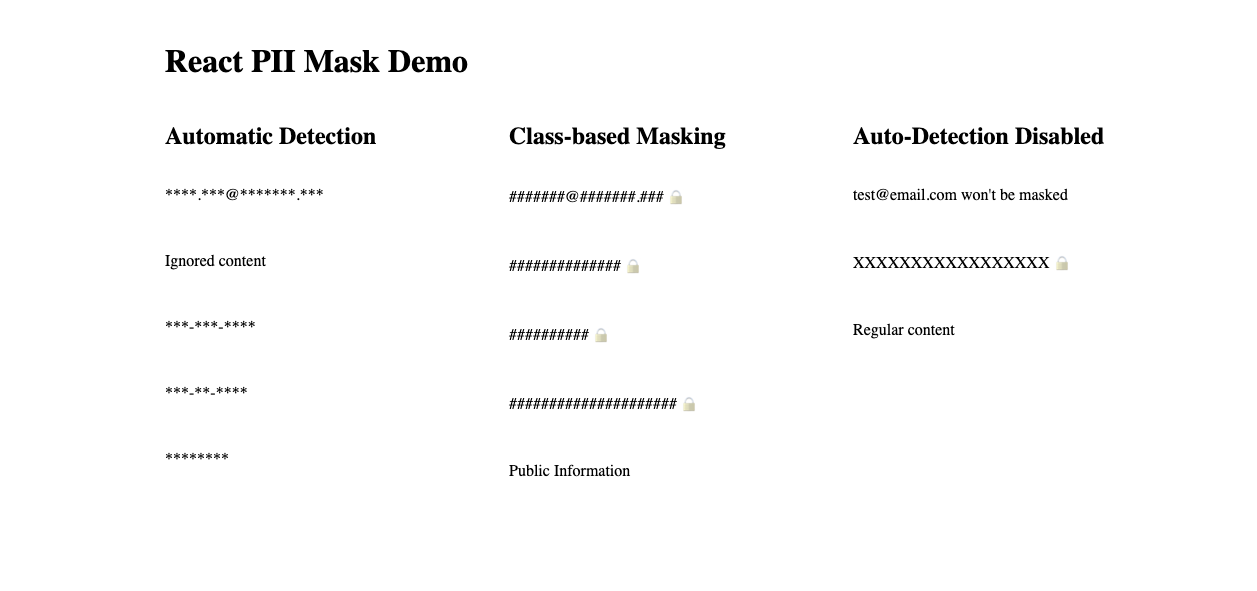
Class-based Masking
Add PII classes to elements you want to mask:
<div>
  <p className="email">[email protected]</p>
  <p className="phone">123-456-7890</p>
  <p className="name">John Doe</p>
  <p className="pii">Sensitive Data</p>
</div>
Automatic Detection
The component automatically detects and masks:
- Email addresses
- Phone numbers
- Social Security Numbers
- Full names
Custom Styling
Import the default styles or create your own:
import 'react-pii-mask/styles.css';API
PIIFilter Component
The main component that handles PII masking:
import { PIIFilter } from 'react-pii-mask';

interface PIIFilterProps {
  // Optional array of HTML tags to skip when masking
  skipTags?: string[];
  // Whether to preserve format characters (@ . - etc) when masking
  preserveFormat?: boolean;
  // Character to use for masking (default: '*')
  maskCharacter?: string;
  // Whether to automatically detect and mask PII (default: true)
  autoDetect?: boolean;
  // Array of RegExp patterns to ignore when masking
  ignorePatterns?: RegExp[];
}

// Default skipTags: ['H1', 'H2', 'H3', 'H4', 'H5', 'H6', 'BUTTON', 'LABEL']
Examples
Basic usage with default settings:
<PIIFilter>
  <div>
    <h1>This heading won't be masked</h1>
    <p>This [email protected] will be masked as ****************</p>
  </div>
</PIIFilter>
Disable auto-detection (only mask elements with PII classes):
<PIIFilter autoDetect={false}>
  <div>
    <p>[email protected] won't be masked</p>
    <p className="pii">This will be masked</p>
  </div>
</PIIFilter>
Ignore specific patterns:
<PIIFilter
  ignorePatterns={[
    /Public Information/i,
    /^ID: \d+$/
  ]}
>
  <div>
    <p>ID: 12345 won't be masked</p>
    <p>Public Information won't be masked</p>
    <p>[email protected] will be masked</p>
  </div>
</PIIFilter>
Format-preserving masking:
<PIIFilter preserveFormat>
  <div>
    <p>[email protected] will be masked as ****@*****.***</p>
    <p>123-456-7890 will be masked as ***-***-****</p>
  </div>
</PIIFilter>
Custom mask character:
<PIIFilter maskCharacter="X" preserveFormat>
  <div>
    <p>[email protected] will be masked as [email protected]</p>
    <p>Without preserveFormat: XXXXXXXXXXXXXXX</p>
  </div>
</PIIFilter>
Screenshot of Example
Utility Functions
import { maskPII, containsPII } from 'react-pii-mask';

// Mask text
maskPII('sensitive text'); // Returns: '************'

// Check for PII
containsPII('[email protected]'); // Returns: true
Types
import type { PIIClass, PIIPattern } from 'react-pii-mask';

// Available PII classes
type PIIClass = 'name' | 'email' | 'phone' | 'pii';

// Pattern types
type PIIPattern = 'email' | 'phone' | 'id' | 'name';
License
MIT © SchoonLabs