
react-prize-wheel-advanced
v1.0.10
Published
React Prize Wheel on Canvas

Maintainers
 ashraf-kabir
Readme
react-prize-wheel-advanced
A beautiful, fully customizable prize wheel component for React 18+. Built on HTML5 Canvas — no SVG limits, no peer dependency headaches, and no segment cap (works with 2 to 100+ entries).
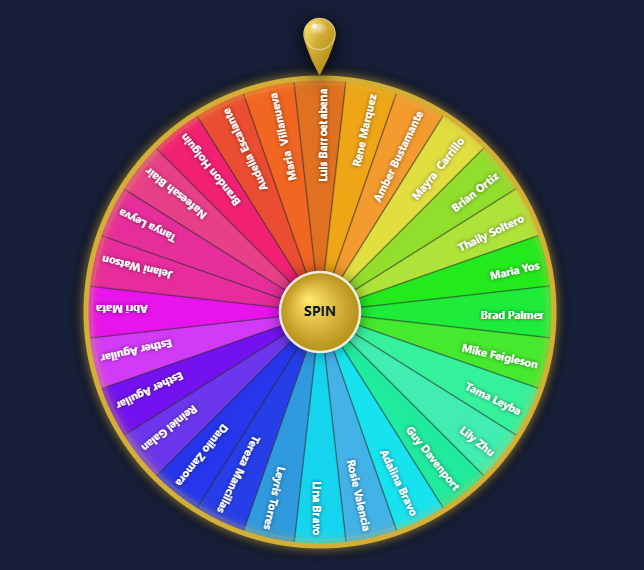
✨ Features
- ✅ React 18 compatible
- ✅ Unlimited segments — no 24-item cap
- ✅ Full names auto-fit inside slices (no truncation)
- ✅ Beautiful SVG teardrop pointer/needle
- ✅ Smooth ease-out spin animation
- ✅ Programmatic spin via
ref.current.click() - ✅ Zero runtime dependencies — pure Canvas
📦 Installation
npm install react-prize-wheel-advanced@latest🚀 Basic Usage
// Default import
import PrizeWheel from 'react-prize-wheel-advanced';
// Named import (also works)
// import { PrizeWheel } from 'react-prize-wheel-advanced';

export default function App() {
  const segments = ['Alice', 'Bob', 'Charlie', 'Diana', 'Edward'];
  const colors   = ['#e74c3c', '#3498db', '#2ecc71', '#f39c12', '#9b59b6'];

  const handleFinished = (winnerIndex) => {
    alert(`Winner: ${segments[winnerIndex]}`);
  };

  return (
    <PrizeWheel
      segments={segments}
      segColors={colors}
      onFinished={handleFinished}
      primaryColor="#d4af37"
      contrastColor="#ffffff"
      buttonText="SPIN"
      spinDuration={5}
      size={500}
    />
  );
}
🎯 Programmatic Spin (via ref)
You can trigger the spin from an external button using a ref:
import { useRef } from 'react';
import PrizeWheel from 'react-prize-wheel-advanced';

export default function App() {
  const wheelRef = useRef(null);

  const segments = ['Alice', 'Bob', 'Charlie', 'Diana'];
  const colors   = ['#e74c3c', '#3498db', '#2ecc71', '#f39c12'];

  return (
    <div>
      <PrizeWheel
        ref={wheelRef}
        segments={segments}
        segColors={colors}
        onFinished={(index) => console.log('Winner:', segments[index])}
      />

      <button onClick={() => wheelRef.current.click()}>
        Spin the Wheel!
      </button>
    </div>
  );
}
⚙️ Props
| Prop | Type | Default | Description |
|----------------|-------------------------|-------------|----------------------------------------------------------|
| segments | string[] | [] | List of names/labels for each slice |
| segColors | string[] | [] | Fill color per slice. Wraps around if fewer than segments|
| onFinished | (index: number) => void | — | Called with the winning segment index when spin ends |
| primaryColor | string | #d4af37 | Color of the outer rim, center button, and pointer |
| contrastColor| string | #ffffff | Text color on slices |
| buttonText | string | SPIN | Label on the center click button |
| spinDuration | number | 5 | Spin duration in seconds |
| size | number | 500 | Width & height of the canvas in pixels |
🎨 Color Tips
Segment colors wrap around if you provide fewer colors than segments — so you can pass just a few colors to create a repeating pattern:
// Alternates between 3 colors across 30 segments
const colors = ['#e74c3c', '#3498db', '#2ecc71'];
For fully random colors on every render, pair it with a utility like:
const generateColors = (n) =>
  Array.from({ length: n }, (_, i) =>
    `hsl(${Math.round((i / n) * 360)}, 70%, 55%)`
  );
📐 Responsive Size
The size prop controls the canvas dimensions. For a responsive wheel, compute it from the container width:
const size = Math.min(window.innerWidth - 32, 500);

<PrizeWheel size={size} segments={segments} segColors={colors} onFinished={handleFinished} />
🔗 Links
📄 License
MIT © Ashraf Kabir