
react-qr-master
v0.3.0
Published
Styled QR codes for React with zero config: logos, gradients, 8 module shapes, 10 themes, WiFi/vCard/UPI/WhatsApp types, PNG/SVG/PDF export, copy & share, scannability check, camera scanner, and batch export. One tiny dependency, works with Next.js.

Maintainers
 yogeshgabani
Keywords
Readme
React QR Master
Styled, scannable QR codes for React. Logos, gradients, 8 module shapes, custom eyes, and ready-made WiFi / vCard / UPI / WhatsApp / event QR types. Export to PNG, SVG or PDF, copy or share, and check that your design actually scans. TypeScript-first, works in Next.js Server Components, one small dependency.






Live demo · API reference · Changelog
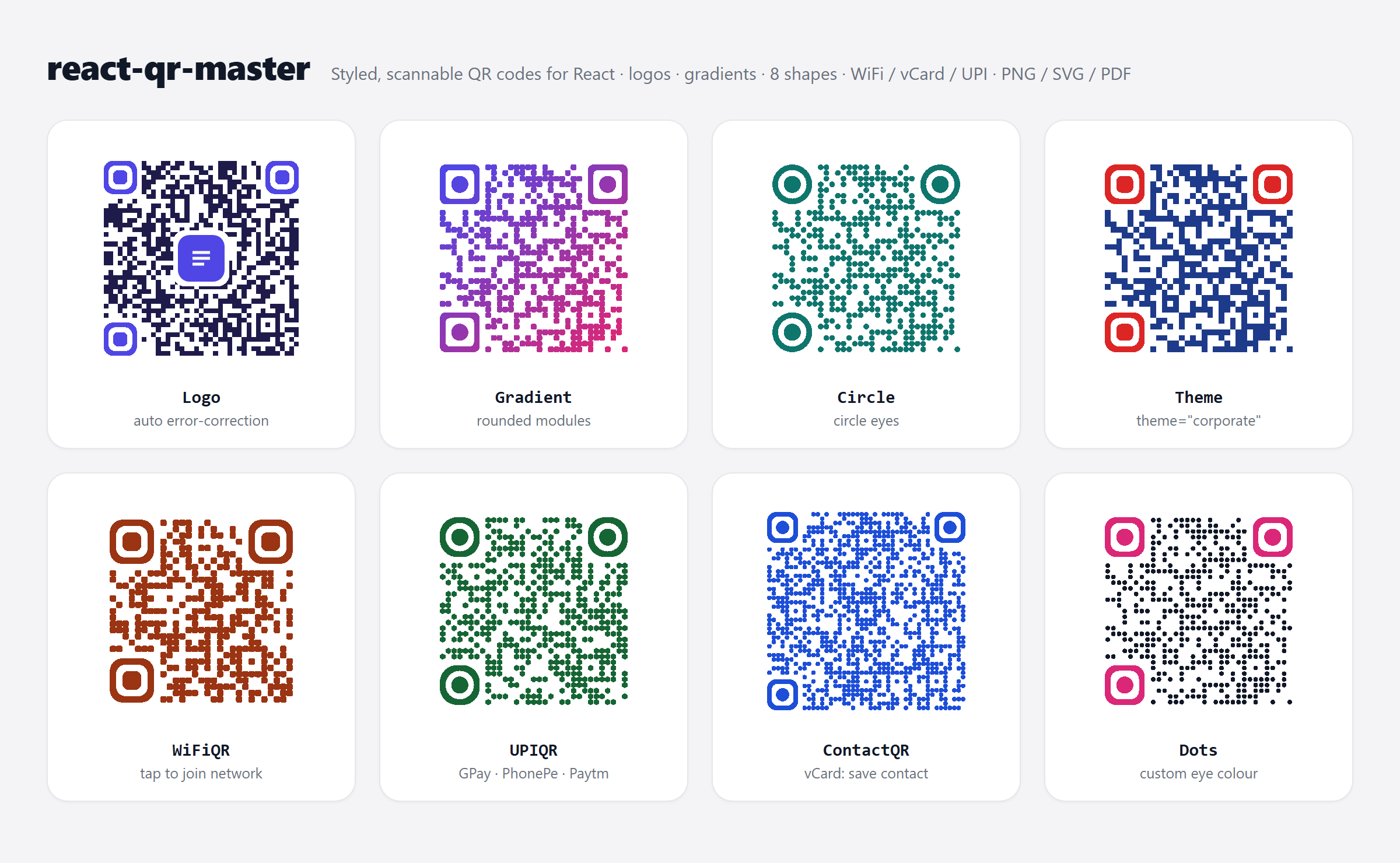
npm install react-qr-masterimport { QRCode } from 'react-qr-master';
export default function App() {
return <QRCode value="https://example.com" size={256} />;
}Why this package
| | react-qr-master | qrcode.react | react-qr-code | qr-code-styling | | ------------------------------------------------------ | :-------------: | :----------: | :-----------: | :-------------: | | React component | ✅ | ✅ | ✅ | ❌ vanilla JS | | Logo in the middle | ✅ | ✅ | ❌ | ✅ | | Module shapes, custom eyes, gradients | ✅ | ❌ | ❌ | ✅ | | "Scan me" frame and label | ✅ | ❌ | ❌ | ❌ | | WiFi, vCard, UPI, WhatsApp, event… helpers | ✅ | ❌ | ❌ | ❌ | | Built-in PNG / SVG / PDF download | ✅ | ❌ | ❌ | ✅ (no PDF) | | Copy to clipboard, native share | ✅ | ❌ | ❌ | ❌ | | Scannability check | ✅ | ❌ | ❌ | ❌ | | Scanner (camera or image file) | ✅ | ❌ | ❌ | ❌ |
Small where it counts. Importing <QRCode> adds about 9 KB gzipped to your app. The scanner's decoder only loads when you use the scanner, scanQRFromImage() or verify(). The only runtime dependency is jsqr.
If you only need a plain black-and-white code, qrcode.react is smaller. Pick this package when the QR has to match a brand, carry structured data, or be downloaded and shared.
Contents
- Styling · Logo · "Scan me" label · Themes and animations
- QR types (WiFi, vCard, UPI, WhatsApp, events, maps, crypto, social)
- Download, copy, share
- Check that it scans
- Next.js and server rendering
- Scanner · Batch generator · Studio · Dynamic QR
- Full API reference
Styling
Every prop is optional except value.
<QRCode
  value="https://example.com"
  size={280}
  fgColor="#4f46e5"
  bgColor="#ffffff"
  shape="rounded" // square | rounded | extra-rounded | circle | dot | diamond | hexagon | star
  cornerStyle="rounded" // outer ring of the eyes: square | rounded | soft-rounded | circle | modern
  eyeShape="circle" // inner pupil: square | rounded | circle | diamond | modern
  eyeColor="#111827"
  moduleSpacing={0.1} // 0–0.5 gap between modules
  level="M" // error correction: L | M | Q | H
/>
Gradients can be linear, radial or conic:
<QRCode
  value="https://example.com"
  gradient={{ type: 'linear', colors: ['#4f46e5', '#db2777'], rotation: 45 }}
/>
Logo
Error correction switches to H automatically when you add a logo, and the logo is capped at a size that still scans.
<QRCode
  value="https://example.com"
  size={300}
  logo="/logo.png" // URL or data URI
  logoSize={0.22} // fraction of the QR width
  logoShape="rounded" // square | rounded | circle
/>
More options (logoMode, logoPosition, logoPadding, borders) are in the API reference.
"Scan me" label
Add a call to action under or above the code. It's drawn inside the SVG, so it's included in every download, copy and share.
<>
  <QRCode value="https://example.com/menu" label="SCAN FOR MENU" />
  <QRCode value="https://example.com" label="SCAN ME" labelStyle="pill" labelPosition="top" />
</>
labelStyle is banner (a frame with a text band, the default), pill or plain. size stays the width and the SVG grows taller to fit the label. Options
Themes and animations
<>
  <QRCode value="https://example.com" theme="corporate" />
  <QRCode value="https://example.com" theme="gradient" animation="breathing" />
</>
Themes: light, dark, neon, corporate, glassmorphism, gradient, modern, minimal, cyberpunk, premium. Any prop you pass overrides the theme. 19 ready-made designs are also exported as TEMPLATES.
Animations: pulse, zoom, bounce, rotate, fade, wave, glow, breathing, scan. The CSS lives inside the SVG, so there is no stylesheet to import.
QR types
Each type builds the correct payload format and accepts every styling prop.
import { WiFiQR, ContactQR, UPIQR, WhatsAppQR, EventQR } from 'react-qr-master';

// Scanning joins the network
<WiFiQR ssid="Cafe Guest" password="latte-art" encryption="WPA2" />

// Scanning saves the contact (vCard)
<ContactQR firstName="Jane" lastName="Doe" mobile="+1 415 555 2671" email="[email protected]" />

// Opens GPay / PhonePe / Paytm with the payment pre-filled
<UPIQR payeeVPA="shop@okhdfc" payeeName="Ravi Stores" amount="249.00" />

// Opens a WhatsApp chat with a message ready to send
<WhatsAppQR phoneNumber="14155552671" message="Hi! I'd like to book a table." />

// Adds the event to the phone's calendar
<EventQR title="Launch party" start="2026-11-20T18:00:00+05:30" location="Hall A" />
| Type | Component | Key props |
| ----------- | -------------- | ----------------------------------------------------------- |
| Any text | QRCode | value |
| Website | WebsiteQR | url |
| Text | TextQR | text |
| WiFi | WiFiQR | ssid, password, encryption, hidden |
| Email | EmailQR | to, subject, body, cc, bcc |
| Phone | PhoneQR | phoneNumber |
| SMS | SMSQR | phoneNumber, message |
| WhatsApp | WhatsAppQR | phoneNumber, message |
| Contact | ContactQR | firstName, lastName, email, mobile, organization… |
| Google Maps | GoogleMapsQR | query, or latitude + longitude |
| Location | LocationQR | latitude, longitude, query |
| Event | EventQR | title, start, end, location |
| Calendar | CalendarQR | title, start, end, recurrence |
| UPI | UPIQR | payeeVPA, payeeName, amount, note |
| Crypto | CryptoQR | coin, address, amount |
| Social | SocialQR | platform, username |
Every type also has a plain encoder (encodeWiFi, encodeUPI, encodeContact, …) that returns the payload string without React.
Download, copy, share
Attach the ref from useQRDownload to the QR, then call the actions from buttons.
import { QRCode, useQRDownload } from 'react-qr-master';

function DownloadableQR() {
  const { ref, download, copy, share } = useQRDownload();

  return (
    <>
      <QRCode ref={ref} value="https://example.com" size={256} />
      <button onClick={() => download('png', { pixelSize: 1024 })}>PNG</button>
      <button onClick={() => download('svg')}>SVG</button>
      <button onClick={() => download('pdf', { filename: 'qr.pdf' })}>PDF</button>
      <button onClick={() => copy()}>Copy</button>
      <button onClick={() => share({ title: 'Scan me' })}>Share</button>
    </>
  );
}
Formats: svg, png, jpg, jpeg, webp, pdf. Options: filename, pixelSize (default 1024), quality (0–1 for JPG/WEBP). share opens the phone's share sheet and resolves false where sharing isn't available.
Check that it scans
A QR can look great and still fail to scan, because of low contrast, a large logo, wide module spacing or light-on-dark colours. verify() decodes your rendered QR at several sizes, with and without simulated camera blur, and tells you what's wrong:
import { QRCode, useQRDownload } from 'react-qr-master';

function CheckedQR() {
  const { ref, verify } = useQRDownload();

  async function check() {
    const result = await verify({ expected: 'https://example.com' });
    // { ok: true, data: 'https://example.com', score: 0.89, inverted: false, warnings: [] }
    if (!result.ok) console.warn(result.warnings);
  }

  return (
    <>
      <QRCode ref={ref} value="https://example.com" shape="dot" fgColor="#9ca3af" />
      <button onClick={check}>Check</button>
    </>
  );
}
score (0–1) is the share of simulated conditions that decoded. Plain codes score about 0.9–1; under 0.5 means some phones will struggle. Run it in your design tool or in tests to catch designs that don't scan before they're printed.
Next.js and server rendering
Client components. Import from react-qr-master anywhere, including App Router pages. The package ships with "use client", so you don't need to add it yourself.
Server Components (no client JavaScript). QRCode, all the QR type components, the encoders and generateMatrix are also exported from react-qr-master/core. That entry has no client-only code, so it renders inside Server Components and runs in route handlers:
// app/wifi/page.tsx (a Server Component)
import { WiFiQR } from 'react-qr-master/core';

export default function Page() {
  return <WiFiQR ssid="Cafe Guest" password="latte-art" size={240} />;
}
SVG string on the server (emails, PDFs, API responses) in Node, Express or Vite SSR:
import { renderToStaticMarkup } from 'react-dom/server';
import { QRCode } from 'react-qr-master/core';

const svg = renderToStaticMarkup(<QRCode value="https://example.com" />);
Scanner
import { QRScanner } from 'react-qr-master';

<QRScanner onScan={(result) => console.log(result.data)} onError={(error) => console.error(error)} />;
Uses the rear camera, ignores duplicate reads, and has a torch toggle and pause/resume through a ref. Camera access needs HTTPS or localhost. Props
Add allowImageUpload to let people pick a photo or screenshot instead. That also works when the camera is blocked or missing. scanQRFromImage does the same without any UI:
async function readQR(file: File) {
  const text = await scanQRFromImage(file); // null when the image has no QR
  console.log(text);
}
Batch generator
Import a CSV or JSON list and export every QR as a ZIP of PNGs or a printable A4 PDF (12 labelled codes per page). Useful for restaurant tables, event badges and product labels.
import { QRBatchGenerator } from 'react-qr-master';

<QRBatchGenerator
  initialRows={[
    { id: 'table-1', value: 'https://example.com/t/1', label: 'Table 1' },
    { id: 'table-2', value: 'https://example.com/t/2', label: 'Table 2' },
  ]}
  qrOptions={{ shape: 'rounded' }}
/>;
Studio
A complete QR designer UI to drop into your app:
import { QRStudio } from 'react-qr-master';

<QRStudio initialValue="https://example.com" />;
Dynamic QR
DynamicQRCode and useDynamicQR let you change the target, set an expiry and cap scans. State is kept in the browser. To change where a printed code points, encode a URL on your own server and redirect from there.
import { DynamicQRCode } from 'react-qr-master';

<DynamicQRCode id="promo-2026" initialValue="https://example.com" maxScans={1000} expiresAt="2026-12-31" />;
Headless
Render the matrix any way you like (canvas, React Native, terminal):
import { useQRGenerator } from 'react-qr-master';

function AsciiQR() {
  const { modules } = useQRGenerator('https://example.com');
  return <pre>{modules.map((row) => row.map((dark) => (dark ? '██' : '  ')).join('')).join('\n')}</pre>;
}
Compatibility
- React 18 and 19, including Next.js (App and Pages Router), Remix, Vite and Create React App
- ESM and CommonJS builds with bundled TypeScript types
- Evergreen browsers (Chrome, Edge, Firefox, Safari 14+). Lossless PDF export uses
CompressionStreamand falls back to high-quality JPEG in older browsers. - Any UTF-8 text, including Hindi, Arabic, Chinese and emoji
Contributing
Issues and pull requests are welcome.
npm install
npm run playground   # live demo on http://localhost:5173
npm test             # unit tests
npm run check:docs   # type-checks every example in README and FEATURES
License
MIT © Yogesh Gabani