
react-raycaster
v0.1.1
Published
A fully customizable raycaster game engine as a React component.

Maintainers
 tmarcon
Readme
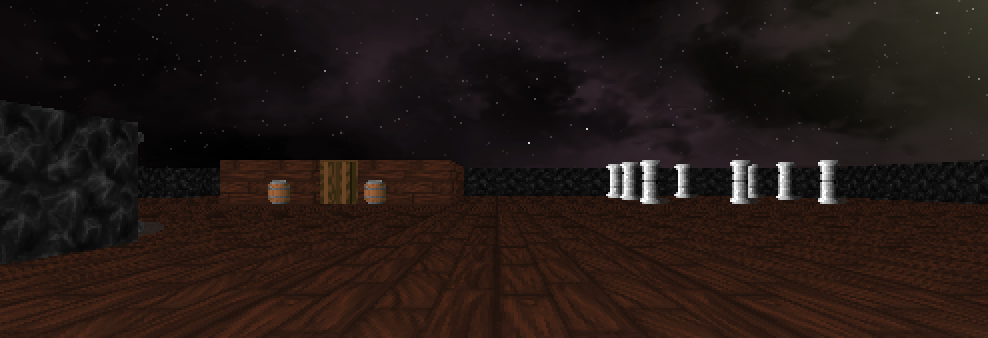
React Raycaster (react-raycaster)

A fully customizable raycaster game engine as a React component.
Check out a cool example here.
Installation
npm install react-raycasteror
yarn add react-raycasterHow to use
import Raycaster from "react-raycaster";

// ...

const map = [
  [1, 1, 1, 1, 1, 1, 1, 1, 1, 1, 1, 1, 1, 1, 1, 1, 1, 1, 1, 1, 1, 1, 1, 1],
  [1, 1, 0, 0, 0, 0, 0, 0, 0, 0, 0, 0, 0, 0, 0, 0, 0, 0, 0, 0, 0, 0, 1, 1],
  [1, 0, 0, 0, 0, 0, 0, 0, 0, 0, 0, 0, 0, 0, 0, 0, 0, 0, 0, 0, 0, 0, 0, 1],
  [1, 0, 0, 0, 0, 0, 1, 1, 1, 1, 1, 0, 0, 0, 0, 0, 0, 0, 0, 0, 0, 0, 0, 1],
  [1, 0, 0, 0, 0, 0, 1, 0, 0, 0, 1, 2, 0, 0, 0, 0, 0, 0, 0, 0, 0, 0, 0, 1],
  [1, 0, 0, 0, 0, 0, 1, 0, 0, 0, 3, 0, 0, 0, 0, 0, 0, 0, 0, 0, 0, 0, 0, 1],
  [1, 0, 0, 0, 0, 0, 1, 0, 0, 0, 1, 2, 0, 0, 0, 0, 0, 0, 0, 0, 0, 0, 0, 1],
  [1, 0, 0, 0, 0, 0, 1, 1, 1, 1, 1, 0, 0, 0, 0, 0, 0, 0, 0, 0, 0, 0, 0, 1],
  [1, 0, 0, 0, 0, 0, 0, 0, 0, 0, 0, 0, 0, 0, 0, 0, 0, 0, 0, 0, 0, 0, 0, 1],
  [1, 1, 0, 0, 0, 0, 0, 0, 0, 0, 0, 0, 0, 0, 0, 0, 0, 0, 0, 0, 0, 0, 1, 1],
  [1, 1, 1, 1, 1, 1, 1, 1, 1, 1, 1, 1, 1, 1, 1, 1, 1, 1, 1, 1, 1, 1, 1, 1]
];

const tiles = {
  1: {
    type: "wall",
    src: "https://raw.githubusercontent.com/kingdcreations/react-raycaster/main/example/src/assets/tex/oak_planks.png",
    collision: true,
  },
  2: {
    type: "sprite",
    src: "https://raw.githubusercontent.com/kingdcreations/react-raycaster/main/example/src/assets/tex/barrel.png",
    collision: true,
  },
  3: {
    type: "door",
    src: "https://raw.githubusercontent.com/kingdcreations/react-raycaster/main/example/src/assets/tex/wood.png",
    collision: true,
  },
}

<Raycaster
  map={map}
  tiles={tiles}
  player={{
    x: 5,
    y: 17,
    rotation: -90
  }}
/>
Using the game context
import Raycaster from "react-raycaster";
import { Joystick } from 'react-joystick-component';

// ...

<Raycaster
  map={map}
  tiles={tiles}
  player={player}
>
  {g =>
    <>
      <Joystick
        move={(e) => e.x && e.y && g.joystickMove(e.x, e.y)}
        stop={() => g.joystickMove(0, 0)} />

      <Joystick
        move={(e) => {e.x && e.y && g.joystickCamera(e.x)}}
        stop={() => g.joystickCamera(0)} />
    </>
  }
</Raycaster>
Props
| Prop | Type | Default | Description |
|---|---|---|---|
| map| number[][] | required | 2D map array containing tiles |
| tiles| Tiles | required | Map tiles definition (See below) |
| player| Player | required | Player initial values |
| mouse| boolean | false | Allows mouse camera rotation |
| inputs | Inputs | (See below) | Sets the rotation speed |
| width | number | 500 | Game x resolution in pixels |
| height | number | 300 | Game y resulition in pixels |
| shading | boolean | true | Allows depth shading |
| bobbing | boolean | true | Enables run animation |
| showFPS | boolean | false | Displays frames per second |
| skybox | string | none | Source from the skybox to display |
| floor | string | none | Source from the floor to display |
| ceiling | string | none | Source from the ceiling to display |
| speed | number | 20 | Sets movement speed |
| rotSpeed | number | 3 | Sets the rotation speed |
Game context
| Method | Description |
|---|---|
| joystickMove(x: number, y: number) | Changes player x and y position on the map |
| joystickCamera(x: number) | Rotates camera / player view |
Types
Tiles
| Name | Type | Default | Description |
|---|---|---|---|
| [number]| Tile | required | The tile identified by a number |
Tile
| Name | Type | Default | Description |
|---|---|---|---|
| type| "wall" \| "sprite" \| "door" | required | Type of the tile |
| src| string | required | Source image of the tile |
| collision| boolean | false | Player collision against the tile |
Player
| Name | Type | Default | Description |
|---|---|---|---|
| x| number | required | Player x value on map |
| y| number | required | Player y value on map |
| rotation| number | 0 | Player rotation in degree |
Inputs
| Name | Type | Default | Description |
|---|---|---|---|
| north| string | "ArrowUp" | Key code for north mouvement |
| east| string | "ArrowRight" | Key code for east mouvement |
| south| string | "ArrowDown" | Key code for south mouvement |
| west| string | "ArrowLeft" | Key code for west mouvement |
| cameraL| string | undefined | Key code for left camera rotation |
| cameraR| string | undefined | Key code for right camera rotation |
| action| string | "Space" | Key code for action triggering |
TODO
- Add sounds
- Add more tile types
- Add moving sprites
- Add different walls height
About
I discovered raycasting as a project from 42 in C, this project is inspired by the world-famous Wolfenstein3D game, which was the first FPS ever.
Here is some useful links:
- http://wolf3d.atw.hu/ (Original Wolfenstein 3D online)
- https://lodev.org/cgtutor/raycasting.html (The main tutorial and code inspiration)
- https://thais-marcon.com/raycasting/ (An example of this component in use online)
- https://github.com/kingdcreations/cub3d (My 42 project in C)
License
MIT