
react-reducer-store
v2.1.8
Published
Global state with React hooks and Context API


Readme
react-reducer-store
Global state with React hooks and Context API
Demo app
Demo app uses the live version of react-reducer-store. To run the Demo app.
cd demo
yarn start
Demo app is hosted in Github pages. Apart from normal functionality that you expect from the app, clicking the Random better should not output the message: "List component is rendering" in the console. View the console and check if the logs are acceptable to you. The only middleware that is of real use if the redux-logger middleware. The rest of the middleware don't add value in the new Hooks api.
Usage
Combine reducers
Write as many reducers as you want in your React app. Combine all the reducers to a root reducer as follows.
import { combineReducers } from 'react-reducer-store';
import todoReducer from './todoReducer';
import randomReducer from './randomReducer';

export default combineReducers({
    todo: todoReducer,
    random: randomReducer
});
Use Store component
Wrap the root component of your project with Store component
import { Store } from 'react-reducer-store';
import rootReducer from './rootReducer';

export default function App() {
    return (
        <Store rootReducer={rootReducer}>
            <Form />
            <List />
        </Store>
    );
}
Use useDispatch hook
Use the useDispatch hook to get the dispatch function to root reducer.
import { useDispatch } from 'react-reducer-store';

export default function Form(props) {
    const dispatch = useDispatch()

    function handleRandom() {
        dispatch({ type: 'DO_RANDOM' });
    }
Use useStore hook
Use the store from the List component using useStore hook
import { useStore, useDispatch } from 'react-reducer-store';

export default function List() {
    const todo = useStore(state => state.todo, []);
    const dispatch = useDispatch();

    function handleDelete(id) {
        dispatch({
            type: 'DELETE_TODO',
            id
        });
    }

    return (
        <div className="list">
            {todo.map(item => (
                <ListItem key={item.id}
                    onDelete={handleDelete.bind(null, item.id)}
                    text={item.text}
                />
            ))}
        </div>
    );
}
Logging
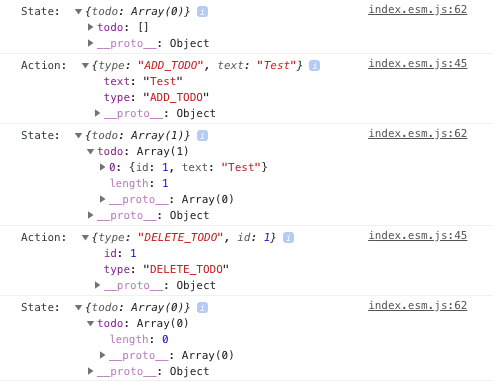
To add logging to the console, set the log prop on the Store to true.
<Store rootReducer={rootReducer} log={true}>
  ...
</Store>
Output looks like below:
Challenges in doing this project with the new Hooks API
At first, I thought the useReducer is a great API, one which should have been part of React since the beginning. So, I started out creating a global store with just useReducer hook. I was hoping that calling useReducer with the same reducer function will give the same state. So, it was a great way of sharing state. But useReducer hook does not work that way. To more about useReducer hook, read my first blog post on this topic.
Then I thought of putting the global state in the Context. I was able to put the global state in context and use it everywhere using a useStore hook. I have outlined the approach in the second article on the same topic. There was a problem with this approach. There were too many updates happening when we put the global store in the context. All components subscribed to the store updated even when they don't need that data.
So, the official solution from React team is to put the dispatch function into the global context and pass the store down as props. I outlined this approach in the third article where I explain why Redux is required. At the time of writing the third article, I did not know the Redux team was struggling with the problem.
The problem of using subscription mechanism that I outlined in the third article to fix too many updates is that it does not work well with concurrent React. So, the only way to solve this problem is to pass the global store into the Context API. And figure out some way to cancel the update from happening. But there is no hook to cancel an update which is already kick-started by the useContext hook. So, the only way around this is to have a higher order component via the connect function to cancel the updates from the context. So, we are back to Square one where we have global store in Context object and a connect HOC to prevent too many updates. Currently, there is no way with the official React API to write a useStore hook. Till then, this is just an experimental project, definitely only for small apps and demo projects.