
react-scroll-board
v0.0.1
Published
React scrolling board component

Maintainers
 banshan_alec
Readme
React Scroll Board V2
React Scroll Board V2 是一个高性能的表格滚动展示组件,基于 React 和 requestAnimationFrame 实现,专为展示动态数据流设计。它特别适合仪表盘、大屏展示、实时监控系统等场景,能够流畅地显示持续更新的数据。
在线预览:https://code.juejin.cn/pen/7509334034711838756
特性
- 高性能动画 - 基于 requestAnimationFrame 的平滑滚动
- 虚拟列表 - 只渲染可见行,适合处理大量数据
- 表格布局 - 专为表格式数据展示设计,支持表头和多列
- 丰富配置 - 支持自定义颜色、列宽、对齐方式等
- 双向滚动 - 支持向上或向下滚动方向
- 交互控制 - 鼠标悬停暂停滚动
- 命令式 API - 支持动态添加数据行
- TypeScript 支持 - 完整的类型定义
- Tailwind CSS 兼容 - 无缝融入现代 CSS 框架
安装
# 使用npm
npm install react-scroll-board

# 使用yarn
yarn add react-scroll-board

# 使用pnpm
pnpm add react-scroll-board
注意:使用前记得引入 CSS 样式文件(项目中有Tailwind CSS 则无需额外引入)
基础使用
import { ScrollBoard } from 'react-scroll-board';
import 'react-scroll-board/dist/index.css'; // 引入样式(项目中有Tailwind CSS 则无需额外引入)

const MyTable = () => {
  // 创建引用以便操作表格
  const scrollBoardRef = useRef();
  const header = ["ID", "名称", "状态"];

  // 添加数据行
  useEffect(() => {
    // 初始数据
    const initialData = [
      ["1", "项目 A", "进行中"],
      ["2", "项目 B", "已完成"],
      ["3", "项目 C", "待处理"]
    ];

    scrollBoardRef.current.push(initialData);

    // 定时添加新数据
    const timer = setInterval(() => {
      const newData = [
        [String(Math.floor(Math.random() * 1000)),
         `新项目 ${Date.now()}`,
         Math.random() > 0.5 ? "进行中" : "已完成"]
      ];

      scrollBoardRef.current.push(newData);
    }, 3000);

    return () => clearInterval(timer);
  }, []);

  return (
    <ScrollBoard
      ref={scrollBoardRef}
      header={header}
      className="my-scroll-board"
      config={{
        rowNum: 5,
        headerBGC: "#1976d2",
        oddRowBGC: "#f5f5f5",
        evenRowBGC: "#e0e0e0"
      }}
    />
  );
};
高级配置
<ScrollBoard
  ref={scrollBoardRef}
  header={["ID", "项目", "进度", "状态", "负责人"]}
  className="dashboard-table"
  config={{
    rowNum: 8,                       // 显示行数
    headerBGC: "#2a3f54",            // 表头背景色
    headerFontColor: "#ffffff",      // 表头文字颜色
    oddRowBGC: "#f9f9f9",            // 奇数行背景色
    evenRowBGC: "#ffffff",           // 偶数行背景色
    rowFontColor: "#333333",         // 行文字颜色
    headerHeight: 50,                // 表头高度
    columnWidth: [80, "30%", "30%", 100, "auto"],  // 列宽配置
    align: ["center", "left", "right", "center", "left"],  // 对齐方式
    hoverPause: true,                // 鼠标悬停时暂停
    scrollDirection: "up"            // 滚动方向:'up' 或 'down'
  }}
/>
API 文档
组件属性 (Props)
| 属性 | 类型 | 必填 | 说明 |
|------|------|:----:|------|
| header | string[] | ✅ | 表头内容数组 |
| className | string | ❌ | 自定义类名 |
| config | TScrollBoardConfig | ❌ | 配置选项对象 |
配置项 (Config: TScrollBoardConfig)
| 配置项 | 类型 | 默认值 | 说明 |
|--------|------|--------|------|
| rowNum | number | 5 | 展示的行数 |
| headerBGC | string | "#00BAFF" | 表头背景色 |
| oddRowBGC | string | "#003B51" | 奇数行背景色 |
| evenRowBGC | string | "#0A2732" | 偶数行背景色 |
| headerFontColor | string | "#ffffff" | 表头字体颜色 |
| rowFontColor | string | "#ffffff" | 行字体颜色 |
| headerHeight | number | 35 | 表头高度(px) |
| columnWidth | (number \| string)[] | [] | 列宽数组,可以是数字(px)或字符串("30%") |
| align | string[] | [] | 列对齐方式,可选值: "left", "center", "right" |
| hoverPause | boolean | true | 鼠标悬停时是否暂停滚动 |
| scrollDirection | "up" \| "down" | "up" | 滚动方向 |
引用方法 (Ref)
通过 useRef() 获取组件引用后可用的方法:
| 方法 | 参数 | 返回值 | 说明 |
|------|------|--------|------|
| push | data: string[][] | void | 向表格添加新的数据行 |
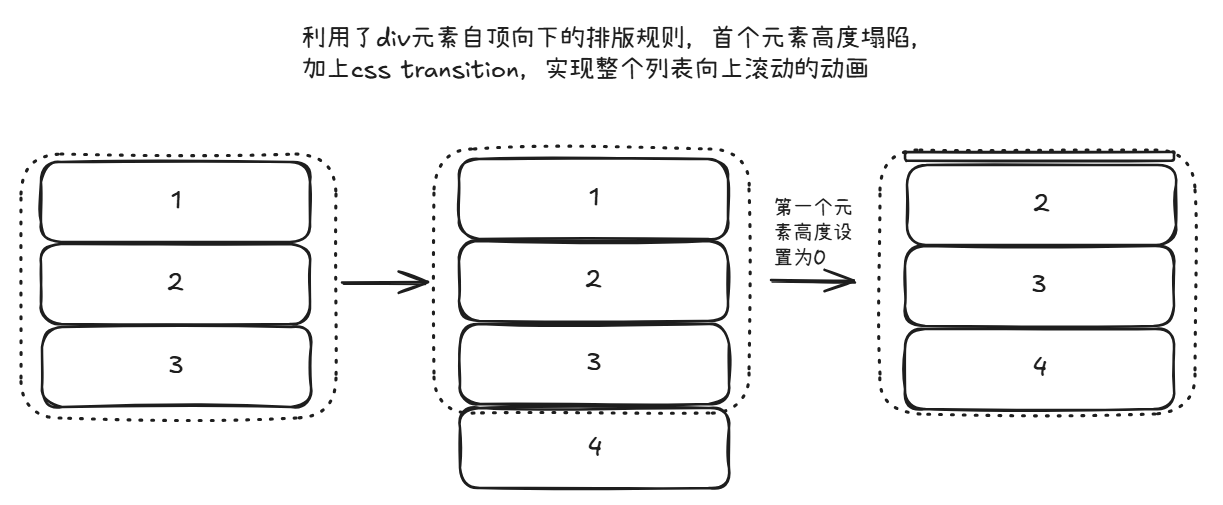
工作原理
- ScrollBoard V2 使用 RequestAnimationFrame 实现平滑滚动,而非通过 CSS transform
- 它采用虚拟滚动技术,只渲染实际可见的行,从而提高性能
- 新数据通过命令式 API 推入队列,并自动按序滚动展示
对比与定时器改变translateY来实现滚动动画,ScrollBoard V2 拥有更好的性能,特别是列表数据很多的情况。
灵感来源:https://github.com/DataV-Team/DataV-React
数据更新模式
本组件采用"推送模式",不同于普通的数据展示组件:
// ❌ 不要这样使用 - 无效的数据传递方式
<ScrollBoard data={myData} />

// ✅ 正确使用方式 - 通过引用推送数据
const ref = useRef();
// ...初始化后
ref.current?.push([["ID", "名称", "状态"]]);
本地开发
克隆代码库并安装依赖:
# 安装主项目依赖
pnpm install

# 安装playground依赖
pnpm playground:install
启动组件库开发:
pnpm dev启动playground预览:
pnpm playground构建组件库:
pnpm build许可证
MIT