
react-select-datepicker
v3.1.0
Published
A simple and reusable dropdown datepicker component for React

Maintainers
 deathspuz
Readme
react-select-datepicker
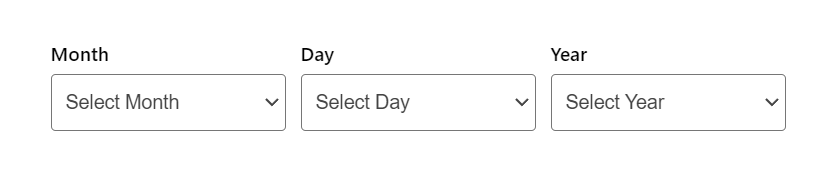
A simple and reusable dropdown datepicker component for React (Demo)





Install
npm install --save react-select-datepickerUsage
import React, { useState, useCallback } from 'react';
import { SelectDatepicker } from 'react-select-datepicker';

export const App = () => {
  const [value, setValue] = useState<Date | null>();

  const onChange = useCallback((date: Date | null) => {
    setValue(date);
  }, []);

  return (
    <SelectDatepicker
      value={value}
      onChange={onChange}
      labels={{
        groupLabel: 'Select your date',
      }}
    />
  );
};
API
Props
value?: Date | null— Controlled value (preferred).onChange?: (date: Date | null) => void— Change handler (preferred).selectedDate?: Date | null— Legacy value prop (still supported).onDateChange?: (date: Date | null) => void— Legacy change handler (still supported).minDate?: Date/maxDate?: Date— Range constraints.order?: 'month/day/year' | 'day/month/year' | ...— Order of selects.reverseYears?: boolean— Reverse year order.hideLabels?: boolean— Hide per-field labels.disabled?: boolean— Disable all selects.hasError?: boolean— Error state (shows validation message).isRequired?: boolean— Marks all fields as required (defaults to false).labels?: { ... }— Label and placeholder overrides.
labels
groupLabel?: string— Single label for the entire date picker group.monthLabel,dayLabel,yearLabel— Field labels.monthPlaceholder,dayPlaceholder,yearPlaceholder— Field placeholders.months?: { 1: string; ... 12: string }— Custom month names.
Examples
Group label
<SelectDatepicker
  value={value}
  onChange={onChange}
  labels={{ groupLabel: 'Select your date' }}
/>
Date range
<SelectDatepicker
  value={value}
  onChange={onChange}
  minDate={new Date(2020, 0, 1)}
  maxDate={new Date(2025, 11, 31)}
/>
Custom order + reverse years
<SelectDatepicker
  value={value}
  onChange={onChange}
  order="day/month/year"
  reverseYears
/>
Custom labels and months
<SelectDatepicker
  value={value}
  onChange={onChange}
  labels={{
    groupLabel: 'Travel date',
    monthLabel: 'Mes',
    dayLabel: 'Día',
    yearLabel: 'Año',
    monthPlaceholder: 'Selecciona mes',
    dayPlaceholder: 'Selecciona día',
    yearPlaceholder: 'Selecciona año',
    months: {
      1: 'Enero',
      2: 'Febrero',
      3: 'Marzo',
      4: 'Abril',
      5: 'Mayo',
      6: 'Junio',
      7: 'Julio',
      8: 'Agosto',
      9: 'Septiembre',
      10: 'Octubre',
      11: 'Noviembre',
      12: 'Diciembre',
    },
  }}
/>
Error state
<SelectDatepicker value={value} onChange={onChange} hasError />Required fields
<SelectDatepicker value={value} onChange={onChange} isRequired />Theming (CSS variables)
<SelectDatepicker
  value={value}
  onChange={onChange}
  className="my-datepicker-theme"
/>
.my-datepicker-theme {
--rsd-gap: 12px;
--rsd-select-padding: 10px 12px;
--rsd-select-border: 1px solid #7c3aed;
--rsd-select-border-radius: 10px;
--rsd-select-font-size: 15px;
--rsd-error-color: #b42318;
}Style options (CSS variables)
Apply these variables on the root element (the wrapper with rsd__react-select-datepicker) or on a custom className.
| Variable | Default | Used for |
| --- | --- | --- |
| --rsd-gap | 8px | Space between selects in the row. |
| --rsd-legend-font-size | 16px | Group label font size. |
| --rsd-legend-font-weight | 600 | Group label font weight. |
| --rsd-legend-margin-bottom | 8px | Spacing below group label. |
| --rsd-error-color | #d73a49 | Error message color. |
| --rsd-error-font-size | 14px | Error message font size. |
| --rsd-error-margin-top | 8px | Spacing above error message. |
| --rsd-required-color | #666 | Asterisk/required indicator color. |
| --rsd-required-margin-left | 4px | Spacing between label text and required indicator. |
| --rsd-label-margin-bottom | 4px | Spacing below field labels. |
| --rsd-select-padding | 6px 8px | Select padding. |
| --rsd-select-border | 1px solid #d0d7de | Select border. |
| --rsd-select-border-radius | 6px | Select border radius. |
| --rsd-select-font-size | 14px | Select font size. |
| --rsd-select-font-family | inherit | Select font family. |
| --rsd-select-line-height | 1.2 | Select line height. |
| --rsd-select-hover-border | #9aa4b2 | Select border color on hover. |
| --rsd-select-focus-border | #0969da | Select border color on focus. |
| --rsd-select-focus-ring | 0 0 0 3px rgba(9, 105, 218, 0.25) | Select focus ring shadow. |
| --rsd-select-disabled-bg | #f6f8fa | Disabled select background. |
| --rsd-select-disabled-color | #8c959f | Disabled select text color. |
Error boundary
import { SelectDatepickerErrorBoundary } from 'react-select-datepicker';

<SelectDatepickerErrorBoundary
  renderFallback={(error) => <div role="alert">Error: {error.message}</div>}
>
  <SelectDatepicker value={value} onChange={onChange} />
</SelectDatepickerErrorBoundary>
License
MIT © JMcAmmond