
react-sfc-webpack-loader
v1.0.2
Published
Webpack loader for Single file components (SFC) for React

Maintainers
 pksilen
Readme
React Single File Components (SFC) Webpack Loader
Webpack loader for React Single File Components (SFC) inspired by Vue SFCs




Prerequisites
"webpack": "^4.0.0",Installation
npm install --save-dev react-sfc-webpack-loader
React Single File Component
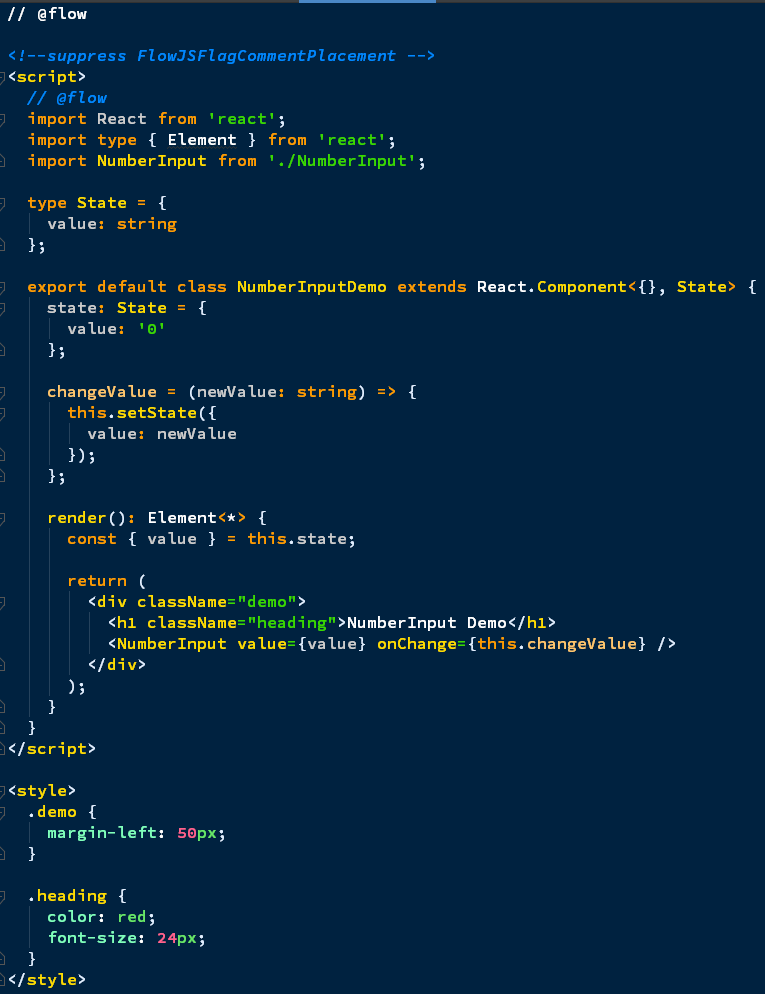
React Single File Component (SFC) is implemented in a .html file where JavaScript is put inside a single ... section and optional CSS is put inside a single (optional) ... section
Style types
Define style type as follows:
CSS
<style type="text/css">
    ...
    ..
</style>
SCSS
<style type="text/scss">
    ...
    ..
</style>
SASS
<style type="text/sass">
    ...
    ..
</style>
LESS
<style type="text/less">
  ...
  ..
</style>
Stylus
<style type="text/styl">
  ...
  ..
</style>
Webpack configuration
Create React App
If you have created your React app with Create React App, you need to eject it by running:
npm ejector
yarn ejectAdd following rule to rules array in config/webpack.config.js file:
module: {
    rules: [
      {
        test: /\.html$/,
        exclude: /node_modules/,
        use: ['babel-loader', 'react-sfc-webpack-loader']
      }
Manual configuration
Have your normal Webpack configuration
Have your normal rules for style loading depending on style type (CSS/SCSS/SASS/LESS/Stylus)
Only change needed is to add this following rule to Webpack configuration:
module: {
    rules: [
      {
        test: /\.html$/,
        exclude: /node_modules/,
        use: ['babel-loader', 'react-sfc-webpack-loader']
      }
Supported tools
- Prettier
- ESLint (below steps must be done in addition to normal ESLint installation and configuration)
Install eslint-plugin-html
npm install --save-dev eslint-plugin-htmlAdd to your ESLint configuration
   {
       "plugins": [
           "html"
       ],
       rules: [
           "react/jsx-filename-extension": [1, { "extensions": [".js", ".jsx", ".html"] }]
       ]
   }
- Flow (Needs ESLint and below steps must be done in addition to normal Flow installation and configuration)
Install eslint-plugin-flowtype-errors
npm install --save-dev eslint-plugin-flowtype-errorsConfigure ESLint
  {
      "plugins": [
          "flowtype-errors"
      ],
      rules: [
         "flowtype-errors/show-errors": 2
      ]
  }
Enable flow usage in .html file
  // @flow
  <script>
  // @flow
  .
  .
  .
  </script>
Tested IDEs/Editors
- WebStorm
Under construction
- Scoped CSS / CSS Modules support
Not supported
- TypeScript
License
MIT License