
react-stopwatch-timer
v1.0.0
Published
React component timer and stopwatch


Readme
React Timer Stopwatch
1. What is it
This is open source project contain React component ReactTimerStopwatch which have timer and stopwatch.
2. Download
If you use npm
npm install --save react-stopwatch-timer
Or yarn
yarn add react-stopwatch-timer
3. Usage
You can import component like below:
import ReactStopwatchTimer from 'react-stopwatch-timer';
Props:
isOn: true or false(default) true make stopwatch or timer will start
watchType: stopwatch or timer default variable is unset. In this props you can choose to your watch work like stopwatch or timer
fromTime: Date object, default is present time. More about Date. This props set time for stopwatch or timer will start it
displayCircle: true or false(default) decide about display beautiful circle around timer or stopwatch
children: You can put some button or etc. inside circle
displayHours: true(default) or false If you don't need hours in your watch you can set this props for false
displayMinutes: true(default) or false If you don't need minutes in your watch you can set this props for false
displaySeconds: true(default) or false If you don't need seconds in your watch you can set this props for false
color: circle elements color. Default props is unset
hintColor: hint color. Default props is unset
callback: function start after timer finish works
Example use:
Watch without circle

import React from 'react';
import ReactTimerStopwatch from 'react-stopwatch-timer';

const App = () => {
    return (
            <ReactTimerStopwatch isOn={true} className="react-stopwatch-timer__table" watchType="stopwatch"/>
    );
};

export default App;
Watch with circle
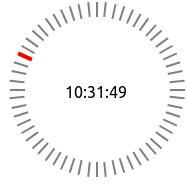
import React from 'react';
import ReactTimerStopwatch from 'react-stopwatch-timer';

const App = () => {
    return (
            <ReactTimerStopwatch isOn={true} className="react-stopwatch-timer__table" watchType="stopwatch" displayCricle={true} color="gray" hintColor="red"/>
    );
};

export default App;
Stopwatch
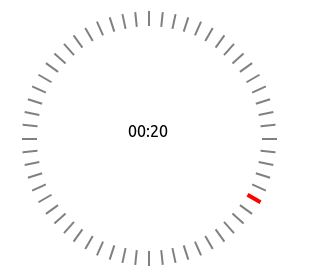
import React from 'react';
import ReactTimerStopwatch from 'react-stopwatch-timer';

const fromTime = new Date(0, 0, 0, 0, 0, 0, 0);

const App = () => {
    return (
        <ReactTimerStopwatch isOn={true} className="react-stopwatch-timer__table" watchType="stopwatch"
                             displayCricle={true} color="gray" hintColor="red" fromTime={fromTime}/>
    );
};

export default App;
Timer
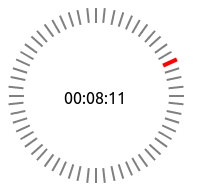
import React from 'react';
import ReactTimerStopwatch from 'react-stopwatch-timer';

const fromTime = new Date(0, 0, 0, 0, 10, 0, 0);

const App = () => {
    return (
        <ReactTimerStopwatch isOn={true} className="react-stopwatch-timer__table" watchType="timer"
                             displayCricle={true} color="gray" hintColor="red" fromTime={fromTime}/>
    );
};

export default App;
Without Hours
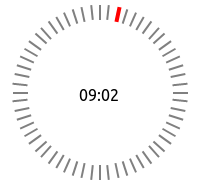
import React from 'react';
import ReactTimerStopwatch from 'react-stopwatch-timer';

const fromTime = new Date(0, 0, 0, 0, 10, 0, 0);

const App = () => {
    return (
        <ReactTimerStopwatch isOn={true} className="react-stopwatch-timer__table" watchType="timer"
                             displayCricle={true} color="gray" hintColor="red" fromTime={fromTime} displayHours={false}/>
    );
};

export default App;
With button inside circle
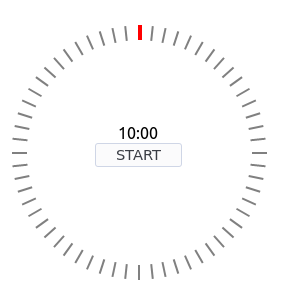
import React, {useState} from 'react';
import ReactTimerStopwatch from 'react-stopwatch-timer';

const fromTime = new Date(0, 0, 0, 0, 10, 0, 0);

const App = () => {

   const [isOn, setIsOn] = useState(false);

   return (
       <ReactTimerStopwatch isOn={isOn} className="react-stopwatch-timer__table" watchType="timer"
                            displayCricle={true} color="gray" hintColor="red" fromTime={fromTime} displayHours={false}>
           <button onClick={() => setIsOn(true) }>START</button>
       </ReactTimerStopwatch>
   );
};

export default App;
Custom style circle element
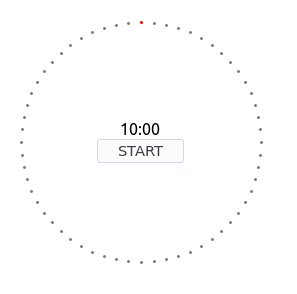 in js file:
import './App.css'
in css or scss file:
.react-stopwatch-timer__element {
    width: 3px !important;
    height: 3px !important;
    border-radius: 5px;
}

.react-stopwatch-timer__table{
    width: 300px !important;
    height: 300px !important;
}
4 License
GNU General Public License v3.0
5 Code Link
Author
Mateusz Karłowski Github Profile