
react-style-editor
v0.4.0
Published
A React component that displays and edits CSS, similar to the browser's DevTools.

Maintainers
 aurelain
Readme
React Style Editor


A React component that displays and edits CSS, similar to the browser's DevTools.
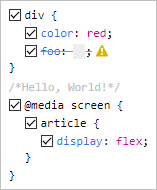
Live demo
Features
- Parses any CSS string and formats it in a familiar fashion
- Validates each rule and each declaration using the browsers's own engine
- Facilitates commenting the CSS code through checkbox toggling
- Allows easy additions by clicking next to the desired location
- Has no dependencies (other than React)
- Is tiny (< 10 KB minified)
- Is customizable through classes
- Offers 3 output formats:
- the code with preserved formatting
- a machine-friendly model of the code (recursive array of objects)
- the prettified code
Installation
npm i react-style-editorUsage
import React from 'react';
import StyleEditor from 'react-style-editor';

class Component extends React.Component {
    render() {
        return (
            <StyleEditor
                defaultValue={`
                    div {color:red;}
                    /* Hello, World! */
                    @media screen {
                        article {
                            display: flex;
                        }
                    }
                `}
            />
        );
    }
}
Props
| prop | type | default | description |
| --------------- | -------- | ----------- | --------------------------------------------------------------------------------------------------------- |
| defaultValue | string | '' | The initial CSS code |
| value | string | undefined | The controlled CSS code |
| onChange | function | null | A closure that receives a single argument, string or array, depending on the value of outputFormats |
| outputFormats | string | 'pretty' | Comma-separated values of: 'preserved', 'machine', 'pretty' |
| readOnly | boolean | false | All interactions with the component are blocked |
All parameters are optional, but some are inter-related. For example, due to the nature of React, you should use StyleEditor either fully controlled or fully uncontrolled (see this article).
A short summary:
defaultValue=> uncontrolled, the component is on its ownvalue=> controlled => you must also use theonChangeorreadOnlyproperties.
The above behavior is identical to that of normal React form elements, e.g. <textarea/>.
Any other props are spread to the internal root.
Exports
Besides the default export (StyleEditor), there are also a few utility functions exported:
analyze(): ouputs themachineformatparse(): a lighter version ofanalyze()stringify(): outputs thepreservedformatprettify(): outputs theprettyformat
They all expect a CSS string as parameter and are useful if you don't want to use the React component and wait for its onChange.
Wishlist
- Color swatches (similar to the browser)
- Dropdown suggestions for properties/values (similar to the browser)
- Keyboard support for
TAB,:andUP/DOWNincrements of numeric values - Theme support (similar to the browser)
- Toggle view mode: tree/original
- Undo/redo
- Better code quality through
propTypes - Filters (similar to the browser)
- Error messages displayed in the warning-sign's tooltip