
react-talking-avatar
v0.1.1
Published
Detect a face/avatar from an uploaded or remote image and animate its lips while audio plays (simulated talking).
Downloads
318

Maintainers
 omarmayallo
Readme
react-talking-avatar
Detect a face/avatar from an uploaded image or a remote URL, then make its lips move as if talking while an uploaded/remote audio file plays — or while it speaks text out loud via a pluggable TTS synthesizer.
The lip motion is a simulation of speech (it looks like the avatar is talking) — not phoneme-accurate lip-sync. Motion is driven by the audio's loudness/spectrum when readable, with a random fallback, so it always looks alive.
- 🧠 Face detection via Google MediaPipe FaceLandmarker (478 landmarks).
- 👄
meshrendering engine (default) — a WebGL face-mesh warp (Three.js). The photo is texture-mapped onto a deformable triangle mesh; the lower lip + jaw vertices actually swing open like a hinge, with a real mouth cavity and faint teeth behind the lips. A lighterpuppet2D canvas engine is also available. - 🌬️ Lifelike idle motion (mesh engine) so the avatar feels alive even when silent: eye blinks, eye darting (saccades), occasional eyebrow raises, breathing, layered head drift, and an optional look-at-pointer mode. Honors the OS reduce-motion setting.
- 🗣️ Realistic lip-sync (
mode: "viseme"): forms vowel/consonant shapes from the audio spectrum (open/wide/round/closed), not just open/close. - 🎙️ Two input modes: play an audio file directly, or give it text and a pluggable speech synthesizer (Edge TTS, ElevenLabs, or your own backend) and it speaks + lip-syncs the result.
- 🌐 Resilient model loading (multi-CDN fallback; self-hostable).
- 📦 Ships as ESM + CJS + types. React is a peer dependency.
- 🖼️ Accepts
File/Blobuploads or remote URLs for image and audio.
Install
npm install react-talking-avatar @mediapipe/tasks-vision threereact, react-dom, @mediapipe/tasks-vision and three are peer/runtime
deps. (three is only needed for the default mesh engine; the puppet engine
has no extra runtime deps.)
Quick start
Two ways to make the avatar talk — pick whichever fits, both use the exact
same <TalkingAvatar> component:
Example 1 — with a ready-made audio file
No server, no setup. Point audio at any MP3/WAV URL (or a File/Blob from
an <input>).
import { TalkingAvatar } from "react-talking-avatar";

export default function App() {
  return (
    <TalkingAvatar
      image="/rania-character.png"   // URL, or a File/Blob from an <input>
      audio="/voice-sample.mp3"      // URL, or a File/Blob
      controls                        // built-in play/pause button
      style={{ maxWidth: 360 }}
      onReady={(r) => console.log("face found", r.mouth)}
      onError={(e) => console.error(e)}
    />
  );
}
Uploads work directly for both image and audio:
<input
  type="file"
  accept="image/*"
  onChange={(e) => setImage(e.target.files![0])} // pass the File straight in
/>
Example 2 — with Edge TTS (free text-to-speech)
No audio file needed — give it text instead, and it synthesizes + lip-syncs
the speech using Microsoft Edge's free neural voices (Arabic + English + 100+
languages, no API key). This needs the tiny proxy server that ships in
edge-tts-server/ (Edge's speech endpoint only accepts
requests from the Edge browser, so this small Node server relays them):
cd edge-tts-server
npm install
npm start          # → http://localhost:5111
import { TalkingAvatar, EdgeTtsSpeechSynthesizer } from "react-talking-avatar";
const synth = new EdgeTtsSpeechSynthesizer({
endpoint: "http://localhost:5111/tts",
voice: "ar-EG-SalmaNeural", // ar-SA-HamedNeural, en-US-AriaNeural, en-GB-RyanNeural, …
// rate: "+0%", pitch: "+0Hz",
});
export default function App() {
return (
<TalkingAvatar
image="/rania-character.png"
speech={{ text: "مرحباً بالعالم — hello world!", synthesizer: synth }}
controls
style={{ maxWidth: 360 }}
/>
);
}A few voices: ar-EG-SalmaNeural, ar-SA-HamedNeural, ar-SA-ZariyahNeural,
ar-AE-FatimaNeural (Arabic); en-US-AriaNeural, en-US-GuyNeural,
en-GB-SoniaNeural, en-GB-RyanNeural (English). For the full list (300+
voices), call await synth.listVoices() — it fetches the server's GET /voices.
Full API reference — every option it takes
<TalkingAvatar> props
| Prop | Type | Default | Description |
| --- | --- | --- | --- |
| image | string \| File \| Blob \| HTMLImageElement | — | Required. Face source: uploaded file/blob or a remote CORS-enabled URL. |
| audio | string \| File \| Blob | — | Example 1 — play this audio directly. |
| speech | SpeechInput | — | Example 2 — speak text via a synthesizer. Takes priority over audio when both are set. |
| autoPlay | boolean | false | Start playing once ready (may be blocked by the browser's autoplay policy). |
| loop | boolean | false | Loop the audio. |
| controls | boolean | true | Show the built-in play/pause button overlay. |
| width | number \| string | "100%" | Container width. |
| height | number \| string | auto | Container height. |
| className | string | — | Passed through to the root <div>. |
| style | CSSProperties | — | Passed through to the root <div>. |
| detectorOptions | DetectorOptions | see below | Face-detection model/WASM tuning. |
| animationOptions | AnimationOptions | see below | Rendering engine + mouth-motion tuning. |
| onReady | (result: FaceDetectionResult) => void | — | Fired once face detection succeeds. |
| onError | (error: Error) => void | — | Detection, playback, or speech-synthesis errors. |
| onPlay / onPause / onEnded | () => void | — | Playback lifecycle events. |
| onSpeechStatus | (status: SpeechStatus) => void | — | TTS progress: "idle" \| "synthesizing" \| "ready" \| "error". |
Imperative handle (via ref): { play(): Promise<void>, pause(): void, toggle(): void, playing: boolean }.
With animationOptions.lookAtPointer enabled, just move the mouse over the
avatar — the component tracks the pointer automatically (no extra wiring).
AnimationOptions
{
  engine?: "mesh" | "puppet";  // default "mesh" (WebGL warp)
  mode?: "hybrid" | "audio" | "random" | "viseme"; // default "hybrid"
  openScale?: number;    // mouth-open amount multiplier (default 2.2)
  smoothing?: number;    // 0..1 reaction speed (default 0.4)
  jitter?: number;       // random liveliness 0..1 (default 0.22)
  interiorColor?: string; // inside-of-mouth color (default "#1c0a0e")

  // --- idle "life" (mesh engine only) ---
  blink?: boolean;              // periodic eye blinks (default true)
  headMotion?: boolean;         // layered head drift (default true)
  headMotionIntensity?: number; // sway amplitude multiplier (default 1)
  breathing?: boolean;          // gentle breathing scale (default true)
  gaze?: boolean;                // eye darting / saccades (default true)
  eyebrows?: boolean;            // occasional eyebrow raises (default true)
  lookAtPointer?: boolean;       // head + eyes follow the mouse (default false)
  respectReducedMotion?: boolean; // honor OS reduce-motion (default true)
  showTeeth?: boolean;           // faint upper teeth when open (default true)
}
All of these (except engine) can be changed live without remounting.
hybrid(default) — follows audio loudness when readable, otherwise flaps procedurally; always adds a little jitter.viseme— estimates mouth shapes (open/wide/round/closed) from the audio spectrum, so the lips form real vowel/consonant shapes. Mesh engine only.audio— strictly amplitude-driven (needs CORS-readable audio).random— pure simulated talking, ignores audio content.
The
engineis fixed when the avatar mounts. To switch engines at runtime, remount with akeythat includes the engine — a single<canvas>can't change between 2D and WebGL contexts.
DetectorOptions
{
  wasmBasePath?: string;   // default: jsDelivr CDN for @mediapipe/tasks-vision
  modelAssetPath?: string; // default: Google-hosted face_landmarker.task
  maxFaces?: number;       // default 1
  minConfidence?: number;  // default 0.4
}
Self-host the model/WASM (recommended for production) by downloading
face_landmarker.task and the tasks-vision wasm/ folder, serving them, and
pointing these paths at your copies.
SpeechInput (the speech prop)
{
  text: string;                    // what the avatar should say
  synthesizer: SpeechSynthesizer;  // one of the synthesizers below, or your own
  voice?: string | File | Blob;    // reference sample to clone (provider-dependent)
  lang?: string;                   // optional BCP-47 hint, e.g. "en", "ar"
}
Built-in synthesizers
| Synthesizer | Key config options | Notes |
| --- | --- | --- |
| EdgeTtsSpeechSynthesizer | endpoint (default http://localhost:5111/tts), voice, rate, pitch | Free, no API key. Needs edge-tts-server/ running. Also exposes listVoices(). |
| ElevenLabsSpeechSynthesizer | apiKey, voiceId, modelId, outputFormat, voiceSettings, clone | Paid hosted API + optional instant voice cloning. ⚠️ Never ship the API key in client code — proxy it in production. |
| RemoteSpeechSynthesizer | endpoint, method, headers, body ("formData" | "json"), textField, voiceField, extraFields, responseAudioUrlField | A configurable HTTP adapter for any TTS backend you host — a serverless function, your own proxy, a self-hosted model. |
| MockSpeechSynthesizer | sample, delayMs | Returns a fixed audio clip after a delay — no backend, useful for demos/tests. |
Or implement SpeechSynthesizer directly: synthesize({ text, voice?, lang?, signal? }) => Promise<Blob>.
Possible errors
| Error | Cause | Fix |
| --- | --- | --- |
| "No face detected in the provided image." | MediaPipe couldn't find a face in image. | Use a clear, front-facing, single-face photo (see example image below). Increasing detectorOptions.maxFaces doesn't help if none are found; check the photo itself. |
| "Failed to load image: …" | The image URL is unreachable or blocked. | Verify the URL is correct and reachable; remote images must serve CORS-friendly headers to be drawn to canvas. |
| "Could not acquire 2D canvas context." | The browser/context refused to create a canvas 2D context (rare — e.g. exhausted GPU/canvas contexts). | Reduce the number of concurrently mounted avatars, or reload the page. |
| Speech never plays / stays on "Generating voice…" forever | speech.synthesizer threw, or the network request is hanging. | Listen to onError / onSpeechStatus="error" for the underlying message. |
| "Edge TTS failed: … (is the edge-tts server running at …?)" | The edge-tts-server proxy isn't running, or endpoint is wrong. | cd edge-tts-server && npm start, and double-check the endpoint URL/port match. |
| "ElevenLabsSpeechSynthesizer requires an apiKey." | No apiKey passed to the config. | Pass a valid ElevenLabs API key. |
| "ElevenLabs TTS failed: 401 …" | Invalid/expired API key. | Check the key and your ElevenLabs plan permissions. |
| "Cannot synthesize empty text." | speech.text was empty/whitespace. | Guard against empty strings before setting speech. |
| Audio doesn't autoplay | Browsers block audio without a user gesture. | Keep controls on (default) so the user presses play, or trigger play() from a click handler via the ref. |
| Lips don't move even though audio plays | audio/animationOptions.mode: "audio" needs CORS-readable audio to analyze amplitude. | Serve audio with CORS headers, or use mode: "hybrid" (default), which falls back to procedural motion. |
Example avatar image
Any clear, front-facing, single-face portrait works best. The bundled test asset used throughout this README and the example app looks like this:
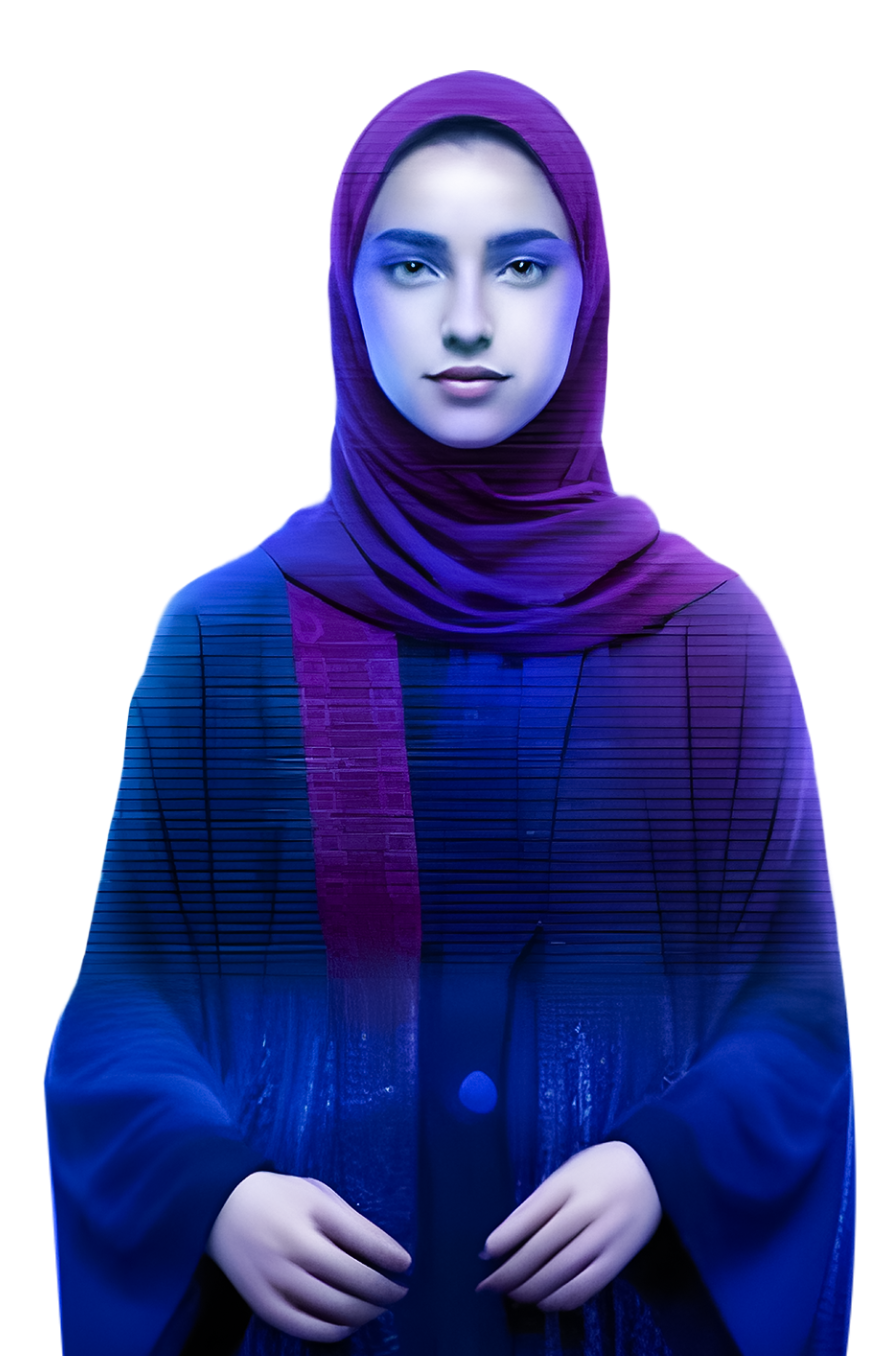
What makes an image detect reliably:
- One face, facing (roughly) the camera — not a profile shot.
- Even lighting, no heavy shadows across the mouth/eyes.
- Reasonable resolution (a few hundred pixels across the face is plenty).
- Mouth and eyes unobstructed (no hands, masks, or sunglasses).
Headless / advanced API
The package also exports framework-agnostic primitives and a hook, for building your own UI around the detection/rendering pipeline:
import {
  detectFace,            // (image, opts) => Promise<FaceDetectionResult>
  TalkingAvatarRenderer, // canvas renderer (jaw-puppet animation)
  MeshTalkingRenderer,   // WebGL mesh-warp renderer (the "mesh" engine)
  AudioMouthDriver,      // Web Audio amplitude reader
  useTalkingAvatar,      // headless React hook
} from "react-talking-avatar";
Example app
A Vite + React + TypeScript demo lives in example/, wired to the
included test assets (rania-character.png, voice-sample.mp3):
npm install            # install the library deps
npm run build          # build dist/ (or `npm run dev` to watch)
npm run example:install
npm run example        # starts the Vite demo at http://localhost:5173
The demo lets you upload your own image/audio, paste remote URLs, and switch animation modes.
License
MIT