
react-text-datepicker
v1.0.5
Published
react-text-datepicker React component

Maintainers
 pablovila
Readme
react-text-datepicker



Sometimes you don't want a calendar datepicker for your forms. Everybody knows his/her own birthday or other important dates that they can enter using old-fashion keyboard. This package helps you with this.
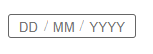
Installation
Install it from npm and include it in your React build process (using Webpack, Browserify, etc).
npm install --save react-text-datepickeror:
yarn add react-text-datepickerUsage
import React from "react";
import TextDatepicker from "react-text-datepicker";

class MyComponent extends React.Component {
  constructor(props) {
    super(props);
    this.state = {
      myDate: new Date()
    };
    this.onChange = this.onChange.bind(this);
  }

  onChange(newValue) {
    this.setState({
      myDate: newValue
    });
  }

  render() {
    return (
      <TextDatepicker value={this.state.myDate} onChange={this.onChange} />
    );
  }
}
Props
Common props you may want to specify include:
| prop | Description | Default Value |
| ----------- | --------------------------------------------------------- | ------------- |
| dayHint | change the text displayed as placeholder for day input | DD |
| hints | specify if you want to display placeholder for each input | true |
| monthHint | change the text displayed as placeholder for month input | MM |
| onChange | subscribe to change events | null |
| separator | change the text displayed between parts of date | / |
| value | control the current value | null |
| yearHint | change the text displayed as placeholder for year input | YYYY |
License
MIT