
react-tilt-button
v0.2.1
Published
A physical, 3D tactile React button with tilt, squish, spring physics and real depth.

Maintainers
 archisvaze
Readme
React Tilt Button
A physical, 3D tactile React button component with tilt, squish, spring physics, and real depth.
🔗 Live Demo: https://react-tilt-button.vercel.app/
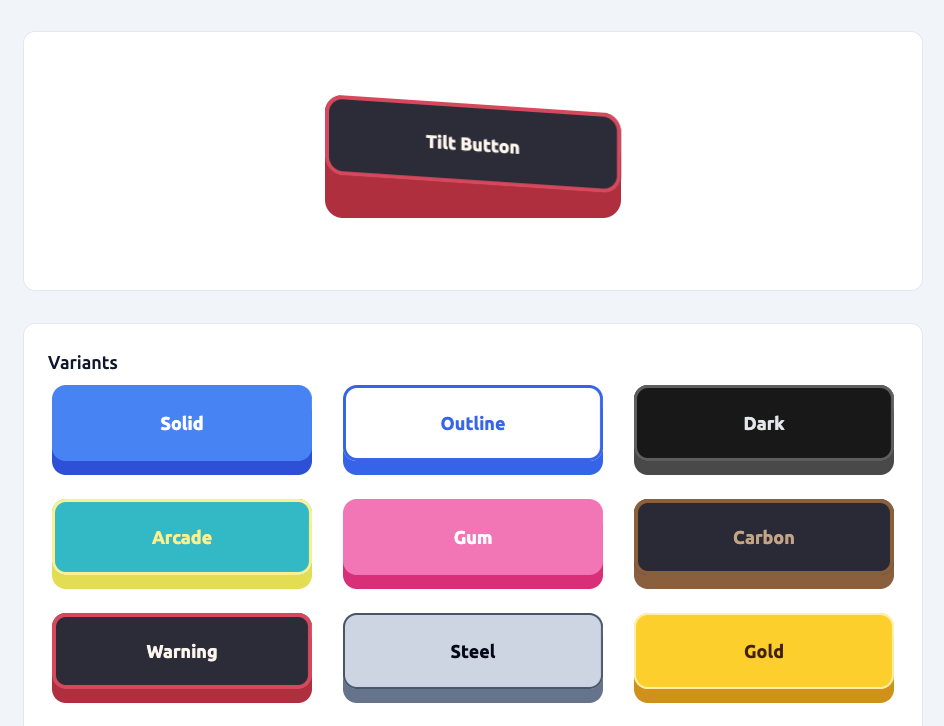
Features:
- Tilts toward the pointer, and follows your finger on touch
- Spring physics: sinks on press, bounces back on release
- Squishes on press (adjustable)
- Has a visible “side wall” (depth) that stays correct at any radius, including pills
- Enforces physical constraints so it never breaks
- Cancels the click if you drag off before releasing
- Supports predefined style variants and spring presets
- Respects
prefers-reduced-motion - Is fully configurable via props
Inspired by react-awesome-button, but implemented as a small, dependency-free component (about 6KB gzipped, CSS included).
Installation
npm install react-tilt-buttonimport { TiltButton } from 'react-tilt-button';Works with React 18 and 19.
Basic Usage
<TiltButton onClick={() => alert('Clicked!')}>Click me</TiltButton>Using Variants
Variants are predefined visual styles (material / theme presets).
<TiltButton variant="solid">Solid</TiltButton>
<TiltButton variant="outline">Outline</TiltButton>
<TiltButton variant="arcade">Arcade</TiltButton>
<TiltButton variant="carbon">Carbon</TiltButton>
<TiltButton variant="warning">Warning</TiltButton>
You can still override any value manually:
<TiltButton
    variant='solid'
    surfaceColor='#10b981'
>
    Custom Green
</TiltButton>
Demo
Try it live here:
👉 https://react-tilt-button.vercel.app/
The demo lets you:
- Test all variants
- Change geometry (depth, radius, tilt, etc.)
- See physical constraints in action
- Copy settings for your own usage
Springs and Squish
The feel is controlled by a spring preset and how much the body squishes:
<TiltButton spring="bouncy">Default</TiltButton>
<TiltButton spring="jelly" squish={0.8}>Extra jiggly</TiltButton>
<TiltButton spring="snappy">Quick and tight</TiltButton>
<TiltButton spring="stiff" squish={0}>Calm, no bounce</TiltButton>
Or pass your own spring:
<TiltButton spring={{ stiffness: 420, damping: 14, mass: 1 }}>Custom</TiltButton>Lower damping means more wobble, higher stiffness means faster. motion scales the speed of the spring without changing how bouncy it is (motion={0} disables animation).
The presets are exported as TiltButtonSprings, so you can start from one and tweak it:
import { TiltButton, TiltButtonSprings } from 'react-tilt-button';

<TiltButton spring={{ ...TiltButtonSprings.jelly, damping: 12 }}>Less wobble</TiltButton>
Full Example
<TiltButton
    variant='arcade'
    width={400}
    height={120}
    elevation={20}
    pressInset={10}
    tilt={4}
    radius={14}
    motion={160}
    spring='bouncy'
    squish={0.5}
>
    My Button
</TiltButton>
Physical Constraints (Important)
The component automatically clamps values:
elevation≤height * 0.5pressInset≤elevationtilt≤elevation / 9radius≤ half the face (radius={999}gives a pill)
While animating, the lowest corner of the face is kept above the base, so the tilt flattens as the button is pressed deeper and a spring overshoot can't push the face through.
So the button:
- Never crashes
- Never inverts
- Never visually breaks
Props
Core
| Prop | Type | Default |
| ---------- | --------- | --------- |
| children | ReactNode | span |
| onClick | function | undefined |
| disabled | boolean | false |
Variant
| Prop | Type | Default | Description |
| --------- | ------ | ------- | ------------------------------ |
| variant | string | solid | Predefined visual style preset |
Geometry
| Prop | Type | Default | Notes |
| ------------ | ---------------- | ------- | ----------------------------------------------------- |
| width | number | string | 260 | No max |
| height | number | string | 64 | No max |
| elevation | number | 14 | Clamped to height * 0.5 |
| pressInset | number | 5 | Clamped to <= elevation |
| tilt | number | 2 | Clamped to <= elevation / 9 |
| pressTilt | boolean | true | When true, the button keeps its skew while pressing |
| radius | number | 14 | Clamped to half the face, so large values make a pill |
| motion | number (ms) | 160 | Speed: scales the spring's timing, 0 disables it |
Physics
| Prop | Type | Default | Description |
| -------- | ---------------- | ---------- | -------------------------------------------------------------------- |
| spring | string | object | 'bouncy' | 'bouncy', 'jelly', 'snappy', 'stiff', or { stiffness, damping, mass } |
| squish | number | 0.5 | How much the whole body bulges on press (0 → 1), 0 turns it off |
Colors (Optional Overrides)
These override the selected variant.
| Prop |
| -------------- |
| surfaceColor |
| sideColor |
| textColor |
Border (Optional Overrides)
| Prop |
| ------------- |
| borderColor |
| borderWidth |
Glare / Specular Highlight (Optional)
The button supports a dynamic specular glare highlight that simulates light reflecting off the surface.
It follows the pointer and becomes an even tint while pressed.
Props
| Prop | Type | Default | Description |
| -------------- | ------ | --------- | ----------------------------------- |
| glareColor | string | #ffffff | Color of the glare highlight |
| glareOpacity | number | 0 | Intensity of the glare (0 → 1) |
| glareWidth | number | 0 | Width of glare band (0 → 100, in %) |
Example
<TiltButton
    glareColor='#ffffff'
    glareOpacity={0.12}
    glareWidth={60}
>
    Shiny Button
</TiltButton>
Misc
| Prop | Description |
| ----------- | -------------------------------------------------------------------- |
| className | Extra classes |
| style | Merged into inline styles |
| type | Button type, defaults to 'button' |
| ref | Forwarded to the <button> (React 19) |
| ...props | Passed to <button>. Your pointer, key and blur handlers run too |
Behavior
- Action fires on release (native click, so Enter and Space work too)
- Dragging off before releasing cancels the click
- Quick taps stay pressed briefly so the animation is visible
- In the middle the face presses down slightly, toward the edges it tilts
- On touch, horizontal movement tilts the button and vertical swipes scroll the page
- With
prefers-reduced-motion, it changes state without animating - This is a physical UI primitive, not a flat semantic button
Styling
All visuals are driven by CSS variables:
--button-raise-level--press-inset--button-hover-pressure--radius--surface-color--side-color--text-color--border-color--border-width--glare-rgb--glare-alpha--glare-width
Colors, border and glare can be themed externally. Geometry variables (--button-raise-level, --press-inset, --radius) are set from props, since the side wall is calculated from them, so change those through props.
Upgrading from 0.1.x
No code changes are needed, but a few things look or behave differently:
- Motion is spring based now. Use
spring="stiff"andsquish={0}for something close to the old feel. radiusis no longer limited to a quarter of the face, so large values (like999) now give a pill.elevationcan go up to half the height (was 30%).- Dragging off the button before releasing no longer triggers
onClick.