
react-ui-kit-native
v0.0.25
Published
React Native components based on React UI Kit
Downloads
49

Maintainers
 react-ui-kit
Readme
React Native UI Kit
React Native components based on React UI Kit
Offical documentation of React UI Kit Native made for React Native applications and you can easily use the components in your project. A lot of predefined styles & properties so it's perfectly fit for prototyping of your app UI.
Support: [email protected]
Setup
Install & usage
- Install local module with react-ui-kit-native (it will also download all required dependencies)
npm install react-ui-kit-native --save- Use any component you want, all available props are available separately for each component below in this documentation. For example:
import React from 'react';
import { Button } from 'react-ui-kit-native';

export default class MyButton extends React.Component {
  render() {
    return (
      <Button full primary rounded label="My button" />
    );
  }
}
Components
List of available components:
Status | Type | Component | Description
:--- | :--- | :--- | :--- |
:heavy_check_mark: | button | Button | react-native TouchableOpacity component with predefined styles & props
:heavy_check_mark: | button | Link | react-native Text & Linking component with predefined properties
:heavy_check_mark: | input | Input | react-native TextInput component with predefined styles & props
:heavy_check_mark: | input | Select | react-native-modal-dropdown module with predefined styles
:soon: | input | Checkbox | react-native Switch component with predefined styles & props
:soon: | input | Datepiker | react-native DatePickerIOS & DatePickerAndroid component with predefined styles & props
:soon: | input | Progress | react-native ProgressViewIOS & ProgressBarAndroid component with predefined styles & props
:heavy_check_mark: | view | Block | react-native View component with predefined styles & props
:heavy_check_mark: | view | Container | react-native View component with predefined styles & props
:heavy_check_mark: | view | Text | react-native Text component with predefined styles & props
:heavy_check_mark: | view | Icon | react-native-vector-icons module with predefined props
:heavy_check_mark: | view | Image | react-native Image component with predefined styles & props
:construction: | view | Badge | react-native Text & View component with predefined styles & props
:construction: | view | Label | react-native Text & View component with predefined styles & props
:soon: | view | Tabs | react-native TabBarIOS component with predefined styles & props
:soon: | view | List | react-native ScrollView component with predefined styles & props
:soon: | view | Menu | react-native ScrollView component with predefined styles & props
Button
PROP | TYPE | DEFAULT | DESCRIPTION
:--- | :--- | :--- | :---
color | string | #FFFFFF | Specifies a text color
size | number | 16 | Specifies a fontSize size
label | string | null | Specifies a string for the button text
icon | bool | null | Specifies an icon name - check Icon component
family | bool | null | Specifies an icon family - check Icon component
loading | bool | false | Disable touch/press events and render ActivityIndicator
full | bool | false | Set the width of the component to 80% from the total width of the screen
opacity | number | 0.8 | Determines what the activeOpacity of the Button should be when touch is active
basic | bool | false | Include styles.basic with backgroundColor: #FFFFFF, borderColor: #45547e █
bold | bool | false | Determines whether the styles.bold should be included
border | bool | false | Determines whether the styles.border should be included
rounded | bool | false | Determines whether the styles.basic should be included
primary | bool | false | Include styles.primary with backgroundColor: #7CB527 █
secondary | bool | false | Include styles.secondary with backgroundColor: #FF3D57 █
tertiary | bool | false | Include styles.tertiary with backgroundColor: #7857A9 █
style | View style | {} | Add style properties for better customization
For more properties visit TouchableOpacity props
Link
PROP | TYPE | DEFAULT | DESCRIPTION
:--- | :--- | :--- | :---
color | string | color: #323642 █ | Specifies a text color
href | string | null | A link (web URL, email, contact etc.)
onPress | func | () => {} | Called when the touch is released
style | View style | {} | Add style properties for better customization
Input
PROP | TYPE | DEFAULT | DESCRIPTION
:--- | :--- | :--- | :---
color | string | #293042 █ | Specifies a text color
placeHolderColor | string | #5E6D95 █ | Specifies a placeholderTextColor
bgColor | string | #FFFFFF | Specifies a backgroundColor color
rounded | bool | false | Determines whether the styles.rounded should be included
type | string | default | One of 'default', 'email-address', 'numeric', 'phone-pad', 'number-pad', 'decimal-pad' for keyboardType
help | string | null | Specifies a string or node for the text positioned between label and input
left | bool | true | Positioning the icon on the left
right | bool | false | Positioning the icon on the right
transparent | bool | false | Determines whether the styles.transparent should be included
borderless | bool | false | Determines whether the styles.borderless should be included
border | bool | false | Determines whether the styles.border should be included
For more properties visit TextInput props
Text
PROP | TYPE | DEFAULT | DESCRIPTION
:--- | :--- | :--- | :---
h1 | bool | false | styles.h1 with fontSize size of 112
h2 | bool | false | styles.h2 with fontSize size of 56
h3 | bool | false | styles.h3 with fontSize size of ~45
h4 | bool | false | styles.h4 with fontSize size of ~34
h5 | bool | false | styles.h5 with fontSize size of ~24
title | bool | false | styles.title with fontSize size of ~20
subtitle | bool | false | styles.subtitle with fontSize size of 16
caption | bool | false | styles.caption with fontSize size of 12
size | number | 14 | Specifies a fontSize size of 14
color | string | #808080 █ | Specifies a text color #808080
thin | bool | false | Set the fontWeight to 100
bold | bool | false | Set the fontWeight to 300
light | bool | false | Set the fontWeight to bold
italic | bool | false | Set the fontStyle to italic
align | bool | null | Specifies a textAlign
For more properties visit Text props
Icon
PROP | TYPE | DEFAULT | DESCRIPTION
:--- | :--- | :--- | :---
color | string | #808080 █ | Specifies an Icon color COLOR_DEFAULT #808080
size | number | 16 | Specifies a fontSize size, BASE_SIZE 16px
name | string | null | What icon to show, for more example see [Icon Explorer](https://oblador.github.io/react-native-vector-icons/)
family | string | null | One of the sets from Bundled Icon Sets
For more properties visit react-native-vector-icons
Image
PROP | TYPE | DEFAULT | DESCRIPTION
:--- | :--- | :--- | :---
avatar | string | false | Based on image width & height will add borderRadius with value of minimum between WIDTH & HEIGHT
width | number | null | Add WIDTH to image style
height | number | null | Add HEIGHT to image style
size | number | null | width & height changed using: tiny divided by 2, small divided by 1.25 or large multiplied by 2
source | string | null | Image source (either a remote URL or a local file resource).
For more properties visit Image props
Examples
A list of example screens based on the above components:
Login
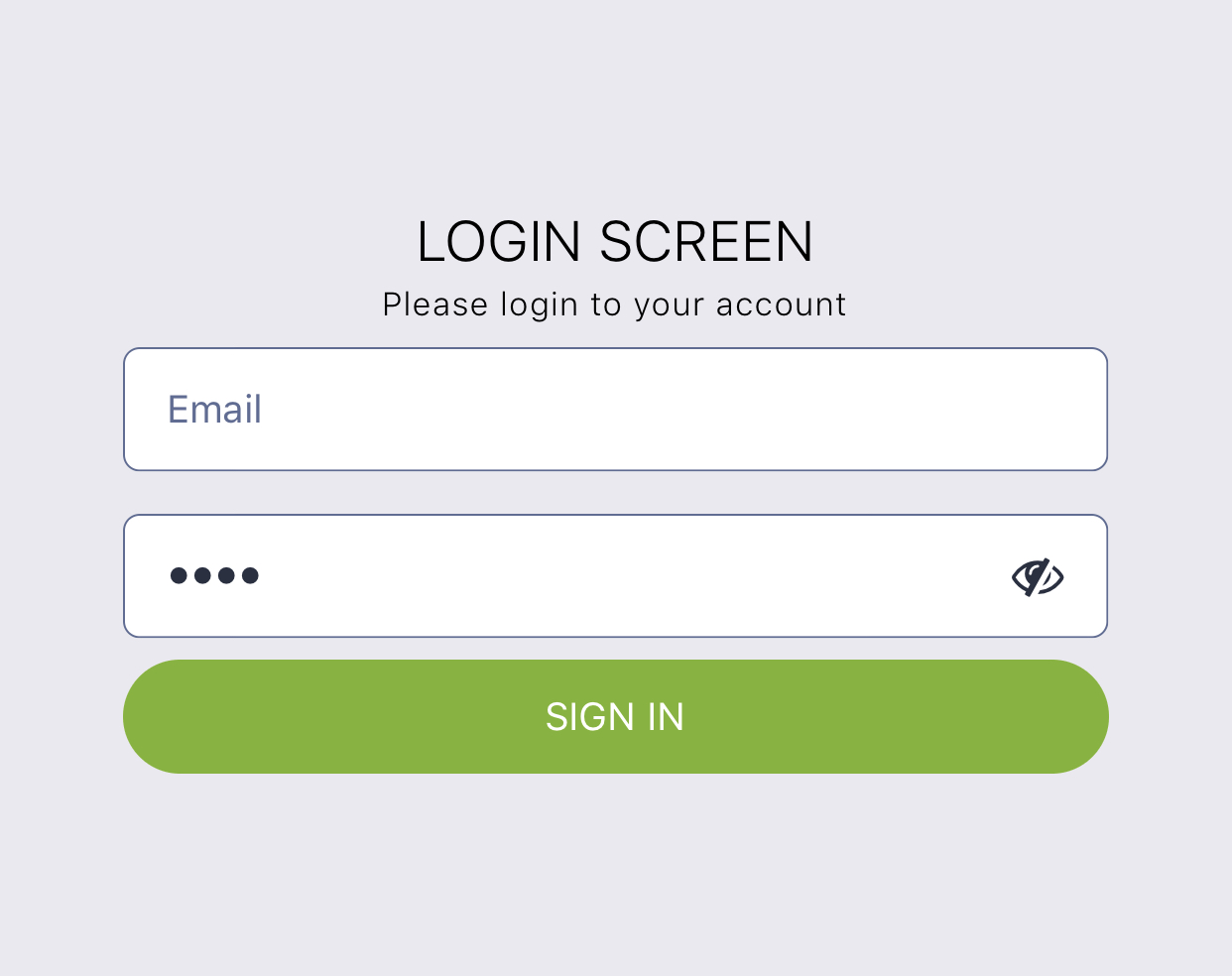
import React from 'react';
import { Block, Button, Input, Text } from 'react-ui-kit-native';

export default class LoginScreen extends React.Component {
  render() {
    return (
      <Block flex middle>
        <Text title light color="#000">
          LOGIN SCREEN
        </Text>
        <Text caption thin color="#000">
          Please login to your account
        </Text>
        <Input placeholder="Email" />
        <Input password placeholder="Password" />
        <Button full primary rounded label="SIGN IN" />
      </Block>
    );
  }
}
Forgot
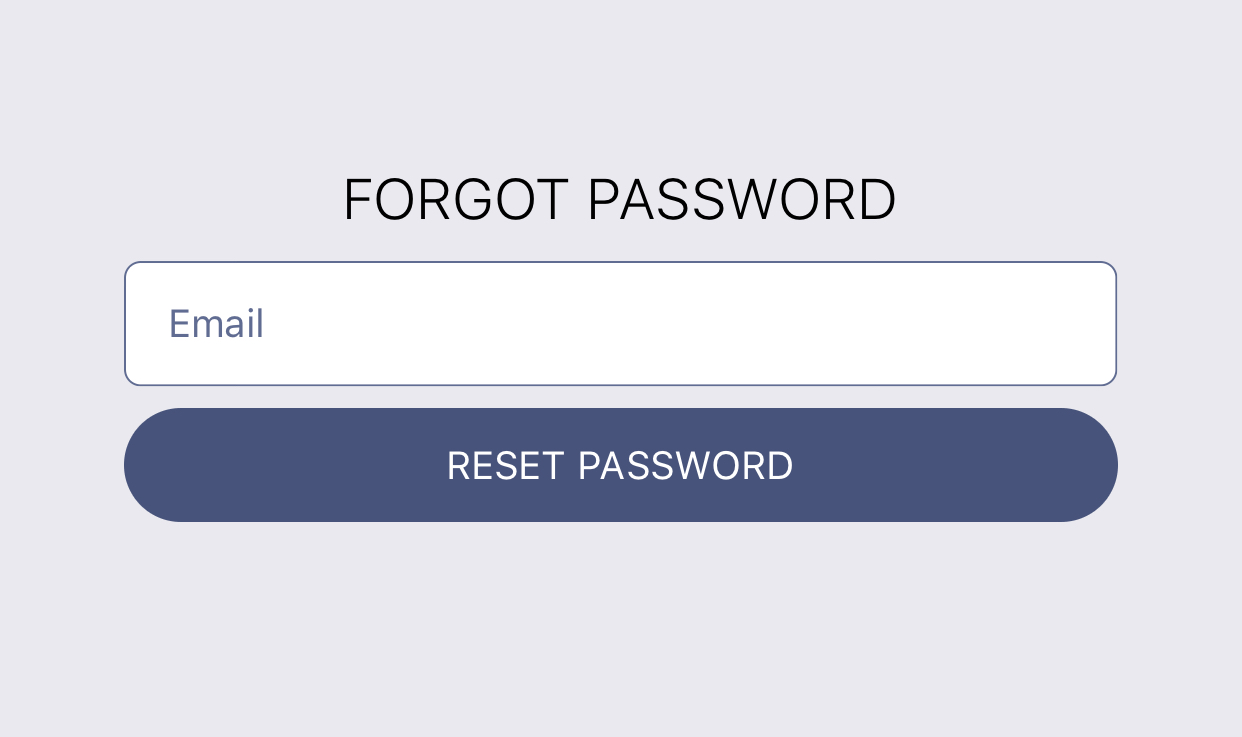
import React from 'react';
import { Block, Button, Input, Text } from 'react-ui-kit-native';

export default class LoginScreen extends React.Component {
  static navigationOptions = {
    header: null,
  };

  render() {
    return (
      <Block flex middle>
        <Text title light color="#000">
          FORGOT PASSWORD
        </Text>
        <Input placeholder="Email" />
        <Button full rounded label="RESET PASSWORD" />
      </Block>
    );
  }
}
Register
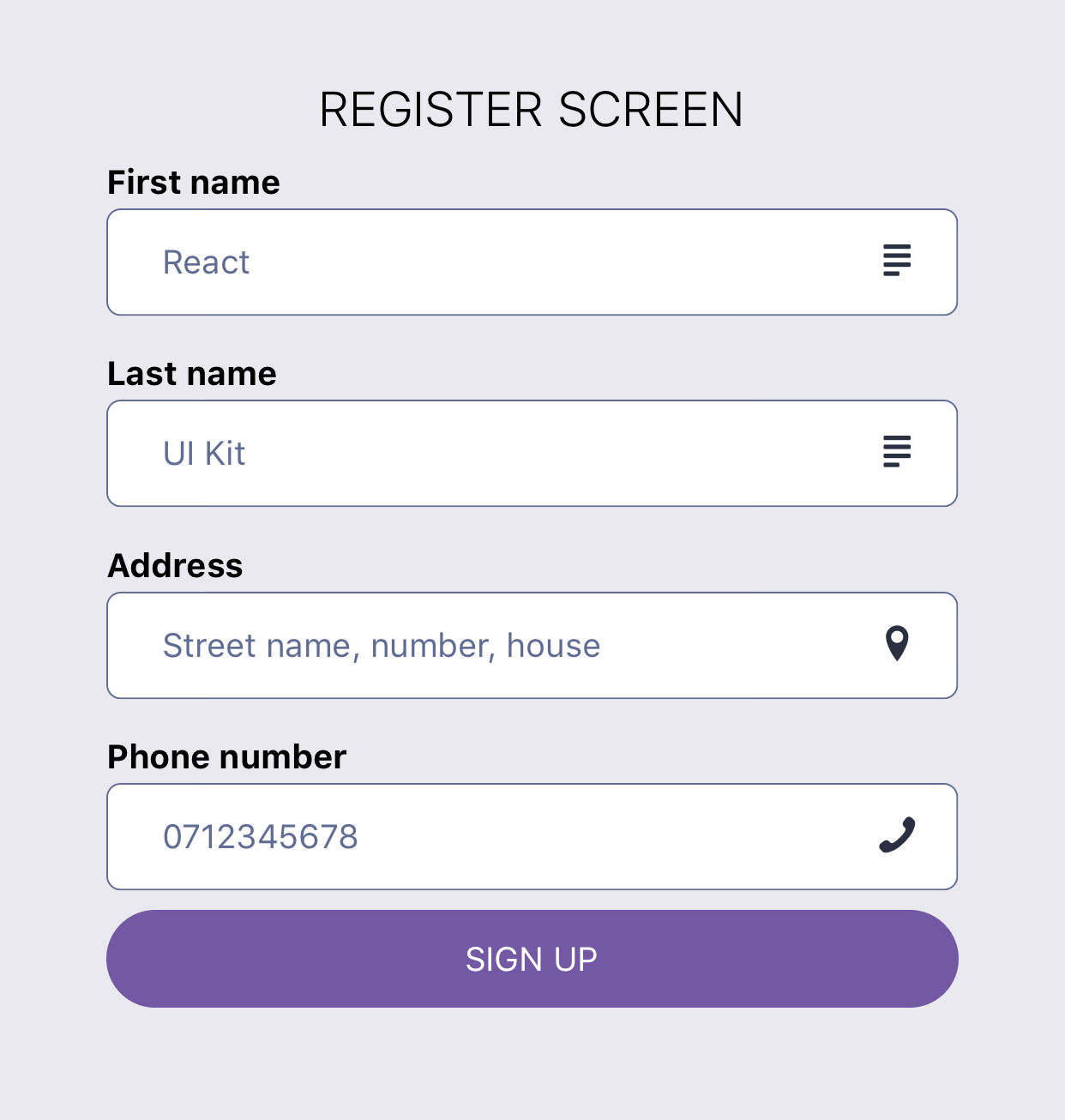
import React from 'react';
import { Block, Button, Input, Text } from 'react-ui-kit-native';

export default class RegisterScreen extends React.Component {
  render() {
    return (
      <Block fluid flex middle>
        <Text title light color="#000">
          REGISTER SCREEN
        </Text>
        <Input label="First name" placeholder="React" right icon="text" family="Entypo" />
        <Input label="Last name" placeholder="UI Kit" right icon="text" family="Entypo" />
        <Input
          right
          icon="location-pin"
          family="Entypo"
          label="Address"
          placeholder="Street name, number, house"
        />
        <Input
          right
          icon="phone"
          family="Entypo"
          type="phone-pad"
          label="Phone number"
          placeholder="0712345678"
        />
        <Button full rounded tertiary label="SIGN UP" />
      </Block>
    );
  }
}
Profile

import React from 'react';
import { StyleSheet, Image } from 'react-native';
import { Block, Text } from 'react-ui-kit-native';

class ProfileScreen extends React.Component {
  render() {
    const { profile } = this.props;

    return (
      <Block fluid flex middle style={styles.profile}>
        <Text h5 light color="#000">{profile.fullname}</Text>
        <Image source={{ uri: profile.avatar }} style={styles.avatar} />
        <Text subtitle light>{`${profile.city}, ${profile.country}`}</Text>
        <Text bold>{profile.email}</Text>
      </Block>
    );
  }
}

ProfileScreen.defaultProps = {
  profile: {
    fullname: `React UI Kit`,
    city: `London`,
    country: `United Kingdom`,
    email: `[email protected]`,
    avatar: `https://react-ui-kit.com/assets/img/react-ui-kit-logo.png`,
  },
};

export default ProfileScreen;

const styles = StyleSheet.create({
  profile: {
    paddingTop: 15,
    backgroundColor: '#fff',
  },
  avatar: {
    width: 200,
    height: 200,
    resizeMode: 'contain',
  },
});
Work in progress
- [x] export components style as
stylesfor easy import - [ ] create
theme HoCwith default theme.js
Contribution
Have an idea for a new component or Screen? Just contact us at [email protected] and will add it to our list.