
react-use-form-lite
v1.27.0
Published
Hook de formularios para React moderno: rápido, ligero, sin dependencias y compatible con TypeScript. Soporta inputs, selects, checkboxes, radios y archivos con validación simple.

Maintainers
 urian-viera
Keywords
Readme
react-use-form-lite



react-use-form-lite es una librería moderna, intuitiva, liviana, escalable y sobre todo flexible para manejar formularios en React sin dependencias adicionales.
Permite una implementación rápida y sin complicaciones, con soporte para múltiples tipos de input (text,hidden, number, email, password, textarea, date, time, datetime-local, month, week, range, color, search, tel, url, select, radio, checkbox (simple y múltiple), y file (simple y múltiple)).
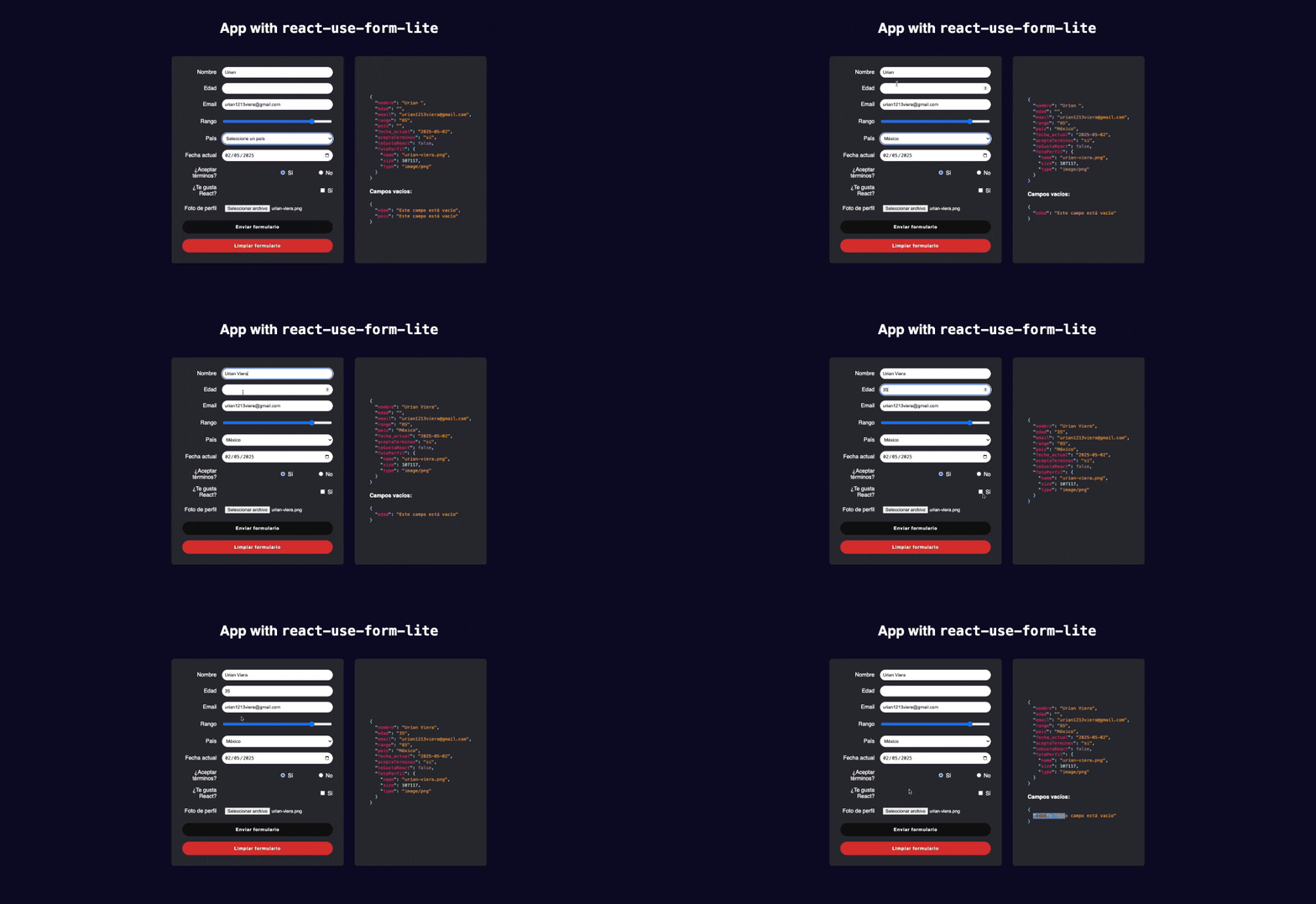
Ejemplo de uso con React Use Form Lite sin TypeScript
Ejemplo de uso con React Use Form Lite con TypeScript
🚀 Instalación
npm install react-use-form-lite
# o
yarn add react-use-form-lite
🚀 ¿Para Qué Fue Creado?
react-use-form-lite ofrece una solución simple, flexible y reutilizable al manejo de formularios en React, eliminando código repetitivo y proporcionando:
- ✅ Manejo centralizado de valores del formulario
- ✅ Inputs conectados automáticamente con
register() - ✅ Gestión especializada de archivos con
registerFile() - ✅ Soporte para todos los tipos de inputs (text, number, email, date, select, radio, checkbox simple/múltiple, file, textarea)
- ✅ Identificación de campos vacíos con
getEmptyFields() - ✅ Reseteo rápido a valores iniciales con
resetForm()
📦 API del Hook useFormLite
El hook useFormLite y sus funciones register y registerFile conectan automáticamente los campos del formulario con el estado interno, simplificando el manejo de sus valores y eventos.
⚙️ Uso básico
// 1. Importar el hook
import { useFormLite } from 'react-use-form-lite';

// Componente principal
export default function MiFormulario() {

  // 2. Definir los valores iniciales del formulario
  const initialFormValues = {
    nombre: '',
    edad: 0,
    email: '',
    pais: 'Colombia', // Puede tener un valor por defecto
    teGustaReact: true,
    lenguajes: ['HTML'], // Puede tener valores preseleccionados
    aceptaTerminos: 'Sí',
    avatar: null,
    documentos: [],
    fechaNacimiento: null, // Puede tener un valor por defecto
  };

  // 3. Definir la función que se ejecutará al enviar el formulario
  const handleFormSubmit = (formData) => {
    console.log('Datos del formulario enviados:', formData);
    console.log('Campos vacíos:', getEmptyFields());

    // Verificar si se ha seleccionado un archivo
    if (formData.avatar) {
      console.log("Avatar seleccionado:", formData.avatar.name);
    }

    // Verificar si se han cargado documentos
    if (formData.documentos.length > 0) {
      console.log("Documentos cargados:", formData.documentos.map(f => f.name));
    }
  };

  // 4. Usar el hook useFormLite
  const {
    values,         // Estado actual del formulario
    handleSubmit,   // Envoltura para la función de envío
    register,       // Para inputs estándar
    registerFile,   // Específicamente para inputs de tipo 'file'
    resetForm,      // Para limpiar el formulario
    getEmptyFields  // Para obtener campos vacíos
  } = useFormLite(initialFormValues, handleFormSubmit);

  return (
    <form onSubmit={handleSubmit}>
    {/* 5. Usar handleSubmit en el form */}
      <h1>Mi Formulario</h1>

      <div>
        <label htmlFor="nombre">Nombre:</label>
        {/* 6. Usar register para inputs de texto, número, email, etc. */}
        <input type="text" id="nombre" {...register('nombre')} placeholder="Escribe el nombre" />
      </div>

      <div>
        <label htmlFor="edad">Edad:</label>
        <input type="number" id="edad" {...register('edad')} />
      </div>

      <div>
        <label htmlFor="email">Email:</label>
        <input type="email" id="email" {...register('email')} placeholder="[email protected]" />
      </div>

      <div>
        <label htmlFor="fechaNacimiento">Fecha de Nacimiento:</label>
        <input type="date" id="fechaNacimiento" {...register('fechaNacimiento')} />
      </div>

      <div>
        <label htmlFor="pais">País:</label>
        <select id="pais" {...register('pais')}>
          <option value="">Seleccione un país</option>
          <option value="Colombia">Colombia</option>
          <option value="México">México</option>
          <option value="Venezuela">Venezuela</option>
        </select>
      </div>

      <div>
        <label>
          <input type="checkbox" {...register('teGustaReact')} /> ¿Te gusta React?
        </label>
      </div>

      <div>
        <p>Lenguajes que conoces:</p>
        <label>
          <input type="checkbox" {...register('lenguajes')} value="HTML" /> HTML
        </label>
        <label>
          <input type="checkbox" {...register('lenguajes')} value="CSS" /> CSS
        </label>
        <label>
          <input type="checkbox" {...register('lenguajes')} value="JavaScript" /> JavaScript
        </label>
      </div>

      <div>
        <p>¿Aceptas los términos?</p>
        <label>
          <input type="radio" {...register('aceptaTerminos')} value="Sí" /> Sí
        </label>
        <label>
          <input type="radio" {...register('aceptaTerminos')} value="No" /> No
        </label>
      </div>

      <div>
        <label htmlFor="avatar">Avatar (un solo archivo):</label>
        {/* 7. Usar registerFile para inputs de tipo 'file' */}
        <input type="file" id="avatar" {...registerFile('avatar')} />
      </div>

      <div>
        <label htmlFor="documentos">Documentos (múltiples archivos):</label>
        <input type="file" id="documentos" multiple {...registerFile('documentos')} />
      </div>

      <div>
        <button type="submit">Enviar</button>
        <button type="button" onClick={resetForm} style={{ marginLeft: '10px' }}>
          Resetear
        </button>
      </div>

        <pre style={{ marginTop: "20px", background: "#f0f0f0", padding: "10px" }}>
          {JSON.stringify({
              informacionFormulario: {
                ...values,
                avatar:
                  values.avatar && typeof values.avatar !== "string"
                    ? {
                        name: values.avatar.name,
                        size: values.avatar.size,
                        type: values.avatar.type,
                      }
                    : values.avatar || null,
                documentos:
                  values.documentos.length > 0
                    ? values.documentos.map((file) => ({
                        name: file.name,
                        size: file.size,
                        type: file.type,
                      }))
                    : [],
              },
              camposVacios: getEmptyFields(),
            },
            null,
            2)}
        </pre>
    </form>
  );
}
✅ Explicación del Ejemplo Anterior:
Importa el hook
useFormLite: Desde la libreríause-form-lite.initialFormValues: Define el estado inicial del formulario, que contiene todos los campos y sus valores iniciales.handleFormSubmit: Esta es la lógica de envío. Recibe el objetovaluescon todos los datos del formulario. Se pasa como segundo argumento auseFormLite.Llamada a
useFormLite:- Pasas
initialFormValuesy la funciónhandleFormSubmit. - Destructuras las propiedades y métodos necesarios:
values: El objeto que contiene el estado actual de todos los campos del formulario.handleSubmit: Una función que debes asignar al eventoonSubmitde la etiqueta<form>. Previene el comportamiento por defecto del navegador y llama a la funciónhandleFormSubmitcon losvalues.register: Función para conectar inputs estándar (texto, número, email, select, radio, checkbox, etc.) al hook. Devuelve props comoname, value/checked, yonChange.registerFile: Función específica para inputs de tipofile. Devuelve props comonameyonChange.resetForm: Función para revertir todos los campos del formulario a susinitialFormValues.getEmptyFields: Función que devuelve un objeto listando los campos que están actualmente vacíos (considerando'',null,undefinedo arrays vacíos).
- Pasas
<form onSubmit={handleSubmit}>: Esencial para quehandleSubmitmaneje el envío.{...register('nombreCampo')}: Para la mayoría de los inputs, esparces las props devueltas porregister. Elnamedel input debe coincidir con la clave eninitialFormValues.Para checkboxes múltiples, usa el mismo
nameenregistery diferentesvalueen cada input.useFormLitemanejará el valor como un array.Para input de tipo
radio, usa el mismonameenregistery diferentesvalueen cada input.
{...registerFile('nombreCampoArchivo')}: Para inputs de tipofile, usaregisterFile.
✅ Tipos de Input Soportados
useFormLite maneja automáticamente diferentes tipos de input basados en el atributo type del input:
Inputs estándar (manejados por
register):text,password,email,number,search,tel,urldate,time,datetime-local,month,weekrange,colortextareaselect(single)checkbox(simple): Su valor envaluesseráboolean.checkbox(múltiple): Si varios checkboxes comparten el mismoname, su valor envaluesserá unstring[]con losvaluede los checkboxes seleccionados.radio: Su valor envaluesserá el value del radio button seleccionado.
Inputs de archivo (manejados por
registerFile):file(simple): Su valor envaluesserá un objetoFileonull.file(múltiple, con el atributomultipleen el input): Su valor envaluesserá unFile[].
🤝 Únete y Contribuye
Si encuentras algún problema o tienes una idea para mejorar el paquete, por favor abre un issue o envía un pull request en GitHub
👨💻 Desarrollador
Urian Viera
🌐 urianviera.com
📺 YouTube
💌 [email protected]
☕ ¡Apóyame en PayPal!
Copyright
© 2025 Urian Viera. Todos los derechos reservados.
🛡 License
Distribuido bajo la licencia MIT

🙌 Agradecimientos
¡Gracias a todos los Devs 👨💻 que han utilizado y contribuido al desarrollo de react-use-form-lite! Su apoyo y retroalimentación son fundamentales para mejorar continuamente este paquete.