
react-vertical-stepers
v2.0.3
Published
A customizable React component library for building vertical steppers with support for nested, collapsible steps and active/completed/waiting states.

Maintainers
 pranaypsurve
Readme
🧭 React Vertical Stepper UI


A customizable React component library for building vertical steppers — supports nested collapsible steps (accordion-style) with active, completed, and waiting statuses.
Ideal for:
- Onboarding flows
- Multi-step forms
- Wizard-style interfaces
- Task progress trackers
🚀 Features
- ✅ Vertical Stepper UI
- 🪜 Nested Steps with collapsible accordion support
- 🎯 Step States: Active, Completed, Waiting
- 🎨 Easily customizable styles
- 💡 Lightweight and framework-friendly
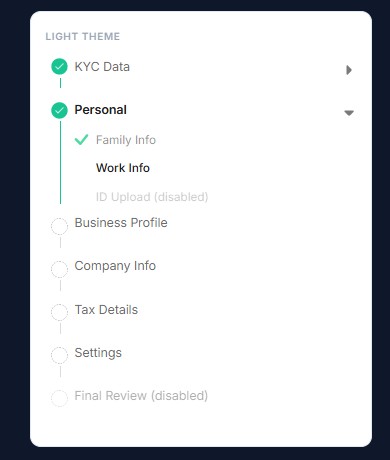
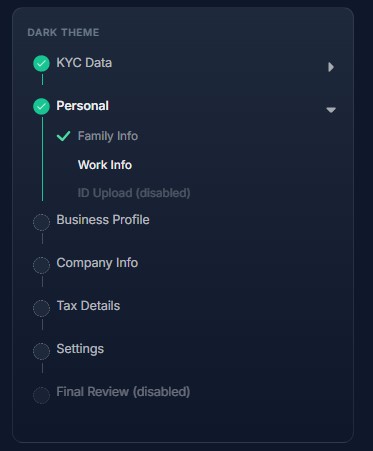
📸 Demo Screenshots
Light theme
Dark theme
📦 Installation
npm install react-vertical-stepers
# or
yarn add react-vertical-stepers
🛠 Peer Dependencies
This library requires React 18 or 19:
npm install react react-dom{
"react": "^18.0.0 || ^19.0.0",
"react-dom": "^18.0.0 || ^19.0.0"
}Import the library styles once in your app entry file:
import "react-vertical-stepers/style.css";🔧 State Structure
{
    kyc_details: {
      status: "finish",
      disable: false,
      contact_info: { status: "finish", disable: false },
      corporate_details: { status: "finish", disable: false },
      address_details: { status: "finish", disable: false },
    },
    personal_details: {
      status: "finish",
      disable: false,
      family_info: { status: "finish", disable: false },
      work_details: { status: "finish", disable: false },
    },
    settings_info: { status: "wait", disable: false },
  }
🔧 Usage
Here’s a basic example like above image:
import { useState } from "react";
import Stepper from "react-vertical-stepers";
import "react-vertical-stepers/style.css";

const dummyList = [
  {
    id: 1,
    title: "KYC Data",
    hasInnersteps: false,
    isAccordion: true,
    dataKey: "kyc_details",
    innerSubChilds: [
      {
        id: 1,
        title: "Contact Information",
        dataKey: "contact_info",
      },
      {
        id: 2,
        title: "Bank Details",
        dataKey: "corporate_details",
      },
      {
        id: 3,
        title: "Address",
        dataKey: "address_details",
      },
    ],
  },
  {
    id: 4,
    title: "Personal Detail",
    hasInnersteps: false,
    isAccordion: true,
    dataKey: "personal_details",
    innerSubChilds: [
      {
        id: 4,
        title: "Family Info",
        dataKey: "family_info",
      },
      {
        id: 5,
        title: "Work Info",
        dataKey: "work_details",
      },
    ],
  },
  {
    id: 6,
    hasInnersteps: false,
    isAccordion: false,
    title: "Settings",
    dataKey: "settings_info",
  },
];
function App() {
  const [reduxState, setReduxState] = useState({
    kyc_details: {
      status: "finish",
      disable: false,
      contact_info: { status: "finish", disable: false },
      corporate_details: { status: "finish", disable: false },
      address_details: { status: "finish", disable: false },
    },
    personal_details: {
      status: "finish",
      disable: false,
      family_info: { status: "finish", disable: false },
      work_details: { status: "finish", disable: false },
    },
    settings_info: { status: "wait", disable: false },
  });
  const [currentStage, setCurrentStage] = useState(0);
  const [stepAccordionActiveId, setStepAccordionActiveId] = useState(null);

  const getStepContent = () => {
    switch (currentStage) {
      case 1:
        return "Contact Info";
      case 2:
        return "Corporate Details";
      case 3:
        return "Address Details";
      case 4:
        return "Family Info";
      case 5:
        return "Work Details";
      case 6:
        return "Settings Info";
      default:
        return "No Content";
    }
  };

  return (
    <section className="flex gap-4">
      <aside>
        <div style={{ width: "300px" }}>
          <Stepper
            theme="light"
            steps={dummyList}
            activeStep={currentStage}
            stepperState={reduxState}
            onStepClick={(id) => {
              setCurrentStage(id);
            }}
            stepAccordionActiveId={stepAccordionActiveId}
            updateAccordionActiveId={(id) => {
              setStepAccordionActiveId(id);
            }}
          />
        </div>
      </aside>
      <div className="flex-1 text-center pt-4">
        <h2 className="mb-4">Render Step Content</h2>
        {getStepContent()}
      </div>
    </section>
  );
}

export default App;
🧩 Props
| Prop Name | Type | Description |
| ------------------------- | ---------------------------------------- | ------------------------------------------------ |
| rootClassName | string (optional) | Custom class for root container styling. |
| theme | "auto" \| "light" \| "dark" (optional) | Color theme. Default "auto" follows system preference. |
| steps | StepItem[] | Step definitions, including nested steps. |
| activeStep | number \| string | Currently selected step key. |
| stepAccordionActiveId | number \| string \| null (optional) | ID of the currently open accordion section. |
| onStepClick | (id: number \| string) => void | Called when a step is clicked. |
| stepperState | StepperState | Local or global state representing step statuses. |
| updateAccordionActiveId | (id: number \| string \| null) => void | Updates active accordion section. Optional. |
Exported types: StepItem, StepperState, StepperProps, StepperTheme, StepStatus, InnerSubStep.
🎨 Typography & theming
The stepper ships with built-in light and dark themes. Use the theme prop:
<Stepper theme="light" {...props} />
<Stepper theme="dark" {...props} />
<Stepper theme="auto" {...props} /> {/* default — follows prefers-color-scheme */}
Override individual colors with CSS variables on the root (via rootClassName or a wrapper).
rvsprefix — short for React Vertical Stepper. All theme variables use--rvs-*to avoid clashing with your app’s own CSS variables.
Typography
| CSS variable | Default | Description |
| --- | --- | --- |
| --rvs-font-family | inherit | Font for the entire stepper |
| --rvs-font-size | 1rem | Base font size |
| --rvs-line-height | 1.5 | Base line height |
| --rvs-title-font-size | 1rem | Step title size |
| --rvs-inner-font-size | 0.8125rem | Accordion inner step labels |
| --rvs-inner-line-height | 1.25rem | Inner step line height |
| --rvs-icon-font-size | 1.125rem | Size of the step circle indicator (not SVG icons) |
Colors (set automatically by theme, or override manually)
| CSS variable | Light default | Description |
| --- | --- | --- |
| --rvs-color-text | rgba(0, 0, 0, 0.88) | Active step title |
| --rvs-color-text-muted | rgba(0, 0, 0, 0.58) | Inactive step title |
| --rvs-color-text-subtle | rgba(0, 0, 0, 0.42) | Inner step labels |
| --rvs-color-finish | #18c492 | Completed step accent |
| --rvs-color-icon-fill | #ffffff | Inactive step circle background |
| --rvs-color-hover | rgba(0, 0, 0, 0.04) | Row hover background |
| --rvs-color-focus | rgba(37, 99, 235, 0.55) | Focus ring |
Layout (connector lines & icon spacing)
| CSS variable | Default | Description |
| --- | --- | --- |
| --rvs-icon-box-size | 32px | Step circle layout box |
| --rvs-icon-scale | 0.565 | Visual circle scale |
| --rvs-icon-gap | 10px | Space between circle and title |
| --rvs-tail-inset | 16px | Horizontal connector line position |
| --rvs-tail-top | 28px | Line starts below the circle |
| --rvs-tail-bottom-gap | 8px | Gap before the next step circle |
| --rvs-step-content-min-height | 48px | Minimum row height |
<Stepper rootClassName="my-stepper" {...props} />.my-stepper {
--rvs-font-family: "Poppins", sans-serif;
--rvs-font-size: 15px;
--rvs-title-font-size: 16px;
--rvs-inner-font-size: 13px;
/* Match your sidebar/card background so inactive circles blend in */
--rvs-color-icon-fill: #f8fafc;
}Or set variables inline on a wrapper:
<div style={{ ["--rvs-font-family" as string]: "Georgia, serif" }}>
  <Stepper {...props} />
</div>
You can also override styles by targeting class names like:
.step-item.step-item-active.steps-item-container.steps-item-title- etc.
🖼 Icons
The stepper ships with built-in SVG icons (bundled in the library):
| Icon | Used for | | --- | --- | | Finish check | Completed top-level steps | | Green tick | Completed accordion inner steps | | Collapse arrow | Accordion expand/collapse |
Custom icons are not supported in v2.0.0. There are no props or CSS variables to replace these images yet. This may be added in a future release.
You can still adjust layout/colors via class overrides (e.g. .step-finish-icon, .collapse-arrow, .steps-inner-icon).
📜 License
ISC License © 2025 Pranay Surve
💬 Feedback / Issues
Comming Soon