
react-visual-filter
v1.1.1
Published
react-visual-filter provides visual filter by adding conditions.


Readme
react-visual-filter
A simple component to create user friendly visual filters for general purpose.
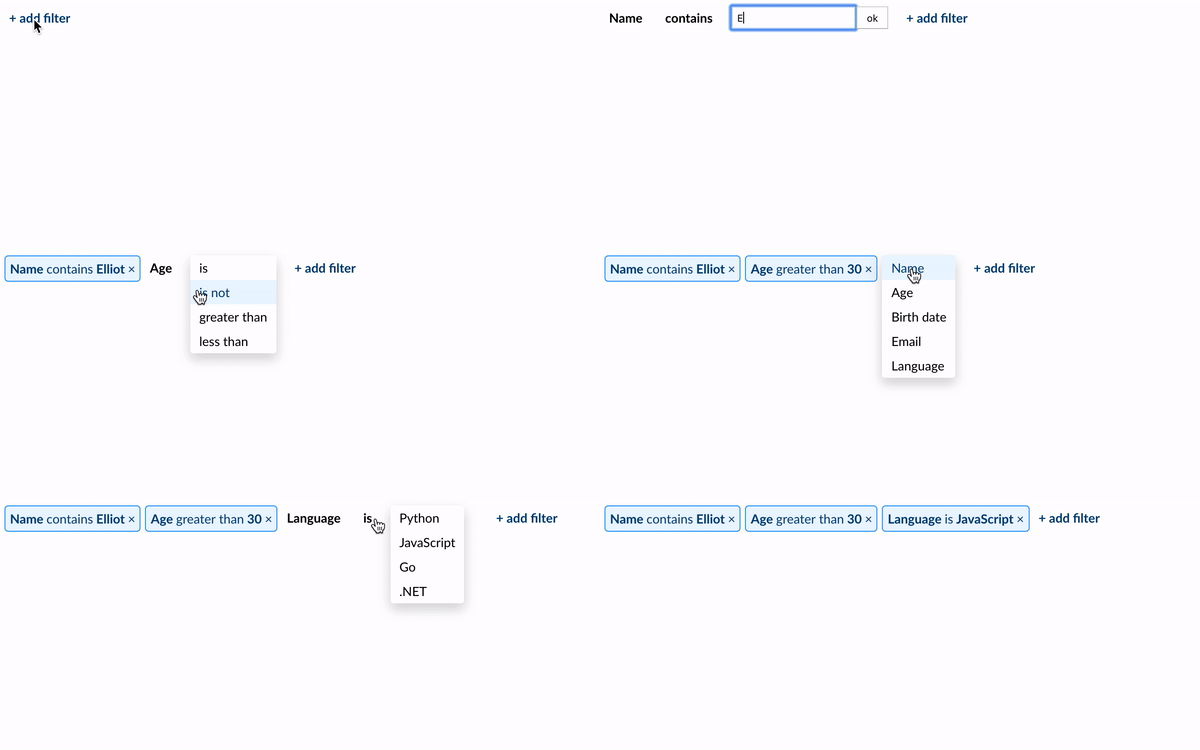
Installation
The package can be installed via NPM:
npm i react-visual-filter
import React from 'react';
import {render} from 'react-dom';
import VisualFilter from 'react-visual-filter';

const FIELDS = [
  {name: 'name', type: 'text', label: 'Name', operators: ['eq', 'ne', 'ct', 'nct', 'sw', 'fw', 'in', 'nn']},
  {name: 'age', type: 'number', label: 'Age', operators: ['eq', 'ne',  'gt', 'lt']},
  {name: 'birth_date', type: 'date', label: 'Birth date', operators: ['eq', 'ne', 'gt', 'lt', 'in', 'nn']},
  {name: 'preference', type: 'list',  label: 'Language', operators: ['eq', 'ne'], list: [
    {name: 'python', label: 'Python'},
    {name: 'javascript', label: 'JavaScript'},
    {name: 'go', label: 'Go'}
  ]}
];

class App extends React.Component {
  handleChange(data) {
    console.log(data);
  }

  render() {
    return(
      <VisualFilter
        fields={FIELDS}
        dateFormat="Y-M-D"
        onChange={this.handleChange} />
    )
  }
}

render(<App />, document.getElementById("root"));
See examples/src as example of usage and configuration.
Usage
The most basic use of the component is the following:
<VisualFilter fields={FIELDS} onChange={this.handleChange} />"FIELDS" is a structure containing all the fields for the filter (described below).
// FIELDS (example)
{name: 'unique_name', type: 'text', operators: ['eq', 'ne']}
You can also start the component with pre-populated conditions using the props "conditions".
<VisualFilter conditions={CONDITIONS} fields={FIELDS} onChange={this.handleChange} />// CONDITIONS (example)
[{id: 'uniqueId1', field: 'name', operator: 'eq', value: 'Elliot'},
{id: 'uniqueId2', field: 'age', operator: 'gt', value: '30'}]onChangeevent handler fires each time a condition is added, removed or updated. The result is an array of objects with the conditions selected by the user.
[{id:  "cond-1",  field:  "name",  operator:  "eq",  value:  "Elliot"},
{id:  "cond-2",  field:  "preference",  operator:  "eq",  value:  "javascript"}
{id:  "cond-3",  field:  "birth_date",  operator:  "lt",  value:  "1984-11-25"}]
Fields
Each field must have the following items:
- name: an unique name for the field.
- type: type of the field (text, number, list or date).
- label: title to be displayed.
- operators: operators available for the current condition.
- list: all options available for the list type. Required only for list type
Operators
Current operators available are:
Operator|Description --- | --- eq | equal ne | not qual ct | contains nct | does not contain in | is empty nn | is not empty sw | starts with fw | finishes with gt | greater than lt | less than
License
Copyright (c) 2018 rfdavid. Licensed under MIT license, see LICENSE for the full license.