
react-waveform-player
v0.1.0
Published
A small React audio player that draws a real waveform — from precomputed peaks, or analyzed from the recording itself.
Downloads
212

Maintainers
 b-script
Readme
react-waveform-player
A small React audio player that draws a real waveform.
Give it precomputed peaks and it draws them without touching the network —
the recording is fetched only when someone presses play. Give it nothing and it
works the waveform out from the recording itself, once the player scrolls into
view.

- No runtime dependencies. React 18 or newer, as a peer.
- Themed entirely with CSS custom properties — works with or without Tailwind.
- Real
<button>and<input type="range">, so keyboard support and screen reader announcements come from the platform rather than reimplemented on divs. - The playback hook is exported separately if you want to build your own UI.
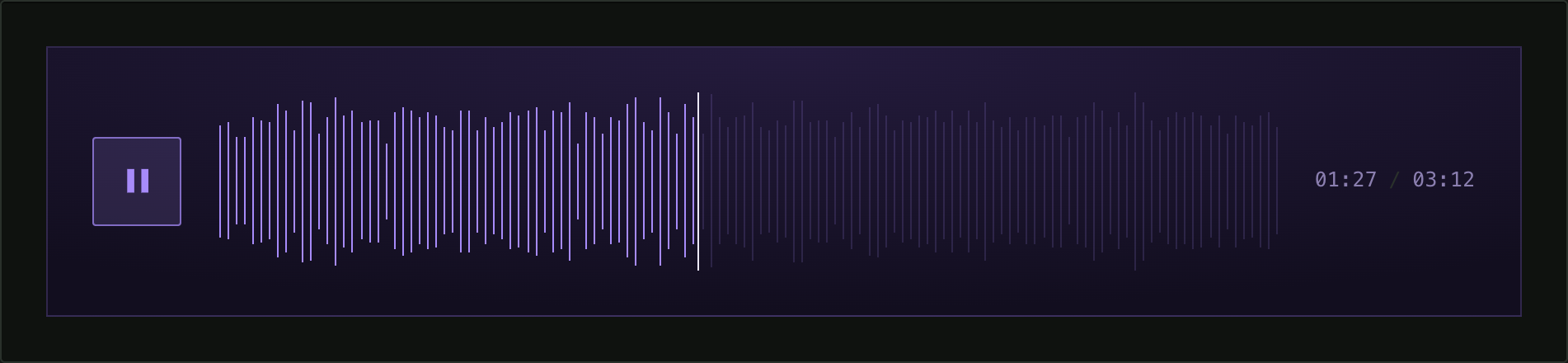
Every screenshot below is the player mid-playback: the part already heard is drawn in the accent colour, the part still to come is dimmed, and the hairline between them is the playhead.
Install
npm install react-waveform-playerUse
import { AudioPlayer } from "react-waveform-player";
import "react-waveform-player/styles.css";

// One value per bar, 0..1 — the amplitude envelope, computed ahead of time.
const peaks = [0.31, 0.48, 0.62, 0.55, 0.4, 0.72 /* … */];

<AudioPlayer src="/interview.mp3" peaks={peaks} durationHint={192} />;
Or, with nothing precomputed at all:
<AudioPlayer src="/interview.mp3" />;That is enough. The player measures itself, analyzes the recording when it comes into view, and draws the result.
Two ways to get a waveform
| | peaks supplied | analyzed in the browser |
|---|---|---|
| network before play | nothing | the whole file, once in view |
| when it appears | immediately | after decoding |
| cross-origin | always works | needs CORS |
| bar count | exactly what you pass | follows the player's width |
Passing peaks is the cheaper path and the reason this package exists. Compute
them once at build time, store them next to your other data, and no visitor
downloads audio they did not ask to hear.
Analysis is the convenient path: nothing to precompute, and every recording gets
its own real waveform. It costs one download and decode per file. That starts
only when the player is within 200px of the viewport, so a page of ten players
fetches just what someone scrolls to — and never runs at all when peaks is
given. Pass analyze={false} to keep a generated placeholder shape instead.
Recordings are decoded once per URL and cached for the page, so several players pointing at the same file cost one download between them.
Peaks
peaks is one number per bar, each 0..1, describing the recording's amplitude
envelope. Any length — the bars spread evenly across the track. Use more bars
for a wider player.
A compact way to store them is one base36 character per bar:
const peaks = [..."mnhhponuskwvjpxqsn"].map((c) => parseInt(c, 36) / 35);To generate them yourself, take the RMS energy of each slice and normalise against the loudest. Prefer RMS over peak amplitude: over a slice spanning a second or more of speech there is nearly always one loud syllable, so every bar pins to full height and the waveform reads as a solid block.
analyzeAudio is exported if you would rather precompute in the browser and
cache the result yourself. It returns 1024 values, which you can pass straight
back in as peaks:
import { analyzeAudio } from "react-waveform-player";

const envelope = await analyzeAudio("/interview.mp3"); // number[] | null
It resolves to null rather than throwing when the file cannot be read —
a cross-origin URL without CORS, a codec the browser will not decode, or no Web
Audio at all.
Props
| prop | type | default | |
|---|---|---|---|
| src | string | — | Audio URL. Nothing is preloaded. |
| peaks | number[] \| null | — | One value per bar, 0..1. Skips analysis. |
| analyze | boolean | true | Work the waveform out from the recording when peaks is absent. |
| barPitch | number | 6 | Target spacing between bars in pixels; the count follows the player's width. Analyzed waveforms only. |
| label | string | — | Shown above the waveform; also moves the time readout up beside it. |
| durationHint | number | — | Length in seconds, so the time shows before anything is fetched. Replaced by the real duration once known. |
| normalize | boolean | false | Stretch the envelope onto the full height. Useful for speech, where values bunch near the top and the waveform reads as a picket fence. |
| labels | { play?, pause?, seek? } | English | Accessible names. |
| className | string | — | Added to the root, for theming. |
Examples
Every one of these is the same component from the package. What separates them sits in the blocks beside each — the package's own stylesheet is never edited.
Theme
One component, one stylesheet. What separates these is a single class in your own CSS — the package's file is never edited.
A1 · Default
No class at all: amber accent, 2 px bars, a 2.75 rem track.
Player.tsx
import { AudioPlayer } from "react-waveform-player";
import "react-waveform-player/styles.css";

// One value per bar, 0..1 — the amplitude envelope, computed ahead of time.
const peaks = [0.31, 0.48, 0.62, 0.55, 0.4, 0.72 /* … */];

export function Player() {
  return <AudioPlayer src="/0.mp3" peaks={peaks} durationHint={192} />;
}
A2 · Green accent
Accent and sizing only — five properties are enough for a different character.

Player.tsx
import { AudioPlayer } from "react-waveform-player";
import "react-waveform-player/styles.css";
import "./Player.css";

// One value per bar, 0..1 — the amplitude envelope, computed ahead of time.
const peaks = [0.31, 0.48, 0.62, 0.55, 0.4, 0.72 /* … */];

export function Player() {
  return (
    <AudioPlayer src="/0.mp3" peaks={peaks} durationHint={192} className="green" />
  );
}
Player.css
.green {
  --waveform-accent: #6ee7b7;
  --waveform-dim: rgb(110 231 183 / 0.18);
  --waveform-track-height: 4rem;
  --waveform-bar-width: 3px;
  --waveform-button-size: 3.5rem;
}
A3 · Paper
Light background, square heavy bars, a serif face. The properties are not only about colour.

Player.tsx
import { AudioPlayer } from "react-waveform-player";
import "react-waveform-player/styles.css";
import "./Player.css";

// One value per bar, 0..1 — the amplitude envelope, computed ahead of time.
const peaks = [0.31, 0.48, 0.62, 0.55, 0.4, 0.72 /* … */];

export function Player() {
  return (
    <AudioPlayer src="/0.mp3" peaks={peaks} durationHint={192} className="paper" />
  );
}
Player.css
.paper {
  --waveform-accent: #b4402f;
  --waveform-dim: rgb(24 20 16 / 0.22);
  --waveform-playhead: #181410;
  --waveform-muted: #6f6558;
  --waveform-rule: #d6cdbd;

  --waveform-bar-width: 6px;
  --waveform-bar-radius: 0;
  --waveform-track-height: 3.25rem;
  --waveform-gap: 1.5rem;

  --waveform-button-size: 2.5rem;
  --waveform-button-border: #b4402f;
  --waveform-button-bg: transparent;

  --waveform-font: Georgia, "Times New Roman", serif;

  padding: 1.25rem 1.5rem;
  background: #f4efe4;
  border: 1px solid var(--waveform-rule);
}
A4 · Compact
A low track and thin bars — a row in a list of recordings, not a player taking half the screen.

Player.tsx
import { AudioPlayer } from "react-waveform-player";
import "react-waveform-player/styles.css";
import "./Player.css";

// One value per bar, 0..1 — the amplitude envelope, computed ahead of time.
const peaks = [0.31, 0.48, 0.62, 0.55, 0.4, 0.72 /* … */];

export function Player() {
  return (
    <AudioPlayer src="/0.mp3" peaks={peaks} durationHint={192} className="compact" />
  );
}
Player.css
.compact {
  --waveform-accent: #8ab4f8;
  --waveform-dim: rgb(138 180 248 / 0.16);
  --waveform-playhead: #cbd5e1;
  --waveform-track-height: 1.5rem;
  --waveform-bar-width: 1px;
  --waveform-button-size: 1.75rem;
  --waveform-gap: 0.625rem;
}
A5 · Monochrome
No accent hue at all. Contrast between light and dark does the whole job.

Player.tsx
import { AudioPlayer } from "react-waveform-player";
import "react-waveform-player/styles.css";
import "./Player.css";

// One value per bar, 0..1 — the amplitude envelope, computed ahead of time.
const peaks = [0.31, 0.48, 0.62, 0.55, 0.4, 0.72 /* … */];

export function Player() {
  return (
    <AudioPlayer src="/0.mp3" peaks={peaks} durationHint={192} className="mono" />
  );
}
Player.css
.mono {
  --waveform-accent: #f5f5f5;
  --waveform-dim: rgb(245 245 245 / 0.12);
  --waveform-playhead: #f5f5f5;
  --waveform-muted: #6b7280;
  --waveform-button-border: rgb(245 245 245 / 0.25);
  --waveform-button-bg: transparent;
  --waveform-bar-width: 2px;
  --waveform-bar-radius: 0;
  --waveform-track-height: 3.5rem;
}
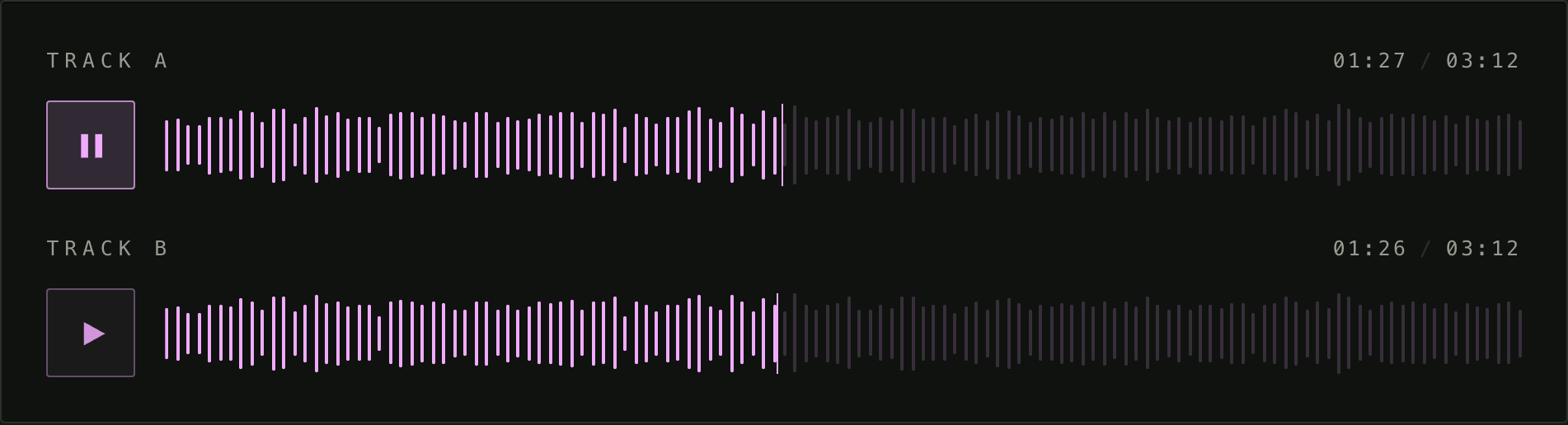
A6 · Brand token
One property on the parent dresses every player inside it. Add a player, it is already themed.
Playlist.tsx
import { AudioPlayer } from "react-waveform-player";
import "react-waveform-player/styles.css";
import "./Playlist.css";

// One value per bar, 0..1 — the amplitude envelope, computed ahead of time.
const peaks = [0.31, 0.48, 0.62, 0.55, 0.4, 0.72 /* … */];

export function Playlist() {
  return (
    <div className="brand">
      <AudioPlayer src="/0.mp3" peaks={peaks} durationHint={192} label="Track A" />
      <AudioPlayer src="/0.mp3" peaks={peaks} durationHint={192} label="Track B" />
    </div>
  );
}
Playlist.css
.brand {
  --brand-accent: #f0abfc;
  display: grid;
  gap: 1.5rem;
}

/* The package declares its defaults inside :where(), so they carry no
   specificity — a plain descendant selector is enough to win. */
.brand .waveform-player {
  --waveform-accent: var(--brand-accent);
  --waveform-dim: color-mix(in oklab, var(--brand-accent) 18%, transparent);
  --waveform-playhead: var(--brand-accent);
}
A7 · Blueprint
Cyan on navy with a drafting grid painted behind the bars. The class styles the wrapper as well as the player, so the panel and its contents arrive together.

Player.tsx
import { AudioPlayer } from "react-waveform-player";
import "react-waveform-player/styles.css";
import "./Player.css";

// One value per bar, 0..1 — the amplitude envelope, computed ahead of time.
const peaks = [0.31, 0.48, 0.62, 0.55, 0.4, 0.72 /* … */];

export function Player() {
  return (
    <AudioPlayer src="/0.mp3" peaks={peaks} durationHint={192} className="blueprint" />
  );
}
Player.css
.blueprint {
  --waveform-accent: #7dd3fc;
  --waveform-dim: rgb(125 211 252 / 0.2);
  --waveform-playhead: #f0f9ff;
  --waveform-muted: #7ea6c4;

  --waveform-bar-width: 2px;
  --waveform-bar-radius: 0;
  --waveform-track-height: 3rem;

  --waveform-button-size: 2.75rem;
  --waveform-button-border: #7dd3fc;
  --waveform-button-bg: rgb(125 211 252 / 0.08);

  padding: 1.5rem;
  background-color: #0b2138;
  background-image:
    linear-gradient(rgb(125 211 252 / 0.1) 1px, transparent 1px),
    linear-gradient(90deg, rgb(125 211 252 / 0.1) 1px, transparent 1px);
  background-size: 1.5rem 1.5rem;
  border: 1px solid rgb(125 211 252 / 0.35);
}
A8 · Terminal
Phosphor green, hairline bars and scan lines. The glow is a filter on the track rather than a property, so the dim and the lit layer both carry it.

Player.tsx
import { AudioPlayer } from "react-waveform-player";
import "react-waveform-player/styles.css";
import "./Player.css";

// One value per bar, 0..1 — the amplitude envelope, computed ahead of time.
const peaks = [0.31, 0.48, 0.62, 0.55, 0.4, 0.72 /* … */];

export function Player() {
  return (
    <AudioPlayer src="/0.mp3" peaks={peaks} durationHint={192} className="terminal" />
  );
}
Player.css
.terminal {
  --waveform-accent: #a3e635;
  --waveform-dim: rgb(163 230 53 / 0.2);
  --waveform-playhead: #ecfccb;
  --waveform-muted: #7f9c46;

  --waveform-bar-width: 1px;
  --waveform-bar-radius: 0;
  --waveform-track-height: 3rem;
  --waveform-gap: 0.875rem;

  --waveform-button-size: 2.25rem;
  --waveform-button-border: rgb(163 230 53 / 0.5);
  --waveform-button-bg: transparent;

  padding: 1.25rem;
  background:
    repeating-linear-gradient(rgb(163 230 53 / 0.05) 0 1px, transparent 1px 3px),
    #071005;
  border: 1px solid rgb(163 230 53 / 0.25);
}

/* The glow belongs on the track, so both layers of bars pick it up. */
.terminal .waveform-track {
  filter: drop-shadow(0 0 3px rgb(163 230 53 / 0.55));
}
A9 · Ink
Black on white, hairline bars, an old-style serif for the figures. Nothing here assumes a dark page.

Player.tsx
import { AudioPlayer } from "react-waveform-player";
import "react-waveform-player/styles.css";
import "./Player.css";

// One value per bar, 0..1 — the amplitude envelope, computed ahead of time.
const peaks = [0.31, 0.48, 0.62, 0.55, 0.4, 0.72 /* … */];

export function Player() {
  return (
    <AudioPlayer src="/0.mp3" peaks={peaks} durationHint={192} className="ink" />
  );
}
Player.css
.ink {
  --waveform-accent: #111111;
  --waveform-dim: rgb(17 17 17 / 0.2);
  --waveform-playhead: #111111;
  --waveform-muted: #6b6b6b;
  --waveform-rule: #d4d4d4;

  --waveform-bar-width: 1px;
  --waveform-bar-radius: 0;
  --waveform-track-height: 2.25rem;
  --waveform-gap: 1.25rem;

  --waveform-button-size: 2.25rem;
  --waveform-button-border: #111111;
  --waveform-button-bg: transparent;

  --waveform-font: "Iowan Old Style", Georgia, serif;

  padding: 1.5rem;
  background: #ffffff;
}
A10 · Ultraviolet
A six-rem track of hairlines over a violet gradient. Height and bar width are two properties, but together they change what the waveform is for — reading a shape, not pressing play.
Player.tsx
import { AudioPlayer } from "react-waveform-player";
import "react-waveform-player/styles.css";
import "./Player.css";

// One value per bar, 0..1 — the amplitude envelope, computed ahead of time.
const peaks = [0.31, 0.48, 0.62, 0.55, 0.4, 0.72 /* … */];

export function Player() {
  return (
    <AudioPlayer src="/0.mp3" peaks={peaks} durationHint={192} className="ultraviolet" />
  );
}
Player.css
.ultraviolet {
  --waveform-accent: #a78bfa;
  --waveform-dim: rgb(167 139 250 / 0.16);
  --waveform-playhead: #ede9fe;
  --waveform-muted: #8b7fb0;

  --waveform-bar-width: 1px;
  --waveform-bar-radius: 0;
  --waveform-track-height: 6rem;
  --waveform-gap: 1.25rem;

  --waveform-button-size: 3rem;
  --waveform-button-border: rgb(167 139 250 / 0.45);
  --waveform-button-bg: rgb(167 139 250 / 0.08);

  padding: 1.5rem;
  background: radial-gradient(120% 140% at 50% 0%, #241b3d 0%, #120e1f 70%);
  border: 1px solid rgb(167 139 250 / 0.2);
}
A11 · Tape
Eight-pixel bars need fewer of them, so this one is fed every third peak. Wide spacing, sepia, and a ribbed ground underneath.

Player.tsx
import { AudioPlayer } from "react-waveform-player";
import "react-waveform-player/styles.css";
import "./Player.css";

// One value per bar, 0..1 — the amplitude envelope, computed ahead of time.
const peaks = [0.31, 0.48, 0.62, 0.55, 0.4, 0.72 /* … */];

// Heavy bars want a sparse envelope, or they run out of room.
const sparse = peaks.filter((_, i) => i % 3 === 0);

export function Player() {
  return (
    <AudioPlayer src="/0.mp3" peaks={sparse} durationHint={192} className="tape" />
  );
}
Player.css
.tape {
  --waveform-accent: #d9a441;
  --waveform-dim: rgb(217 164 65 / 0.22);
  --waveform-playhead: #f5e6c8;
  --waveform-muted: #a08a63;

  --waveform-bar-width: 8px;
  --waveform-bar-radius: 1px;
  --waveform-track-height: 4rem;
  --waveform-gap: 1.75rem;

  --waveform-button-size: 3.25rem;
  --waveform-button-border: rgb(217 164 65 / 0.55);
  --waveform-button-bg: rgb(217 164 65 / 0.1);

  --waveform-font: Georgia, "Times New Roman", serif;

  padding: 1.5rem 1.75rem;
  background: repeating-linear-gradient(90deg, #241a10 0 2px, #2a1f13 2px 4px);
  border: 1px solid #3a2b19;
  border-radius: 4px;
}
A12 · Inline
Shrunk far enough to sit inside a running sentence. The root is a div, so inline-block and a width are all it takes to set one in text — with the clock hidden, since at this size it would leave the track no room.

Article.tsx
import { AudioPlayer } from "react-waveform-player";
import "react-waveform-player/styles.css";
import "./Article.css";

// One value per bar, 0..1 — the amplitude envelope, computed ahead of time.
const peaks = [0.31, 0.48, 0.62, 0.55, 0.4, 0.72 /* … */];

export function Article() {
  return (
    <p>
      The recording opens with two minutes of room tone —{" "}
      <AudioPlayer
        src="/0.mp3"
        peaks={peaks}
        durationHint={192}
        className="inline-player"
      />{" "}
      — before the first question is asked.
    </p>
  );
}
Article.css
.inline-player {
  --waveform-track-height: 1rem;
  --waveform-bar-width: 1px;
  --waveform-button-size: 1.5rem;
  --waveform-gap: 0.5rem;

  /* inline-block, not inline-flex: the package's own row is the flex
     container, and it needs a block of width to spread across. */
  display: inline-block;
  width: 12rem;
  vertical-align: middle;
}

/* At this size the clock would leave the track no room at all. */
.inline-player .waveform-time {
  display: none;
}
Props
What each prop changes. The ones worth weighing come in pairs, where exactly one thing differs.
B1 · Label and translations
A label moves the time readout up beside it. Every string a screen reader announces is yours to supply.

Player.tsx
import { AudioPlayer } from "react-waveform-player";
import "react-waveform-player/styles.css";

// One value per bar, 0..1 — the amplitude envelope, computed ahead of time.
const peaks = [0.31, 0.48, 0.62, 0.55, 0.4, 0.72 /* … */];

export function Player() {
  return (
    <AudioPlayer
      src="/0.mp3"
      peaks={peaks}
      durationHint={192}
      label="Wstęp"
      labels={{ play: "Odtwórz", pause: "Pauza", seek: "Przewiń nagranie" }}
    />
  );
}
B2 · Normalize
Stretches the envelope onto the full bar height. Stored peaks are scaled against the loudest moment, which for continuous speech leaves every bar tall. Leave it off when several players should stay comparable.

Comparison.tsx
import { AudioPlayer } from "react-waveform-player";
import "react-waveform-player/styles.css";
import "./Comparison.css";

// One value per bar, 0..1 — the amplitude envelope, computed ahead of time.
const peaks = [0.31, 0.48, 0.62, 0.55, 0.4, 0.72 /* … */];

export function Comparison() {
  return (
    <div className="pair">
      <AudioPlayer src="/0.mp3" peaks={peaks} durationHint={192} label="off" />
      <AudioPlayer src="/0.mp3" peaks={peaks} durationHint={192} label="on" normalize />
    </div>
  );
}
Comparison.css
.pair {
  display: grid;
  gap: 2rem;
  grid-template-columns: repeat(auto-fit, minmax(17rem, 1fr));
}
B3 · Bar density
Target spacing between bars, in pixels. The bar count follows the player's own width, so the waveform stays equally dense at any size. Applies to an analyzed waveform only — supplied peaks are drawn exactly as given.

Comparison.tsx
import { AudioPlayer } from "react-waveform-player";
import "react-waveform-player/styles.css";
import "./Comparison.css";

export function Comparison() {
  return (
    <div className="pair">
      <AudioPlayer src="/0.mp3" durationHint={192} barPitch={3} label="pitch 3" />
      <AudioPlayer src="/0.mp3" durationHint={192} barPitch={12} label="pitch 12" />
    </div>
  );
}
Comparison.css
.pair {
  display: grid;
  gap: 2rem;
  grid-template-columns: repeat(auto-fit, minmax(17rem, 1fr));
}
B4 · Analyzed from the file
With no peaks given, the player downloads and decodes the recording once it nears the viewport. durationHint keeps the readout from sitting at --:-- until then.

Player.tsx
import { AudioPlayer } from "react-waveform-player";
import "react-waveform-player/styles.css";

// No peaks: analyze defaults to true, so the waveform is worked out
// from the recording itself the first time the player nears the viewport.
export function Player() {
  return <AudioPlayer src="/0.mp3" durationHint={192} />;
}
B5 · No analysis
The stand-in shape instead of a decode. Nothing goes over the network until someone presses play.

Player.tsx
import { AudioPlayer } from "react-waveform-player";
import "react-waveform-player/styles.css";

export function Player() {
  return <AudioPlayer src="/0.mp3" durationHint={192} analyze={false} />;
}
Building blocks
The component is one possible arrangement. The hook, the bars and the stand-in shape are each exported on their own.
C1 · Headless
The hook alone, your own button, none of the package CSS. Playback state and the clock come ready.

Headless.tsx
import { useAudioPlayback, clock } from "react-waveform-player";
import "./Headless.css";

export function Headless() {
  const { audioRef, playing, progress, current, duration, toggle } =
    useAudioPlayback("/0.mp3");

  return (
    <div className="headless">
      {/* data-waveform-audio is what lets one player pause the others. */}
      <audio ref={audioRef} src="/0.mp3" preload="none" data-waveform-audio hidden />
      <button onClick={toggle}>{playing ? "Pause" : "Play"}</button>
      <span>{Math.round(progress * 100)}%</span>
      <span>{clock(current)} / {clock(duration)}</span>
    </div>
  );
}
Headless.css
.headless {
  display: flex;
  flex-wrap: wrap;
  align-items: center;
  gap: 1rem;
}

.headless button {
  padding: 0.5rem 1rem;
  border: 1px solid #3a433b;
  border-radius: 2px;
  background: transparent;
  color: #e8e7de;
  font: 0.75rem ui-monospace, SFMono-Regular, Menlo, monospace;
  letter-spacing: 0.12em;
  text-transform: uppercase;
  cursor: pointer;
}
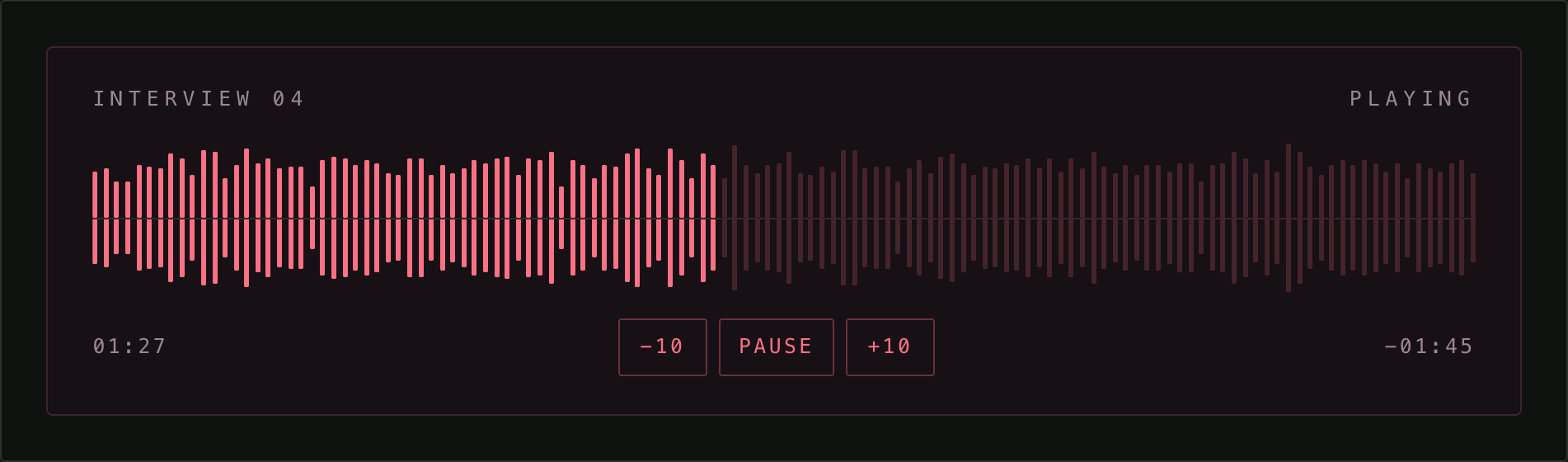
C2 · Mirrored deck
A deck rather than a row: the envelope mirrored about a centre line, the transport underneath, elapsed and remaining at the edges. The dim and lit layers are the same two exports the component uses — only the arrangement is yours. The range input still lies over the waveform, so arrows, Home and End keep working.
MirrorPlayer.tsx
import { WaveformBars, clock, useAudioPlayback } from "react-waveform-player";
import "react-waveform-player/styles.css";
import "./MirrorPlayer.css";

// One value per bar, 0..1 — the amplitude envelope, computed ahead of time.
const peaks = [0.31, 0.48, 0.62, 0.55, 0.4, 0.72 /* … */];

/** One half of the waveform: the dim layer with the lit one clipped over it. */
function MirrorHalf({ progress, flipped }: { progress: number; flipped?: boolean }) {
  return (
    <div className={flipped ? "mirror-half mirror-half--flipped" : "mirror-half"}>
      <WaveformBars heights={peaks} className="waveform-bars--dim" />
      <div
        className="waveform-lit"
        style={{ clipPath: `inset(0 ${(1 - progress) * 100}% 0 0)` }}
      >
        <WaveformBars heights={peaks} />
      </div>
    </div>
  );
}

export function MirrorPlayer() {
  const { audioRef, playing, current, duration, known, progress, seekMax, toggle, seek } =
    useAudioPlayback("/0.mp3");

  const nudge = (by: number) => seek(Math.min(seekMax, Math.max(0, current + by)));

  return (
    // waveform-player carries the package's property defaults — bar width,
    // radius and the rest — so the bars have something to size themselves by.
    <div className="mirror-player waveform-player">
      <audio ref={audioRef} src="/0.mp3" preload="none" data-waveform-audio hidden />

      <p className="mirror-head">
        <span>Interview 04</span>
        <span>{playing ? "Playing" : "Stopped"}</span>
      </p>

      <div className="mirror-track">
        <MirrorHalf progress={progress} />
        <MirrorHalf progress={progress} flipped />
        <input
          className="waveform-scrubber"
          type="range"
          min={0}
          max={seekMax}
          step="any"
          value={progress * seekMax}
          disabled={!known}
          onChange={(e) => seek(Number(e.target.value))}
          aria-label="Seek"
        />
      </div>

      <div className="mirror-foot">
        <span className="mirror-clock">{clock(known ? current : null)}</span>
        <div className="transport">
          <button onClick={() => nudge(-10)} disabled={!known} aria-label="Back ten seconds">
            −10
          </button>
          <button className="transport-main" onClick={toggle}>
            {playing ? "Pause" : "Play"}
          </button>
          <button onClick={() => nudge(10)} disabled={!known} aria-label="Forward ten seconds">
            +10
          </button>
        </div>
        <span className="mirror-clock">
          {known && duration !== null ? `−${clock(duration - current)}` : clock(null)}
        </span>
      </div>
    </div>
  );
}
MirrorPlayer.css
.mirror-player {
  --waveform-accent: #fb7185;
  --waveform-dim: rgb(251 113 133 / 0.2);
  --waveform-bar-width: 3px;
  --waveform-bar-radius: 1px;

  display: grid;
  gap: 0.875rem;
  padding: 1.25rem 1.5rem;
  background: #171014;
  border: 1px solid #3a2530;
  border-radius: 4px;
  color: #9a8890;
}

.mirror-head {
  display: flex;
  justify-content: space-between;
  margin: 0;
  font-size: 0.6875rem;
  text-transform: uppercase;
  letter-spacing: 0.28em;
}

.mirror-track {
  position: relative;
  display: grid;
}

.mirror-half {
  position: relative;
  height: 2.5rem;
}

/* Flipping the second copy is what turns one envelope into a mirrored pair. */
.mirror-half--flipped {
  transform: scaleY(-1);
}

/* The package centres its bars; here they grow from the seam outwards. */
.mirror-half .waveform-bars {
  align-items: flex-end;
}

.mirror-track::after {
  content: "";
  position: absolute;
  inset: 50% 0 auto;
  border-top: 1px solid #3a2530;
  pointer-events: none;
}

.mirror-foot {
  display: flex;
  align-items: center;
  justify-content: space-between;
  gap: 1rem;
}

.mirror-clock {
  font-size: 0.6875rem;
  font-variant-numeric: tabular-nums;
  letter-spacing: 0.14em;
}

.transport {
  display: flex;
  gap: 0.375rem;
}

.transport button {
  min-width: 3rem;
  padding: 0.375rem 0.625rem;
  border: 1px solid rgb(251 113 133 / 0.35);
  border-radius: 2px;
  background: transparent;
  color: #fb7185;
  font: inherit;
  font-size: 0.6875rem;
  letter-spacing: 0.14em;
  text-transform: uppercase;
  cursor: pointer;
  transition: background 150ms ease-out, border-color 150ms ease-out;
}

.transport button:hover:not(:disabled) {
  border-color: #fb7185;
  background: rgb(251 113 133 / 0.14);
}

.transport button:disabled {
  opacity: 0.4;
  cursor: default;
}

.transport-main {
  min-width: 5rem;
  background: rgb(251 113 133 / 0.1);
}
C3 · Shape only
A waveform derived from the source string, with no audio behind it. The same string always draws the same shape, so a list does not flicker as real waveforms arrive.

Placeholder.tsx
import { WaveformBars, fallbackWaveform } from "react-waveform-player";
import "react-waveform-player/styles.css";

export function Placeholder({ src }: { src: string }) {
  return (
    <div className="waveform-player">
      <div className="waveform-track">
        <WaveformBars heights={fallbackWaveform(src, 96)} className="waveform-bars--dim" />
      </div>
    </div>
  );
}
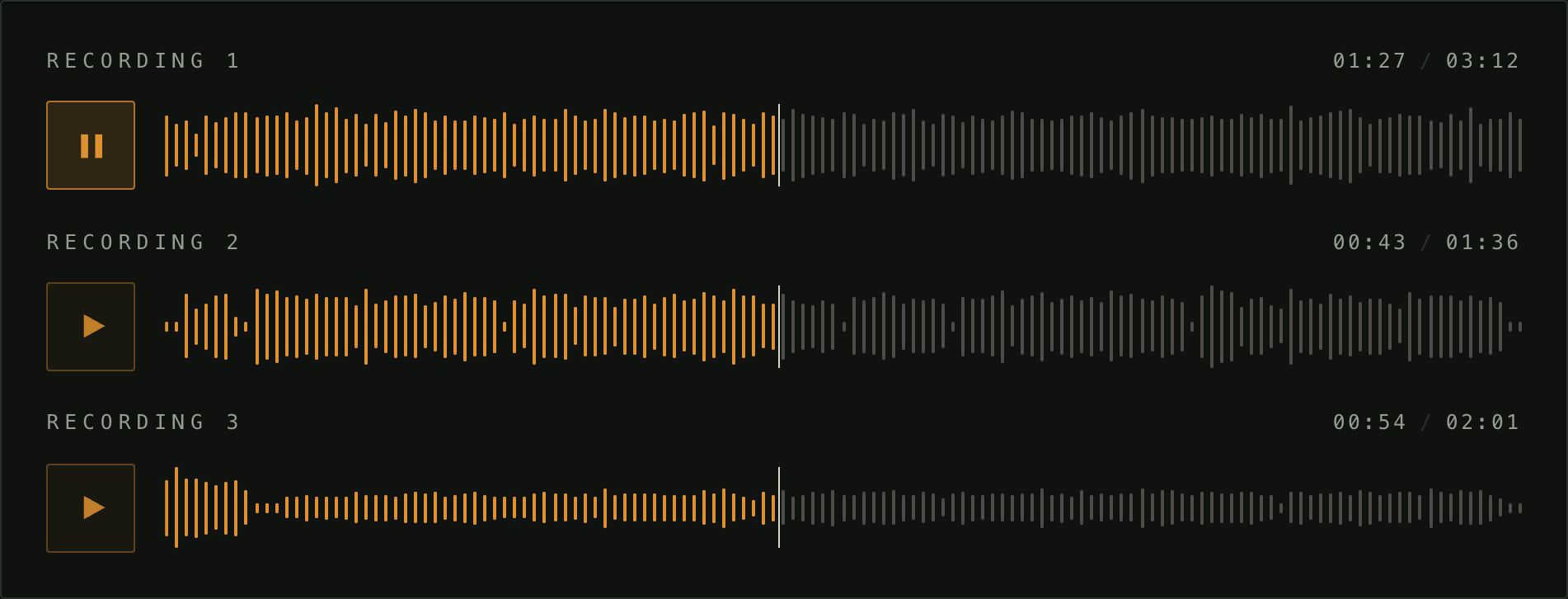
C4 · Several recordings
Starting one stops the rest. It reaches only players from this package, so audio the page owns is never touched.
Archive.tsx
import { AudioPlayer } from "react-waveform-player";
import "react-waveform-player/styles.css";
import "./Archive.css";

const tracks = [
  { src: "/1.ogg", label: "Recording 1" },
  { src: "/2.ogg", label: "Recording 2" },
  { src: "/3.ogg", label: "Recording 3" },
];

export function Archive() {
  return (
    <div className="stack">
      {tracks.map((t) => (
        <AudioPlayer key={t.src} src={t.src} label={t.label} />
      ))}
    </div>
  );
}
Archive.css
.stack {
  display: grid;
  gap: 1.25rem;
}
Theming reference
Every value is a custom property on .waveform-player, declared inside
:where() so anything you write wins, whatever order your stylesheets load in.
| variable | default |
|---|---|
| --waveform-accent | #e0912f |
| --waveform-dim | rgb(217 214 204 / 0.3) |
| --waveform-playhead | #d9d6cc |
| --waveform-muted | #959c91 |
| --waveform-rule | #2a312b |
| --waveform-button-border | 35% of the accent |
| --waveform-button-bg | 5% of the accent |
| --waveform-button-size | 3rem |
| --waveform-track-height | 2.75rem |
| --waveform-bar-width | 2px |
| --waveform-bar-radius | 9999px |
| --waveform-gap | 1rem |
| --waveform-font | system monospace |
Structure
For anything the variables do not cover, these are the class names. They are part of the public API and will not change without a version bump.
.waveform-player                  root; carries the custom properties
├── .waveform-label               only when `label` is given
│   └── .waveform-time--inline    elapsed / total
└── .waveform-row
    ├── .waveform-button          play/pause; .waveform-button--playing while playing
    ├── .waveform-track
    │   ├── .waveform-bars--dim   the unplayed bars
    │   │   └── .waveform-bar
    │   ├── .waveform-lit         the played copy, clipped to the playhead
    │   │   └── .waveform-bar
    │   ├── .waveform-playhead    hairline at the current position
    │   └── .waveform-scrubber    the transparent range input
    └── .waveform-time            elapsed / total, when there is no `label`
        └── .waveform-time-sep
The playback hook
useAudioPlayback is the whole playback layer without any markup.
| returns | |
|---|---|
| audioRef | put this on your own <audio> |
| playing | is it playing |
| current | seconds elapsed |
| duration | seconds total, or null before metadata loads |
| known | false until metadata loads — nothing is preloaded, so that is not until first play |
| progress | 0..1, or 0 while unknown |
| seekMax | what to give a range input's max before the duration is known |
| toggle | play or pause |
| seek | jump to a time in seconds |
Only one recording plays at a time. That is scoped to elements carrying
data-waveform-audio, so audio your page owns is never touched — which is why
the headless examples above set it. Pass
useAudioPlayback(src, { exclusive: false }) to opt out.
Everything exported
| export | |
|---|---|
| AudioPlayer | the component |
| useAudioPlayback | playback state, above |
| WaveformBars | one layer of bars, drawn in currentColor |
| fallbackWaveform | the stand-in shape, from a seed string and a bar count |
| analyzeAudio | fetch, decode and measure a recording |
| resample | collapse an envelope onto N bars |
| useAnalyzedPeaks | the two above, gated on coming into view |
| useElementWidth | element width via ResizeObserver |
| barsForWidth | bar count for a width and a pitch |
| clock | seconds to mm:ss |
Types: AudioPlayerProps, PlayerLabels, WaveformBarsProps, AudioPlayback,
AudioPlaybackOptions.
WaveformBars renders .waveform-bars and .waveform-bar and nothing else, so
it needs either styles.css or your own rules for those two classes.
Notes
- ESM only. CommonJS consumers need a dynamic
import(). - Ships
"use client", so it works in the Next.js App Router. - Analysis needs
OfflineAudioContext,IntersectionObserverandResizeObserver. Where any of those is missing, or the fetch or decode fails, the player falls back to a generated shape rather than showing nothing.
License
MIT