
react-weekly-calendar
v1.0.24
Published
react-weekly-planning provides a React component for weekly planning. Easily set up and manage a weekly schedule with customizable tasks, groups and views.

Maintainers
 yvesmorekacou
Readme
react-weekly-calendar 🚀
🧠 Design Philosophy
"Performance starts with the freedom to build."
Most calendar libraries trap you in their box. react-weekly-calendar gives you the tools and gets out of your way. It's for developers who see a calendar not as a widget, but as a data visualization problem. Because performance starts with the freedom to build.
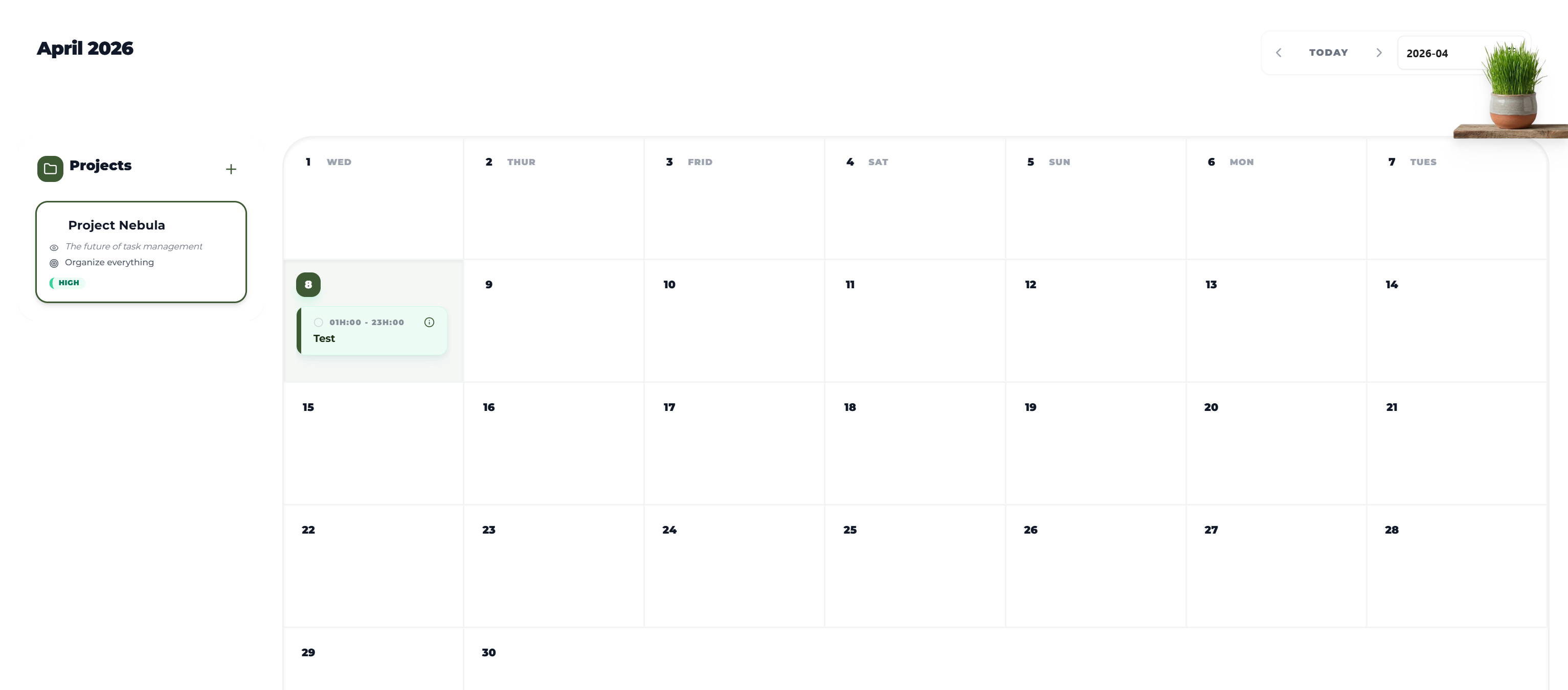
👉 Month View Example: Live Demo | GitHub Repo
📦 Installation
npm install react-weekly-calendar🧩 Advanced: Custom Calendar Implementation
⚡ A modular approach
This package is based on a simple principle: use only what you need. Each feature (planning logic, data management, UI) is independent.
Building your own UI
For advanced users, CalendarTaskContext provides all the state you need to build a custom calendar (e.g., a Month view).
Complete Implementation Example (Month View)
Here is a complete example showing how to build your own month view with advanced task management and drag-and-drop.
import React from "react";
import {
  ChevronLeft,
  ChevronRight,
  Plus,
  Clock,
  Calendar as CalendarIcon,
  Trash2,
  Check,
} from "lucide-react";
import {
  getDayHourlyForMonth,
  getMonthDay,
  millisecondsToHours,
  getHash,
  getNewTaskForDropOrPaste,
  useCalendarTaskContext,
  getUniqueId,
  updateOffsetWithDateCalendarForWeek,
  updateOffsetWithDateCalendarForMonth,
  useIntersectionObserver,
  checkDuplicates,
} from "react-weekly-calendar";
import {
  DatePicker,
  Modal,
  Form,
  Input,
  TimePicker,
  Select,
  message,
  ConfigProvider,
} from "antd";
import dayjs from "dayjs";
import "antd/dist/reset.css";
import { CalendarTaskContextProvider } from "react-weekly-calendar";

/**
 * Calendar header component (navigation and title)
 */
const CalendarHeader = ({ monthOffset, onPrev, onNext, onToday, onDateChange }) => {
  const currentMonthStr = dayjs().add(monthOffset, "month").format("MMMM YYYY");

  return (
    <div className="flex flex-col gap-6 mb-8 relative ">
      <div className="flex items-center justify-between px-2 ">
        <h2 className="text-2xl font-black text-gray-900 capitalize tracking-tight">{currentMonthStr}</h2>

        {/* Navigation controls (Prev Month, Today, Picker, Next Month) */}
        <div className="flex items-center gap-2 bg-white rounded-xl border border-gray-100 p-1.5 shadow-sm">
          <button
            onClick={onPrev}
            className="p-1.5 text-gray-400 hover:text-gray-900 hover:bg-gray-50 rounded-lg transition-all"
          >
            <ChevronLeft size={20} />
          </button>
          <button
            onClick={onToday}
            className="px-4 text-xs font-black text-gray-500 hover:text-[#3d5a35] uppercase tracking-widest transition-colors"
          >
            Today
          </button>

          {/* Integrated Ant Design Month Picker */}

          <button
            onClick={onNext}
            className="p-1.5 text-gray-400 hover:text-gray-900 hover:bg-gray-50 rounded-lg transition-all"
          >
            <ChevronRight size={20} />
          </button>
          <DatePicker
            picker="month"
            onChange={onDateChange}
            allowClear={false}
            suffixIcon={<CalendarIcon size={16} className="text-[#3d5a35]" />}
            className="h-11 rounded-lg border-gray-200 hover:border-[#3d5a35] focus:border-[#3d5a35] transition-all shadow-sm bg-white font-bold"
            placeholder="Select month"
            value={dayjs().add(monthOffset, "month")}
          />
        </div>
      </div>
    </div>
  );
};

/**
 * Event Pill component (Individual task block)
 */
const EventPill = ({ title, time, colorClass, onDragStart, onDragEnd, id, onClick }) => {
  // Icon selector based on category (color)
  const getIcon = () => {
    if (colorClass.includes("red")) return <Clock size={12} className="text-red-500 opacity-60" />;
    if (colorClass.includes("green")) return <Clock size={12} className="text-emerald-500 opacity-60" />;
    if (colorClass.includes("blue")) return <Clock size={12} className="text-blue-500 opacity-60" />;
    return <Clock size={12} className="text-[#3d5a35] opacity-60" />;
  };

  /**
   * Generates a deterministic (but random-looking) solid background color based on task ID.
   */
  const getBgColor = () => {
    const bgColors = ["bg-red-50", "bg-emerald-50", "bg-blue-50", "bg-[#3d5a35]/10", "bg-purple-50", "bg-pink-50", "bg-indigo-50", "bg-slate-50"];
    const hash = id.split('').reduce((acc, char) => acc + char.charCodeAt(0), 0);
    return bgColors[hash % bgColors.length];
  };

  const randomBg = getBgColor();

  return (
    <div
      draggable={!!onDragStart}
      onDragStart={onDragStart}
      onDragEnd={onDragEnd}
      onClick={onClick}
      className={`relative mb-2 rounded-lg flex overflow-hidden cursor-pointer hover:shadow-md transition-all shadow-sm group border border-gray-100/40 cardShadow ${randomBg} bg-opacity-100`}
      style={{ minHeight: '56px' }}
    >
      {/* Left accent vertical bar */}
      <div className={`w-1.5 self-stretch ${colorClass.split(' ').find(c => c.startsWith('border-l-'))?.replace('border-l-', 'bg-') || 'bg-emerald-400'}`} />
      <div className="flex flex-col flex-1 px-3 py-2 gap-1 justify-center overflow-hidden">
        <div className="flex items-center gap-2">
          {getIcon()}
          <span className="text-[10px] font-bold text-gray-500 tracking-tight whitespace-nowrap">{time}</span>
        </div>
        <div className="font-bold text-[13px] leading-tight text-gray-800 truncate pr-1">
          {title}
        </div>
      </div>
    </div>
  );
};

/**
 * Render optimization via Intersection Observer (skips rendering of off-screen items)
 */
const VirtualItem = ({ children }) => {
  const ref = React.useRef(null);
  const { entry, height } = useIntersectionObserver(ref, {
    rootMargin: "0px",
    threshold: 0,
  });

  const isVisible = !!entry?.isIntersecting;

  return (
    <div
      ref={ref}
      style={{ minHeight: isVisible ? "auto" : `${height}px` }}
    >
      {isVisible ? children : null}
    </div>
  );
};

/**
 * Main Calendar Grid component (Manages all tasks)
 */
const CalendarGrid = ({ monthOffset }) => {
  // Retrieve task management tools from react-weekly-calendar
  const { addTask, getTasks, getTask, deleteTask, updateTask } = useCalendarTaskContext();
  const today = new Date();

  // UI States (Modal, Editing, Day Selection)
  const [isModalOpen, setIsModalOpen] = React.useState(false);
  const [dragOverDay, setDragOverDay] = React.useState(null);
  const [editingTask, setEditingTask] = React.useState(null);
  const [selectedDayInfo, setSelectedDayInfo] = React.useState(null);
  const [form] = Form.useForm();

  // Day data for the current month view
  const currentMonthDays = getMonthDay(monthOffset);
  const currentMonthHourly = getDayHourlyForMonth(monthOffset);

  /**
   * Opens modal to CREATE a new event on a specific day.
   */
  const handleOpenModal = (dayIndex) => {
    setEditingTask(null);
    const hourlyInfo = currentMonthHourly[dayIndex];
    setSelectedDayInfo({
      day: hourlyInfo.day,
      dayIndex: dayIndex,
      start: hourlyInfo.start,
      end: hourlyInfo.end,
    });

    const startHour = parseFloat(millisecondsToHours(hourlyInfo.start));
    const endHour = parseFloat(millisecondsToHours(hourlyInfo.end));

    form.setFieldsValue({
      title: "",
      timeRange: [
        dayjs().startOf("day").add(startHour, "hour"),
        dayjs().startOf("day").add(endHour, "hour"),
      ],
      color: "bg-red-50 text-red-700 border-l-4 border-l-red-400",
    });

    setIsModalOpen(true);
  };

  /**
   * Opens modal to MODIFY an existing task.
   */
  const handleEditTask = (task, hash) => {
    setEditingTask({ task, hash });
    setSelectedDayInfo({
      day: task.taskDate,
      dayIndex: task.dayIndex,
      start: task.taskStart,
      end: task.taskEnd,
    });

    form.setFieldsValue({
      title: task.taskSummary,
      timeRange: [dayjs(task.taskStart), dayjs(task.taskEnd)],
      color: task.taskColor,
    });

    setIsModalOpen(true);
  };

  /**
   * Handles task DELETION via the modal button.
   */
  const handleDeleteTask = () => {
    if (editingTask) {
      deleteTask(editingTask.hash, editingTask.task.id);
      setIsModalOpen(false);
      message.success("Task deleted!");
    }
  };

  /**
   * Triggered when starting a task DRAG-AND-DROP.
   */
  const handleDragStart = (e, task, hash) => {
    const target = e.currentTarget;
    target.style.opacity = "0.4";

    // Set task data in dataTransfer (JSON format)
    e.dataTransfer.setData("application/json", JSON.stringify({
      id: task.id,
      taskStart: task.taskStart,
      taskEnd: task.taskEnd,
      dayIndex: task.dayIndex,
      hash: hash
    }));
  };

  /**
   * Resets styles and states after dragging ends.
   */
  const handleDragEnd = (e) => {
    const target = e.currentTarget;
    target.style.opacity = "1";
    setDragOverDay(null);
  };

  /**
   * Handles task DROP onto a new cell.
   */
  const handleDrop = (e, dayIndex, hash) => {
    e.preventDefault();
    setDragOverDay(null);
    // Pass the event to getNewTaskForDropOrPaste
    const result = getNewTaskForDropOrPaste(e, dayIndex, "Project Nebula", getTask, hash);
    if (result && result.newTask) {
      const tasks = getTasks(hash);
      const isDuplicate = checkDuplicates(
        tasks.filter((t) => t.id !== result.newTask.id),
        result.newTask.taskStart,
        result.newTask.taskEnd,
        "Project Nebula"
      );

      if (isDuplicate) {
        message.warning("A task already exists in this time slot.");
        return;
      }

      deleteTask(result.newTask.draghash, result.newTask.id);
      addTask({ ...result.newTask, id: getUniqueId() });
    }
  };

  /**
   * SAVES changes (Add or Update) after form submission.
   */
  const handleSaveTask = (values) => {
    if (!selectedDayInfo) return;

    const { title, timeRange, color } = values;
    const [start, end] = timeRange;
    const dayBasis = dayjs(selectedDayInfo.day).startOf('day');
    const startMs = dayBasis.hour(start.hour()).minute(start.minute()).second(0).millisecond(0).valueOf();
    const endMs = dayBasis.hour(end.hour()).minute(end.minute()).second(0).millisecond(0).valueOf();

    const taskData = {
      id: editingTask ? editingTask.task.id : getUniqueId(),
      taskSummary: title,
      taskStart: startMs,
      taskEnd: endMs,
      taskDate: selectedDayInfo.day,
      taskExpiryDate: dayjs(selectedDayInfo.day).add(1, "day").valueOf(),
      groupId: "Project Nebula",
      dayIndex: selectedDayInfo.dayIndex,
      taskColor: color,
    };

    const dayWeekOffset = updateOffsetWithDateCalendarForWeek(selectedDayInfo.day);
    const hash = getHash(dayWeekOffset, "Project Nebula", selectedDayInfo.dayIndex).day;
    const tasks = getTasks(hash);

    const otherTasks = editingTask ? tasks.filter(t => t.id !== editingTask.task.id) : tasks;

    // Check for duplicates before saving
    if (checkDuplicates(otherTasks, startMs, endMs, "Project Nebula")) {
      message.error("This time slot is already occupied.");
      return;
    }

    if (editingTask) {
      updateTask(editingTask.hash, editingTask.task.id, taskData);
      message.success("Task updated!");
    } else {
      addTask(taskData);
      message.success("Task added!");
    }

    setIsModalOpen(false);
    form.resetFields();
  };

  const colorOptions = [
    { label: "Work Order", value: "bg-red-50 text-red-700 border-l-4 border-l-red-400" },
    { label: "Move-In", value: "bg-emerald-50 text-emerald-700 border-l-4 border-l-emerald-400" },
    { label: "Move-Out", value: "bg-blue-50 text-blue-700 border-l-4 border-l-blue-400" },
    { label: "Notes", value: "bg-emerald-50 text-emerald-700 border-l-4 border-l-emerald-400" },
  ];

  return (
    <ConfigProvider theme={{ token: { colorPrimary: "#3d5a35", borderRadius: 8 } }}>
      <div className="flex flex-col h-full border-2 border-gray-200/60 rounded-2xl overflow-hidden bg-white/10">
        <div className="grid grid-cols-7 flex-1">
          {currentMonthDays.map((day, idx) => {
            const isToday = day.dayOfTheMonth === today.getDate() &&
              currentMonthHourly[idx].day.getMonth() === today.getMonth() &&
              currentMonthHourly[idx].day.getFullYear() === today.getFullYear();
            const dayWeekOffset = updateOffsetWithDateCalendarForWeek(currentMonthHourly[idx].day);
            const hash = getHash(dayWeekOffset, "Project Nebula", idx).day;
            const tasks = getTasks(hash);

            const isFirstRow = idx < 7;
            const isDragOver = dragOverDay === idx;

            return (
              <div
                key={day.dayOfTheMonth}
                onDragOver={(e) => { e.preventDefault(); setDragOverDay(idx); }}
                onDragLeave={() => setDragOverDay(null)}
                onDrop={(e) => handleDrop(e, idx, hash)}
                onClick={() => handleOpenModal(idx)}
                className={`group relative p-3 h-full flex flex-col transition-all duration-300 border-r-2 border-b-2 border-gray-200/50 last:border-r-0 cursor-pointer
                  ${isToday ? "bg-[#3d5a35] " : "bg-white/10 hover:bg-white/20"}
                  ${isDragOver ? "bg-[#3d5a35]/25 scale-[1.01] z-10 shadow-inner ring-2 ring-[#3d5a35]/30 ring-inset" : ""}`}
              >
                {/* Day cell header (Number and day name for the first row) */}
                <div className="flex justify-between items-start mb-2 shrink-0 pointer-events-none">
                  <div className="flex items-center gap-2">
                    <span className={`w-8 h-8 flex items-center justify-center text-sm font-black rounded-lg transition-all
                                   ${isToday ? "bg-white/20 text-white" : "text-gray-900"}`}>
                      {day.dayOfTheMonth}
                    </span>
                    {isFirstRow && (
                      <span className={`text-[10px] font-black uppercase tracking-widest ${isToday ? "text-white/80" : "text-gray-400"}`}>{day.day}</span>
                    )}
                  </div>

                  <div className={`opacity-0 group-hover:opacity-100 p-1.5 rounded-lg transition-all ${isToday ? "text-white/80" : "text-gray-400"}`}>
                    <Plus size={16} />
                  </div>
                </div>

                {/* Day tasks list - with internal scrolling */}
                <div className="flex-1 overflow-y-auto pr-1 flex flex-col gap-0.5 scrollbar-hide hover:scrollbar-default">
                  {tasks.map((task) => {
                    if (task.dayIndex !== idx) return null;
                    return (
                      <VirtualItem key={task.id}>
                        <EventPill
                          id={task.id}
                          title={task.taskSummary || ""}
                          time={`${millisecondsToHours(task.taskStart)} - ${millisecondsToHours(task.taskEnd)}`}
                          colorClass={task.taskColor}
                          onDragStart={(e) => handleDragStart(e, task, hash)}
                          onDragEnd={handleDragEnd}
                          onClick={(e) => {
                            e?.stopPropagation();
                            handleEditTask(task, hash);
                          }}
                        />
                      </VirtualItem>
                    );
                  })}
                </div>
              </div>
            );
          })}
        </div>

        {/* Create/Edit event modal */}
        <Modal
          title={
            <div className="flex items-center gap-3 mb-2">
              <div className="w-10 h-10 bg-[#3d5a35] rounded-xl flex items-center justify-center text-white shadow-sm">
                <Plus size={24} strokeWidth={2.5} />
              </div>
              <div className="flex flex-col">
                <span className="text-xl font-black text-gray-900 leading-tight">
                  {editingTask ? "Edit" : "Create"} Event
                </span>
                <span className="text-[10px] text-gray-400 font-bold uppercase tracking-wider mt-0.5">
                  {selectedDayInfo && dayjs(selectedDayInfo.day).format("dddd, MMMM D")}
                </span>
              </div>
            </div>
          }
          open={isModalOpen}
          onCancel={() => setIsModalOpen(false)}
          footer={null}
          centered
          width={420}
          className="calendar-modal"
        >
          <Form form={form} layout="vertical" onFinish={handleSaveTask} className="mt-8">
            <Form.Item
              name="title"
              label={<span className="text-xs font-black text-gray-400 uppercase tracking-widest">Title</span>}
              rules={[{ required: true, message: "Please enter a title" }]}
            >
              <Input placeholder="Team Brainstorming" className="py-3 px-4 rounded-xl border-gray-200 bg-gray-50 focus:bg-white transition-all font-bold placeholder:text-gray-300" />
            </Form.Item>
            <Form.Item
              name="timeRange"
              label={<span className="text-xs font-black text-gray-400 uppercase tracking-widest">Time Range</span>}
              rules={[{ required: true, message: "Please select a time" }]}
            >
              <TimePicker.RangePicker format="HH:mm" className="w-full py-3 px-4 rounded-xl border-gray-200 bg-gray-50 focus:bg-white transition-all font-bold" placeholder={["Start", "End"]} />
            </Form.Item>
            <Form.Item name="color" label={<span className="text-xs font-black text-gray-400 uppercase tracking-widest">Category</span>}>
              <Select className="h-12 rounded-xl" dropdownStyle={{ borderRadius: '16px', padding: '8px' }}>
                <Select.Option key="emerald" value="bg-emerald-50 text-emerald-700 border-l-4 border-l-emerald-400">
                  <div className="flex items-center gap-3 py-1">
                    <div className="w-3 h-3 rounded-full bg-emerald-500" />
                    <span className="font-bold text-gray-700">Generic Task</span>
                  </div>
                </Select.Option>
                {colorOptions.map((option) => (
                  <Select.Option key={option.value} value={option.value}>
                    <div className="flex items-center gap-3 py-1">
                      <div className={`w-3 h-3 rounded-full ${option.value.split(' ')[2].replace('border-l-', 'bg-')}`} />
                      <span className="font-bold text-gray-700">{option.label}</span>
                    </div>
                  </Select.Option>
                ))}
              </Select>
            </Form.Item>

            {/* Action buttons: Delete, Cancel, Save/Update */}
            <div className="flex gap-4 mt-12">
              {editingTask && (
                <button
                  type="button"
                  onClick={handleDeleteTask}
                  className="w-14 h-14 shrink-0 rounded-2xl flex items-center justify-center bg-red-50 text-red-500 hover:bg-red-100 transition-all border border-transparent hover:scale-105"
                >
                  <Trash2 size={22} strokeWidth={2.5} />
                </button>
              )}
              <button
                type="button"
                onClick={() => setIsModalOpen(false)}
                className="flex-1 h-14 rounded-2xl text-sm font-black text-gray-400 hover:text-gray-900 bg-gray-100 hover:bg-gray-200 transition-all border border-transparent"
              >
                Cancel
              </button>
              <button
                type="submit"
                className="w-14 h-14 shrink-0 rounded-2xl flex items-center justify-center bg-[#3d5a35] text-white hover:bg-[#2d4627] shadow-lg shadow-emerald-100/20 transition-all hover:-translate-y-0.5 border border-transparent"
              >
                <Check size={24} strokeWidth={3} />
              </button>
            </div>
          </Form>
        </Modal>
      </div>
    </ConfigProvider>
  );
};

export default function App() {
  const [monthOffset, setMonthOffset] = React.useState(0);
  const handlePrevMonth = () => setMonthOffset((prev) => prev - 1);
  const handleNextMonth = () => setMonthOffset((prev) => prev + 1);
  const handleToday = () => setMonthOffset(updateOffsetWithDateCalendarForMonth(new Date()));
  const handleDateChange = (date) => {
    if (date) setMonthOffset(updateOffsetWithDateCalendarForMonth(date.toDate()));
  };

  return (
    <CalendarTaskContextProvider hashScope="day">
      <div className="min-h-screen flex flex-col font-sans selection:bg-[#3d5a35]/20 selection:text-[#3d5a35] relative bg-transparent">
        <main className="flex-1 px-6 py-6 w-full flex flex-col max-w-full relative">
          <div className="sticky top-0 z-50 bg-transparent py-4 -mx-6 px-10 mb-8 flex items-center overflow-visible transition-all">
            <div className="flex-1">
              <CalendarHeader monthOffset={monthOffset} onPrev={handlePrevMonth} onNext={handleNextMonth} onToday={handleToday} onDateChange={handleDateChange} />
            </div>
          </div>

          {/* Nature Decoration - Floating Pot */}
          <div className="absolute top-[50px] right-0 z-[100]">
            <img
              src="pot.png"
              alt="Decoration"
              className="w-[150px] drop-shadow-xl"
            />
          </div>

          <div className="flex-1">
            <CalendarGrid monthOffset={monthOffset} />
          </div>
        </main>
      </div>
    </CalendarTaskContextProvider>
  );
}
This code demonstrates how to create a full monthly calendar with task management (add, edit, delete) and drag-and-drop. It uses getMonthDay and getDayHourlyForMonth to generate the days of the month.
[!IMPORTANT] Important:
getNewTaskForDropOrPasteanddataTransferFor this utility function to correctly calculate the position of the new task (especially during custom drag-and-drop), it is imperative to store the source task's information in
dataTransfer(as a JSON string) at the time ofdragStart. This is shown in thehandleDrag(orhandleDragStart) function via:e.dataTransfer.setData("application/json", JSON.stringify({ id, taskStart, taskEnd, dayIndex, hash }))
[!TIP] Switching from a monthly view to a weekly view
To adapt this code for a weekly view, you simply need to replace the following functions:
getMonthDaywithgetWeekDaysgetDayHourlyForMonthwithgetDayHourlyForWeeksetMonthOffset((prev) => prev - 1)withsetWeekOffset((prev) => prev - 7)updateOffsetWithDateCalendarForMonthwithupdateOffsetWithDateCalendarForWeek
👉 Month View Example: Live Demo | GitHub Repo
Understanding Hashes and Scopes
The library uses "hashes" to bucket tasks. Use getHash(offset, ...) to get the correct key:
- Scope
"week": UsegetHash(offset).week - Scope
"group": UsegetHash(offset, groupId).group - Scope
"day": UsegetHash(offset, groupId, dayIndex).day
⚡ Performance Optimization
useIntersectionObserver
Utility hook for virtualization. Detects when an element enters the viewport to mount/unmount heavy DOM elements.
👉 Performance Demo (7,000 tasks): Watch Video
const { entry, height } = useIntersectionObserver(ref, { rootMargin: "600px" });
const isVisible = !!entry?.isIntersecting;
🔧 API Reference (Utilities & Hooks)
Hooks
useCalendarDateState
Calculates grid data (days and hourly slots) based on a reference date.
const { weekDays, dailyHours } = useCalendarDateState(date, weekOffset);Date & Offset Utils
| Function | Description |
|----------|-------------|
| getCalendarDate() | Returns current date. |
| updateCalendarDateWithOffset(off, date) | Updates date based on week offset. |
| updateOffsetWithDateCalendarForWeek(date) | Calculates week offset from date. |
| updateOffsetWithDateCalendarForMonth(date) | Calculates month offset from date. |
| updateOffsetWithDateCalendarForDay(date) | Calculates day offset from date. |
| calculateWeekDifference(date) | Returns week difference in days. |
| calculateDayDifference(date) | Returns absolute day difference. |
| calculateMonthDifference(date) | Returns month difference. |
Task & UI Utils
| Function | Description |
|----------|-------------|
| getHash(offset, group, day) | Generates bucket hashes. |
| millisecondsToHours(ms) | Formats string (e.g., "14h:06"). |
| getUniqueId() | Generates a UUID v4. |
| getDayHourlyForWeek(offset)| Returns hourly slots for all days in a week. |
| getDayHourlyForMonth(offset)| Returns hourly slots for all days in a month. |
| getNewTaskForDropOrPaste(...) | Calculates task position for custom drag & drop (requires the event). |
| getMonthDay(offset) | Returns metadata for all days in a month. |
| getWeekDays(offset) | Returns metadata for all days in a week. |
[!IMPORTANT] Important:
getNewTaskForDropOrPasteanddataTransferFor
getNewTaskForDropOrPasteto function correctly, you must manually store the dragged task's information (as a JSON string) in the event'sdataTransfer(orclipboardData) inside yourhandleDrag(oronDragStart) handler. The utility retrieves these values to calculate the new task's properties.Required keys in JSON object:
id: The ID of the task.taskStart: The start timestamp.taskEnd: The end timestamp.dayIndex: The index of the day.hash: The hash of the task's current bucket.Example implementation in
handleDragStart:const handleDragStart = (e, task, hash) => { e.dataTransfer.setData("application/json", JSON.stringify({ id: task.id, taskStart: task.taskStart, taskEnd: task.taskEnd, dayIndex: task.dayIndex, hash: hash })); };Example implementation in
handleDrop:const handleDrop = (e, dayIndex, hash) => { e.preventDefault(); const result = getNewTaskForDropOrPaste(e, dayIndex, groupId, getTask, hash); // ... };
🛠 Task Management (CalendarTaskContext)
The CalendarTaskContext handles indexing, caching, and expiration of tasks automatically.
CalendarTaskContextProvider
Wrap your app to enable global task management.
| Prop | Type | Description |
|------|------|-------------|
| hashScope | "week" \| "group" \| "day" | Defines how tasks are bucketed. |
| children | React.ReactNode | Your application. |
[!NOTE]
hashScopedefaults to"week". However, the pre-built<Calendar />component internally uses"day"for its logic to ensure granular task management across different views.
useCalendarTaskContext()
Access the task store from any nested component.
| Name | Type | Description |
|------|------|-------------|
| tasks | TasksStore | All tasks, organized by buckets. |
| addTask | (task) => void | Adds a new task. |
| updateTask | (hash, id, data) => void | Updates an existing task. |
| deleteTask | (hash, id) => void | Removes a task. |
| getTasks | (hash) => Task[] | Retrieves tasks for a specific hash. |
| isValidTask| (task) => boolean | Checks if a task is not expired. |
[!WARNING] Task Expiration (
taskExpiryDate) It is crucial to define ataskExpiryDate(timestamp or Date object) for every task.
- If
taskExpiryDateis missing, the task will be considered invalid and will disappear almost immediately after creation.- If
taskExpiryDateis in the past, the task will also be automatically removed by the internal cleaning mechanism.
Example: Adding a Task
const { addTask } = useCalendarTaskContext();
addTask({
  id: "123",
  groupId: "1",
  taskStart: Date.now(),
  taskEnd: Date.now() + 3600000,
  taskSummary: "New Task"
});
📅 The <Calendar /> Component
The Calendar component is the main building block of the library. It provides a highly configurable weekly view.
👉 Weekly View Example: Live Demo | Demo Repository
Key Props
date
- Description: Sets the current date to display in the calendar.
- Type:
Date - Use Case: Set the focus date of the calendar.
<Calendar date={new Date()} ... />weekOffset
- Description: Sets the offset for the week being displayed.
- Type:
number - Use Case:
-7for previous week,7for next week,0for current.
<Calendar weekOffset={0} ... />groups
- Description: Array of group data (e.g., developers, rooms, projects).
- Type:
GroupFeildsType[] - Note: The
idfield for each group is required.
const groups = [{ id: '1', label: 'Group A' }];
<Calendar groups={groups} ... />
Full Prop Reference
| Prop Name | Type | Description |
|-----------|------|-------------|
| date | Date | The current date to display. |
| weekOffset | number | Offset for the week. |
| groups | GroupFeildsType[] | Array of group data. |
| className | string | Additional class names. |
| style | React.CSSProperties | Additional styles. |
| groupRender | ({ currentGroup }) => ReactNode | Custom render for a group. |
| dayRender | ({ dayIndex, ... }) => ReactNode | Custom render for a day. |
| taskRender | ({ currentTask }) => ReactNode | Custom render for a task. |
| addTaskRender | ({currentGroup, dayInfo}) => ReactNode | Custom render for 'Add Task' button. |
| handleAddTask | (group, dayInfo) => void | Handler for adding a task. |
| handleClickTask | (task) => void | Handler for clicking a task. |
| handleClickGroup | (group) => void | Handler for clicking a group. |
| handleDragTask | (event, task) => void | Handler for starting a drag. |
| handleDropTask | (event, ...) => void | Handler for dropping a task. |
| handleDragTaskEnd | (event) => void | Handler for ending a drag. |
| rowsStyle / className | CSSProperties / string | Styles/Classes for rows. |
| groupsColsStyle / className | CSSProperties / string | Styles/Classes for group columns. |
| daysColsStyle / className | CSSProperties / string | Styles/Classes for day columns. |
| addTaskStyle / className | CSSProperties / string | Styles/Classes for Add Task button. |
| taskContainerStyle / className | CSSProperties / string | Styles/Classes for task containers. |
| sumHoursRender | (data) => ReactNode | Custom render for hours summation. |
🚀 Quick Start
Here is a complete, minimal example showing how to set up the Calendar with the CalendarTaskContextProvider.
import React from "react"
import { Calendar, CalendarTaskContextProvider, useCalendarTaskContext } from "react-weekly-calendar";

// A sub-component to access the context with useCalendarTaskContext()
const MyCalendarContent = () => {
 const groups = [
    { id: "1", label: "Developer A" },
    { id: "2", label: "Developer B" }
  ];

  return (
    <Calendar
      groups={groups} // Array of groups
      date={new Date()} // Today's date
      weekOffset={0}      // Current week
      handleDragTask={() => {}} // Crucial: must be defined to enable internal drag-and-drop

      // Simple task creation trigger
      addTaskRender={({ currentGroup, dayInfo }) => (
        <AddTask
          currentGroup={currentGroup}
          dayInfo={dayInfo}
        />
      )}
    />
  );
};

// Root component that provides the context required by useCalendarTaskContext()
const App = () => (
  <CalendarTaskContextProvider>
    <MyCalendarContent />
  </CalendarTaskContextProvider>
);

const AddTask = ({ currentGroup, dayInfo }) => {
  const { addTask } = useCalendarTaskContext();

  const handleAddTask = () => {
    const now = Date.now();

    const newTask = {
      id: `${now}`,
      task: "Meeting",
      taskStart: now,
      taskEnd: now + (2 * 60 * 60 * 1000), // 2 hours duration
      taskDate: dayInfo.day,
      groupId: currentGroup.id,
      dayIndex: dayInfo.positionDay,
      taskExpiryDate: new Date(now + 86400000), // Expires in 24h
    };

    addTask(newTask);
  };

  return (
    <button
      onClick={handleAddTask}
      className="w-full h-full opacity-0 hover:opacity-100 bg-blue-100 transition-opacity"
    >
      + Add Task
    </button>
  );
};

export default App;
📄 License
This project is licensed under the MIT License - see the LICENSE file for details.