reactaform
v1.2.0
Published
A powerful, type-safe React form builder library with dynamic field rendering, conditional visibility, multi-language support, and extensible validation
Maintainers
Readme
ReactaForm
ReactaForm is a fully dynamic, ultra-customizable form engine for modern React applications. With schema-driven rendering, full TypeScript support, and built-in performance optimizations, it provides everything you need to build powerful forms—without the boilerplate.
✨ Features
🔧 Core Capabilities
- Dynamic Schema-Driven Forms — Generate entire forms from JSON definitions.
- Type-Safe by Design — Strongly typed fields, validators, and submission handlers.
- 20+ Built-In Field Types — Text, email, phone, dropdown, slider, rating, date, file upload, and more.
🎨 Customization & Theming
- Themeable via CSS Variables — Customize colors, spacing, borders, typography, and support light/dark modes.
- Component Registry — Register custom field components.
🧠 Logic & Validation
- Custom Validation System — Register validators globally or per field.
- Conditional Logic — Show or hide fields dynamically based on parent values.
🌍 Internationalization
- Built-In Multi-Language Support — i18n with translation caching for fast rendering.
⚡ Performance & UX
- Optimized Input Handling — Debounced updates + requestAnimationFrame-driven state management.
- Accessible by Default — ARIA attributes, keyboard navigation, and focus management.
🔌 Flexible Submission Flow
- Custom Submission Handlers — Integrate any workflow, API, or async logic.
📦 Installation
npm install reactaform react react-domPeer Dependencies:
- React
^18.0.0 || ^19.0.0 - React-DOM
^18.0.0 || ^19.0.0
🌐 Environment Compatibility
ReactaForm works seamlessly with:
- Vite (recommended)
- Webpack / CRA
- Next.js
- Parcel, esbuild, Rollup
The library intelligently handles import.meta.env and process.env with automatic fallbacks—no config tweaks required.
🚀 Quick Start
import { ReactaForm, createInstanceFromDefinition } from 'reactaform';
import { useState } from 'react';
// Define definition, can be load from server
const definition = {
name: "contactForm",
version: "1.0",
displayName: "Contact Form",
properties: [
{ name: "fullName", displayName: "Full Name", type: "string", required: true },
{ name: "email", displayName: "Email", type: "email", required: true },
{ name: "message", displayName: "Message", type: "text", required: true }
]
};
function App() {
const result = createInstanceFromDefinition(definition, "myForm");
const [instance] = useState(result.instance);
return (
<ReactaForm
definitionData={definition}
instance={instance}
language="en"
/>
);
}Note: ReactaForm manages internal form state automatically. Use
setInstance()only for programmatic overrides.
📖 Core Concepts
Form Definitions
interface ReactaDefinition {
name: string;
version: string;
displayName: string;
properties: FieldDefinition[];
}Supported Field Types
| Type | Description |
|------|-------------|
| checkbox | Boolean |
| color | Color picker |
| date | Date Picker |
| dropdown | Select menu |
| email | Email input |
| file | File selection |
| float | Float input |
| float-array | Float array input |
| image | Image preview |
| int-array| Integer array input |
| int | Integer input |
| multi-selection | Multiple selection |
| password | Password input |
| phone | Phone number input |
| radio | Radio button group |
| rating | Star rating |
| slider | Range slider |
| switch | Boolean |
| text | Single line input |
| time | Time input |
| unitValue | Value + unit conversion |
| url | URL input |
🎭 Conditional Visibility
{
"name": "country",
"displayName": "Country",
"type": "dropdown",
"options": [
{ "label": "United States", "value": "US" },
{ "label": "Canada", "value": "CA" }
]
},
{
"name": "state",
"displayName": "State",
"type": "dropdown",
"parents": { "country": ["US"] }
},
{
"name": "province",
"displayName": "Province",
"type": "dropdown",
"parents": { "country": ["CA"] }
}
🔍 Validation
{
"name": "email",
"displayName": "Email",
"type": "email",
"required": true,
"pattern": "^[a-z]+$",
"minLength": 5,
"maxLength": 100
}🎨 Theming
Customize with CSS variables:
:root {
--reactaform-color-primary: #2563eb;
--reactaform-color-error: #ef4444;
--reactaform-font-size: 1rem;
--reactaform-input-bg: #ffffff;
}
/* Dark */
[data-reactaform-theme="dark"] {
--reactaform-bg-primary: #1a1a1a;
--reactaform-text-color: #ededed;
}Enable Dark Mode:
<ReactaForm darkMode={true} ... />🌍 Internationalization (i18n)
<ReactaForm language="fr" ... />Custom Translations
// public/locales/fr/myform.json
{
"Full Name": "Nom complet",
"Email": "Courriel"
}🔧 Advanced Usage
Custom Components
import { registerComponent } from 'reactaform';
const CustomInput = ({ value, onChange, field }) => (
<input
value={value}
placeholder={field.displayName}
onChange={(e) => onChange(e.target.value, null)}
/>
);
registerComponent("customType", CustomInput);Custom Validation
import { registerValidationHandler } from 'reactaform';
registerValidationHandler("customType", (value) =>
value.length < 10 ? "Must be at least 10 characters" : null
);Custom Submission
import { registerSubmissionHandler } from 'reactaform';
registerSubmissionHandler("mySubmitHandler", async (_, __, values, t) => {
if (!values.email.includes("@")) return [t("Invalid email address")];
await fetch("/api/contact", {
method: "POST",
body: JSON.stringify(values),
});
});
const definition = {
name: "contactForm",
submitHandlerName: "mySubmitHandler"
};Provider Usage
import { ReactaFormProvider, ReactaFormRenderer } from 'reactaform';
<ReactaFormProvider defaultLanguage="en">
<ReactaFormRenderer properties={definition.properties} instance={formData} />
</ReactaFormProvider>📚 API Reference
ReactaForm Props
| Prop | Type | Required | Description |
|------|------|----------|-------------|
| definitionData | ReactaDefinition \| string | ✔ | Form definition |
| instance | ReactaInstance | – | Form state instance |
| language | string | – | e.g. "en", "fr" |
| darkMode | boolean | – | Force dark mode |
| className | string | – | Custom CSS class |
| style | CSSProperties | – | Inline styles |
🧪 Testing
npm run test
npm run typecheck🏗️ Building
npm run build:lib
npm packOutputs:
- ESM:
dist/reactaform.es.js - CJS:
dist/reactaform.cjs.js - Types:
dist/index.d.ts
📄 License
MIT
🤝 Contributing
Contributions welcome! Open a pull request anytime.
🗺️ Roadmap
- [ ] Enhanced accessibility audit
- [ ] Additional built-in validators
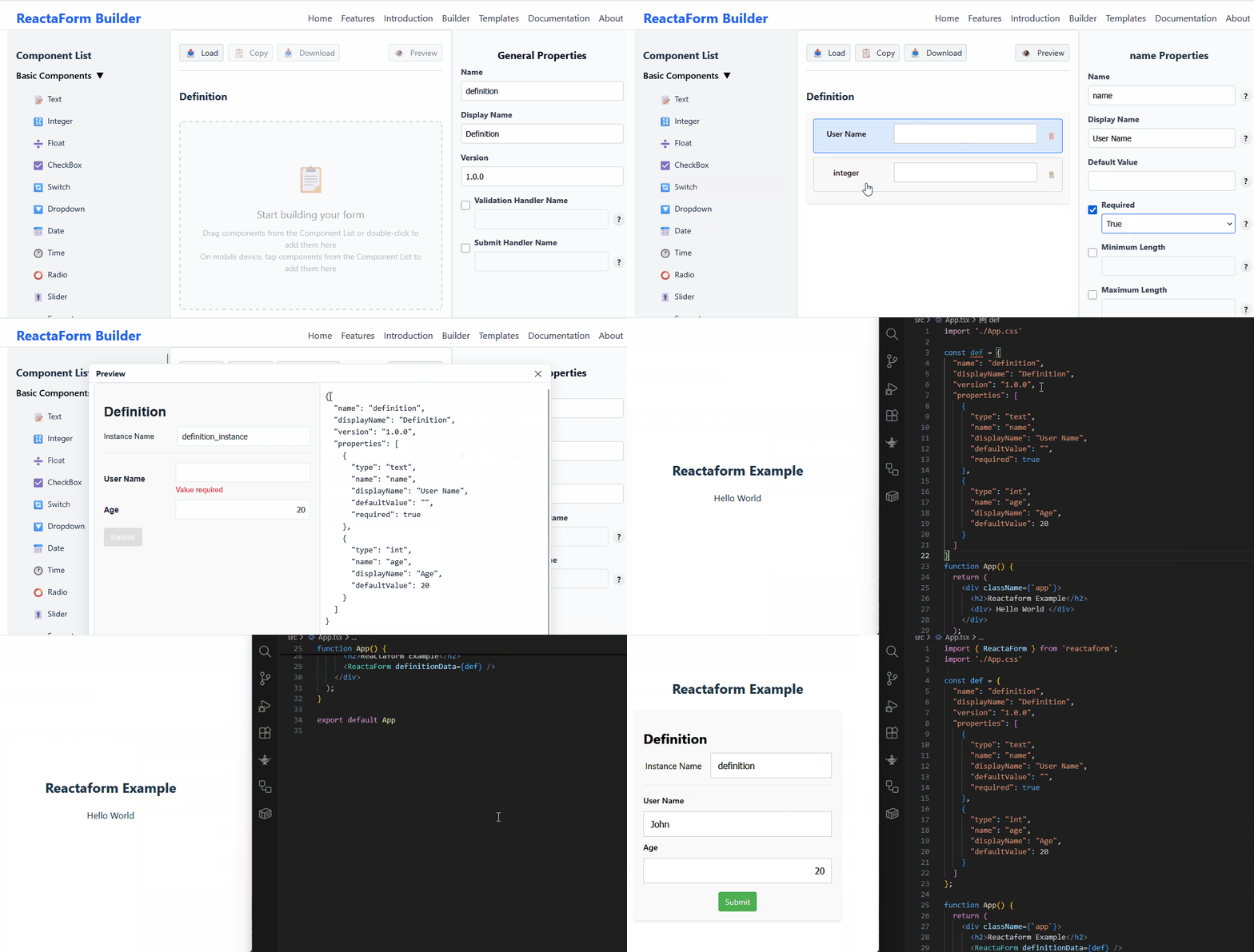
- [ ] Visual form-builder UI
- [ ] Schema migration tools
- [ ] Performance profiling dashboard
Built with ❤️ using React and TypeScript