
reactjs-calendar-date-picker
v0.1.1
Published
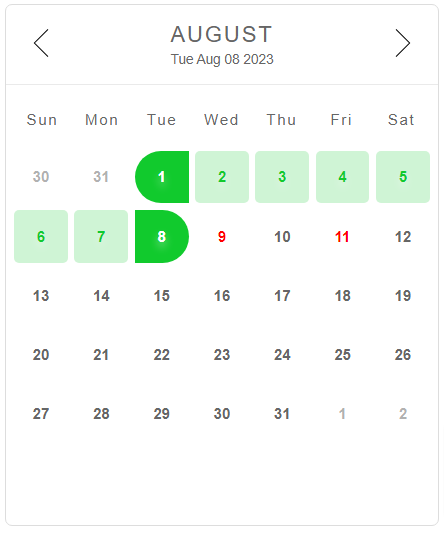
A date picker calendar component built with react that supports date selection and reserved days.

Maintainers
 shamouni
Readme
React Calendar Date Picker
A date picker calendar component built with react that supports date selection and reserved days.
Installation
npm install reactjs-calendar-date-pickerimport { useRef, useState } from "react";
import Calendar from "reactjs-calendar-date-picker";
import { type TCalDate, type TCalendarRef } from "reactjs-calendar-date-picker";You need to import the css style
import "reactjs-calendar-date-picker/dist/style.css";Examples
import { useRef, useState } from "react";
import Calendar from "reactjs-calendar-date-picker";
import { type TCalDate, type TCalendarRef } from "reactjs-calendar-date-picker";
import "reactjs-calendar-date-picker/dist/style.css";
type TState = {
fromDate: string;
toDate: string;
};
const App = () => {
const [selected, setSelected] = useState<TState | null>(null);
const onChange = (arg: TCalDate) => {
const { from, to } = arg;
const fromDate = from ? new Date(from).toLocaleDateString() : "";
const toDate = to ? new Date(to).toLocaleDateString() : "";
setSelected({ fromDate, toDate });
};
// reserved days
const sample_days = [
new Date(2025, 7, 14, 0, 0, 0, 0).getTime(),
new Date(2025, 7, 12, 0, 0, 0, 0).getTime(),
];
const { fromDate, toDate } = selected || {};
const calRef = useRef<TCalendarRef>(null);
const onClearClick = () => calRef.current?.clear();
return (
<div className="container">
<Calendar reservedDays={sample_days} onChange={onChange} ref={calRef} />
<p className="note">
{fromDate && <span>from: {fromDate}</span>}
{toDate && <span>to: {toDate}</span>}
</p>
<div>
<button onClick={onClearClick}>clear</button>
</div>
</div>
);
};
export default App;