
reactjs-editor
v11.0.3
Published
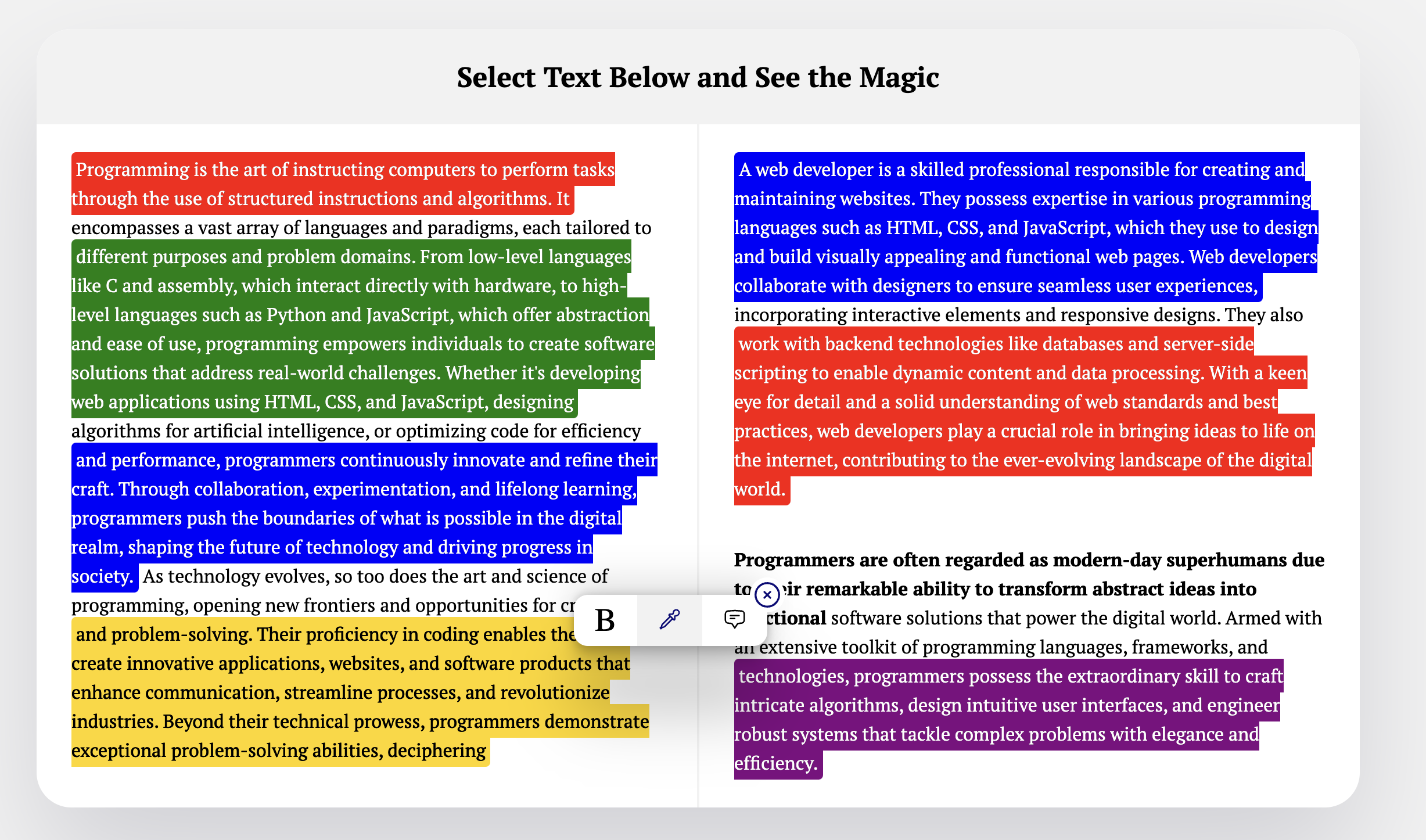
A simple react library that lets you highlight text, make text bold, and add comment on any text as a sticky notes

Maintainers
 bibek_neupane
Readme
Install
npm i reactjs-editor --legacy-peer-depsUsage
import { Editor } from 'reactjs-editor';

const colors = [
  { name: 'hl-red', hex: '#fca5a5' },
  { name: 'hl-yellow', hex: '#fef08a' },
  { name: 'hl-green', hex: '#86efac' },
  { name: 'hl-blue', hex: '#93c5fd' },
  { name: 'hl-purple', hex: '#d8b4fe' },
  { name: 'hl-white', hex: '#ffffff' },
  { name: 'hl-orange', hex: '#fdba74' },
  { name: 'hl-cyan', hex: '#67e8f9' },
  { name: 'hl-rose', hex: '#fda4af' },
  { name: 'hl-indigo', hex: '#a5b4fc' },
];

function App() {
  return (
    <Editor
      htmlContent={`<p>Select any text and see the magic.</p>`}
      colors={colors}
    />
  );
}
Persisting User Changes
When users highlight text, add comments, or bold content, you can save those changes and restore them on their next visit. Use the useDomValue hook to get the modified HTML and store it anywhere (database, localStorage, etc.).
Save changes
import { Editor, useDomValue } from 'reactjs-editor';

function App() {
  const { dom } = useDomValue();

  const handleSave = () => {
    // dom contains the modified HTML with all user highlights & comments
    const snapshot = { key: dom?.key, props: dom?.props, ref: dom?.ref, type: dom?.type };
    // Save to your database, localStorage, or any storage
    localStorage.setItem('editorContent', JSON.stringify(snapshot));
  };

  return (
    <>
      <Editor htmlContent={`<p>Select any text and see the magic.</p>`} colors={colors} />
      <button onClick={handleSave}>Save</button>
    </>
  );
}
Restore changes on next visit
import { Editor, useDomValue } from 'reactjs-editor';

function App() {
  const { setDom } = useDomValue();

  useEffect(() => {
    const saved = localStorage.getItem('editorContent');
    if (saved) {
      setDom(JSON.parse(saved)); // restores highlights, comments, and bold text
    }
  }, []);

  return <Editor htmlContent={`<p>Select any text and see the magic.</p>`} colors={colors} />;
}
This way, your users' edits persist across sessions — they won't lose their highlights or comments.
Highlight CSS Classes
Add these classes to your stylesheet so highlighted text is readable on each background:
.hl-red { background: rgba(252,165,165,0.55); color: #450a0a; border-radius: 3px; padding: 1px 2px; }
.hl-yellow { background: rgba(254,240,138,0.55); color: #0c0a0a; border-radius: 3px; padding: 1px 2px; }
.hl-green { background: rgba(134,239,172,0.5); color: #052e16; border-radius: 3px; padding: 1px 2px; }
.hl-blue { background: rgba(147,197,253,0.5); color: #0f172a; border-radius: 3px; padding: 1px 2px; }
.hl-purple { background: rgba(216,180,254,0.5); color: #3b0764; border-radius: 3px; padding: 1px 2px; }
.hl-white { background: rgba(255,255,255,0.88); color: #09090b; border-radius: 3px; padding: 1px 2px; box-shadow: inset 0 0 0 1px rgba(0,0,0,0.08); }
.hl-orange { background: rgba(253,186,116,0.55); color: #431407; border-radius: 3px; padding: 1px 2px; }
.hl-cyan { background: rgba(103,232,249,0.45); color: #083344; border-radius: 3px; padding: 1px 2px; }
.hl-rose { background: rgba(253,164,175,0.55); color: #4c0519; border-radius: 3px; padding: 1px 2px; }
.hl-indigo { background: rgba(165,180,252,0.5); color: #1e1b4b; border-radius: 3px; padding: 1px 2px; }
Claude Code Prompt
Use this prompt with Claude Code to add reactjs-editor to any project:
Install reactjs-editor in my project and add the Editor component:

1. Run: npm i reactjs-editor --legacy-peer-deps
2. Ask me which file/component I want to add the Editor to
3. Import { Editor } from 'reactjs-editor' in that file
4. Add an <Editor /> component with htmlContent set to the existing JSX/HTML content
   (or a sample paragraph if none exists), and pass a colors prop with these 10 color objects:
   { name: 'hl-red', hex: '#fca5a5' }
   { name: 'hl-yellow', hex: '#fef08a' }
   { name: 'hl-green', hex: '#86efac' }
   { name: 'hl-blue', hex: '#93c5fd' }
   { name: 'hl-purple', hex: '#d8b4fe' }
   { name: 'hl-white', hex: '#ffffff' }
   { name: 'hl-orange', hex: '#fdba74' }
   { name: 'hl-cyan', hex: '#67e8f9' }
   { name: 'hl-rose', hex: '#fda4af' }
   { name: 'hl-indigo', hex: '#a5b4fc' }
5. Add these CSS classes to the project's stylesheet so highlighted text is readable
   on each background:
   .hl-red { background: rgba(252,165,165,0.55); color: #450a0a; border-radius: 3px; padding: 1px 2px; }
   .hl-yellow { background: rgba(254,240,138,0.55); color: #0c0a0a; border-radius: 3px; padding: 1px 2px; }
   .hl-green { background: rgba(134,239,172,0.5); color: #052e16; border-radius: 3px; padding: 1px 2px; }
   .hl-blue { background: rgba(147,197,253,0.5); color: #0f172a; border-radius: 3px; padding: 1px 2px; }
   .hl-purple { background: rgba(216,180,254,0.5); color: #3b0764; border-radius: 3px; padding: 1px 2px; }
   .hl-white { background: rgba(255,255,255,0.88); color: #09090b; border-radius: 3px; padding: 1px 2px; box-shadow: inset 0 0 0 1px rgba(0,0,0,0.08); }
   .hl-orange { background: rgba(253,186,116,0.55); color: #431407; border-radius: 3px; padding: 1px 2px; }
   .hl-cyan { background: rgba(103,232,249,0.45); color: #083344; border-radius: 3px; padding: 1px 2px; }
   .hl-rose { background: rgba(253,164,175,0.55); color: #4c0519; border-radius: 3px; padding: 1px 2px; }
   .hl-indigo { background: rgba(165,180,252,0.5); color: #1e1b4b; border-radius: 3px; padding: 1px 2px; }
License
MIT
[email protected] · LinkedIn @vivekneupane11 · GitHub @vivekneupane11