
readoutlang
v3.1.0
Published
Readout - the document format agents hand back: routed diagrams, charts, KPI tiles and notebook pages from plain text, rendered self-contained and verified. Plus the OKF docs-profile linter (frontmatter, cross-links, indexes).

Maintainers
 ianberdin
Readme
readoutlang
Readout puts a real diagram inside the document you already have. Write a
```readout fence in a README, a design doc or an on-call runbook, and that
block becomes a routed, themed, interactive picture - boxes and arrows, charts,
KPI tiles - in the same file as the prose that explains it. No second tool, no
image to keep in sync, no whiteboard link that rots.
A source carries semantics and structure only: no colors, no coordinates, no CSS, no hand-placed arrows. That is the whole trick. It means an agent can write one from scratch, a human can read the diff, and a verifier can prove in a headless browser that the rendered picture is faithful.
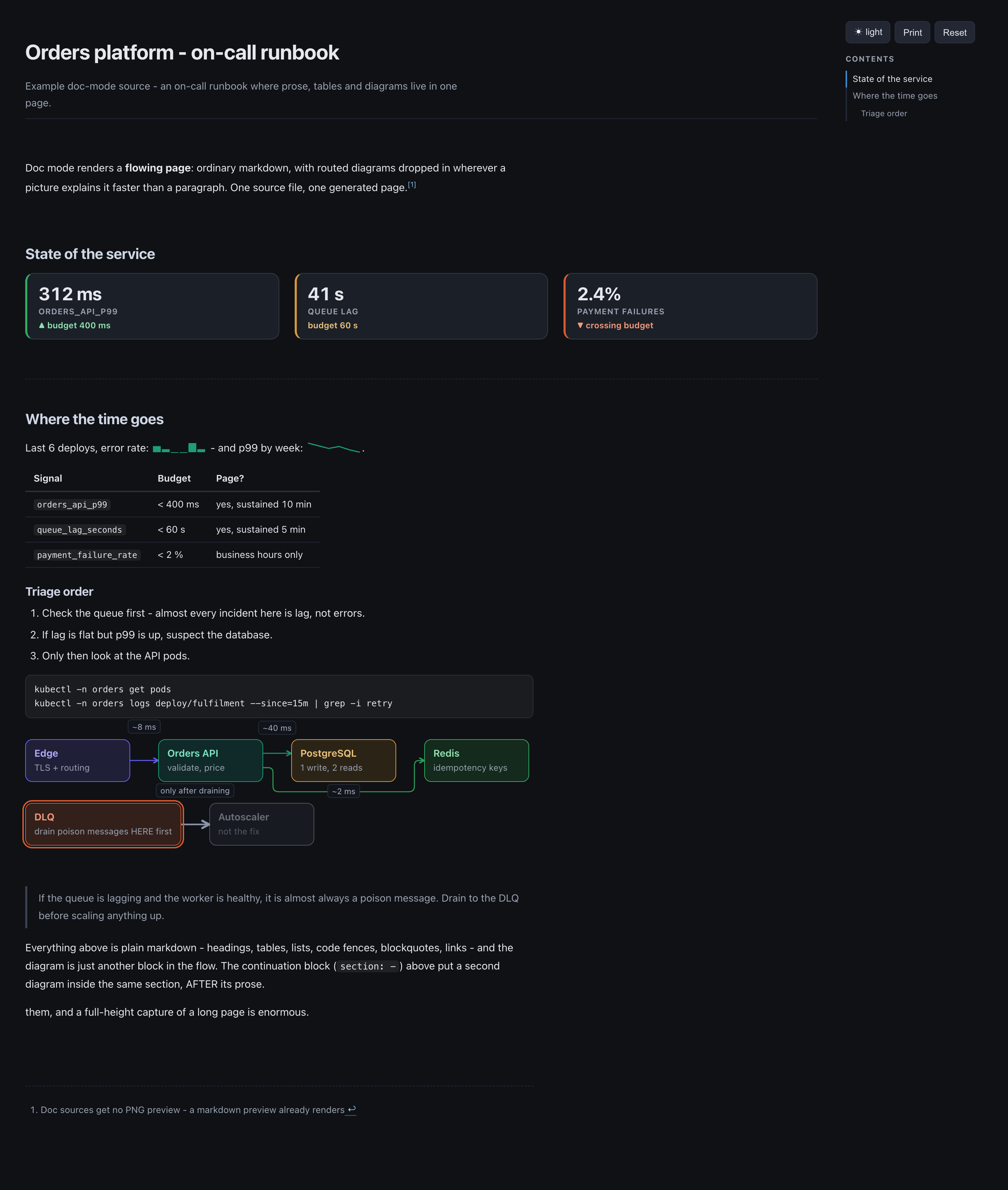
One markdown file, rendered by readout diagram:
examples/runbook.diagram.md.
The prose, the table, the KPI tiles, the shell block and both diagrams are all
in that one source. No coordinates in it, no hand-placed arrows, no Mermaid.
This package ships two halves that grew out of each other:
- Readout - the language, the renderer, the CLI, and a browser runtime for mounting a fence live inside your own app.
- The OKF docs profile - a linter for a
docs/knowledge base (frontmatter, generated folder manifests, link integrity, staleness), which is where the format came from and is half of this README.
No runtime dependencies: frontmatter, markdown, the DSL, the layout engine, the
arrow router and both chart themes are hand-rolled. The only peer is
playwright, optional, used by the PNG and verify paths.
| I want to... | Go to |
|---|---|
| try it in 30 seconds | Your first fence |
| know where a fence actually shows up | Where a Readout fence renders |
| look up a grammar detail | The language - one table per construct |
| render a fence inside my own app or chat UI | Embedding in your own app |
| find a command or a flag | CLI reference |
| keep a docs/ tree navigable by humans and agents | The OKF docs profile |
| know why a diagram reads badly, and what to reach for | BEST-PRACTICES.md |
Install
npm i -D readoutlang        # or: pnpm add -D readoutlang
npx readoutlang --help      # or without installing anything
Two bins, one program: readout and okf. The distinction is
deliberate and permanent - OKF is the docs profile the tool enforces,
readout is the tool. Every command works under either name; this README
writes readout.
Your first fence
readout diagram walks the docs tree - <root>/docs by default - and
renders every *.diagram.md / *.diagram.json under it to a sibling .html.
The smallest complete project is therefore one file, docs/checkout.diagram.md:
---
type: diagram
description: A checkout request, end to end.
---

# Checkout

```readout
section: 1 - Request path

row:
  web[purple]: Web | clicks Pay
  api[teal]: API | :8080 - validates
  db[amber]: Postgres | orders

edges:
  web -> api : HTTPS
  api -> db : SQL
```
npx readoutlang diagram
# OKF diagram: 1 rendered of 1 source(s) -> docs/checkout.diagram.htmlWhat you get is ONE file: dark plus light themes, pan/zoom, search, click-to-spotlight, no external requests, no library. Open it in a browser, or commit it next to its source.
| Situation | Reach for |
|---|---|
| sources do not live under docs/ | --docs=<dir> (env OKF_DOCS); --docs=. renders the whole project tree |
| the project root is not the cwd | --root=<dir> (env OKF_ROOT) - anchors git and repo-relative links |
| a PNG preview next to each canvas | on by default in write mode; needs the optional playwright peer, and is skipped with a note when it is absent |
| nothing rendered, no error | there is no docs/ tree, or no *.diagram.md in it - see the two flags above |
Monorepo note. Inside this repository the same CLI runs straight from source through tsx:
pnpm readout <command>from the repo root or from this package, no build step.pnpm okf <command>is the same thing, and most docs elsewhere in the monorepo still sayokf.
Where a Readout fence renders
Four surfaces, in the order that matters. The fence is identical on all four: the same source, the same layout engine, the same router.
| Surface | What renders the fence | You need |
|---|---|---|
| 1. A markdown document you already have | readout diagram renders the whole document to one self-contained page - or your own markdown renderer mounts just the fence, in place | the CLI, or readoutlang/runtime |
| 2. An AI chat transcript, live as it streams | the model writes a fence, the chat mounts every valid intermediate parse | readoutlang/runtime |
| 3. Your editor, while you author | syntax highlighting for the fence body | the repo's editors/zed/ |
| 4. A standalone infinite canvas | readout diagram, with the default render: canvas | the CLI |
1. The documents you already have
A Readout source IS a markdown document. Put render: doc in the frontmatter
and the whole file renders as a page: paragraphs, ### headings, lists,
quotes, pipe tables, fenced code, footnotes, inline sparklines - with routed
diagrams and chart cards dropped in wherever a picture is faster than a
paragraph. The frontmatter description becomes the subtitle. That is the hero
image at the top of this file.
The second path needs no CLI at all: a host that already renders your markdown
can mount the fences itself. In Playcode, the editor's markdown and README
preview finds every ```readout block and mounts it in place, with an
expand / copy source footer under each one.
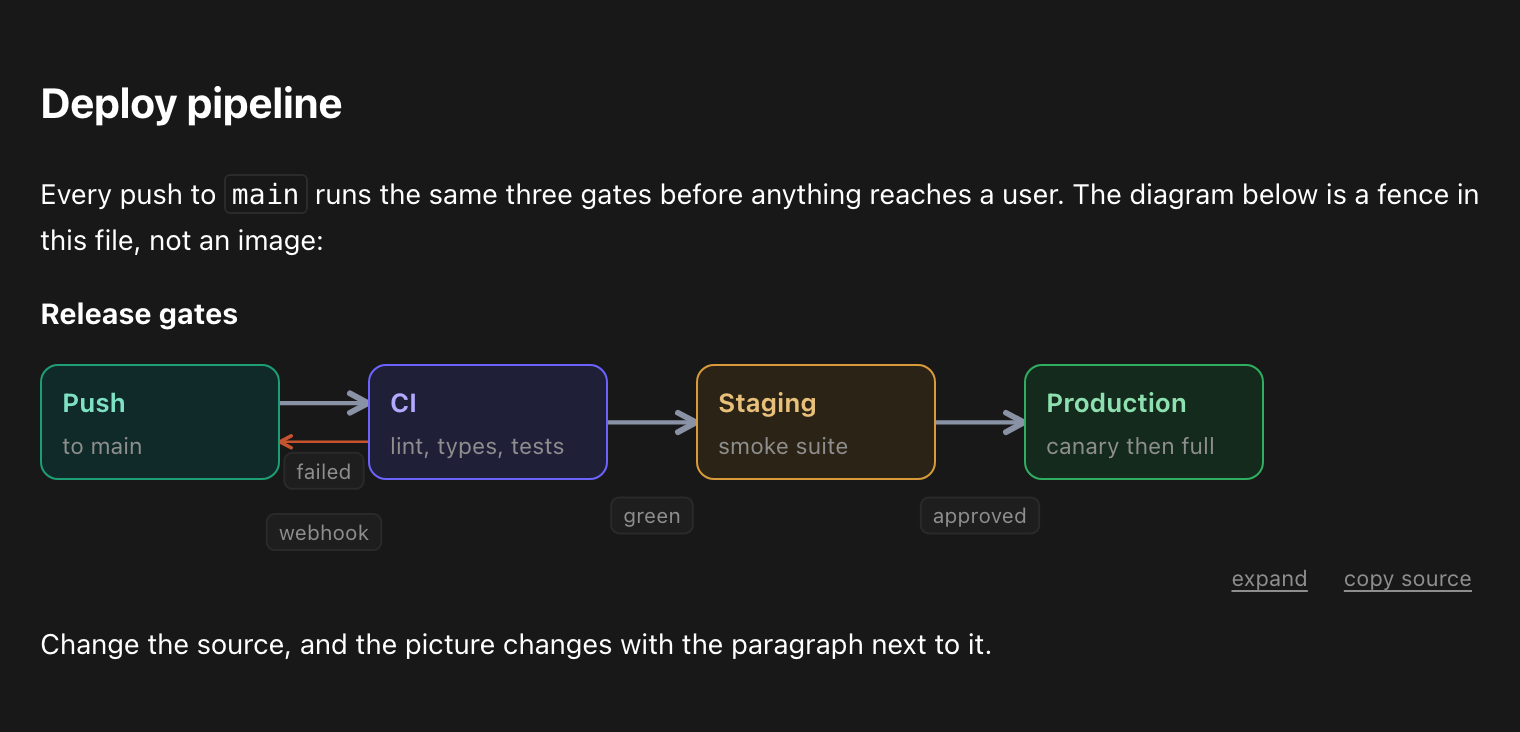
The prose above and below that diagram is the same file. Change the source and the picture changes with the paragraph next to it.
On GitHub and npm a fence is still a plain code block, because neither
renderer is extensible. The workaround is one flag: readout diagram --images
writes <base>.<theme>.png next to each canvas source and injects a preview
block under the H1, so any markdown preview shows the real picture above its
source. The DSL parser ignores ![...] lines, so
that injection round-trips safely. Doc-mode pages get the canvas link without
an image, because a full-height capture of a long page is enormous.
2. Live in an AI chat
This is what the strict source discipline is for. A model writes a fence; the
chat parses it with parseOkfdSnippet, mounts it with mountDiagram, and the
reader gets a diagram instead of ASCII art. Playcode's AI agent ships this: the
diagram appears in the transcript, expands to a full-screen pan/zoom viewer,
and hands back its source on request.

That flow is authored as a row:. The message column is too narrow for four
cards on a line, so the runtime transposed it into a vertical chain and the
router re-routed it top-down, keeping a side corridor for the backward
"card declined" edge. Nothing in the source changed.
Three properties make this safe rather than merely possible:
- Lenient fence grammar. A chat fence carries the block grammar only: no
frontmatter, no H1, and even
section:is optional. Same validators, same line-numbered errors, rebased onto the fence body so the model can be handed its own mistake. - Streaming-safe.
update(model)swaps the model in place, so every valid intermediate parse can be mounted while the tokens are still arriving. - Contained. Hard size caps, no globals, no storage, no wheel capture, and an edge label chip that is never allowed to leave the mount box. Details in Embedding in your own app.
3. Your editor: the Zed extension
editors/zed/
in the repository (it is not in the npm tarball) is a Zed extension with a
tree-sitter grammar for the DSL. It highlights ```readout fences
(canonical) and ```okf-d fences (the permanent legacy alias) inside any
markdown file, plus standalone .okf-d files.
One language covers both fence names because Zed resolves a fence's info string
against a language's name or its path_suffixes: name = "readout" claims
the canonical fence, path_suffixes = ["okf-d"] claims the legacy one and the
file extension. Zed extensions provide languages, themes, icon themes,
snippets, debuggers and MCP servers - there is no webview or renderer API - so
in-editor preview goes through the PNG block, or through the
Open diagram in browser task shipped in .zed/tasks.json. Install notes:
editors/zed/README.md.
4. And additionally: a standalone Canvas
When a diagram outgrows a page, drop render: doc and you get an infinite
pan/zoom board instead: architecture maps, flows, FK graphs. Same grammar, same
router, one self-contained HTML file.
| Dark | Light |
|---|---|
|  |
|  |
|
The same source in both themes:
examples/orders.diagram.md -
an order pipeline, its data model, and a failure path. The runtime owns colour,
which is why the source never mentions one.
The two render modes
One grammar, two outputs, selected by one frontmatter key:
| Mode | Frontmatter | It is |
|---|---|---|
| doc | render: doc | a notebook-grade PAGE: prose, tables, KPI tiles, charts and routed diagrams in one flow, with a scroll-spy Contents rail, per-section expand/copy chrome, and a print stylesheet |
| canvas | render: canvas, or omit the key | an infinite pan/zoom board behind a 40px header strip (title, section dropdown with type-to-filter, search, theme, zoom); the board itself lays out at a fixed 1440px reference width and pans - it never re-wraps with the viewport |
Any other render: value is an error. The packaged runtime owns theming,
layout reflow and arrow routing in both modes - one adaptive discipline for
page, embed and viewer - and readout diagram --verify proves the invariants
in headless Chromium at 1800, 768 and 390px, all three enforcing, with a
per-diagram quality report (bends, crossings, path ink, chip distance).
The language
File shape
---
type: diagram
description: One line - becomes the doc-mode subtitle.
render: doc            # omit for a canvas
---

# The H1 is the title

Doc mode: this prose flows into the page. Canvas mode: prose before the
first fence is the caption; prose after any fence is an error.

```readout
section: 1 - First section
nav: 1-First

row:
  api[teal]: API | :8080 - validates
  db[amber]: DB | rows of record

edges:
  api -> db : SQL
```

More prose (doc mode). It attaches to the NEXT section - use a continuation
block (`section: -`) to write commentary AFTER a diagram inside one section.
Each fence holds ONE section; edges: accumulate across fences. Indentation is
2 spaces (an odd indent is an error), # starts a full-line comment, and a
block with several top-level nodes is wrapped in a stretched column.
The parser also emits non-blocking warnings: advice about a source that
renders, but says something the author probably did not mean. They arrive as a
warnings array on the parse result and as WARN <file>: ... lines from the
CLI. A warning never changes an exit code.
Sections
| Line | Meaning |
|---|---|
| section: <label> | required; the heading. id: overrides the slug, nav: the toolbar text |
| section: - | continuation: no heading, no nav/ToC entry - lets prose and diagrams alternate inside one logical section (this is the fix for "my text ended up before the picture") |
| fold: true | doc mode: the section renders collapsed (<details>); deep links and print open it |
| legend: teal=service, red=failure, flow=flow, fk=FK | one entry per role in use; in the rendered page each swatch is a click-to-filter for that role |
| edges: | indented edge lines follow (see Edges) |
Containers
Every container is a line ending in : with its children indented under it.
Any of them takes a gap override in parentheses: rowT(110):.
| Container | Direction and alignment | Default gap |
|---|---|---|
| row: | horizontal, centered, wraps | 40px |
| rowT: | horizontal, TOP-aligned, wraps - the shape for cards of unequal height | 56px |
| rowS: | horizontal, centered, NO wrap - use with spacer | 64px |
| rowW: | horizontal, centered, wraps, wide gaps - for labelled chains | 76px |
| col: | vertical, left-aligned | 34px |
| colS: | vertical, children STRETCHED to equal width | 28px |
| stack: | vertical, stretched, tight | 18px |
| grid2: | two-column grid (span makes a child cross both) | 20px |
| cols: / cols(2,1): | the doc-mode page grid, children fill their cells (below) | 14px |
| ranks: | vertical, centered - the outer frame of a layered tree | 80px |
| rankrow: | one rank of a layered tree, horizontal, never wraps | 56px |
| panel: | a bordered, tinted box wrapping a vertical group | 30px |
| cluster "Heading" (subtitle) <layout>: | a titled group; <layout> is any name above, default col | per layout |
cols: is a page grid, row: is a chain of steps. This is the single most
common authoring mistake. cols: (or cols(2,1): for weights, one integer
1-12 per child) is the doc-mode PAGE GRID: equal or weighted columns of the
content width, children FILL their cells, charts redraw at the width the cell
actually got, phones stack it. It is
for side-by-side panels with no arrows between them - a row of KPI tiles,
two charts on one line. A chain of steps wants row:, which sizes each card to
its content and leaves a corridor for the arrows. Put a chain in cols: and
eight steps squeeze into 78px cells separated by a 14px gutter that no arrow
and no label chip fits through. Joining a cols's own children with edges
therefore earns a parse WARNING naming the offending edge; it still renders,
and the runtime then treats it as a flow (below).
Two more container behaviours worth knowing:
- The
colscell floor. A cell never drops below the 120px a card wants, and that floor yields to the fair share rather than overflowing - so a roomy grid keeps its columns, and a crowded one squeezes evenly instead of pushing a card past the edge. ranks+rankrow- layered trees (FK graphs): rank by depth, point every arrow up with@tb. Arankrow's children are peers at one depth and are never joined to each other, so it is never mistaken for a flow.
A narrow embed transposes a flow, it does not wrap it. A row - or an
edge-joined cols - whose own children are connected by arrows is a FLOW;
anything else (a cluster inventory, a rankrow of peers, a row of unconnected
charts) is not. Flow-ness is read off the edge list, so there is nothing to
author. The runtime measures each flow against the width its cards actually
want, and the moment one no longer fits on a line it becomes a vertical chain
that the router re-routes top-down, reserving a side corridor for backward or
skipping edges and widening the gap where labelled steps need room for their
chips. What that replaces is wrapping, which is the worst of both worlds: the
left-to-right reading order dies AND every arrow is forced through the single
gutter between the columns, so labels collide and arrowheads pile up. The
decision is measured, not width-gated - a six-card chain stacks in
a 900px panel for exactly the reason a four-card one stacks at 320px. A
standalone page still wraps, because there the whole canvas pans and zooms.
Nodes
id[role flags]: Name | line | line     box (lines accept `code`, **bold**, [text](url))
inst id[role]: Name | line             saturated instance box
table id[role]: Name                   ER card; indented fields follow:
  fieldId: uid: UUID PK                  with id -> usable as an edge endpoint
  - name: string                         anonymous field
kpi id[role dir]: value | label | delta   stat tile, e.g.:
kpi k1[green up]: $22,667 | July gross | +37% on June
qr id[role]: payload | caption         scannable QR code, e.g.:
qr q1: exp://8081--962m.playcode.run:443 | Scan with Expo Go
note: ...   warn: ...   info: ...      full-width bands (green / red / blue)
sub: ...                               small sub-label
spacer                                 flexible gap (with rowS)
Roles: purple teal amber green red blue yellow gray. Node flags:
| Flag | Meaning |
|---|---|
| wide | relax the width cap (box: long reference boxes; chart: full content width in doc mode). A parse ERROR on qr, whose size is derived |
| span | grid2 only: span both columns |
| mark | emphasis ring - "this node is the point" |
| ghost | de-emphasized context (the inverse of mark) |
| up down flat | kpi only: the delta glyph. The ROLE carries good/bad - a red down is a warning, a green down is a win |
| nudge=DX,DY | last-resort visual offset; survives reflow, arrows re-aim |
qr is the one node whose reader is a camera, so it is the one node with a
hard limit and no knobs. The payload is capped at 119 UTF-8 bytes - over it
is an ERROR, never a truncation, because a shortened payload still scans, to
somewhere else - and over 58 bytes earns a warning, since the symbol then
needs the largest plate step and will fill a chat column. There are no escape
sequences, deliberately: an escape would make the written text differ from the
scanned bytes, so a \n in a payload (or a \r, or a \t) is a backslash and a
letter and is encoded as such. Writing one earns a warning rather than an error -
the backslash may be meant (a Windows path, the WiFi payload spec's own escape) -
and what the warning says is that a payload needing real line breaks, a vCard for
instance, cannot be a qr at all: the symbol would scan cleanly to something
malformed. Everything else is derived: the module count from the payload, the
plate side from that count (the smallest step giving at least 5 px per module),
the error-correction level fixed at H because that is what makes a center mark
survivable, and the mark itself the runtime's. So a qr takes a role, mark /
ghost and nudge=DX,DY and nothing else - wide, an EC level or a logo toggle
are parse errors, each of them being presentation. The payload renders as selectable text under the symbol
too, always, so a page is usable with no camera and a reader can check where a
scan will send their phone; in a mount too narrow for the smallest step the
symbol is DROPPED rather than shrunk and that chip is what is left, because a QR
too small to scan is worse than none. A row of QR cards STACKS before it drops
anything, though: an embed asks whether a plate it is holding has fallen under
the scan floor, and hands that card the whole column instead - so three codes
side by side stay side by side while they all fit, and become a vertical list the
moment one of them would otherwise stop being scannable. The stack is worth more
width than any card in a three-track row can be granted, which is why it comes
first. Design rules:
BEST-PRACTICES.md.
Edges
a -> b : label          plain arrow, optional label chip
a -teal-> b             role-colored arrow
a => b                  PRIMARY path - heavier stroke ( =teal=> for colored)
a -.-> b                thin FK arrow (child -> parent)
a <-> b    a <=> b      arrowheads both ends (plain / primary)
a -> a @r               self-loop (side via the @ hint)
a -green-> b @bt : PUT  side hints @<exit><enter>: l r t b, "." = auto
Arrows are routed, never drawn: orthogonal elbows with obstacle avoidance (straight -> L -> Z -> A*), ports spread along shared sides and MATCHED across an edge (a side carrying one edge follows the port it faces, so adjacent cards connect dead straight instead of stepping), and parallel runs in separate lanes.
Labels come after paths, in two passes: every edge routes first, then every chip is placed with the finished path set as an obstacle. A chip background is opaque, so a chip lying across another arrow makes that arrow look like it stops dead - and in one pass the third chip cannot know where the seventh edge will run. A chip on its OWN line is the normal look and stays. Inside an embed a chip may never leave the mount box either: a chip outside is LOST, because the host clips it and no scroll reaches it, so staying inside is part of the placer's definition of a free spot rather than a clamp applied afterwards.
If an arrow still looks wrong, fix the STRUCTURE first - the escalation ladder
is in
BEST-PRACTICES.md.
Charts
chart id[<type> <flags>]: Title | caption opens a chart; indented lines fill it:
chart c_rev[stackedBar values wide]: Monthly gross revenue | net of refunds, USD
  fmt: usd                  # usd | pct | int | compact
  y:   revenue              # value-axis label (donut: center caption)
  x:   Mar, Apr, May, Jun   # categories - one value per series per category
  s new[purple]:  4200, 5100, -, 3900     # "-" is a GAP (no data), never 0
  s renewals[teal]: 8100, 8400, 9200, 9600
  ref 16000[red]: break-even              # marker line on the value axis
  refx May[red]: core update              # vertical event marker on a category
  ann Jun: one whale = 43%                # short callout in a band above the plot
  hl: Jun                                 # emphasized categories, rest dim
  src: ClickHouse events, 2026-08-07      # "Source:" line under the plot
  scale: rev                              # same-name charts share one y-domain
| Type | Use for | Notes |
|---|---|---|
| bar / groupedBar | comparison between series | single series = plain columns |
| stackedBar | composition over time | values prints stack TOTALS |
| hbar | rankings with long names | long labels middle-ellipsize + tooltip |
| line | trends | value labels dodge collisions automatically |
| area | cumulative totals | bands first, lines never buried |
| donut | one moment's share | NO x: - each s line is one slice; over 6 slices wants hbar |
| waterfall | a bridge between two totals | exactly ONE series of DELTAS; negatives red, gray Total bar added |
| combo | bars plus a line over them | s margin[green line] = line; add y2 for a right axis (fmt2: + y2: label) |
| heatmap | a series x categories matrix | heat: green sequential ramp, heat: red green diverging around 0 |
Chart flags: wide (more room; doc mode = full content width), values
(numbers on marks - dropped when they cannot fit), facet (line/area/bar: one
mini panel per series, all sharing the whole chart's domain), nudge=DX,DY. A
series must carry exactly as many values as there are categories.
| Dark | Light |
|---|---|
|  |
|  |
|
Worked examples of every type:
examples/metrics.diagram.md.
No chart library - the axis, the ramps and both themes are hand-rolled SVG. The
arrow at the bottom points at a chart, because a chart is a card.
Three types are easy to get wrong, so here they are in full:
chart c_wf[waterfall values]: July to August bridge
  fmt: usd
  x: July, New subs, Renewals, Top-ups
  s delta[green]: 22667, -2375, -7673, -7390

chart c_margin[combo values]: Revenue vs margin
  fmt: usd
  fmt2: pct
  y2: margin
  x: May, Jun, Jul
  s gross[teal]: 19508, 17239, 22667
  s margin[green line y2]: 78.7, 71.2, 68.3

chart c_ret[heatmap values]: Cohort retention
  fmt: pct
  heat: green
  x: M0, M1, M2
  s May[gray]: 100, 65, 50
  s Jun[gray]: 100, 53, -
Every rendered chart carries a data toggle (its numbers as a table plus
copy-as-CSV) and styled hover tooltips (click to pin, Esc to release); clicking
a mark opens the data with that series' row highlighted. Charts are edge
endpoints and routing obstacles like any other card.
Doc mode: the notebook
render: doc turns the source into a flowing page:
- Markdown between fences: paragraphs,
###/####headings (auto-anchored, with hover deep links),-/1.lists with nesting,>quotes,---rules, fenced code blocks, inlinecode/ bold / italic /[text](url). - Tables: pipe tables with the alignment row honored (
---:right,:---:center); numeric columns right-align themselves; headers are sticky and click-to-sort (asc / desc / source order - view-state only). - KPI rows:
cols:pluskpitiles is the standard report opener. - Images:
- relative paths only; an external URL is a parse error, because a committed page must not fetch the network. A missing file next to the source is a build warning. - Footnotes:
A claim.[^1]...[^1]: the fine print- rendered superscripts with a collected list plus backlinks at the page end. - Sparklines:
spark(4200 5100 4800)/sparkbar(1 2 3)inline in prose or table cells;spark(teal: ...)picks the role. - Navigation: a scroll-spy Contents rail (sections plus h3s); below 1280px it becomes a slide-over behind a floating button.
- One heading per section: a markdown heading directly above a fence whose
text repeats the fence's
section:label folds into it (its prose stays); the section number renders as an engineering-drawing pill. - Sectional legends: the page-level legend is gone; each section carries a quiet pill row of the roles IT uses (click-to-filter kept), plus planned/FK line samples when the section has such edges.
- Per-section chrome: an expand + copy-source footer under every diagram (hover-revealed on desktop, always present on touch); expand opens the shared pan/zoom viewer on the ORIGINAL reference-width layout, Esc closes.
- Print: the Print button (or Cmd+P) forces the light palette, hides chrome, opens all folds, and avoids page breaks inside cards - the PDF hand-off path.
- Mobile: the narrow boundary is measured SHAPE, not width. A flow that no longer fits transposes into a vertical chain (the router re-routes top-down); an inventory stacks; a MAP - containers joined by cross-links - refuses to fake-adapt and renders a fitted miniature of its true desktop layout instead, one tap from the full viewer. Charts redraw at the width they get, wide tables scroll inside their own box - the page never scrolls sideways.
- Prose before a fence attaches to the FOLLOWING section; use
section: -continuation blocks for diagram-then-commentary; trailing prose is the outro.

Interactions in a rendered page
| Gesture | Canvas | Doc |
|---|---|---|
| drag / wheel | pan / zoom | native scroll |
| / | search cards (matches name, lines, id; dims the rest; Enter cycles and jumps) | - |
| click a card | PIN its arrow spotlight; Esc or background click clears; shareable as #focus=<id> | text selection |
| double-click a card | edit text in place (exploration only - the source is the truth) | same |
| click a legend swatch | filter that role everywhere (boxes, edges, chart series) | same |
| hover a card / mark | transient arrow spotlight / value tooltip (click pins) | same |
| t / f / 1-9 | theme / fit / jump to section | - |
| section dropdown / ToC | fit that section and set #sec-<id> | scroll and set hash |
| expand (footer or miniature tap) | - | shared pan/zoom viewer on the reference-width original; Esc closes |
A canvas with 3 or more sections opens fitted to its FIRST section, not the unreadable fit-all. The static render is always complete: filters, folds, sort and search are view-state that print and PNG ignore.
Embedding in your own app
readoutlang/runtime is a browser-only ESM subpath - parse, validate, mount -
with no Node builtin anywhere in its import graph, so it lazy-chunks cleanly
into an app bundle. It is the module behind both the chat and the markdown
preview above. Four exports:
| Export | Signature |
|---|---|
| parseOkfdSnippet | (text: string) => { model: DiagramModel \| null; errors: string[]; warnings?: string[] } |
| validateDiagram | (model: DiagramModel) => { message: string }[] - empty means valid |
| mountDiagram | (el: HTMLElement, model: DiagramModel, opts?: MountOptions) => OkfdMountHandle |
| SNIPPET_CAPS | { sourceBytes: 65536, nodes: 120, edges: 300, series: 40, points: 200, qr: 8 } |
parseOkfdSnippetis the LENIENT entry for a chat fence: the BLOCK grammar only - no frontmatter, no H1, andsection:is optional (an implicit section wraps bare nodes). Same validators and line-numbered errors as the CLI, with the numbers rebased onto the fence body, plus theSNIPPET_CAPSsize limits so a pathological model message cannot melt a tab.modelis non-null ifferrorsis empty; hand the error strings back to the model that wrote the fence.warningsnever blocks - treating one as an error breaks the degraded-state contract, in which onlymodel === nullon a finished stream means "this never became a diagram".mountDiagraminjects the scoped embed stylesheet once per document (guarded byid="okfd-embed-css"), then renders intoel. It THROWS on an invalid model - a missingtitleis the one tolerated gap, because a fence snippet legitimately has none.
MountOptions:
| Option | Default | Meaning |
|---|---|---|
| theme.resolved | "dark" | "light" \| "dark". The mount never reads or writes the document theme - the host resolves it and passes it in |
| theme.hostTokens | true | map the embed's neutrals onto the host's --pc-* design tokens, with the packaged values as the CSS fallback. false = the packaged palette only |
| docName | "chat" | a label for this mount: it namespaces the persisted-overlay key and names the overlay export (<docName>.overlay.json) |
| interactive | "static" | "static" renders once and consumes NO input, so a mount inside a scrolling transcript cannot hijack the wheel. "full" adds wheel zoom, drag pan and pinch, all scoped to the element and released by destroy() |
The returned OkfdMountHandle:
| Member | Behavior |
|---|---|
| destroy() | release every listener and observer the mount installed |
| redraw() | re-stack flows, refit charts, re-route arrows (after a host resize or a reveal) |
| setTheme("light" \| "dark") | re-theme in place |
| update(model) | swap the model, drop any pinned tooltip, re-render - the streaming path, safe to call on every valid intermediate parse |
| model() | the model currently mounted |
| fit() / zoomBy(f) / resetView() / getZoom() | view control. Wired for interactive: "full"; on a static mount they are deliberately inert (getZoom() returns 1) rather than a way to smuggle a transform past the mode |
The view-control four are typed as always present, and the types cannot say "these exist iff that option was passed", so a host that shows zoom chrome should feature-detect the capability instead of assuming a build ships it:
import type { DiagramModel } from 'readoutlang' // type-only: erased, pulls in no Node code

const { mountDiagram, parseOkfdSnippet } = await import('readoutlang/runtime')

const { model, errors } = parseOkfdSnippet(fenceBody)
if (!model) {
  showErrors(errors) // "line 4: unknown role ..." - feed these back to the author
} else {
  const handle = mountDiagram(el, model, {
    theme: { resolved: 'dark', hostTokens: true },
    docName: 'chat',
    interactive: 'static',
  })

  const canZoom = typeof handle.zoomBy === 'function' && typeof handle.fit === 'function'

  // later: handle.setTheme('light') / handle.update(nextModel) / handle.destroy()
}
An embed is isolated by construction: no globals, no localStorage, no
history, no document-theme writes; arrow marker ids are per-mount, so two
embeds on one page cannot share <defs>; click-to-edit is off; and in-page
(#anchor) plus relative links are dropped, since only http, https and
mailto mean anything inside someone else's app. A mount whose content still
overflows gets its own horizontal scroller rather than stretching the message
around it. Two behaviours matter most in a narrow mount: a flow transposes
into a vertical chain instead of wrapping (Containers), and a
label chip never leaves the mount box (Edges).
For Node-side use, the package root exports the linter and builder API - see Programmatic API. The CLI is a thin wrapper over exactly those.
CLI reference
Both bins run the same program: readout <command>, okf <command>, or
npx readoutlang <command> without installing.
| Command | What it does |
|---|---|
| check [--staged] [--json] | validate frontmatter and links over all docs, or only git-staged docs (the ratchet). Also reports invalid diagram sources |
| links [--json] | dangling cross-links across the whole bundle (every markdown file, README/index included) |
| index [--dry\|--check] | regenerate per-folder index.md. --check fails on drift and writes nothing, --dry previews |
| diagram [--dry\|--check] | render *.diagram.md / *.diagram.json to sibling .html. --check is the drift gate |
| stale [--days=N] [--json] | docs older than N days by git last-commit date (default 365). Informational, always exit 0 |
| fix | stamp missing type, add status to archive/ docs, regenerate indexes |
| precommit | hook entry: regenerate and stage indexes and diagrams, then check staged docs |
diagram flags:
| Flag | Effect |
|---|---|
| --images[=dark\|light\|both] | PNG previews (default dark). ON by default in write mode; needs the optional playwright peer |
| --no-images | HTML only |
| --no-embed | do not write the preview block (image plus canvas link) into the sources |
| --verify | build, then prove the router, chrome and chart invariants per diagram in headless Chromium at 1800/768/390px (all enforcing), sampling only the SETTLED page and printing a drawn-ink quality report per width. Unchanged artifacts are skipped through a content-hash cache in .local/temp/okfd-verify-cache.json; OKF_VERIFY_ALL=1 re-verifies everything |
| --serve [--port=N] | authoring loop: watch sources, rebuild on save, live-reload the browser (default port 4990). --watch is an accepted alias. Runs until Ctrl-C |
| --diff <a> <b> | what changed between two sources: added / removed / renamed nodes, added / removed edges |
| --to-dsl | convert *.diagram.json (the raw model, same renderer - useful for generated diagrams) to the compact DSL, round-trip guarded, then rebuild |
| --fmt | align box-line columns in sources (whitespace only), then rebuild |
Global:
| Flag | Default |
|---|---|
| --root=<dir> | cwd (env OKF_ROOT) - anchors git and repo-relative links |
| --docs=<dir> | <root>/docs (env OKF_DOCS) - the tree that is linted and rendered |
| --version / -v, --help / -h | - |
--json gives machine output for check, links and stale. Under pnpm use
pnpm -s readout ... --json so the banner stays off stdout. Exit codes: 0 ok,
1 errors found, 2 usage error.
The OKF docs profile
The other half of the package, and where the format came from. OKF is the
profile, readout is the tool that enforces it. The profile is deliberately
minimal - markdown, YAML frontmatter, cross-links, nothing exotic - and it is
modelled on
OKF.
check, links, index, stale, fix and precommit are its commands, and
a *.diagram.md source is just an OKF doc that happens to carry fences.
What the profile buys you
A docs/ tree an agent can navigate without a vector index, and that a new
human can enter at any file. Six properties, each with a mechanism behind it
rather than a convention nobody follows:
| Property | Mechanism |
|---|---|
| Routable - "find every ADR" is a grep, not a search product | required type from a known taxonomy, inferable from the path |
| Summarised - you know what a doc is before opening it | required one-line description |
| Navigable - one file tells you what a folder holds | generated per-folder index.md manifests, built from those two fields |
| Whole - a link either resolves or gets reported | links over the full bundle, plus an inbound-link scan on rename |
| Dated - nobody trusts a doc that is silently rotting | stale derived from the git last-commit date, not a hand-maintained field |
| Kept true - the tree does not decay between cleanups | precommit regenerates artifacts and blocks broken staged docs |
Frontmatter
Every concept doc opens with:
---
type: guide            # REQUIRED - routable kind (taxonomy below)
description: One line. # REQUIRED - what the doc is; warns past 240 chars
status: active         # OPTIONAL - two groups, below
tags: [sky, storage]   # OPTIONAL - free-form, greppable
---
Type taxonomy (12): adr, daily, meeting, person, feature-plan,
exec-plan, draft, bug, hypothesis, report, guide, diagram. An
unknown value warns and is never rejected - a corpus that refuses your word for
a thing gets edited around instead of adopted.
Status takes two groups, on purpose. The lifecycle four answer "is this doc
still true?" and apply to any kind of doc: active, draft, superseded,
archived. The delivery five answer "how far did the work get?" and only make
sense on a plan: in-progress, building, shipped-dev, shipped,
complete. Plans are the majority of a real corpus and authors reach for
delivery words whether or not a linter allows them, so warning about those was
warning about correct frontmatter.
The path implies a type, which is what filename-type-mismatch compares
against and what fix stamps. First match wins:
| Path | Inferred |
|---|---|
| *.exec-plan.md / *.diagram.md | exec-plan / diagram |
| any decisions/ segment | adr |
| any drafts/ / bugs/ / hypotheses/ segment | draft / bug / hypothesis |
| top-level reports/ daily/ meetings/ features/ | report daily meeting feature-plan |
| people/<name>.md, at that depth only | person (deeper: guide) |
| anything else | guide |
Cross-cutting folders are authoritative wherever they appear, while area kinds
are anchored to the FIRST path segment - which is what keeps reports/daily/x
a report and people/hiring/x a guide.
Exemptions, so the profile does not generate busywork: index.md and
README.md are reserved and need no frontmatter; docs under archive/ need
type (for filtering) but no description; scripts/, node_modules/ and
.git/ are never walked at all.
The rules
15 rules produce findings. Errors block, warnings inform; every severity lives
in one place, SEVERITY in src/config.ts.
| Rule | Severity | Fires when |
|---|---|---|
| frontmatter-missing | error | the file does not open with a --- YAML block |
| type-missing | error | no type, or it is empty |
| description-missing | error | no description (exempt under archive/) |
| duplicate-frontmatter-key | error | the same key appears twice - the last value silently wins |
| value-yaml-unsafe | error | an unquoted type/description that strict YAML (Obsidian and friends) would misread: a : inside it reads as a nested mapping, a # as an inline comment, a leading indicator character as a block scalar or anchor |
| description-multiline | error | type or description uses a \| / > block scalar |
| diagram-invalid | error | a diagram source does not parse or validate (surfaced by check and precommit) |
| description-too-long | warning | over 240 chars - it stopped being one sentence |
| type-unknown | warning | a type outside the taxonomy |
| status-invalid | warning | a status outside the nine allowed values |
| filename-type-mismatch | warning | type disagrees with what the path implies - only when both are known kinds, so a misfiled doc is caught but a new kind is not punished |
| archive-status-missing | warning | a doc under archive/ with no archived or superseded status |
| adr-superseded-unmarked | warning | an ADR body says "Superseded" but the frontmatter does not |
| multiple-h1 | warning | more than one # heading, counted on the code-stripped body so a # comment inside a bash fence is not a heading |
| link-dangling | warning | a cross-link resolves to a path that does not exist |
link-dangling ships as a warning on purpose: a real corpus links into code
and absolute repo paths, and that must not brick the commit path. Promote it to
error once a full-repo readout links pass is clean.
Two further rule ids, index-stale (error) and index-not-generated
(warning), carry declared severities but are not emitted as per-doc findings.
The index command reports them itself instead: STALE <path> plus exit code
1, and SKIP <path> - not generated, refusing to overwrite.
Generated index.md manifests
readout index writes one index.md per folder from the frontmatter of the
files in it:
<!-- GENERATED by readoutlang - do not edit by hand -->

# sky

## Documents

* [Sky storage v3](23-storage.md) - How chunks, volumes and the cold tier fit together.

## Subdirectories

* [runbooks/](runbooks/) - Operating procedures for the Sky control plane.
The title is the frontmatter title, else the H1, else the filename; the
one-liner is the description. A subdirectory's one-liner comes from its own
README.md description.
Four behaviours worth knowing:
- Write guard. The generator refuses to overwrite an index file whose first
line lacks the generated marker, and it looks for an existing index
case-insensitively - which is what stops a hand-authored
INDEX.mdfrom being clobbered on a case-insensitive filesystem. The marker is matched by PREFIX and recognises every generation of this tool, so a file stamped by an older release stays updatable instead of going stale forever. - Gitignored paths are skipped. Indexing one publishes its title and description, which is how a gitignored drafts file once ended up quoted in a committed index.
- Chronological folders get no manifest.
daily/,meetings/and date-shard directories (2026/07/) are excluded: a generated list of dates is not information. - Drift is a gate.
index --checkwrites nothing and exits 1 when any manifest differs from generation.
Links
links resolves every markdown link in the whole bundle - including the
README and index files that check skips - and reports what does not exist.
| Written as | Resolved against |
|---|---|
| ./x.md, ../y/x.md | the linking file's directory |
| /path/from/repo/root | the repo root (--root) |
| [[doc-id]] | the docs root plus .md; an Obsidian \|alias and any #anchor are stripped first |
| #anchor, http:, mailto:, any scheme | skipped |
Targets that point out of docs/ and into code are verified on the real
filesystem, so a doc referencing a source file that moved is caught too.
Finding docs by structure
The payoff. No index, no embeddings, no tooling:
grep -rl '^type: adr' docs                 # every ADR
grep -rl '^tags:.*\bsky\b' docs            # by tag
grep -rl '^status: superseded' docs        # everything known to be out of date
grep '^\* ' docs/sky/index.md              # one-line summary of a folder's docs
readout stale --days=180 --json            # untouched for half a year
The precommit ratchet
Wire precommit into a git hook and the tree cannot decay. One process, in
this order:
- Regenerate every folder manifest and
git addthe ones that changed. - Rebuild every diagram canvas and
git addthe ones that changed. A broken diagram source is an error and blocks the commit. - Lint the STAGED docs - the bytes actually being committed, read from the staged blob rather than the working tree - for frontmatter and outbound links.
- For every doc the commit renames or deletes, scan the whole corpus for inbound links to the old path and warn.
Errors block and print what to fix; warnings print and let the commit through.
In this repository the hook lives in .husky/pre-commit, installed by the
repo-root prepare script, so a fresh pnpm install wires it up with no husky
package needed.
Known limit: the staged check only sees staged files, so an inbound link
broken by a rename is caught only for the paths this commit touches. Full-graph
integrity needs a periodic readout links.
Staleness and fix
readout stale [--days=N] lists docs whose last commit is older than N days
(default 365), oldest first, from git log --follow. It is derived, never
stored, so it cannot lie the way a hand-maintained updated: field does.
Uncommitted files are untracked, not stale. It is informational and always
exits 0.
readout fix is strictly additive and never overwrites: it stamps a missing
type from the path, adds status: archived to archive/ docs that have no
status (never downgrading a present superseded), and regenerates the
manifests. Descriptions are deliberately NOT auto-filled - they are prose, and
a generated one is worse than none.
Programmatic API
The package root is Node-side and exports exactly what the CLI uses:
setRoots, loadAllDocs, loadStagedDocs, loadEveryMarkdown, lintDocs,
lintLinks, regenerateIndexes, staleDocs, fix, precommit,
parseFrontmatter, inferType, TYPE_TAXONOMY, STATUS_ENUM, the report
formatters, plus the diagram side (buildDiagrams, walkDiagramSources,
parseDiagramMd, renderDiagramHtml, exportImages, validateDiagram) and
the model types.
import { setRoots, loadAllDocs, lintDocs, lintLinks } from 'readoutlang'

setRoots({ root: process.cwd() })          // call once, before loading any docs
const docs = loadAllDocs()
const findings = [...lintDocs(docs), ...lintLinks(docs)]
Verification and the generated artifacts
- Drift gate.
readout diagram --checkfails when any.htmlis stale against its source, so a generated artifact can never quietly diverge. - Invariants.
readout diagram --verifybuilds first, then asserts per diagram in headless Chromium: every model edge is actually drawn, no NaN geometry, no routed segment crosses a card that is not its own endpoint (EVERY segment, stubs included), no label chip covers a card or another edge's path, chart text stays inside its card, and value labels never overlap. Folded sections are opened before the assertions run, and results are content-hash cached (OKF_VERIFY_ALL=1bypasses). The guarantees are asymmetric by design: PATHS are guaranteed by the router, LABELS are best-effort with a fallback - which is exactly why verify exists. A verify failure is an authoring signal (tight corridor, overlong label), not a renderer bug to work around. - One source, several artifacts. The
.html(and local.png) are generated siblings; exclude them in the editor (file_scan_exclusions) rather than reorganising the repo. A generated file leads with itsMODEL, then carries aLIBRARY CODE BELOW - stop herebanner ahead of the minified runtime, so everything diagram-specific is in the first ~40 lines. - Pick one loader and regenerate through it forever. The page script is the
runtime factory serialised with
Function.prototype.toString(), so the emitted bytes carry the formatting of whichever loader imported it: a tsx run (pnpm readoutin this repository, whatprecommituses) lands the runtime as one minified line, while the Vite-built CLI (dist/cli.js, what the npm bin runs) lands the same code rolldown-formatted - measured at +11,444 bytes and +3,236 lines per artifact, constant across diagrams (the earlier tsc/tsgo build measured +13,049 / +3,396). Both render identically and both pass--verify, so switching loaders rewrites every generated file for nothing.
The design rules the renderer encodes, per-chart-type guidance, the escalation
ladder (reorder -> regroup -> spacer/gap -> @hints -> nudge), and the emphasis
doctrine (mark / ghost / hl: are authored SEMANTICS - "this is the
finding" - while colors, sizes and coordinates stay banned) are in
BEST-PRACTICES.md.
Package layout
src/cli.ts          commands + flags + exit codes
src/config.ts       paths, taxonomy, severities, the fs walker
src/frontmatter.ts  CRLF/BOM-safe parse/serialize, duplicate-key detection
src/markdown.ts     code stripping + link extraction
src/links.ts        link resolution + dangling rule
src/index-gen.ts    manifest generation + write-guard
src/rules/          frontmatter + convention rules
src/diagram/        types, dsl (parser - its header comment IS the grammar),
                    emit, validate, template, chart, build, verify, serve,
                    images, fmt, snippet (the chat-fence entry)
src/diagram/runtime/  core (layout + router + charts), css, index (the embed API)
src/{git,doc,stale,fix,precommit,report}.ts
test/               vitest fixtures per area
editors/zed/        the Zed extension (repo only, not in the npm tarball)
examples/           the sources behind the screenshots above
pnpm test # vitest
pnpm typecheck # tsgo
pnpm lint # oxlint + oxfmt
pnpm build # vite (js + sourcemaps, one output file per source file)
# then tsgo --emitDeclarationOnly (.d.ts)MIT. Built by Playcode.