
redux-cow
v1.0.0
Published
Rax千牛开发框架


Readme
Why Qdux
上手简单
QDUX只有 Starter , fire, addAction, addReducer 4个API, 比redux的理解成本和使用成本都低。
约定胜于规则
QDUX没有redux的灵活性,而是提供了最好的使用方法,只要遵循,即可以写出人人都可理解的代码。
低耦合性
QDUX使用了只有一个中心的事件派发机制,任何组件,任何模块都可以一条命令直达数据处理中心。 降低了模块间的耦合性。
How Qdux works
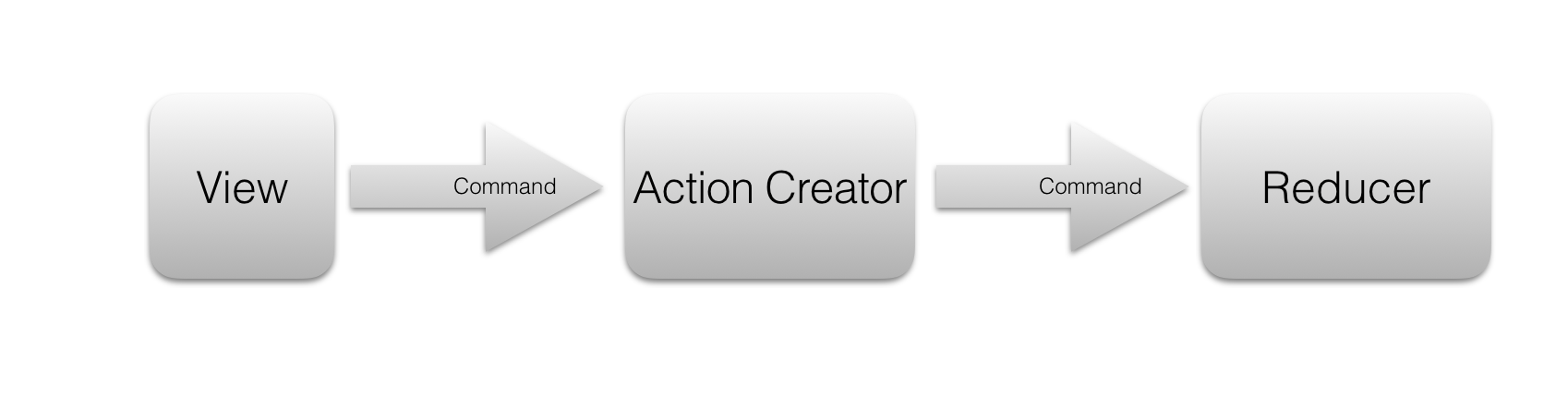
Qdux基于redux的事件流机制,比redux更简单,更容易理解和使用。 所有的事件流只通用fire接口进行派发一条command, 派发后首先有action creator创建为一个action, 然后同样的command会被传送到reducer中心进行处理,并最终更新到view.
安装
tnpm install @ali/qdux
API
Starter
Starter为程序入口的API, Starter只有一个方法 ,就是Starter.run。
import {Starter} from '@ali/qdux';
import app from './app';
Starter.run(app);
addAction
增加一个action创建器
import {addAction, fire} from '@ali/qdux';

//静态payload的action

/*
 fire({
    type: 'ADD_ONE'
 })
 */

addAction({
    type: 'ADD_ONE',
    payload: 1
});

// 动态payload
/*
 fire({
    type: 'ADD_CUSTOM',
    payload: 6
 })
 */
addAction({
    type: 'ADD_CUSTOM',
    payload: (value)=> {
        return value;
    }
});
addReducer
增加一个数据处理器, 每一条响应的action,都会产生一条响应的数据处理器
import {addReducer} from '@ali/qdux';
/**
 * 这里的value,相当于state.value
 */

addReducer({
    value(initValue=0, action){
        switch (action.type) {
            case 'ADD_ONE':
            case 'ADD_CUSTOM':
                return initValue + action.payload;
            default:
                return initValue;
        }
    }
});
addReducer 每一个key 值,都会在state里增加一个对应的值。 以上的value,在 view的 this.props.value里可以获取到。
fire
fire是全局的命令派发器,可以在任意的模块里派发,并在reducer里进行处理。 fire能派发三种命令
不带参数的静态命令
以下代码派发一条,静态命令
fire({
   type: 'ADD_ONE'
});
带参数的动态命令
fire({
   type: 'ADD_CUSTOM',
   payload: 6
});
异步请求的命令
异步请求的命令,payload的值函数,异步请求的命令不会进一步被reducer处理 以下为异步请求的命令
addAction({
    type: 'FETCH_LIST_DATA',
    payload: (params)=>{
        return ()=> {
            //更改Loading的状态
            fire({
                type: 'IS_LOADING_DATA',
                payload: true
            });

            let d =  [{value: "模拟数据" }];
            setTimeout(()=> {

                fire({
                    type: 'IS_LOADING_DATA',
                    payload: false
                });

                fire({
                    type: 'FETCH_LIST_DATA_SUCCESS',
                    payload: d
                });
            }, 2000);
        }
    }
});
默认的启动命令 APP_START
框架内置了程序的启动命令,希望在action和reducer里对改命令进行处理,做程序的数据初始化操作
import {APP_START} from '@ali/qdux';
addAction({
    type: APP_START,
    payload: 'initValue'
})

addReducer({
    value(state="", action){
        if(action.type == 'APP_START') {
            return action.payload;
        }
        return state;
    }
})
app 文件
app为程序的入口View文件,和一般的view并无任何区别, 通过Starter.run(app)后, app里会增加reduer里的所有属性 在代码里直接获取即可
import {View, Text, Button} from 'nuke';
import {createElement, Component, render} from 'rax';
import {fire} from '@ali/qdux';

class Counter extends Component {
    onClick=(v)=> {
        fire({
            type: 'BUTTON_CLICK',
            payload: v
        })
    }
    render() {

        return (
            <View style={{flex:1,flexDirection: 'row',justifyContent: 'flex-start'}}>
                <Button onPress={() => this.onClick(-1)}>减少</Button>
                <Text>{this.props.value}</Text>
                <Button onPress={() => this.onClick(1)}>增加 </Button>
            </View>
        );
    }
}

module.exports = Counter;
使用自带的例子
例子使用qap-cli开发,执行以下命令既可以看到响应的例子
tnpm install qap-cli -g
git clone  qdux.git
cd ./examples
tnpm install
qap debug
最后
本框架暂时只支持rax, 将在下一步支持react。