
redux-postgrest
v1.6.0
Published
<a href="https://www.npmjs.com/package/redux-postgrest"> <img src="https://img.shields.io/npm/v/redux-postgrest.svg" alt="Version" /> </a>
Downloads
71


Readme
🐘 Redux-Postgrest
A library to make developing with React and postgREST as effortless as possible, by taking care of all the plumbing 🔧.
Why?
One of the great things about PostgREST is that it can remove any indirection between your React application and your database, treating your data model itself as a "single, declarative source of truth".
Redux-PostgREST fully embraces this philsosophy. Your tables, views and functions are mapped to redux action types using PostgREST's own documentation endpoint.
Now, when you want to query your database, all you have to do is just dispatch redux actions, and then select the response data! 👍
🧰 What's in the box
- A middleware - takes care of data fetching
- A reducer - stores API requests and responses
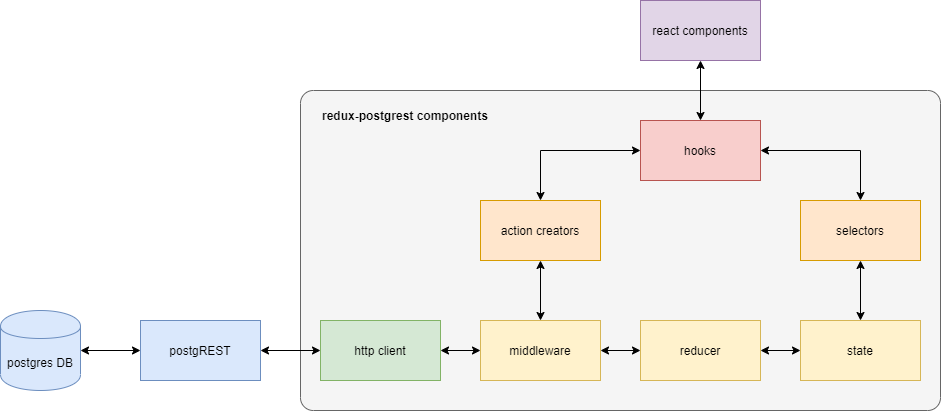
Optionally, to make life even easier:
- Action creators
- Selectors - in development
- Hooks
🏁 Quickstart
Install
yarn add redux-postgrestConfigure
// store.js
import { applyMiddleware, combineReducers, createStore } from "redux";
import { connectPgRest } from "redux-postgrest";

const { reducer, middleware } = connectPgRest({
  url: "http://localhost:8000" // Your postgREST server
});

const store = createStore(
  combineReducers({ api: reducer }),
  applyMiddleware(middleware)
);

export default store;
Make a table
-- your postgres db:

CREATE TABLE my_table_name (
  example_id       INTEGER PRIMARY KEY GENERATED ALWAYS AS IDENTITY,
  example_text     TEXT,
  example_datetime TIMESTAMPTZ NOT NULL DEFAULT CURRENT_TIMESTAMP
);

INSERT INTO my_table_name (example_text) VALUES ('Hello world!');
Dispatch
// Component.js

const {
  useDispatchGet,
  useDispatchPost,
  useDispatchPatch,
  useDispatchDelete
} = makePgRestHooks("my_table_name"); // Your postgREST endpoint

function MyComponent() {
  const dispatch = useDispatchGet();

  useEffect(() => {
    dispatch()
  }, [dispatch]); // will only run after the component is first mounted

  // ...
}

export default MyComponent;
Select
// Component.js
import React from 'react';

const {
  useDispatchGet,
  useDispatchPost,
  useDispatchPatch,
  useDispatchDelete
} = makePgRestHooks("my_table_name"); // Your postgREST endpoint

function MyComponent() {
  const dispatch = useDispatchGet();

  useEffect(() => {
    dispatch();
  }, [dispatch]);

  const myTableData = useSelector(
    ({ api }) => api.my_table_name && api.my_table_name.GET.body
  );

  if(myTableData && myTableData.length) {
    return <span>{myTableData[0].example_text}</span> // Should say "Hello world!"
  }

  return null;
}

export default MyComponent;
License
MIT.