
redux-webauthn
v1.0.6
Published
Redux middleware for registering and authenticating users with the Web Authentication API.


Readme
redux-webauthn
Redux middleware for registering and authenticating users with the Web Authentication API (FIDO2).
Unsure what Web Authentication is? New to public key cryptography? Start at Webauthn.Guide!
This library provides Redux middleware and a reducer to help integrate Web Authentication (also known as FIDO2) into web applications, which will allow your users to authenticate with Touch ID, Windows Hello, Yubikeys, and more. Written in TypeScript for ease of use.
For security reasons, this library must be used in conjunction with a server-side application that is responsible for generating parameters for the Web Authentication API, and the server must properly validate registration and authentication objects (credentials and assertions) created by an authenticator.
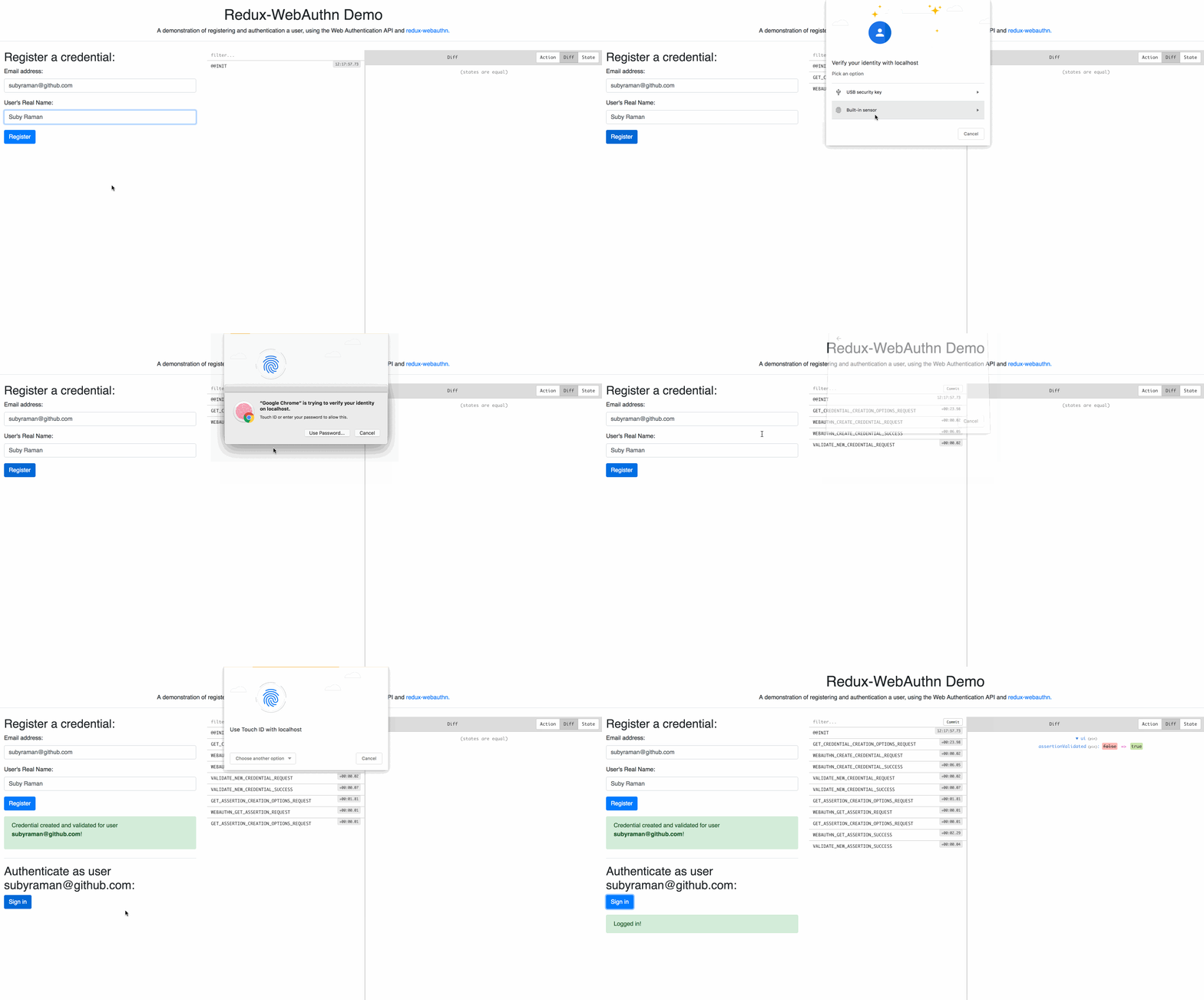
See a live demo of the client-side UX for the library
See the demo folder for an example demonstrating the full server-client WebAuthn data flow, using React, Redux, and Typescript.
Quickstart:
Add the middleware and reducer into your Redux store. The reducer is optional, but can help ease the initial integration of WebAuthn into your application.
import { applyMiddleware, compose, createStore } from "redux"
import {webauthnMiddleware, webauthnReducer} from "redux-webauthn"

const enhancer = compose(
    applyMiddleware(webauthnMiddleware),
)

const reducers = combineReducers({
    'webauthn': webauthnReducer,
    ...otherReducers
})

const store = createStore(reducers, {}, enhancer)
Registering a user:
When registering a user, a new credential keypair will be created, tied to that user and to your website's origin. See Webauthn.Guide for a deeper explanation.
The PublicKeyCredentialCreationOptions, the object used to generate a new keypair, must be created on your server for security reasons, and provided to the client. This library does not have opinions on how you should fetch that data from your server, but the redux-webauthn-server-example provides an sample middleware that describes a possible client-server API.
Once that object is retrieved, redux-webauthn provides action functions that can be used to execute the appropriate Web Authentication API function.
See the example middleware given in the demo, providing an example of how to use the action functions for registration:
 case RequestActionTypes.GET_CREDENTIAL_CREATION_OPTIONS_REQUEST: {
    next(action);

    const formData = _objectToFormData(action.payload);
    try {
        // request a PublicKeyCredentialCreationOptions object from the server
        const response = await postJSON('/webauthn_begin_activate', formData);

        if (response.fail) {
            throw new Error(response.fail);
        }

        // convert the b64 data from the server into ArrayBuffers for the WebAuthn API
        response.challenge = webauthnB64ToArrayBuffer(response.challenge);
        response.user.id = webauthnB64ToArrayBuffer(response.user.id);
        if (response.allowCredentials) {
            response.allowCredentials = response.allowCredentials.map((credential: any) => {
                return {id: webauthnB64ToArrayBuffer(credential.id), ...credential};
            })
        }

        // Dispatching this action will execute the `navigator.credentials.create` function to create a new credential.
        return store.dispatch(WebauthnActions.webauthnCreateCredentialRequest(response));
    } catch (err) {
        return store.dispatch(WebauthnActions.webauthnCreateCredentialFailure(err))
    }
Authenticating a user:
When registering a user, a new assertion will be created, with a signature created by the private key that was created during registration. See Webauthn.Guide for a deeper explanation.
As with registration, the browser API expects a PublicKeyCredentialRequestOptions object to be generated on your server, and passed into the API. The demo provides example middleware showing how that interaction can take place:
case RequestActionTypes.GET_ASSERTION_CREATION_OPTIONS_REQUEST: {
    const payload = {login_username: action.payload.username};
    const formData = _objectToFormData(payload);

    // get the `PublicKeyCredentialRequestOptions` from the server
    const response = await postJSON('/webauthn_begin_assertion', formData) as any;

    response.challenge = webauthnB64ToArrayBuffer(response.challenge);
    response.allowCredentials = response.allowCredentials.map((credential: any) => {
        credential.id = webauthnB64ToArrayBuffer(credential.id);
        return credential;
    });

    // Dispatching this action will execute the `navigator.credentials.create` function to create a new assertion.
    store.dispatch(
        WebauthnActions.webauthnGetAssertionRequest(response));
    break;
API
Action Functions
Functions
<Const> webauthnCreateCredentialFailure
▸ webauthnCreateCredentialFailure(error: Error): object
Defined in Actions.ts:33
Action function called after a failure in creating a new credential.
Parameters:
| Name | Type |
| ------ | ------ |
| error | Error |
Returns: object
<Const> webauthnCreateCredentialRequest
▸ webauthnCreateCredentialRequest(publicKeyCredentialCreationOptions: PublicKeyCredentialCreationOptions): object
Defined in Actions.ts:16
Action function to be called during registration, to create a credential. Dispatches the WEBAUTHN_CREATE_CREDENTIAL_REQUEST action, which will result in the webauthnMiddleware to call navigator.credentials.create, the native API for creating a credential.
If a credential is successfully created, the WEBAUTHN_CREDENTIAL_CREATE_SUCCESS action type will be dispatched onto the store, with the new PublicKeyCredential as payload.
If not successful, the WEBAUTHN_CREDENTIAL_CREATE_FAILURE action will be dispatched.
Parameters:
| Name | Type | Description |
| ------ | ------ | ------ |
| publicKeyCredentialCreationOptions | PublicKeyCredentialCreationOptions | |
Returns: object
<Const> webauthnCreateCredentialSuccess
▸ webauthnCreateCredentialSuccess(serializedCredential: SerializedPublicKeyCredential): object
Defined in Actions.ts:26
Action function called after a new credential has been successfully created after a user confirms a registratration. Note that the ArrayBuffer items in the assertion are automatically converted in to url-safe base64 strings, without padding.
Parameters:
| Name | Type | | ------ | ------ | | serializedCredential | SerializedPublicKeyCredential |
Returns: object
<Const> webauthnGetAssertionFailure
▸ webauthnGetAssertionFailure(error: Error): object
Defined in Actions.ts:56
Action function called after a failure in creating an assertion.
Parameters:
| Name | Type |
| ------ | ------ |
| error | Error |
Returns: object
<Const> webauthnGetAssertionRequest
▸ webauthnGetAssertionRequest(publicKeyCredentialRequestOptions: PublicKeyCredentialRequestOptions): object
Defined in Actions.ts:49
Action function to be called during authentication, to create an authentication assertion, which is used to prove an identity of a user. Dispatches the WEBAUTHN_GET_ASSERTION_REQUEST action, which will result in the webauthnMiddleware to call navigator.credentials.get, the native API for creating an assertion.
If a credential is successfully created, the WEBAUTHN_GET_ASSERTION_SUCCESS action type will be dispatched onto the store, with the new PublicKeyCredential as payload.
If not successful, the WEBAUTHN_GET_ASSERTION_FAILURE action will be dispatched.
Parameters:
| Name | Type |
| ------ | ------ |
| publicKeyCredentialRequestOptions | PublicKeyCredentialRequestOptions |
Returns: object
<Const> webauthnGetAssertionSuccess
▸ webauthnGetAssertionSuccess(assertion: SerializedAssertion): object
Defined in Actions.ts:65
Action function called after an assertion has been successfully created after a user confirms an authentication. Note that the ArrayBuffer items in the assertion are automatically converted in to url-safe base64 strings, without padding.
Parameters:
| Name | Type | | ------ | ------ | | assertion | SerializedAssertion |
Returns: object
Utility Functions
<Const> arrayBufferToWebauthnB64
▸ arrayBufferToWebauthnB64(arrayBuffer: ArrayBuffer): string
Defined in Utils.ts:6
Utility function for transforming an ArrayBuffer into a url-safe base64 string without padding, used across the WebAuthn API.
Parameters:
| Name | Type | Description |
| ------ | ------ | ------ |
| arrayBuffer | ArrayBuffer | |
Returns: string
<Const> webauthnB64ToArrayBuffer
▸ webauthnB64ToArrayBuffer(b64String: String): ArrayBuffer
Defined in Utils.ts:18
Utility function for transforming a url-safe base64 string without padding into an ArrayBuffer.
Parameters:
| Name | Type |
| ------ | ------ |
| b64String | String |
Returns: ArrayBuffer
Reducer
webauthnReducer
▸ webauthnReducer(state?: WebauthnState, action: ActionType<"Actions">): WebauthnState
Defined in Reducer.ts:11
Reducer that can be used to handle actions dispatched from the webauthnMiddleware object. Suggested unless you would like to create your own reducer to handle the actions yourself.
Parameters:
| Name | Type | Default value |
| ------ | ------ | ------ |
| Default value state | WebauthnState | {} as WebauthnState |
| action | ActionType<"Actions"> | - |
Returns: WebauthnState