
reevesagents
v2.0.0
Published
Local tmux-first workspace manager for AI CLI agents
Downloads
1,265

Maintainers
 mkcsai
Readme
ReevesAgents is free and open source under the Apache-2.0 license.
English · Deutsch · Français · Español · Português · Italiano · Türkçe · Русский · 简体中文 · العربية
ReevesAgents is a local workspace for AI coding CLIs. It runs Claude Code, Codex, OpenCode, Hermes, Kimi, DeepSeek, Qwen, Pi, Aider, Gemini CLI, Cline CLI, Crush, Goose, Kilo Code, Letta Code, Mistral Vibe, Grok Build, Kiro CLI, Factory Droid, Qoder CLI, Warp, Junie CLI, GitHub Copilot CLI, Cursor CLI, Rovo Dev CLI, and other provider CLIs side by side in tmux. You can use it as a normal CLI/TUI/Web UI, or attach its opt-in MCP so one agent can spawn, read, steer, and stop the rest.
Provider logins stay inside each provider CLI. ReevesAgents keeps its own state
as a few plain JSON files under ~/.reeves, and it runs only while you or an
attached CLI are using it.
Quick Start
pnpm add -g reevesagents
reevesagents doctor
reevesagents
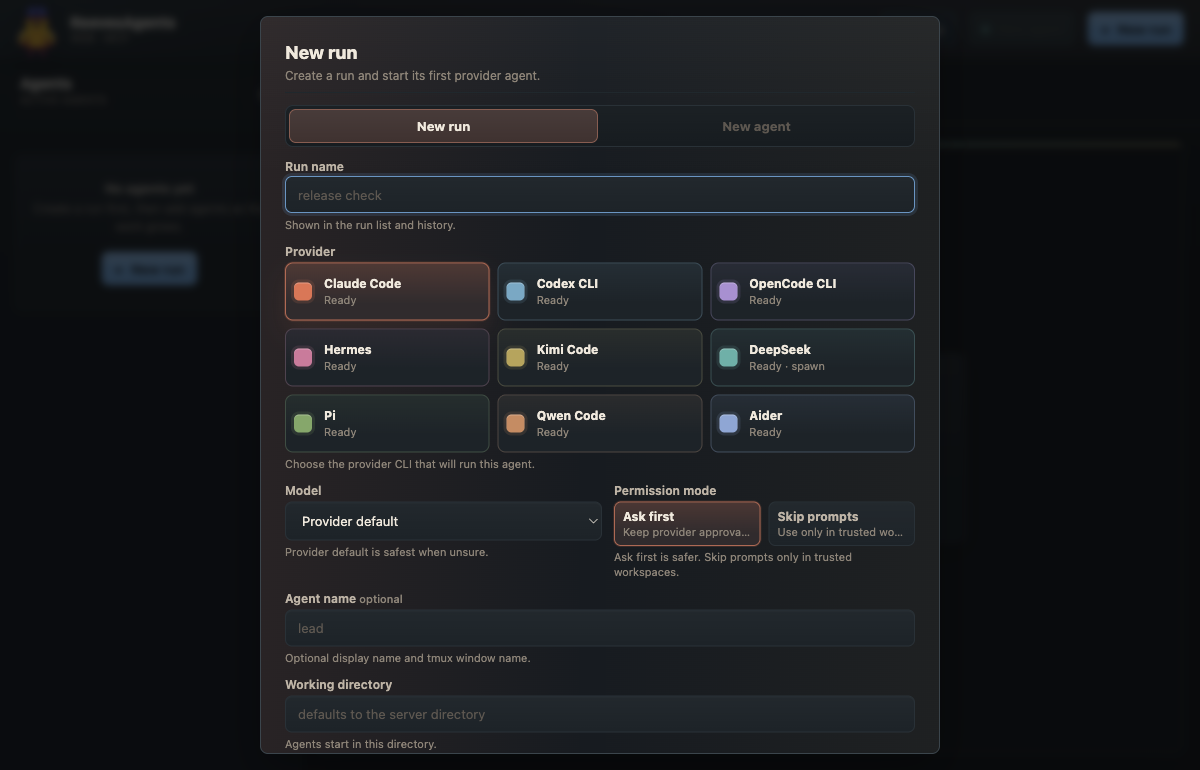
Start a run from the CLI:
reevesagents spawn claude-code:lead codex:tests hermes:research \
  --name "release check" \
  --prompt "Review the release path, test coverage, and docs."
Open the Web UI:
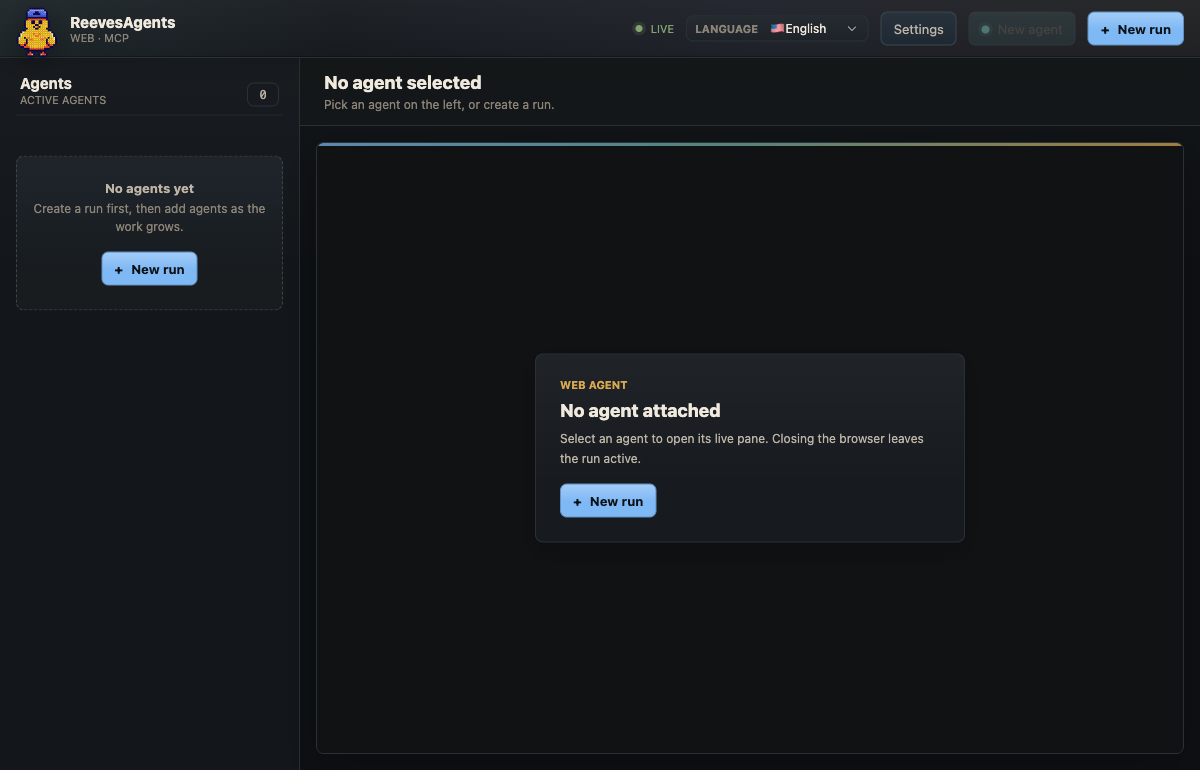
reevesagents webLet one attached agent drive the others:
reevesagents attach codex
reevesagents hosts
Restart that CLI after attach so it loads the MCP tools.
What It Gives You
| Surface | Use it for | | --- | --- | | TUI | Keyboard-first run control inside the terminal. | | Web UI | Local visual view of runs, panes, agents, approvals, and history. | | CLI | Scripts, smoke checks, spawning, state cleanup, and tmux jumps. | | Agent Control MCP | One trusted CLI can spawn and drive other CLIs through local tools. | | tmux | Real provider CLI windows that keep running after the UI closes. |
ReevesAgents is local by design. State is plain JSON under ~/.reeves, and the
CLIs it starts are the same CLIs you already use by hand.
Tools
Four tools sit next to the coding CLIs. Perplexity CLI searches the web, Google Colab CLI runs scripts and notebooks on CPU, GPU and TPU runtimes, Hugging Face CLI downloads and uploads models and datasets and runs jobs on the Hub, and Ollama runs local or cloud models from the terminal. Agents call them from their own shell.
reevesagents tools lists the four with a purpose, an example command, and
whether each is installed and signed in (for Ollama: reachable). Add --json
for scripts. An agent with the MCP attached gets the same list from
list_tools.
ReevesAgents needs Node.js 22.12+, tmux 3.0+, and at least one supported
provider CLI installed and authenticated. It supports macOS, Linux, and WSL.
# Homebrew
brew tap mertkayacs/reevesagents
brew install reevesagents

# pnpm
pnpm add -g reevesagents

# npm
npm install -g reevesagents

# one-shot checks
pnpm dlx reevesagents doctor
npx reevesagents doctor
Pin a version by replacing <version>:
pnpm add -g reevesagents@<version>Source install:
git clone https://github.com/mertkayacs/reevesagents.git
cd reevesagents
pnpm install
pnpm build
pnpm link --global
reevesagents doctor
The TUI and Web UI drive the same local runs:
No arguments launches the TUI.
| Command | Purpose |
| --- | --- |
| reevesagents | Launch the TUI. |
| spawn [spec...] | Start a run. Each spec is provider[:nickname[:model]]. |
| add [spec...] | Add agents to the most recent active run. |
| runs | List active runs. |
| agents [run-id] | List agents across runs or inside one run. |
| open <id> | Jump to a run or agent tmux window. |
| peek <agent-id> | Print recent output from one agent. |
| send <agent-id> <text...> | Paste text into an agent without submitting. |
| key <agent-id> <key> | Send enter, escape, arrows, tab, space, backspace, or ctrl-c. |
| interrupt <agent-id> | Send Ctrl-C to one agent. |
| stop <run-id> | Stop a run. Requires --yes or ALLOW_DESTRUCTIVE=1. |
| kill <agent-id> | Stop one agent. Requires --yes or ALLOW_DESTRUCTIVE=1. |
| setup | First-run check. --attach connects every installed host CLI. |
| doctor | Check Node, tmux, state, and provider CLIs. |
| web | Start the loopback-only Web UI. |
| providers | List provider ids, aliases, models, and availability. |
| tools | List Perplexity, Google Colab, Hugging Face and Ollama with purpose, example, and install and sign-in state. |
| approvals | List pending approval requests. |
| approve / deny | Resolve one approval request. |
| hosts | Show which host CLIs have ReevesAgents attached. |
| attach [cli] | Connect the Agent Control MCP to one host CLI, or all installed hosts. |
| detach <cli> | Remove that MCP connection from one host CLI. |
| skills [action] | Install, remove, or inspect the ReevesAgents skill. |
| mcp | Start the MCP server over stdio. Host CLIs run this. |
| config [key] [value] | Show or update editable settings. |
| presets | List saved run presets. |
| save-preset | Save a live run as a preset. |
| start-preset | Start a run from a preset. |
| delete-preset | Delete a preset. |
| delete | Delete one ended agent record. Requires confirmation. |
| delete-run | Delete one ended run and archive it. Requires confirmation. |
| history | List archived runs. |
| delete-history | Delete one archived history record. Requires confirmation. |
| reap | End zombie agents and agents past max_lifetime_ms, and kill orphan tmux sessions no run record owns. |
Common flags:
--json: available on script-facing list and action commands.--name <name>: name a run.--cwd <dir>: run agents from a directory.--prompt <text>: paste startup text into each spawned agent.--skip: skip provider permission prompts for unattended workers.--run <run-id>: add agents to a specific run.--port <n>and--no-open: Web UI startup options.
Agent Control is an optional MCP server. Attach it only to a CLI you trust to drive local tools:
reevesagents attach claude
reevesagents hosts
After restart, that CLI receives tools to spawn, read, send_text,
send_key, interrupt, kill, stop, manage approvals, manage presets, and
inspect hosts. The provider catalog is also exposed as reevesagents://providers.
In Claude Code you can install the connection and its operating instructions together as a plugin:
claude plugin marketplace add mertkayacs/reevesagents
claude plugin install reevesagents@reevesagents
The server is listed in the official MCP Registry as io.github.mertkayacs/reevesagents.
Workers do not receive the MCP by default. If a worker should create its own workers, attach ReevesAgents to that worker's CLI explicitly.
Codex sandboxes MCP calls by default, which blocks tmux launches. When using
Codex as the host that drives agents, run it with full access, for example
codex --sandbox danger-full-access, or use a Codex profile that sets
sandbox_mode = "danger-full-access".
Full tool reference: docs/mcp.md. Agent-facing operator guide: AGENTS.md.
State lives under ~/.reeves:
~/.reeves/
  config.json
  presets/
  runs/
  history/
Two environment variables override the default paths:
REEVES_REGISTRY: state root override forruns/,history/, andpresets/.REEVES_CONFIG: config file path override.
In the Web UI, open Config and choose Web theme → Light or Dark, then
save. The choice is stored in config.json and also applies to the embedded
terminal. The default is Dark. From the CLI, use reevesagents config web_theme light.
One registry per tmux server: the background orphan sweep judges session ownership against the current registry, so two registries must not share one tmux server.
Agent tasks, task notes, inbox messages and approval text are redacted for known token patterns before their state files are written.
Spread one project across multiple CLIs:
reevesagents spawn deepseek:backend claude-code:product codex:review \
  --name "feature x" \
  --prompt "Backend, product copy, and a review pass."
Watch one agent and then open its window:
reevesagents peek backend -n 40
reevesagents open backend
Stop the run when the work is done:
reevesagents stop "feature x" --yesreevesagents webThe Web UI binds to 127.0.0.1 only and runs in the foreground. Agents keep
running after the page closes because they live in tmux.
The Web UI uses optional runtime modules, ws and @lydell/node-pty. npm
installs them by default. CLI and TUI commands keep working without them, and
reevesagents web explains what is missing.
To reach it from another machine, forward the loopback port over SSH:
ssh -L 8080:127.0.0.1:8080 user@hosttmux is not installed. Install tmux and run reevesagents doctor. The TUI
auto-wraps itself in a tmux session named reeves; set
REEVES_NO_TMUX_WRAPPER=1 to skip that behavior.
A provider CLI is missing or signed out. ReevesAgents launches provider CLIs
that are already on PATH and authenticated. reevesagents doctor shows what
is detected. If a launched window is waiting at login, peek shows it.
The Web UI reports missing packages. Reinstall with optional dependencies
enabled, then run reevesagents doctor.
Port already in use. reevesagents web starts at 8080 by default. If it is
taken, the server binds the next free port in a small range and prints the URL.
Contributor docs live under docs/. Start with CONTRIBUTING.md, testing, and releasing.
End users do not need the development toolchain. Contributors use pnpm, TypeScript, tsup, Vitest, and ESLint from the repository.
Cite this
@software{kaya2026reevesagents,
  author = {Mert Kaya},
  title = {ReevesAgents: Local tmux workspace for AI coding CLIs},
  year = {2026},
  license = {Apache-2.0},
  url = {https://github.com/mertkayacs/reevesagents},
  version = {1.8.2}
}
Links
- Website: https://reevesagents.mertkayacs.com
- npm: https://www.npmjs.com/package/reevesagents
- GitHub: https://github.com/mertkayacs/reevesagents
- Eschatia Labs: https://eschatialabs.com
- Mert Kaya: https://mertkayacs.com
- Releases: https://github.com/mertkayacs/reevesagents/releases
- Issues: https://github.com/mertkayacs/reevesagents/issues
- Changelog: CHANGELOG.md
- License: Apache-2.0
An Eschatia Labs project by Mert Kaya.