
relative-import-fixer
v1.1.8
Published
CLI tool for TypeScript projects that removes unnecessary relative imports and replaces them with absolute imports based on the paths configured

Maintainers
 jhoanvandam
Readme
relative-import-fixer

Demo
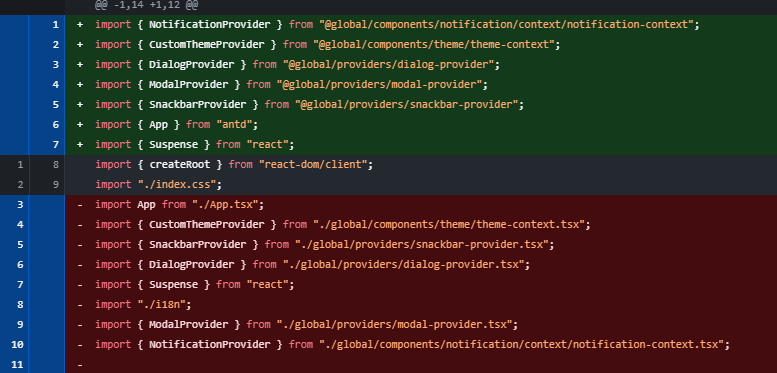
Description
relative-import-fixer is a CLI tool for TypeScript projects that removes unnecessary relative imports and replaces them with absolute imports based on the paths configured in tsconfig.json.
It also checks for uncommitted git changes before running to ensure your working directory is clean and to prevent accidental loss of work.
This tool uses ts-morph to manipulate source code and automatically fix imports, keeping your code organized and easy to maintain.
Installation
npm install -g relative-import-fixer
# or install locally in your project
npm install relative-import-fixer
Usage
Run the command in your project root:
npx run-relative-import-fixernpm run-relative-import-fixerpnpm run-relative-import-fixerThe script will prompt you for:
- The path to your
tsconfig.jsonfile (default:./tsconfig.json) - The glob pattern for the TS/TSX files to process (default:
src/**/*.{ts,tsx})
Before execution, the script verifies that you have no uncommitted changes and that tsconfig.json has absolute paths configured.
🧰 CLI Usage
npx relative-import-fixer [options]📌 Options
| Flag | Alias | Description | Default |
| ------------ | ----- | ------------------------------------------ | ------------------- |
| --tsconfig | -t | Path to your tsconfig.json file | tsconfig.json |
| --glob | -g | Glob pattern for files to process | src/**/*.{ts,tsx} |
| --force | -f | Skips Git dirty check and forces execution | false |
| --help | -h | Displays help information | |
📈 Example
npx run-relative-import-fixer -t ./tsconfig.base.json -g apps/student/**/*.{ts,tsx} --forceThis will:
- Skip Git check
- Use a custom tsconfig path
- Fix imports in the specified files
How it works
Git status check: ensures no uncommitted changes exist to prevent accidental work loss.
tsconfig.jsonvalidation: verifies thatcompilerOptions.pathscontains absolute path mappings.File processing: loads the specified TS/TSX files using
ts-morphand finds relative imports.Imports removal and fixing: removes relative imports that aren't Node.js built-ins or dependencies and repairs missing imports with absolute paths.
Imports organization: organizes imports in each file for clean and maintainable code.
Main API / Functions
checkGitStatusAndExitIfDirty(): checks git status.hasAbsoluteTsconfigPaths(tsconfigPath: string): validates absolute paths in tsconfig.verifyTsConfigFile(tsConfigPath: string): verifies tsconfig file existence.isSideEffectImport(importDecl: ImportDeclaration): verifies if the import is Side Effect Type ex:(import './index.css').isPackageJsonDependency(importName: string): verifies if the import is from the packageJSON libraries.isNodeBuiltin(path: string): verifies if the import is from the core of Typescript.fixRelativeImports({ globPattern, tsConfigPath }): performs the import transformation from relative to absolute.
Keywords
typescript, imports, import-fixer, relative-imports, ts-morph, code-transformation, cli-tool, nodejs, typescript-transformer, absolute-imports
Used Dependencies
Thanks to the authors and maintainers of the great open source projects that make this tool possible, especially: This project relies on the following main libraries:
- ts-morph — TypeScript compiler API wrapper for source code manipulation.
- simple-git — Simple interface for running Git commands in Node.js.
License
MIT License © 2025 Jhoan Hernández