
remark-interlinear-gloss
v1.0.3
Published
Interlinear glossing with Markdown using remark-directive

Maintainers
 cubedhuang
Readme
remark-interlinear-gloss
remark plugin to support interlinear glossing for linguistics in Markdown.
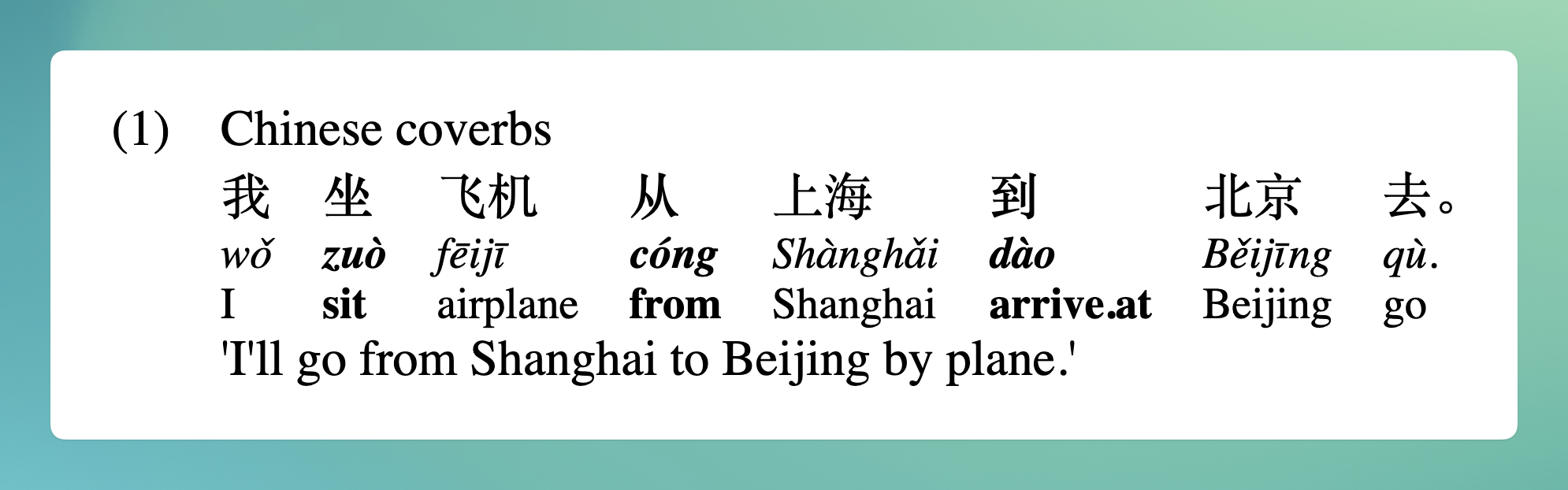
:::gloss
| Chinese coverbs
我 **坐** 飞机 **从** 上海 **到** 北京 去。
/ wǒ **zuò** fēijī **cóng** Shànghǎi **dào** Běijīng qù.
= I **sit** airplane **from** Shanghai **arrive.at** Beijing go
| 'I'll go from Shanghai to Beijing by plane.'
:::
Contents
What is this?
This package is a unified (remark) plugin to add support for linguistic interlinear glossing via remark-directive.
When should I use this?
This project is useful for Markdown documents that include interlinear glossed text, such as linguistics papers and language documentation. Because it uses remark-directive, keep in mind that it won't be portable to other Markdown renderers. On your own site it can be great!
Install
This package is ESM only. In Node.js (version 16+), install with npm:
npm install remark-interlinear-glossIn Deno with esm.sh:
import remarkInterlinearGloss from "https://esm.sh/remark-interlinear-gloss@1";In browsers with esm.sh:
<link rel="stylesheet" href="https://esm.sh/remark-interlinear-gloss@1/styles.css">
<script type="module">
  import remarkInterlinearGloss from "https://esm.sh/remark-interlinear-gloss@1?bundle";
</script>
Use
Say our document example.md contains the following. (Note that \: is used because remark-directive would otherwise interpret :237 as an empty text directive.)
## Rule 1: Word-by-word alignment

Interlinear glosses are left-aligned vertically, word by word, with the example. E.g.

:::gloss
| Indonesian (Sneddon 1996\:237)
Mereka di Jakarta sekarang.
= they in Jakarta now
| 'They are in Jakarta now.'
:::
…and our module example.js contains:
import rehypeStringify from "rehype-stringify";
import remarkDirective from "remark-directive";
import remarkInterlinearGloss from "remark-interlinear-gloss";
import remarkParse from "remark-parse";
import remarkRehype from "remark-rehype";
import { read } from "to-vfile";
import { unified } from "unified";

const file = await unified()
  .use(remarkParse)
  .use(remarkDirective)
  .use(remarkInterlinearGloss)
  .use(remarkRehype)
  .use(rehypeStringify)
  .process(await read("example.md"));

console.log(String(file));
…then running node example.js yields:
<h2>Rule 1: Word-by-word alignment</h2>
<p>Interlinear glosses are left-aligned vertically, word by word, with the example. E.g.</p>
<figure class="gloss">
<figcaption class="gloss-header">Indonesian (Sneddon 1996:237)</figcaption>
<ol class="gloss-body">
  <li>
    <ol class="gloss-column">
      <li class="gloss-word gloss-word-text">Mereka</li>
      <li class="gloss-word gloss-word-gloss">they</li>
    </ol>
  </li>
  <li>
    <ol class="gloss-column">
      <li class="gloss-word gloss-word-text">di</li>
      <li class="gloss-word gloss-word-gloss">in</li>
    </ol>
  </li>
  <li>
    <ol class="gloss-column">
      <li class="gloss-word gloss-word-text">Jakarta</li>
      <li class="gloss-word gloss-word-gloss">Jakarta</li>
    </ol>
  </li>
  <li>
    <ol class="gloss-column">
      <li class="gloss-word gloss-word-text">sekarang.</li>
      <li class="gloss-word gloss-word-gloss">now</li>
    </ol>
  </li>
</ol>
<p class="gloss-footer">'They are in Jakarta now.'</p>
</figure>
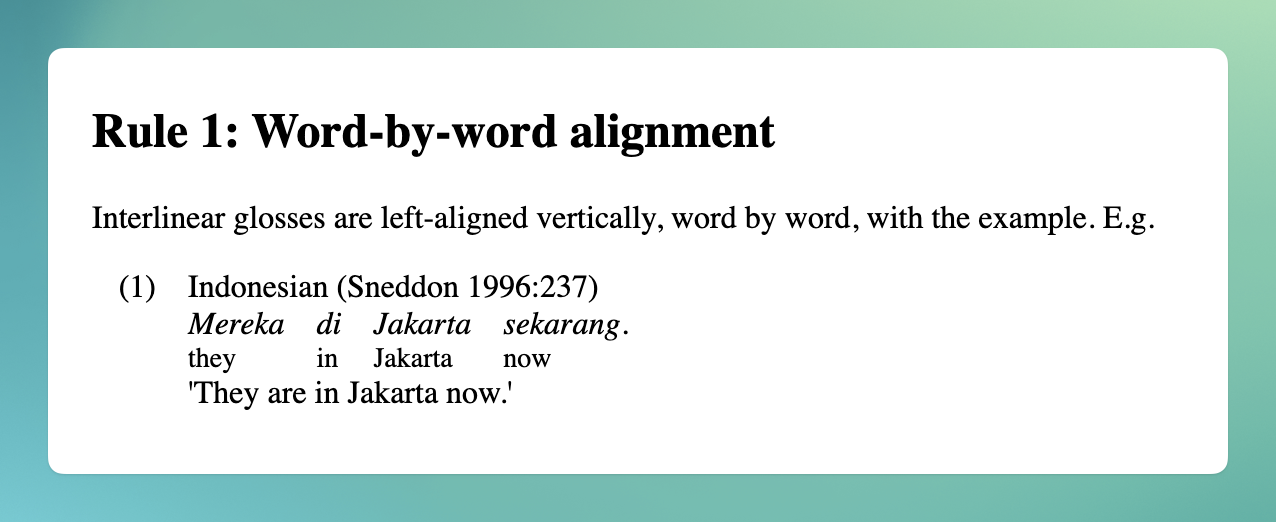
When the base styles are imported from "remark-interlinear-gloss/styles.css", the output is as follows:
Syntax
Inside a :::gloss directive, each line is parsed as follows:
| Prefix | Meaning | CSS class |
| ------ | ---------------------- | ------------------------------- |
| (none) | Source text | gloss-word-text |
| / | Transliteration | gloss-word-transliteration |
| = | Gloss | gloss-word-gloss |
| \| | Header/footer metadata | gloss-header / gloss-footer |
Lines prefixed with | at the beginning or end of the block become headers or footers respectively. Outside of headers and footers, all words are automatically divided into columns. Additional Markdown styles may be used at any point in the gloss, as shown below.
:::gloss
| Chinese
你 写 **书**
/ ní xiě **shū**
= 2SG write **book**
| 'You write a **book**.'
:::
CSS
This package includes optional base styles. Import them in your project:
import "remark-interlinear-gloss/styles.css";Or with esm.sh:
<link rel="stylesheet" href="https://esm.sh/remark-interlinear-gloss@1/styles.css" />Or write your own styles targeting these classes:
.gloss— the outer<figure>.gloss-header— the<figcaption>for header lines.gloss-body— the<ol>containing all columns.gloss-column— the<ol>containing words in one column.gloss-word— the<li>for each word.gloss-word-text— source text words.gloss-word-transliteration— transliterated words.gloss-word-gloss— glossed words.gloss-footer— the<p>for footer lines
API
This package exports no identifiers. The default export is remarkInterlinearGloss.
unified().use(remarkDirective).use(remarkInterlinearGloss)
Add support for interlinear glossing. remark-directive must be used before remark-interlinear-gloss.
Returns
No parameters. Returns undefined.
Types
This package is fully typed with TypeScript.
Security
Use of remark-interlinear-gloss does not involve rehype (hast) or user content so there are no openings for cross-site scripting (XSS) attacks.
Related
remark-directive— required for directive syntax