
remotion-captions-kit
v0.2.0
Published
Animated caption presets and headless caption primitives for Remotion, built on @remotion/captions

Maintainers
 bblackwell21
Readme
remotion-captions-kit
Animated caption presets and headless caption primitives for
Remotion, built on top of
@remotion/captions.
I built this making videos for videoventure.ai
after hitting the same two walls over and over: pages split purely by time,
so you'd get lines like "the blank page. This" welded across a sentence
boundary, and there just weren't enough caption styles to offer people.
@remotion/captions handles parsing and stops there. This kit is
everything after that: pagination that breaks where a person would, the
timing math every caption style needs, and ready-made animated styles like
the ones short-form editors ship built in.
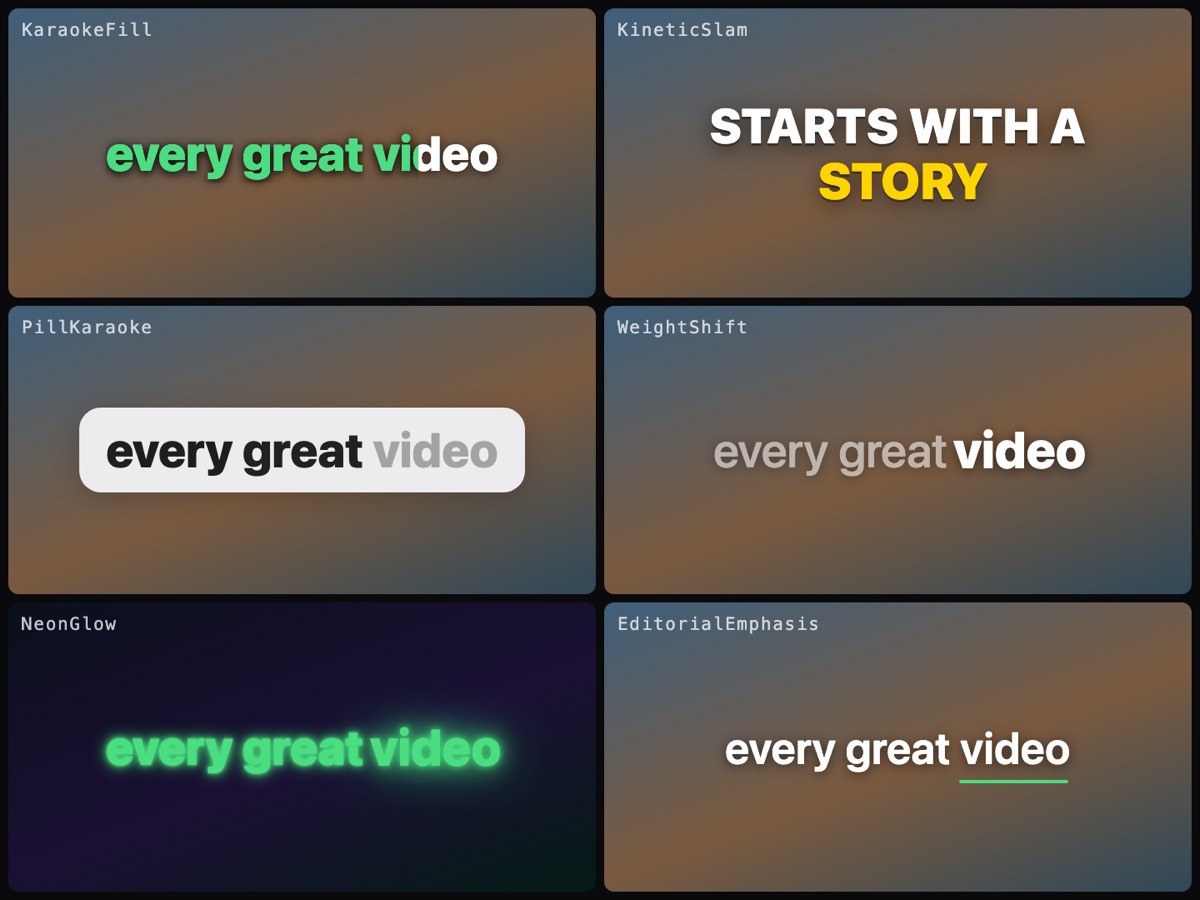
Presets
| Preset | Look |
| --- | --- |
| KaraokeFill | Color sweeps left-to-right through the active word |
| KineticSlam | Bold uppercase words slam in one by one with overshoot |
| PillKaraoke | The line sits in a rounded pill; words darken as spoken |
| WeightShift | Minimal: the active word carries the weight, the rest sit back |
| NeonGlow | The active word ignites; spoken words keep an afterglow |
| EditorialEmphasis | The line rises in as one piece; an underline sweeps the active word |
Install
npm i remotion-captions-kitremotion, @remotion/captions, and react are peer dependencies; any
Remotion v4 project already has them.
Quick start
import {
  captionsFromWords,
  useCaptionPages,
  CaptionTrack,
  KineticSlam,
} from "remotion-captions-kit";

// Word timings from Whisper, ElevenLabs, AssemblyAI, …
const WORDS = [
  {word: "every", start: 0.25, end: 0.55},
  {word: "great", start: 0.55, end: 0.9},
  {word: "video", start: 0.9, end: 1.35},
  // …
];

export const MyVideo = () => {
  const {captions} = captionsFromWords({words: WORDS});
  const {pages} = useCaptionPages({captions, maxDurationMs: 1200});

  return (
    <CaptionTrack pages={pages}>
      {(page) => (
        <KineticSlam
          page={page}
          theme={{activeColor: "#FFD400", position: "bottom"}}
          emphasis={[{words: ["video"], color: "#FFD400"}]}
        />
      )}
    </CaptionTrack>
  );
};
Already using createTikTokStyleCaptions()? Every preset takes its
TikTokPage directly, skip captionsFromWords and pass your pages in.
Pagination that respects sentences
The stock createTikTokStyleCaptions() groups words purely by time
window, so a page can read "the blank page. This", welding a sentence
end to the start of the next one, straight across a pause. This kit's
createCaptionPages() (what useCaptionPages uses) breaks pages the way
a person would:
- after sentence-ending punctuation (
.!?…), including inside closing quotes and brackets ("done."“done.”(done.)) - at silences of
silenceGapMsor longer (default 400ms) - before a word that would push the page past
maxDurationMs(default 1200) ormaxCharsPerPage(default 42) — time alone doesn't bound line length, so fast speech overflows the safe area without a character cap
and it avoids the breaks a person wouldn't make:
- Abbreviations don't end sentences.
Dr. Chen,vs.,the U.S. market,J. R. R. Tolkien,$1.5 millionall stay on one line. Words that can end a sentence either way (etc.,U.S.,Inc., list numbers) break only when the next word looks like a fresh start — soleft the U.S./Then everything changedbreaks, andthe U.S. marketdoesn't. - Cap-forced breaks move to the nearest clause boundary. Rather than
splitting
we packed the car, locked the / door and left, it backs up to the comma:we packed the car,/locked the door and left. - Flash pages get merged. A page that would show for less than
minDurationMs(default 300) joins a neighbour, soYes.No.Maybe.becomes one readable line instead of three 4-frame flickers. Set it to0to keep every break. - Orphans get evened out. A cap break at the end of a phrase strands
the tail on its own —
This is where you/start.A page holding fewer thanminWordsPerPagewords (default 2) is merged away if there's room, and if there isn't, one word moves across the break instead:This is where/you start.A cap break was arbitrary to begin with, so shifting it costs nothing. Set it to1for deliberate one-word-at-a-time pacing.
Neither cleanup pass will cross a silence or a sentence end — those are
real boundaries, and welding across them is the thing the stock paginator
gets wrong. So orphan control is best-effort, not a guarantee: with a real
boundary on both sides and no room to merge, the page stays as it is.
Usually that means maxDurationMs is too tight to hold the phrase —
a story worth telling, needs 1600ms and can't be paginated without an
orphan at a 1200ms cap.
Whitespace doesn't matter
Caption.text is whitespace-sensitive in @remotion/captions: a leading
space means "new word", and omitting it merges your whole transcript into
one page — [{text: "hello"}, {text: "there"}] renders as hellothere.
Deepgram and AssemblyAI emit bare words, Whisper emits them space-prefixed,
and getting it wrong is a documented footgun
(remotion#4555).
createCaptionPages() reads the convention off the array instead of making
you know which one you have. If no caption carries a leading space, every
caption is its own word. If any does, the spaces are honoured exactly, so
genuine sub-word splits (" Remo" + "tion") still join up. Malformed
input is handled too: out-of-order and overlapping words are sorted,
whitespace-only and non-finite entries are dropped, and no page ever comes
back with an infinite or negative durationMs.
It emits the same TikTokPage shape, so it drops into anything built on
@remotion/captions.
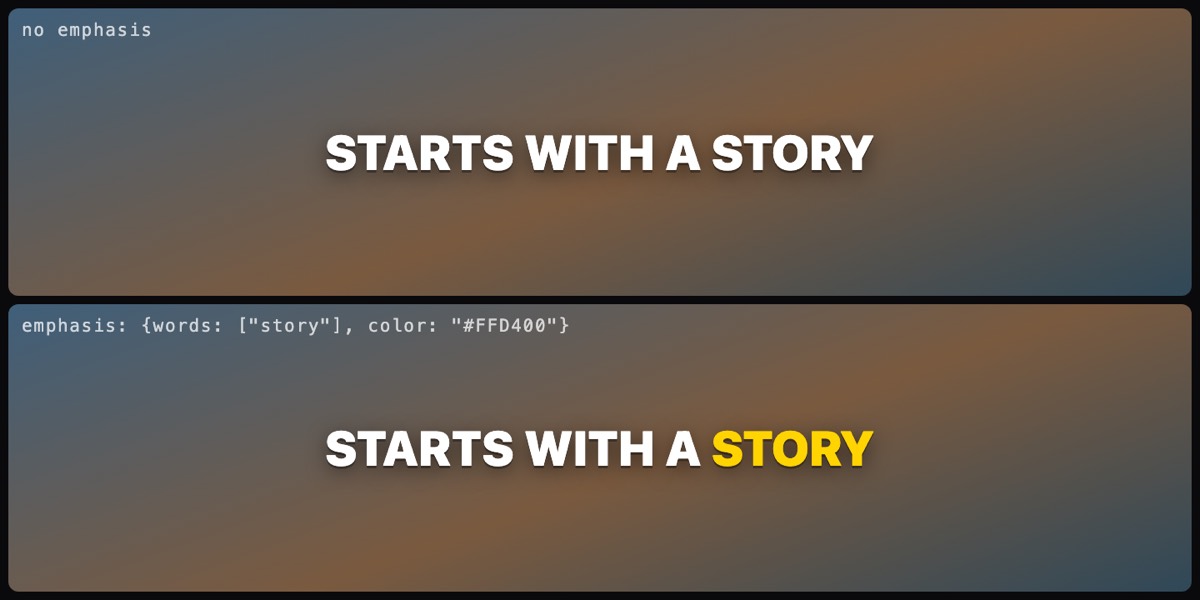
Emphasis: per-word color and style
Every preset accepts emphasis rules that match words and restyle them:
emphasis={[
  {words: ["profit", "free"], color: "#FFD400"},
  {match: (token, i) => i === 0, style: {fontStyle: "italic"}},
]}
Matching is case-insensitive and ignores punctuation, so "start" matches
the token " start.".
Theming
All presets share one CaptionTheme; each reads the fields it needs:
type CaptionTheme = {
  fontFamily?: string;
  fontSize?: number;      // px at your composition's resolution
  textColor?: string;     // base/non-active words
  activeColor?: string;   // highlight / fill / glow
  pillColor?: string;     // pill & box backgrounds
  position?: "top" | "center" | "bottom";
  edgeOffset?: number;    // fraction of height from the chosen edge
  paddingX?: number;      // horizontal padding, fraction of width
  maxWidth?: number;      // caption block cap, fraction of width
};
All placement values are fractions of the composition, so one theme works
at every resolution. To clear TikTok/Reels UI chrome, raise edgeOffset
to ~0.18. On wide compositions, maxWidth: 0.65 keeps lines readable:
const theme = {position: "bottom", edgeOffset: 0.18, maxWidth: 0.65};Rolling your own style
The headless layer is exported, so a custom style is ~30 lines:
import {useTokenStates, placementStyle, resolveTheme} from "remotion-captions-kit";

const MyStyle = ({page}) => {
  const {tokens} = useTokenStates({page}); // isActive, hasAppeared, progress per word
  // render spans however you like
};
useTokenStates does the absolute-vs-relative time conversion for you,
the classic source of captions lighting up early or late.
SRT files
SRT works too. Cues carry no word timing, so splitCaptionsIntoWords()
distributes each cue's duration across its words by length. Close enough
that word-level styles read correctly:
import {parseSrt} from "@remotion/captions";
import {splitCaptionsIntoWords, useCaptionPages} from "remotion-captions-kit";

const {captions} = parseSrt({input: srtFileContents});
const {captions: words} = splitCaptionsIntoWords({captions});
const {pages} = useCaptionPages({captions: words});
Prefer page-level styles for SRT (PillKaraoke, EditorialEmphasis) if
the approximation bothers you; they only depend on cue timing.
Demo & tests
pnpm install
pnpm studio   # Remotion Studio with all six presets on sample timings
pnpm test     # vitest suite for pagination, SRT splitting, emphasis
License
MIT