
replypages-discordjs
v1.1.6
Published
A module to allow page by page embeds in discord.js using reactions


Readme
ReplyPages-discordjs
This module is used to make simple interfaces that you can flip through by adding and removing reactions.
The buttons are as follows:

From there you can create large and small paged interfaces.
To get started:
const Discord = require('discord.js');
const replyPages = require('replypages-discordjs');

let client = new Discord.Client();

replyPages.createListener(client);
To send the interface you must use
Discord.Message.replyPages([ //Discord.Message is a typedef use a message that it replies to
    new Discord.RichEmbed().setTitle('1st'),
    new Discord.RichEmbed().setTitle('2nd'),
    new Discord.RichEmbed().setTitle('3rd'),
    new Discord.RichEmbed().setTitle('4th'),
    new Discord.RichEmbed().setTitle('5th')
]);
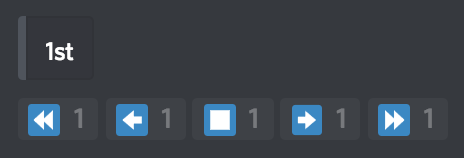
The above would respond with the following:
A way to use it may continue as follows:
client.on('message', (message) => { //When a message is recived
    if (message.author.bot) return;
    if (message.message.content == '!guilds') { //if the message is "!guilds"
        let embeds = []; //create the array of embeds to be sent

        client.guilds.forEach(guild => { //Get all guilds
            let embed = new Discord.RichEmbed() //make the embed
                .setTitle(guild.name) //Add the name to the embed
            if (guild.iconURL) {
                embed.setImage(guild.iconURL) //add the icon if exists
            }
            embed.setFooter((embeds.length + 1) + '/' + client.guilds.size); //for first 1/<guildcount>
            embeds[embeds.length] = embed; //add the embed to the array
        }); //repeat to make an embed for every guild

        message.replyPages(embeds); //send the array of embeds using <message>.replyPages(<embed array>)
    }
});