
repnix
v1.0.4
Published
Local-first repository health orchestration for JavaScript and TypeScript projects

Maintainers
 zhamilto
Readme
RepNix


Keep your JavaScript and TypeScript repositories from missing the guardrails you meant to add.
RepNix is a local-first CLI that inventories the checks already protecting a repository, identifies useful gaps without duplicating your tooling, and helps you safely add a focused set of complementary tools.
It is for maintainers with existing repositories who want consistent guardrails without maintaining a personal checklist of packages, scripts, configuration, and CI changes for every project. RepNix supports JavaScript and TypeScript repositories first, while also covering workspace consistency, documentation, supply-chain policy, CI workflows, release readiness, and frontend performance.
RepNix orchestrates the tools you choose. It does not replace your existing TypeScript, ESLint, Biome, Prettier, Vitest, Jest, Knip, OSV-Scanner, dependency-cruiser, or package-quality workflows.

Get started
Requirements: Node.js 20+ and one of npm, pnpm, Yarn, or Bun.
Install RepNix as a development dependency, then run a read-only inventory:
npm install --save-dev repnix
npx repnix audit
If RepNix recommends checks you want to add, run the interactive setup. It explains why each check matters and previews every package, script, configuration file, and CI change before applying anything:
npx repnix setupSetup requires an interactive terminal to apply changes. In non-interactive environments, repnix setup --plan --format json emits a revalidatable, read-only plan.
Once setup is complete, run the unified health check:
npm run healthFor detailed findings and remediation, use:
npx repnix check --detailsAlready have RepNix installed? Run npx repnix audit from the repository root.
The demo uses an intentionally under-protected TypeScript project. RepNix identifies relevant gaps, then setup --plan previews the packages, scripts, and configuration it would add without applying anything.
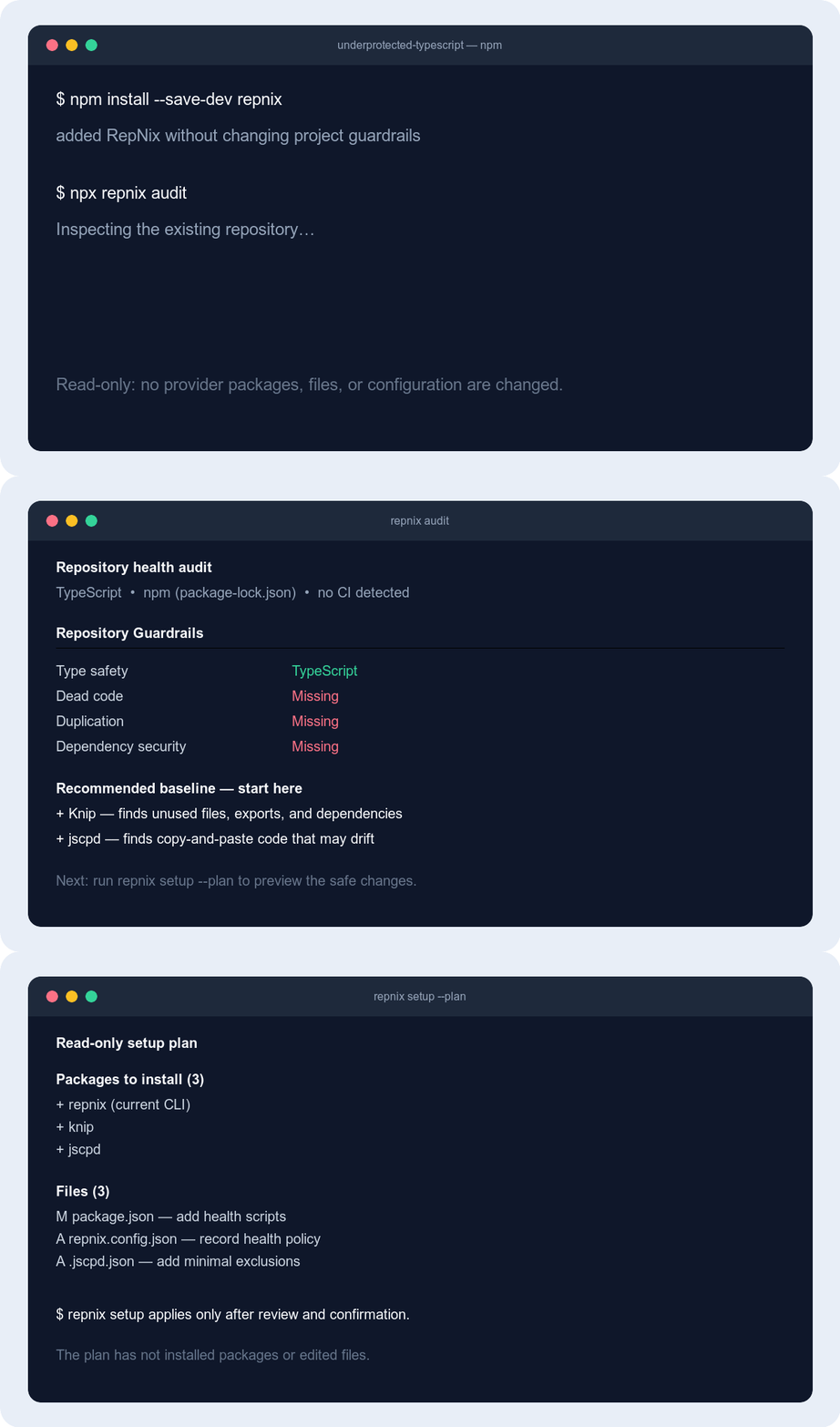
The workflow
audit → choose recommendations → setup → check- Audit the repository without modifying it.
- Choose the providers that fit your project.
- Set up packages, scripts, configuration, and optional CI integration through a previewed plan.
- Check all active health providers with one command.
Think of repository health as a set of safety nets:
- Type safety catches mismatched values before the program runs.
- Linting and formatting catch risky patterns and keep code consistent.
- Tests protect behavior when code changes.
- Dead-code and duplication checks find code that is unused or repeated.
- Security checks look for known vulnerabilities in third-party dependencies.
- Architecture and bundle checks protect module boundaries and shipped JavaScript size.
- Package publishing checks verify what npm consumers will receive.
RepNix detects which of these apply to your repository and shows the next useful step. A recommendation is not automatically a problem: optional checks often need a project-specific rule or budget before they can be useful.

Why RepNix?
Most repositories accumulate quality tools one at a time. That makes it easy to miss important coverage, add overlapping analyzers, or leave CI with a collection of unrelated commands.
RepNix gives you a clear inventory and a deliberate next step:
- Works with your repository. Detects the package manager, framework, language, monorepo layout, CI, scripts, configuration, and installed providers already in use.
- Measures active coverage. An installed package is not treated as a health check unless it is configured and actually contributes a capability.
- Adds only useful gaps. Recommendations are based on the repository’s shape and existing tools, with baseline, optional, and advanced priorities.
- Preserves your choices. Setup keeps existing scripts and configuration, creates only the files it needs, and shows conflicts instead of overwriting them blindly.
- Understands repository roles. CLI, library, web application, Node application, and tooling scopes receive different recommendations; a React dependency alone does not make a CLI a web app.
- Stays local-first. RepNix itself does not install packages or access a package registry during
auditorcheck. Active repository scripts and built-in providers are still executable project code. - Produces one report. Human-readable output groups findings by category and provider; JSON and SARIF formats support automation and code scanning.
- Supports gradual adoption. A reviewed baseline can record current debt so CI fails only on new findings.
- Scales across workspaces. Root and workspace quality scripts can run as separate, attributed results instead of hiding failures behind one aggregate command.
- Supports explicit policy. License and coverage thresholds can be recorded in
repnix.config.json.
Commands
| Command | Purpose | Changes files? |
| ----------------------------------- | ----------------------------------------------------------------------------- | :---------------------: |
| repnix audit | See what your repository already checks, what is missing, and why it matters. | No |
| repnix setup | Review and apply recommended checks through an interactive preview. | Yes, after confirmation |
| repnix setup --plan --format json | Emit a serializable setup plan without applying it. | No |
| repnix setup --apply-plan <file> | Revalidate, review, and apply a saved plan. | Yes, after confirmation |
| repnix check | Run all active health checks and get a short result. | No |
| repnix check <category> | Run one category, such as dead-code or security. | No |
| repnix check --details | Show findings, locations, remediation, and baseline state. | No |
| repnix check --format json\|sarif | Emit machine-readable output to stdout. | No |
| repnix check --write-baseline | Record reviewed current findings for gradual CI adoption. | Yes |
| repnix fix [category] | Apply fixes, then re-check only those categories (--no-check skips). | Yes |
Examples:
# Read-only inventory of existing coverage
npx repnix audit

# Interactive setup for recommended providers
npx repnix setup

# Run everything currently configured
npx repnix check

# Run one category
npx repnix check dead-code
npx repnix check package-health

# Send machine-readable output to another tool
npx repnix check --format json > repnix-report.json

# Inspect locations and provider-specific remediation
npx repnix check --details

# Record existing debt, then fail only on new findings
npx repnix check --write-baseline
Learn more
- Health categories
- Configuration and automation
- Setup and workflow
- Security and trust
- Built-in providers are defined in
src/providers/catalog.ts. - Compatibility pilots
- Launch demo notes
Development
Use Node.js 24.12+ on the 24.x line (recommended) or Node.js 22.20+ on the 22.x line for the development toolchain. The published CLI supports Node.js 20+; packaged CI tests exercise that runtime separately.
pnpm install
pnpm verify
The package uses Node.js ESM, strict TypeScript, and Vitest. See CONTRIBUTING.md for the built-in provider catalog workflow and pull-request guidelines.
Run the packaged smoke test locally after building:
pnpm build
pnpm test:package
The disposable consumer and provider acceptance tests are available through:
pnpm test:e2e
pnpm test:phase2
pnpm test:phase3
Compatibility and support
RepNix continuously validates its first-run workflow against a checked-in compatibility corpus covering CLI/Node applications, TypeScript projects, npm libraries, React and Next.js web applications, and pnpm workspaces. See the compatibility guide for the supported shapes and how to report a mismatch.
- npm package
- GitHub repository
- Report an issue
- Request a provider
- Report a security vulnerability
- Contributing guide
- Release history
- MIT license
Releases
Release intent is recorded in a Changeset file. Every push to main runs the full project verification; when pending Changesets exist, GitHub Actions opens a version-package pull request. Merging that pull request updates package.json, CHANGELOG.md, and the CLI version automatically. The resulting push publishes the package through npm trusted publishing and creates the matching v<version> Git tag. The workflow can also be started manually from GitHub Actions.
For a user-facing change, add a Changeset before merging:
pnpm changesetChoose patch, minor, or major, describe the change, and commit the generated .changeset/*.md file with your work. Maintenance-only changes can use a patch Changeset; documentation-only changes do not need a release unless they affect the published README or package documentation.