
repo-context-center
v0.8.2
Published
A ContextOps toolkit for AI coding agents.

Maintainers
 gokhanyigit
Readme
repo-context-center


repo-context-center is a local-first ContextOps layer for AI coding agents.
It gives agents a compact way to understand a repository before they read broadly: task routing, startup context, decision memory, lightweight project memory, token reduction, and agent guidance. It is not an AI coding agent, code generator, code reviewer, or security scanner.
It works with Codex, Claude Code, Cursor, Copilot-style agents, and other coding assistants that read repository instructions or Markdown docs.
Local-First
- No API keys.
- No AI service.
- No model costs.
- No background process.
- Works entirely on local repository metadata and Markdown files.
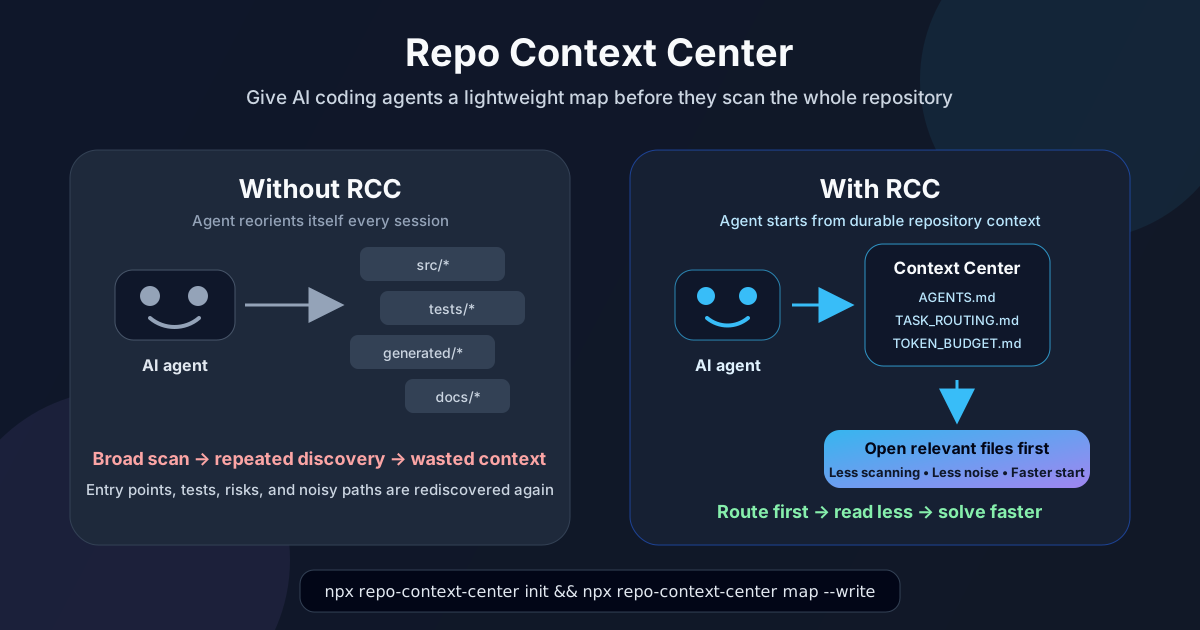
Repo Context Center installs and maintains small context files inside your repository, centered around AGENTS.md and docs/ai-context/*.
Quick Start
Users only need to initialize the repository:
npx repo-context-center initThat installs AGENTS.md, docs/ai-context/*, and .repo-context-center/config.json.
Preview installation without writing files:
npx repo-context-center init --dry-runOverwrite existing context templates:
npx repo-context-center init --forceAgent Workflow
The primary agent workflow is intentionally small:
rcc work "fix login bug"rcc work prints a concise agent-focused work brief:
- task intent;
- map freshness status and a refresh recommendation when context looks stale;
- recommended files to inspect first;
- relevant tests or test folders;
- recent decisions and memory;
- known risks;
- read-first guidance for required, task-specific, and optional context files;
- targeted lookup hints with deterministic reasons and confidence;
- a rough token estimate for the brief;
- the suggested next command after work.
Agents and integrations can request the same work brief as stable JSON:
rcc work "fix login bug" --jsonThe JSON form is generated from the same internal work brief as the human-readable output and includes stable fields such as schemaVersion, command, task, contextBudget, mapFreshness, recommendedFiles, relevantTests, readFirstGuidance, readFirst, targetedLookupHints, tokenEstimate, fastLookup, and nextCommand.
Control read-first breadth with a context budget:
rcc work "fix login bug" --context-budget minimal
rcc work "fix login bug" --context-budget balanced
rcc work "fix login bug" --context-budget deep
After meaningful completed work, the agent records lightweight work memory:
rcc done --summary "fixed login bug" --files auto --verify "npm test -- login"If a durable project decision was made, record that separately with the decision command described in Advanced Commands.
Agents should treat RCC output as navigation guidance, not proof. Source code remains the source of truth, and agents should verify source before editing.
If shell access is unavailable, agents should read the fallback context docs listed in AGENTS.md, especially COMMUNICATION_MODE.md, TASK_ROUTING.md, TOKEN_BUDGET.md, and DO_NOT_READ.md.
start and log still exist for backward compatibility and lower-level workflows. New agent flows should prefer work and done.
Why It Matters
AI coding agents often spend context rediscovering the same repository facts:
- Which files matter for this task?
- Which generated, vendored, build, or coverage paths should be skipped?
- Where are the risky shared modules?
- Which tests are likely related?
- What did a previous session already learn?
- Which project decisions should not be rediscovered?
That repeated discovery costs tokens, time, and attention. RCC gives agents a durable place to start, so each session can begin from compact repository context instead of rebuilding it from scratch.
Token Estimate Proof
Verified estimates on this repository:
| Scenario | Estimate | | --- | ---: | | Naive scan | 97,917 tokens | | Compact startup | 546 tokens | | Estimated reduction | 99.4% |
Validated against larger public repositories with different structures:
| Repository | Files scanned | Naive scan estimate | Compact startup context | Estimated reduction | | --- | ---: | ---: | ---: | ---: | | FastAPI | 500 | ~936K tokens | ~862 tokens | ~99.9% | | LangChain | 500 | ~1.18M tokens | ~4.4K tokens | ~99.6% |
Estimate whether RCC is reducing broad repo reads:
npx repo-context-center estimate --compare-naiveExample output excerpt from LangChain:
Naive comparison:
- Estimated naive scan: 1,189,515 tokens
- Estimated compact startup: 4,752 tokens
- Estimated saving: 1,184,763 tokens
- Estimated saving: 99.6%
Estimates use ceil(characters / 4) and are intended for relative comparison only. Actual tokenizer costs vary by model. RCC aims to reduce broad rediscovery, not guarantee savings.
Advanced Commands
User should start with only:
npx repo-context-center initThe commands below are useful for power users, CI, debugging, and integrations.
Refresh Repository Maps
map --write analyzes real files with deterministic heuristics and updates generated sections in AGENTS.md and docs/ai-context/*.
npx repo-context-center map --write --max-files 300Example output:
repo-context-center map

Files scanned: 500
Mode: write

Updated files:
- AGENTS.md (updated)
- docs/ai-context/TASK_ROUTING.md (updated)
- docs/ai-context/PROJECT_MAP.md (updated)
- docs/ai-context/HOTSPOTS.md (updated)

Detected:
- Task routing rows: 3
- Modules: 7
- Risks: 5
- Dependencies: 4
- Symbols: 6
- Hotspots: 7
Preview proposed generated context changes:
npx repo-context-center map --dry-run --max-files 300Check whether generated context is stale:
npx repo-context-center map --check --max-files 300Recommended --max-files values:
- Small and medium repos:
150-300. - Larger repos and monorepos:
500or more, tuned to keep CI runtime acceptable.
Find Focused Fallback Files
Use find when rcc work gives useful direction but the agent still needs a focused fallback before broad search:
npx repo-context-center find "decision command"find "<query>" returns focused file candidates with short deterministic reasons. It prefers task-routing, filename, path, paired-test, and lightweight content signals while filtering noisy generated, fixture, snapshot, archive, and internal context paths.
Estimate Token Savings
Use estimate when evaluating whether the context layer is pulling its weight:
npx repo-context-center estimate --compare-naive
npx repo-context-center estimate --task "fix login bug"
npx repo-context-center estimate --json
Integrations And JSON
Use work --json when an agent or tool needs the full work brief in a stable machine-readable shape:
npx repo-context-center work "improve package scripts" --json
npx repo-context-center work "improve package scripts" --json --context-budget minimal
Use suggest --json when integrating RCC recommendations into another tool:
npx repo-context-center suggest "fix auth login bug" --jsonUse scan --json to inspect only repository layout and lightweight context suggestions:
npx repo-context-center scan --jsonValidation, Archiving, And Decisions
Validate installed context files:
npx repo-context-center validate
npx repo-context-center validate --strict
Archive older long-running notes:
npx repo-context-center archive --keep 50Preserve durable project decisions:
npx repo-context-center decision add "Keep AGENTS.md compact" --reason "Reduce startup token overhead" --files AGENTS.md
npx repo-context-center decision list
npx repo-context-center decision search "agents"
Legacy Lower-Level Commands
start and log remain available for backward compatibility:
npx repo-context-center start "fix auth bug"
npx repo-context-center log "Fixed auth routing" --files src/auth.ts,tests/auth.test.ts
Prefer rcc work and rcc done for new agent workflows.
Command Reference
repo-context-center --help
repo-context-center init [--dry-run] [--force] [--github-action]
repo-context-center work "<task>" [--json] [--context-budget minimal|balanced|deep] [--max-files <number>]
repo-context-center done --summary "<summary>" [--files auto|none|"<path,path>"] [--verify "<command/result>"] [--dry-run]
repo-context-center map [--write] [--check] [--dry-run] [--json] [--max-files <number>]
repo-context-center validate [--strict]
repo-context-center archive [--keep <number>] [--dry-run]
repo-context-center estimate [--mode compact|investigation|detailed] [--task "<task>"] [--compare-naive] [--json] [--max-files <number>]
repo-context-center find "<query>" [--limit <number>]
repo-context-center decision add "<decision>" --reason "<reason>" [--status <status>] [--files <path,path>]
repo-context-center decision list
repo-context-center decision search "<query>"
repo-context-center suggest "<task>" [--json] [--symbols] [--max-files <number>]
repo-context-center scan [--json]
repo-context-center start "<task>" [--max-files <number>] [--copy]
repo-context-center log "<summary>" [--files <path,path>] [--dry-run]
| Command | Purpose | When to use |
| --- | --- | --- |
| init | install context templates | once per repo |
| work | print an agent work brief | before agent work |
| done | save completed-work memory | after meaningful agent work |
| map --write | refresh generated repo maps | after structure changes |
| map --check | detect stale generated maps | CI / PRs |
| validate | check required context files | setup and CI |
| archive | keep long-running notes compact | periodic maintenance |
| estimate | estimate context/token savings | evaluation and debugging |
| find | locate focused candidate files | fallback before broad search |
| decision | record durable project decisions | architecture/workflow decisions |
| suggest | get recommendations or JSON | tooling and integrations |
| scan | inspect repo layout | diagnostics |
| start | legacy startup prompt | backward-compatible workflows |
| log | legacy change log entry | backward-compatible workflows |
CI / Keeping Context Fresh
RCC does not run in the background. Generated context changes only when commands such as map --write are run.
Refresh generated context after significant structure changes, such as:
- new source roots;
- renamed modules;
- new CLI entrypoints;
- changed test layout;
- updated build or config files;
- new generated-output locations;
- changed package scripts.
Use map --check in CI to fail pull requests when generated context files are stale:
name: Repository Context Check

on:
  pull_request:

jobs:
  context-check:
    runs-on: ubuntu-latest
    steps:
      - name: Checkout
        uses: actions/checkout@v4

      - name: Setup Node
        uses: actions/setup-node@v4
        with:
          node-version: 20

      - name: Check generated context is fresh
        run: npx repo-context-center map --check --max-files 300
If CI fails, refresh generated sections locally:
npx repo-context-center map --write --max-files 300Then commit the updated AGENTS.md and docs/ai-context/* files.
Install the default PR validation workflow:
npx repo-context-center init --github-actionInstalled Files
repo-context-center init installs generic templates:
AGENTS.mddocs/ai-context/COMMUNICATION_MODE.mddocs/ai-context/TASK_ROUTING.mddocs/ai-context/MODULE_INDEX.mddocs/ai-context/PROJECT_MAP.mddocs/ai-context/RISK_REGISTER.mddocs/ai-context/DEPENDENCY_MAP.mddocs/ai-context/SYMBOL_MAP.mddocs/ai-context/TOKEN_BUDGET.mddocs/ai-context/DO_NOT_READ.mddocs/ai-context/HOTSPOTS.mddocs/ai-context/LESSONS_LEARNED.mddocs/ai-context/CHANGE_LOG.mddocs/ai-context/archive/
It also creates .repo-context-center/config.json.
repo-context-center map --write may update generated sections in:
AGENTS.mddocs/ai-context/TASK_ROUTING.mddocs/ai-context/MODULE_INDEX.mddocs/ai-context/PROJECT_MAP.mddocs/ai-context/RISK_REGISTER.mddocs/ai-context/DEPENDENCY_MAP.mddocs/ai-context/SYMBOL_MAP.mddocs/ai-context/HOTSPOTS.mddocs/ai-context/TOKEN_BUDGET.mddocs/ai-context/DO_NOT_READ.mddocs/ai-context/CHANGE_LOG.md
With --github-action, init also creates:
.github/workflows/repo-context-check.yml
Roadmap
| Capability | Status | | --- | --- | | Generic context installation | Available | | Agent work brief | Available | | Repository understanding | Available | | Task routing | Available | | Explainable recommendation reasons | Available | | Targeted fallback search | Available | | Token estimation | Available | | Stale context detection | Available | | CI freshness check | Available | | Durable work logs and decision memory | Available | | Context archiving | Available | | Richer import graph | Planned | | Better framework detection | Planned | | Safer merge/update UX | Planned | | Project-specific packs | Planned | | Context analytics | Planned | | Agent handover improvements | Planned |
Development
npm install
npm run build
npm test
Manual Release
This package is prepared for manual npm publishing.
npm run build
npm test
npm pack
The package publishes the compiled dist/ output, including the generic context templates copied during build. prepublishOnly runs build and tests before a manual npm publish.