
repo-onboarder
v1.0.4
Published
Turn any GitHub repo into a complete onboarding package — README, Architecture, Getting Started, and Tests — powered by IBM Bob

Maintainers
 mygemailf1
Readme
Developer Onboarding Accelerator
Turn any GitHub repository into a complete onboarding package in minutes — powered by IBM Bob.
Built for the IBM Bob Dev Day Hackathon 2026 · Theme: Turn idea into impact faster
Quick start (fastest)
# Runs via the published npm package
npx repo-onboarder https://github.com/expressjs/express
# Output written to ./output
If IBM Bob CLI is installed and authenticated, it will be used automatically.
If not, the tool falls back to Groq (configureGROQ_API_KEY).
GROQ_API_KEY=your_key npx repo-onboarder <repo-url>🎬 Demo Video 🎬
Click the thumbnail below to watch the demo on YouTube
📸 Screenshots
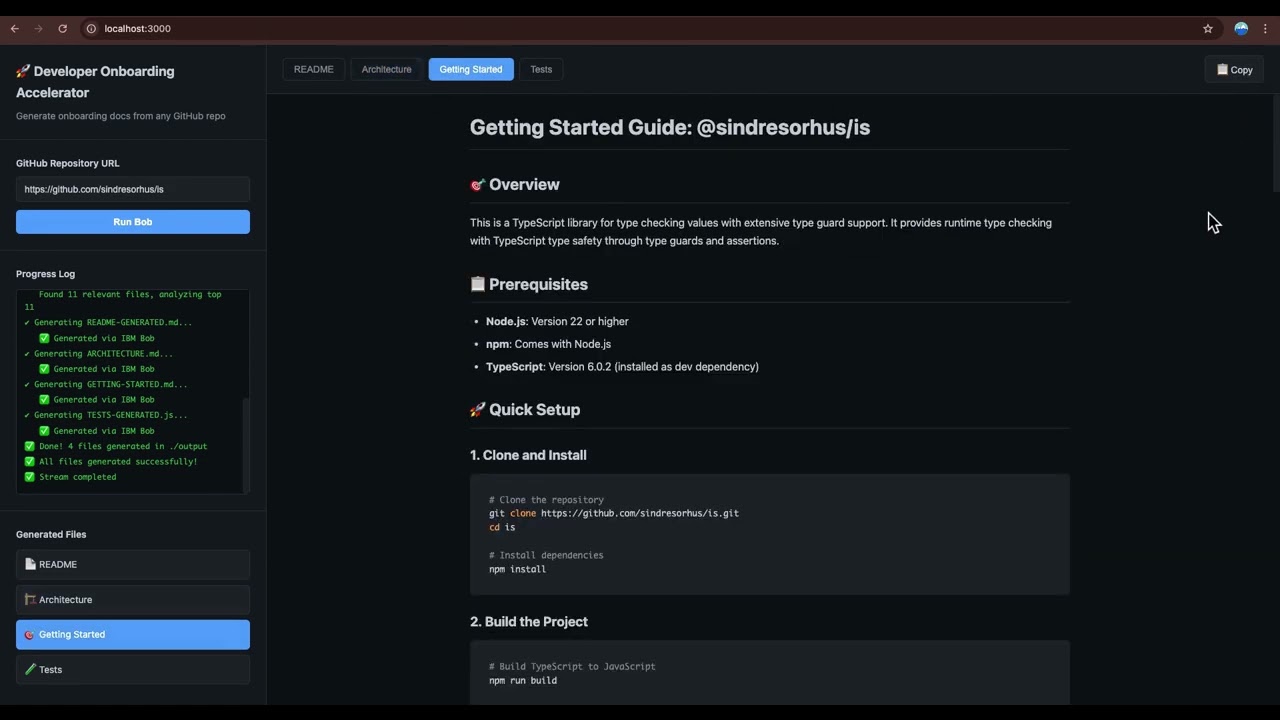
| IBM Bob Shell | CLI — All 4 files via Bob | Web UI | Bob in Action |
|---|---|---|---|
|  |
|  |
|  |
|  |
|
The Problem
Every developer has been there: you join a new project, clone the repo, and stare at thousands of lines of unfamiliar code. Where do you start? What does this thing actually do? Which files matter?
Onboarding a developer to a new codebase takes 4–8 hours on average. That's time spent:
- Reading through files with no clear entry point
- Reverse-engineering architecture from code
- Hunting for setup instructions scattered across wikis and Slack
- Writing tests from scratch just to understand what functions do
Multiply that by every new hire, every open source contributor, every team member switching projects — and you have a massive, invisible tax on developer productivity.
The Solution
Developer Onboarding Accelerator is a CLI + web tool that takes any GitHub repository URL and uses IBM Bob to automatically generate a complete onboarding package in minutes.
One command:
node cli.js https://github.com/expressjs/expressFour files, ready to use:
| File | What it contains |
|------|-----------------|
| README-GENERATED.md | Plain English explanation of what the repo does, its purpose, and key features |
| ARCHITECTURE.md | How the code is organized, main components, design patterns, and why the structure exists |
| GETTING-STARTED.md | Where new developers should start, key files to read first, setup steps, and common workflows |
| TESTS-GENERATED.js | Unit tests for the main functions — ready to run, covering typical use cases and edge cases |
IBM Bob reads the actual code, understands it, and writes documentation that would take a developer hours to produce manually.
Impact
| Metric | Before | After | |--------|--------|-------| | Time to get an actionable orientation | 4–8 hours | ~5–10 minutes | | Documentation written manually | Hours of work | Zero | | Barrier to open source contribution | High | Low | | New hire productivity | Day 3–5 | Day 1 |
Who benefits:
- New hires — get up to speed on day one instead of day five
- Open source maintainers — lower the barrier for contributors
- Engineering teams — reduce the onboarding tax across every project switch
- Solo developers — return to old projects without re-reading everything
AI Benchmark: IBM Bob vs Others
We ran the same 4 prompts against the same repo (expressjs/express) using IBM Bob, ChatGPT 4o, Perplexity Sonar, and Manus AI.
| Dimension | IBM Bob | ChatGPT 4o | Perplexity | Manus AI | |-----------|---------|------------|------------|----------| | README quality | ⭐⭐⭐⭐⭐ | ⭐⭐⭐⭐ | ⭐⭐ | ⭐⭐⭐ | | Architecture depth | ⭐⭐⭐⭐⭐ | ⭐⭐⭐ | ⭐⭐ | ⭐⭐⭐⭐ | | Getting started | ⭐⭐⭐⭐⭐ | ⭐⭐⭐ | ⭐⭐ | ⭐⭐⭐⭐ | | Tests generated | ⭐⭐⭐⭐⭐ | ⭐⭐⭐ | ⭐⭐⭐ | ⭐⭐⭐⭐ | | Automation | ⭐⭐⭐⭐⭐ | ⭐ | ⭐ | ⭐ |
IBM Bob produced the deepest, most actionable output — and it's fully automated in one command.
📊 Full comparison with detailed analysis →
How IBM Bob Is Used
IBM Bob is the primary AI engine for this tool. Bob is not a helper or an add-on — it is the core of what makes this work.
For each repository, the tool:
- Clones the repo and analyzes the top 20 most relevant files (entry points + core modules + key configs)
- Builds a structured codebase snapshot (code + file structure)
- Calls
bob do "<prompt>"four times with targeted, role-based prompts:- "You are a technical documentation expert. Given this codebase snapshot, generate a comprehensive README..."
- "You are a software architect. Generate an architecture overview explaining how the code is organized..."
- "You are a developer onboarding specialist. Generate a getting started guide for new developers..."
- "You are a test engineer. Generate unit tests for the main functions..."
- Captures Bob's output and writes it directly to files
Bob's ability to understand code context, infer intent, and write in natural language is what makes the output genuinely useful — not just a file listing or a summary, but real documentation a developer can act on immediately.
Fallback chain: If Bob times out or is unavailable (e.g., in cloud deployment), the tool automatically falls back to a Groq LLM chain:llama-3.3-70b-versatile → meta-llama/llama-4-scout-17b-16e-instruct → llama-3.1-8b-instant → allam-2-7b.
Demo
CLI:
node cli.js https://github.com/expressjs/express🚀 Developer Onboarding Accelerator
Repository: https://github.com/expressjs/express
✔ Cloning repo...
Cloned to .temp-repos/express
✔ Analyzing codebase...
Found 146 relevant files, analyzing top 20
✔ Generating README-GENERATED.md... ✅ Generated via IBM Bob
✔ Generating ARCHITECTURE.md... ✅ Generated via IBM Bob
✔ Generating GETTING-STARTED.md... ✅ Generated via IBM Bob
✔ Generating TESTS-GENERATED.js... ✅ Generated via IBM Bob
✅ Done! 4 files generated in ./outputWeb UI:
node server.js
# Open http://localhost:3000
Paste any GitHub URL, click Run Bob, and watch the progress stream live. Results appear in 4 tabs with markdown rendering and syntax highlighting.
Setup
Prerequisites
- Node.js 14+
- IBM Bob CLI installed and authenticated (
bob do "hello"should work) - Git
Install
git clone https://github.com/RandomProjects-db/Developer-Onboarding-Accelerator.git
cd Developer-Onboarding-Accelerator
npm install
Configure
cp .env.example .envEdit .env:
GROQ_API_KEY=your_groq_api_key_here # Free at https://console.groq.comIBM Bob is used automatically if you have the Bob CLI installed and authenticated locally.
GROQ_API_KEYis only needed for the fallback.
NPM Package
repo-onboarder is published on npm and can be used without cloning this repository.
Installation & Usage
# Option 1: Run directly with npx (no installation required)
npx repo-onboarder https://github.com/expressjs/express

# Option 2: Install globally
npm install -g repo-onboarder
repo-onboarder https://github.com/expressjs/express
Configuration
Create a .env file in your current directory with your Groq API key:
# .env
GROQ_API_KEY=your_groq_api_key_here
Or set it as an environment variable:
GROQ_API_KEY=your_key npx repo-onboarder <repo-url>How It Works
- Primary: Uses IBM Bob CLI if installed locally (
bob docommand) - Fallback: Uses Groq API with model chain:
llama-3.3-70b-versatilemeta-llama/llama-4-scout-17b-16e-instructllama-3.1-8b-instantallam-2-7b
Output files are saved to ./output/ in your current directory.
Docker
Run the tool in a container without installing Node.js locally. The Docker image is automatically published to GitHub Container Registry.
Pull and Run
# Pull the latest image
docker pull ghcr.io/randomprojects-db/developer-onboarding-accelerator:latest

# Run the web UI
docker run -p 3000:3000 \
  -e GROQ_API_KEY=your_key_here \
  ghcr.io/randomprojects-db/developer-onboarding-accelerator:latest

# Open http://localhost:3000
Run CLI in Docker
# Run CLI and save output to local directory
docker run --rm \
  -v $(pwd)/output:/app/output \
  -e GROQ_API_KEY=your_key_here \
  ghcr.io/randomprojects-db/developer-onboarding-accelerator:latest \
  node cli.js https://github.com/expressjs/express
Build Locally
# Build from source
docker build -t dev-onboarder .

# Run
docker run -p 3000:3000 -e GROQ_API_KEY=your_key dev-onboarder
Usage
CLI
node cli.js <github-repo-url>Output files are saved to ./output/.
Web UI
node server.jsOpen http://localhost:3000, paste a GitHub URL, click Run Bob.
Project Structure
dev-onboarder/
├── cli.js          # Entry point — accepts GitHub URL as CLI argument
├── index.js        # Orchestrator — clone → analyze → generate
├── analyzer.js     # Walks directory tree, builds codebase snapshot
├── generator.js    # Calls Bob CLI, captures output, writes 4 files
├── server.js       # Express server — wraps CLI, streams via SSE
├── public/
│   ├── index.html  # Single page web UI
│   ├── style.css   # Dark theme styling
│   └── app.js      # Frontend — SSE client, markdown rendering
└── .env.example    # Environment variable template
Running the Generated Tests
The generated TESTS-GENERATED.js uses Mocha + Supertest. Tests are fully runnable out of the box:
npm testOr run directly:
npx mocha output/TESTS-GENERATED.js --timeout 5000Example output:
  Express App
    ✔ should return 200 for GET /
    ✔ should return 404 for GET /unknown
    ✔ should return 200 for POST / with middleware
    ✔ should return 500 for GET / with error
    ✔ should return 200 for GET / with route parameter
    ✔ should return 200 for GET / with query parameter
    ✔ should return 200 for GET / with header

  7 passing (78ms)
Self-healing tests: The generator automatically runs the tests after generation. If any fail, it feeds the errors back to the AI to fix them — producing all-passing tests without manual intervention.
Note: Generated tests are a starting point. They validate core functionality of the analyzed repo. You may want to extend them with project-specific edge cases.
Why This Matters
The theme of this hackathon is "Turn idea into impact faster." Developer onboarding is one of the biggest hidden costs in software development — and it's solvable with AI.
This tool doesn't just demonstrate what IBM Bob can do. It solves a real problem that every developer faces, every time they touch a new codebase. The impact is immediate, measurable, and scales across teams and open source.
bob_sessions
See the bob_sessions/ folder for screenshots and logs of IBM Bob generating documentation during development and testing of this tool.
License
MIT