
repoboundary
v0.1.1
Published
Local CLI guardrails for protected files in AI-assisted Git repositories.
Downloads
327


Readme
RepoBoundary
RepoBoundary is a local CLI guardrail for developers using AI coding agents.
Define protected paths like src/auth/**, src/payments/**, prisma/schema.prisma, or supabase/migrations/**. If those protected files are created, modified, deleted, or renamed in staged Git changes, RepoBoundary blocks the commit and explains exactly what was touched.
Prompts guide the agent. RepoBoundary verifies what actually changed.
Demo
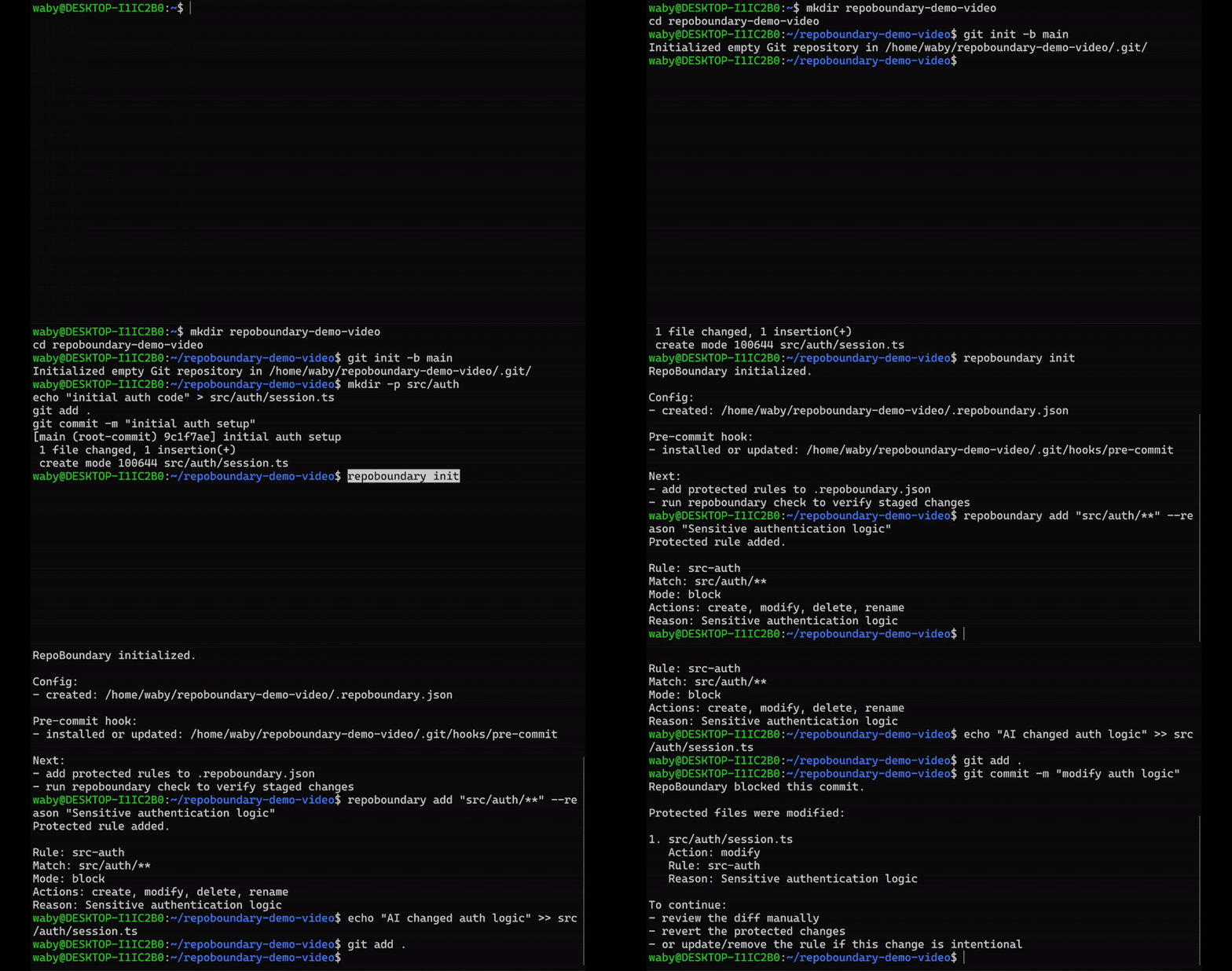
RepoBoundary blocks a commit when a protected path is changed:
Install
Requires Node.js 20 or later.
npm install -g repoboundaryConfirm the CLI is available:
repoboundary --helpQuick Start
Run inside a Git repository:
repoboundary init
repoboundary add "src/auth/**" --reason "Sensitive authentication logic"
Now stage a protected change:
# edit or create a file under src/auth/
git add .
git commit -m "test protected change"
RepoBoundary blocks the commit if the staged changes touch src/auth/**.
Example output:
RepoBoundary blocked this commit.

Protected files were changed:

1. src/auth/session.ts
   Action: modify
   Rule: src-auth
   Reason: Sensitive authentication logic

To continue:
- review the diff manually
- revert the protected changes
- or update/remove the rule if this change is intentional
Why RepoBoundary Exists
AI coding agents can edit many files quickly. That speed is useful, but it also creates risk when agents touch sensitive areas like authentication, payments, database schemas, migrations, infrastructure, or environment configuration.
RepoBoundary helps you keep the speed of AI-assisted coding while adding a deterministic check before sensitive changes are committed.
It does not depend on the agent behaving perfectly. It checks what actually reached Git staging.
Scope & Trust Model
RepoBoundary is a commit-time guardrail. It checks staged Git changes before commit and blocks protected paths from being committed unnoticed.
RepoBoundary does not prevent an AI agent, editor, script, or developer from changing files on disk.
It is not a sandbox, antivirus, malware scanner, secret scanner, or complete security system. The CLI runs locally, reads local Git state and .repoboundary.json, and does not upload your code.
Rules use Git repo-relative paths and glob patterns, such as src/auth/** or prisma/schema.prisma. Do not use absolute filesystem paths like /tmp/project/src/auth/** or C:\project\src\auth\**.
Commands
repoboundary init
Creates .repoboundary.json if missing and installs or updates the Git pre-commit hook without overwriting existing hook content.
repoboundary initrepoboundary add
Adds a protected Git repo-relative path or glob rule.
--reason is required so blocked commits explain why the path is protected.
repoboundary add "src/auth/**" --reason "Sensitive authentication logic"Default behavior:
Mode: block
Actions: create, modify, delete, rename
Absolute filesystem paths are rejected.
repoboundary remove
Removes one protected rule by ID.
repoboundary remove src-authrepoboundary status
Shows the repo root, config status, hook status, rule count, and rule details.
repoboundary statusrepoboundary check
Manually checks currently staged changes.
repoboundary checkExit codes:
0 = no protected staged changes
1 = protected staged changes found
2 = Git, config, or internal error
Config Example
.repoboundary.json:
{
  "version": 1,
  "rules": [
    {
      "id": "src-auth",
      "match": ["src/auth/**"],
      "actions": ["create", "modify", "delete", "rename"],
      "mode": "block",
      "reason": "Sensitive authentication logic"
    }
  ]
}
V0 supports mode: "block" only.
Each match entry is interpreted against Git repo-relative staged paths. Use src/auth/**, not /home/me/project/src/auth/** or C:\project\src\auth\**.
Blocked Commit Example
RepoBoundary blocked this commit.

Protected files were changed:

1. src/auth/session.ts
   Action: create
   Rule: src-auth
   Reason: Sensitive authentication logic

To continue:
- review the diff manually
- revert the protected changes
- or update/remove the rule if this change is intentional
Common Protected Paths
repoboundary add "src/auth/**" --reason "Sensitive authentication logic"
repoboundary add "src/payments/**" --reason "Payment logic requires review"
repoboundary add "src/billing/**" --reason "Billing logic requires review"
repoboundary add "prisma/schema.prisma" --reason "Database schema changes require review"
repoboundary add "prisma/migrations/**" --reason "Database migrations require review"
repoboundary add "supabase/migrations/**" --reason "Database migrations require review"
repoboundary add ".github/workflows/**" --reason "CI/CD changes require review"
repoboundary add ".env.example" --reason "Environment contract changes require review"
Example Workflow
mkdir repoboundary-demo
cd repoboundary-demo
git init

repoboundary init
repoboundary add "src/auth/**" --reason "Sensitive authentication logic"

mkdir -p src/auth
echo "test" > src/auth/session.ts

git add .
git commit -m "test protected file"
Expected result:
RepoBoundary blocked this commit.Troubleshooting
repoboundary init says you are outside a Git repository
Run it from an existing Git repo, or initialize one first:
git init
repoboundary initadd, remove, or check says the config is missing
Run:
repoboundary initCommits are not being checked
Run:
repoboundary statusThis shows whether the config exists and whether the pre-commit hook is installed.
The config is invalid
Fix .repoboundary.json so it matches the schema above.
Invalid config fails closed and blocks check / pre-commit validation.
A protected change is intentional
Review the diff first:
git diff --cachedThen choose one of these options:
# unstage the protected file
git restore --staged <path>

# revert the protected file
git restore <path>

# or deliberately update/remove the RepoBoundary rule
repoboundary remove <rule-id>
Git hooks can be bypassed
Git allows users to bypass local hooks with:
git commit --no-verifyRepoBoundary V0 is designed as a local guardrail for developers who want protection in their own workflow. It is not a complete enforcement system for teams. CI / Pull Request checks may be added in a future version if user feedback confirms the need.
Development
For local development from this checkout:
npm install
npm run typecheck
npm run test
npm run build
node dist/cli.js --help
Run the full check:
npm run checkLicense
MIT