
rethink-react
v0.1.0
Published
rethink-react CLI


Readme
Rethink React CLI
Work easily with rethink struture pattern in react.
How to install:
With YARN
$ yarn add global rethink-reactWith NPM
$ npm install -g rethink-reactGOTCHAS
if need create a component like UserList or CardUser or MenuItem
is recommended to use (-) to separate words.
ex: User-List = UserList at the end.
How work with:
After install you can open your rethink react-native app and run:
Creating a Component
$ rethink-gen create-component ComponentNameor shorthand
$ rethink-gen cc ComponentNamecan specify type of component
$ rethink-gen create-component ComponentName [options]

Options:
  --pure        create a PureComponent
  --stateless   create a Stateless Component
  --module      ModuleName create a component inside some module
  --web         create a Web Component (TODO)
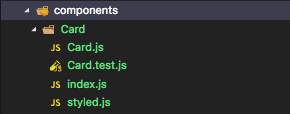
this command will generate a component like src/components/ComponentName
with this following structure:
Creating a Module
$ rethink-gen create-module MyModuleor shorthand
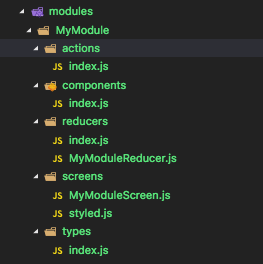
$ rethink-gen cm MyModulethis command will generate a modules like src/modules/MyModule
with this following structure:
Creating a Screen inside some Module
$ rethink-gen create-screen MyScreen -m MyModuleor shorthand
$ rethink-gen cs MyScreen -m MyModulethis command will generate a modules like src/modules/MyModule/screens/MyScreen.js
Creating a Redux Store
$ rethink-gen store-reduxor shorthand
$ rethink-gen srthis command will generate a store folder in src/

Show Help with Commands Information
$ rethink-gen helpWhat you can do:
- [x] Be possible to create a component inside
src/module/components/NewComponent - [x] Be possible to create a screen inside
src/module/screens/NewScreen.js - [x] Be possible to create stateless component. ex:
rethink-gen cc ComponentName -stateless - [x] Be possible to create pure component. ex:
rethink-gen cc ComponentName -pure - [ ] Be possible to work with web too *now work's onl with react-native. ex:
rethink-gen cc ComponentName -web
Help rethink dev's to improve this cli.