
richtemplate
v1.0.7
Published
***New Major Version Released!***


Readme
Javascript templating engine. 
New Major Version Released!
Rewritten in es6, and also perfomance improvements.
Require module for parsing html files to plain Javascript. There is two environments, one Development another production.
Installation
using npm
npm install richtemplateWhy Templating Engine
Most javascript templating engines, parsing to string. Domtemplate has dom elements or require modules. You has direct access to Dom elements. In this case no need for jquery selectors etc.
How it works
Below is image to show difference between prod and dev packages.
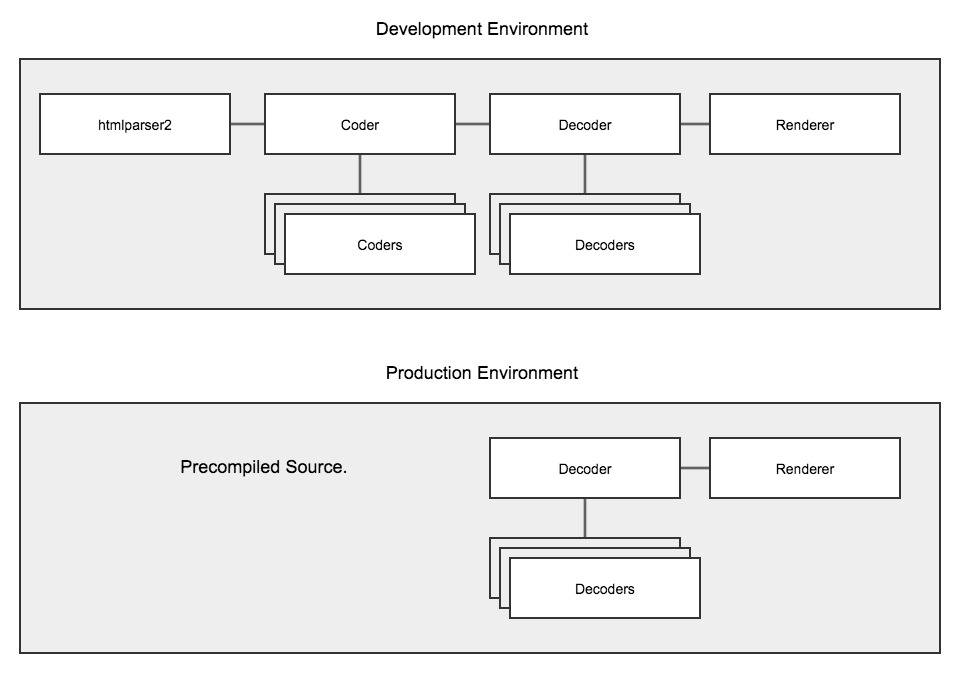
In the development Environment you use runtime version of package, which one parse on browser. For Production you use compiled app version, where is no need for parser and coder.
Prerequisites
You need to install nodejs and grunt CLI globally npm -g install grunt-cli
How to install
Run
npm install
Then
grunt
How to use
Usage examples see in examples section.
Fix paths in require.config file
Templating parser use custom coders
Component - <cp></cp> use for require modules
<cp src="buttonA/buttonA" tp-name="testButton" ></cp>
Where
srcis location of require Moduletp-namename of component. There also can be shortcut version
<cp-testButton src="buttonA/buttonA" ></cp-testButton>
-cp-testButton where testButton is the name of component
There can be used by only attributes as well
<div src="buttonA/buttonA" tp-type="cp" tp-name="testButton" ></div>
Placeholder - <pl></pl> use as containers in template, also can use in javascript as access to elements
<pl tp-name="testButton" tp-tag="h2" ></pl>
Where
tp-namename of Placeholder.tp-tagtag of Placeholder, default value isdiv.
There also can be shortcut version
<pl-header ></pl-header>
pl-headerwhereheaderis the name of placeholder
There can be used by only attributes as well
<h2 tp-type="pl" tp-name="header" ></h2>