
npm package discovery and stats viewer.

Discover Tips

  • General search

    [free text search, go nuts!]

  • Package details

    pkg:[package-name]

  • User packages

    @[username]

Sponsor

Optimize Toolset

I’ve always been into building performant and accessible sites, but lately I’ve been taking it extremely seriously. So much so that I’ve been building a tool to help me optimize and monitor the sites that I build to make sure that I’m making an attempt to offer the best experience to those who visit them. If you’re into performant, accessible and SEO friendly sites, you might like it too! You can check it out at Optimize Toolset.

About

Hi, 👋, I’m Ryan Hefner  and I built this site for me, and you! The goal of this site was to provide an easy way for me to check the stats on my npm packages, both for prioritizing issues and updates, and to give me a little kick in the pants to keep up on stuff.

As I was building it, I realized that I was actually using the tool to build the tool, and figured I might as well put this out there and hopefully others will find it to be a fast and useful way to search and browse npm packages as I have.

If you’re interested in other things I’m working on, follow me on Twitter or check out the open source projects I’ve been publishing on GitHub.

I am also working on a Twitter bot for this site to tweet the most popular, newest, random packages from npm. Please follow that account now and it will start sending out packages soon–ish.

Open Software & Tools

This site wouldn’t be possible without the immense generosity and tireless efforts from the people who make contributions to the world and share their work via open source initiatives. Thank you 🙏

© 2025 – Pkg Stats / Ryan Hefner

rims

v2.0.5

Published

Another way redux combines with react

Readme

Rims

Build Status codecov npm GitHub

即插即用的 reactredux 连接池, 提供与 react-redux 相同的 api, 使用闭包实现!

Why not react-redux ?

react-redux 通过 context 将整个项目变成了一颗 "组件树", 每个组件变成了这棵树上的节点
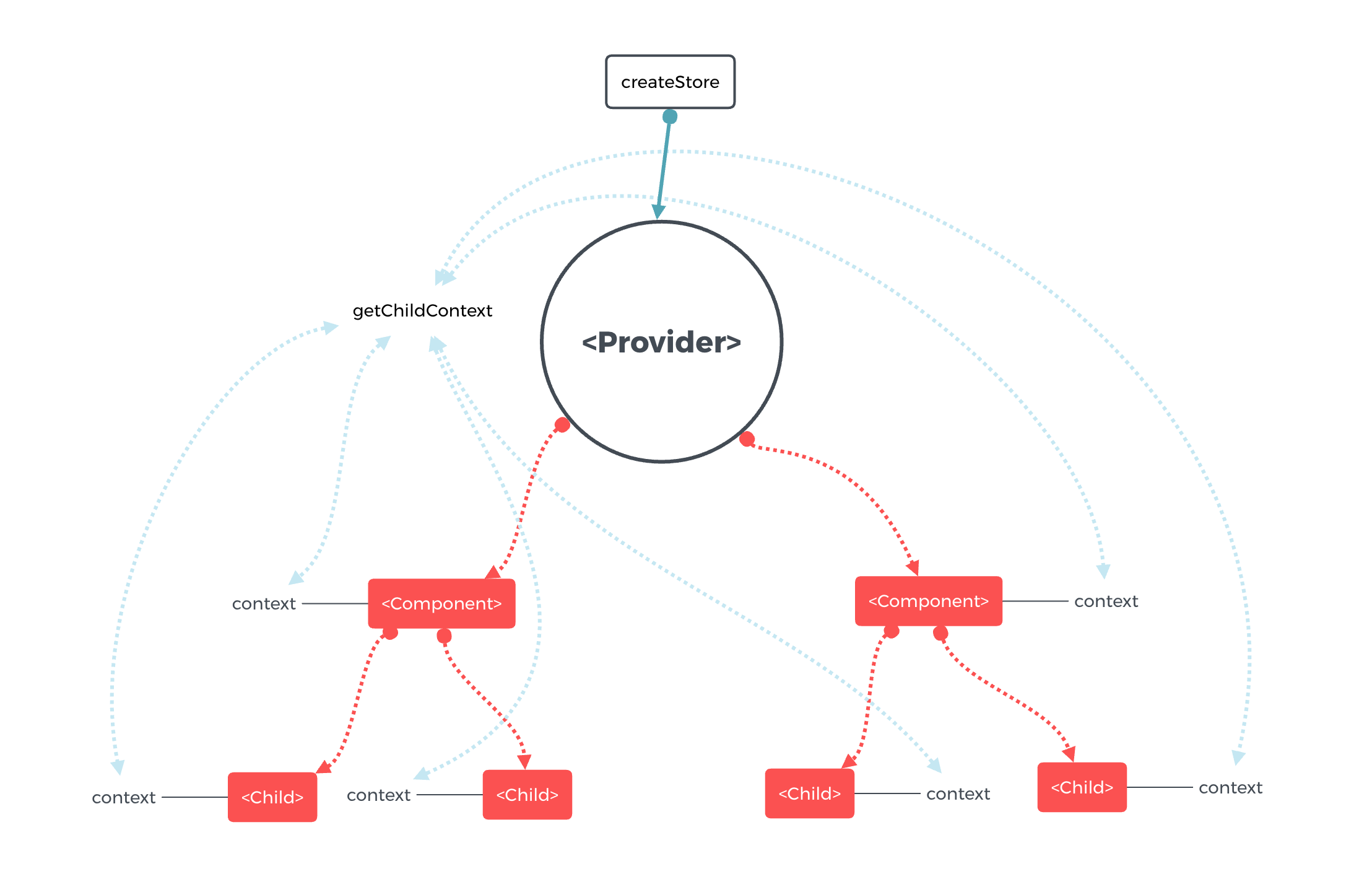
react-redux.png

这就意味着如果有一个组件脱离了这颗树, 那么这个组件将无法与 store 通信

rims 架构下, 整个项目看起来像是一个圆环, 无论是子组件或父组件, 他们直接与圆环中心相关联
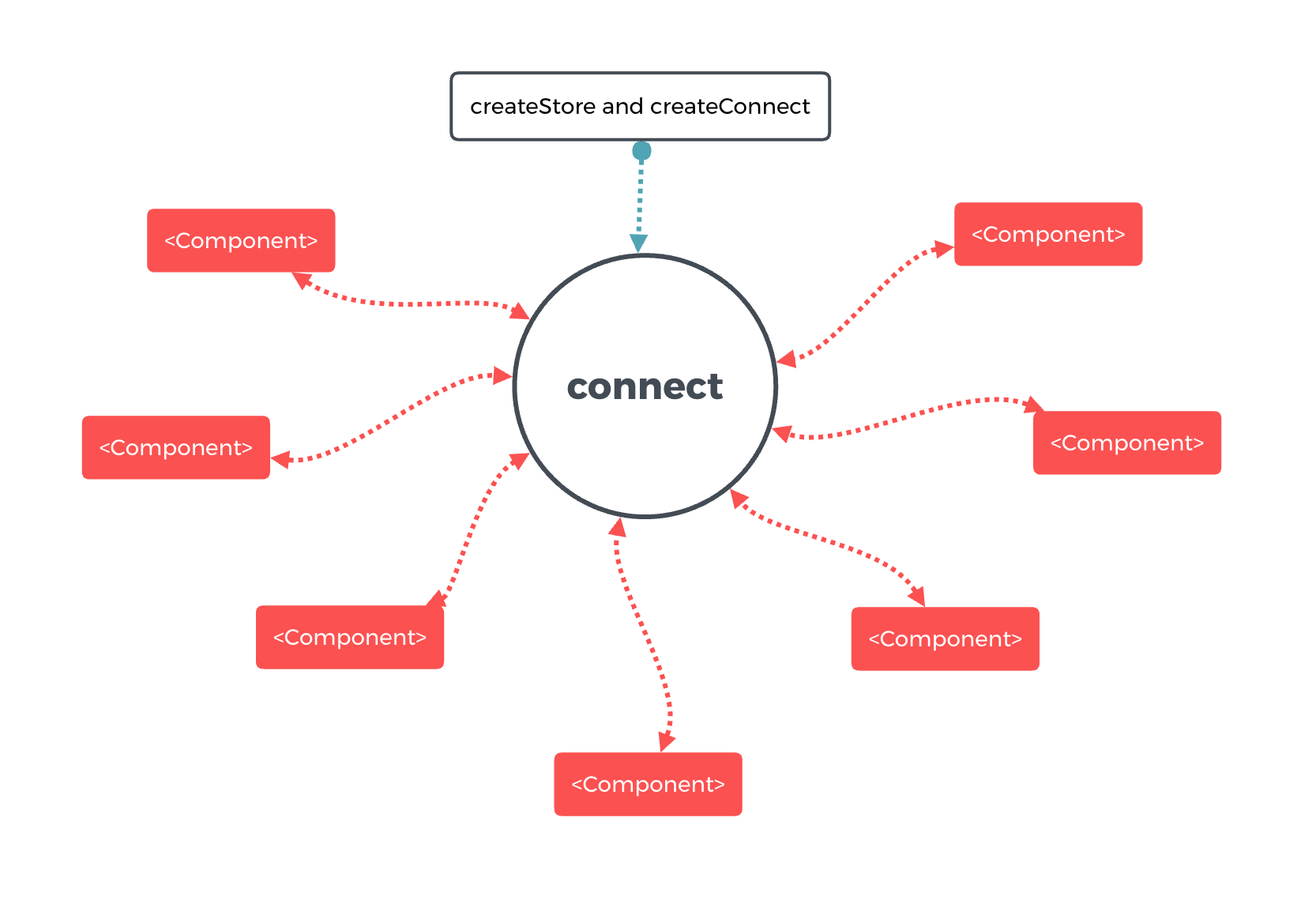
rims.png

rims 提供与 react-redux 相同用法的 connect.

rims 即插即用 甚至可以与原有使用 react-redux 的项目共存(注意: 同一组件不要同时使用二者的 connect), 可将 store 直接传入 createConnect, 只维护一个 store.

rims 利用闭包实现组件之间的联系, 如果结合 redux-persist 甚至可以达到不同页面之间的数据流通.

Quick Start

Installation

npm install --save rims

or

yarn add rims

Create store and connect

// createConnect.js
import { createStore } from 'redux';
import reducers from './reducers';
import { createConnect } from 'rims';

const store = createStore(reducers);

export default createConnect(store);

需要创建一个新的文件, 用于创建 storecreateConnect

创建 store, 我们仅替换了 react-redux, 好消息是若你此前配置过 store, 那么 store 不需要变动, 仅仅导出 createConnect 即可. 当然这也意味着我们仍然可以用 redux 的插件: redux-thunk redux-logger 等.

Connect Components

import connect from './createConnect';

@connect(state => state)
class App extends React.Component{
  // ...
}

多页面应用状态共享

通过状态数据持久化实现, 使用 redux-persist 实现状态数据持久化.

// createConnect.js
import { createStore } from 'redux';
import { persistStore, persistReducer } from 'redux-persist';
import reducers from './reducers';
import { createConnect } from 'rims';

const persistConfig = {
  key: 'root',
  storage: storageSession,
};

const persistedReducer = persistReducer(persistConfig, reducers);

const store = createStore(persistedReducer);

export default createConnect(store);

License

MIT
