
risei
v3.3.6
Published
Risei allows you to write unit tests as simple JavaScript objects, so it's easy and fast, with no drag on redesign.

Maintainers
 riseimaker
Readme
Risei Read-Me
Overview
Risei is a new way to write unit tests that's easier, faster, and more readable. Tests made with Risei aren't a source of errors or a drag on redesigns.
Risei does all this by replacing hand-coded tests with simple declarative syntax.
- Risei has many convenient and time-saving features.
- Risei works with class-based JavaScript in modules.
- Risei works with TypeScript after just a few tweaks.
You can find a longer version of this read-me at https://deusware.com/risei. It expands greatly on the information here.
Risei's major features are now complete, but new enhancements or fixes may appear from time to time. For release notes, see the version history.
Examples
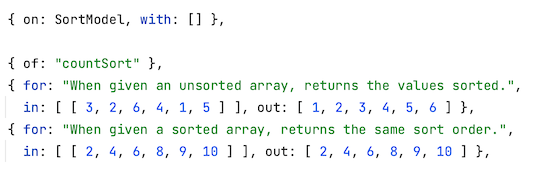
Here are two example tests, in which SortModel.countSort() is being tested using the inputs from .in and the expected output from .out:
Here are the example test results for those two tests:
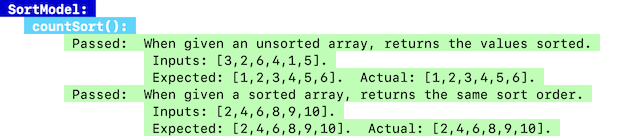
- Outputs are always listed, even on passing tests, which makes code usage much clearer.
- Any failing tests appear in light red.
- Your latest tests always sort to the bottom so it's easy to find their results.
Test runs have a title bar so the starting point is easy to find:

And they have a summary bar at the bottom:

- This bar is red when any tests fail, just as you'd expect.
Features of Risei
Click ▼ / ▲ to see sections here, or the ► links to see full explanations on Risei's website.
Easy declarative syntax to write tests simply and quickly. ▼ ► Writing tests
Easy-to-read test definitions and outputs. ▲ ► Examples
Simple reuse of test properties. ▼ ► Collapsing forward
Built-in declarative dependency faking. ▼ ► Spoofing using
.plusFull support for
asynccode without special syntax. ▼ ► Writing testsConsistent syntax for all callable code. ▼ ► Properties and statics
Testing exception / error paths effortlessly. ► Using
.and: "throws"Deriving values to test indirectly. ► Using
.fromSetting up and tearing down arbitrary test state. ► Using
.doand.undoTesting for
undefinedas output. ► Usingthis.undefRunning a method repeatedly in one test. ► Using
.and: "poly"And more! Check out the full Risei home page.
Installation
Install Risei for development time only:
npm install --save-dev riseiEnsure that package.json specifies ECMAScript modules:
"type": "module"And add Risei's metadata to package.json:
"risei": {
  "tests": "**.rt.js"
}
Testing Risei Itself
To test Risei itself, you clone it from a parallel repository, install its dependencies, and run its self-tests. See the full explanation here.
Writing Tests
You write tests in .rt.js files like this:
import ATestSource from "risei/ATestSource";
import ClassToTest from "ClassToTest.js";

export class SomeTests extends ATestSource {
    tests = [ ... ];
}
Write individual tests as plain JavaScript objects with Risei's simple syntax:
tests = [ ...
    { on: ContainerClass, with: [ "a", "b", "c" ],    // Target class and constructor args.
      of: "doesContain",                              // Target method name.
      for: "When the arg is present, returns true.",  // Description of test.
      in: [ "c" ],                                    // Inputs to method.
      out: true },                                    // Expected output.
... ];- Asynchronous / awaitable code can tested with no changes at all to this syntax.
- But you use
asyncandawaitif you define functions within tests.
- But you use
- Properties can be tested with no changes at all to this syntax.
- Use empty arrays for
.inor.withwhen there are no args to pass.
- Use empty arrays for
- You can use long names for properties if you want.
Running Tests
Once you have some tests written, you can run them manually:
node ./node_modules/risei/index.jsOr write a script in package.json that does the same:
"scripts": {
  "test": "node ./node_modules/risei/index.js"
}
And then run that script:
npm testProperty reuse with collapsing forward
You can state repeated test properties just once, and let them collapse forward across subsequent tests to save time and make tests easier to read.
Risei collapses values together from partial or full test objects until it has a full test to run. Every property collapses forward until it is changed or wiped out:
{ on: ContainerClass, with: [ "a", "b", "c" ] },                     // Following tests are of this class.

{ of: "doesContain" },                                               // Following tests are of this method.
{ for: "Returns true when arg present.", in: [ "c" ], out: true },   // First test: now Risei has enough to run on.
{ for: "Returns false when arg absent.", in: [ "d" ], out: false },  // Next test: same method, different test case.

{ of: "countOf" },                                                   // Change of tested method.  Method-related props are wiped out.
...

{ on: SortingClass, with: [ ] }, // Change of tested class. All existing props are wiped out.- To change just one property between tests, restate it along with
just: true. - There are more options available, and an exclusion for mutated args.
- Learn all the details here.
Test isolation with spoofing
You can use declarative spoofing syntax to define what dependencies of your targeted code return for it to use.
The most basic spoofing looks like this:
{
  on: TestedClass,
  ...
  plus: [
      { on: Dependency, of: "someMethod", as: 10 },  // Dependency.someMethod() returns 10 in this test.
      { of: "testedClassMethod", as: 11 }            // TestedClass.testedClassMethod() returns 11 in this test.
    ],
  ...
}- It's just like fakes, mocks, or test doubles in other test systems, but easier to write and read.
- Numerous additional capabilities, as well as compressed syntax, can be mixed freely in many ways.
- Learn more here.
TypeScript with Risei
To test TypeScript code with Risei, you make sure the code is transpiled before the tests are run, and you point Risei to the transpiled .js files.
- Learn all about it here.
Troubleshooting
If errors are thrown while testing, gold bars listing them appear at the bottom, and full stack traces appear amid the test output. If problems cause test files not to load, a gold bar with the error message also appears:

- If files don't load, tests in those files disappear from the output and the totals.
- Those and other problems can be solved with the help of this troubleshooting guide.
Known issues and workarounds
There are the known minor issues:
Any mutated test args are used in mutated form by later tests when collapsing forward.
- To work around this, just restate those args for each test.
Spoofing accessor properties only works when they have both a getter and a setter.
- You can use
.doand.undoto set and reverse other properties.
- You can use
Custom overrides of
toString()and other built-in methods aren't recognized automatically. Nor are instance methods with the same names as static methods.- You can use an
.andvalue of"instance"to ensure these are recognized.
- You can use an
Exclusions from Risei
At present, there are a few things Risei doesn't support. Some of these may be supported in the future.
- You can see the whole list here.
You can save a lot of time by using Risei for most of your code, but another framework for whatever it doesn't support.
Maker
Risei is written by myself, Ed Fallin. I'm a longtime software developer who likes to find better ways to do things.
If you find Risei useful, consider spreading the word to other devs, making a donation, suggesting enhancements, or proposing sponsorships.
You can get in touch about Risei at [email protected].
License
Risei is published for use under the terms of the MIT license:
Risei Copyright © 2023–2026 Ed Fallin
Permission is hereby granted, free of charge, to any person obtaining a copy of this software and associated documentation files (the "Software"), to deal in the Software without restriction, including without limitation the rights to use, copy, modify, merge, publish, distribute, sublicense, and/or sell copies of the Software, and to permit persons to whom the Software is furnished to do so, subject to the following conditions:
The above copyright notice and this permission notice (including the next paragraph) shall be included in all copies or substantial portions of the Software.
THE SOFTWARE IS PROVIDED "AS IS", WITHOUT WARRANTY OF ANY KIND, EXPRESS OR IMPLIED, INCLUDING BUT NOT LIMITED TO THE WARRANTIES OF MERCHANTABILITY, FITNESS FOR A PARTICULAR PURPOSE AND NONINFRINGEMENT. IN NO EVENT SHALL THE AUTHORS OR COPYRIGHT HOLDERS BE LIABLE FOR ANY CLAIM, DAMAGES OR OTHER LIABILITY, WHETHER IN AN ACTION OF CONTRACT, TORT OR OTHERWISE, ARISING FROM, OUT OF OR IN CONNECTION WITH THE SOFTWARE OR THE USE OR OTHER DEALINGS IN THE SOFTWARE.