
rn-heatmap
v0.0.5
Published
The react-native-heatmap package provides a customizable activity heatmap similar to GitHub's contribution graph, built with react-native-svg.


Readme
Heatmap Component - NPM Package
Overview
The rn-heatmap package provides a customizable activity heatmap similar to GitHub's contribution graph, built with react-native-svg.
Installation
npm install rn-heatmapor with Yarn:
yarn add rn-heatmapPeer Dependencies
Ensure you have react-native-svg installed:
npm install react-native-svgUsage
Light Mode Component
import React from 'react';
import { View } from 'react-native';
import {Heatmap} from 'rn-heatmap';

const LightModeHeatmap = () => {
  return (
    <View>
      <Heatmap
        year={2024}
        activeDays={[
          {monthIndex: 0, dayIndex: 5, level: 2},
          {monthIndex: 2, dayIndex: 10, level: 3},
          {monthIndex: 5, dayIndex: 20, level: 1},
        ]}
        defaultCellColor="#808080"
        colorMap={{
          1: '#a3d9a5',
          2: '#57c84d',
          3: '#228b22',
        }}
        cellSize={12}
        dayGap={6}
        monthlyGap={30}
        textPadding={10}
        fontWeight="bold"
        getMonthAnnotation={monthIndex =>
          [
            'Jan',
            'Feb',
            'Mar',
            'Apr',
            'May',
            'Jun',
            'Jul',
            'Aug',
            'Sep',
            'Oct',
            'Nov',
            'Dec',
          ][monthIndex]
        }
        showMonthAnnotation={true}
        monthlyAnnotationFontSize={12}
        monthlyAnnotationColor="black"
        cellBorderRadius={4}
        paddingHorizontal={15}
        paddingVertical={5}
        bottomPadding={15}
        showCurrentFullYear={true}
        showScrollBar={true}
      />
    </View>
  );
};

export default LightModeHeatmap;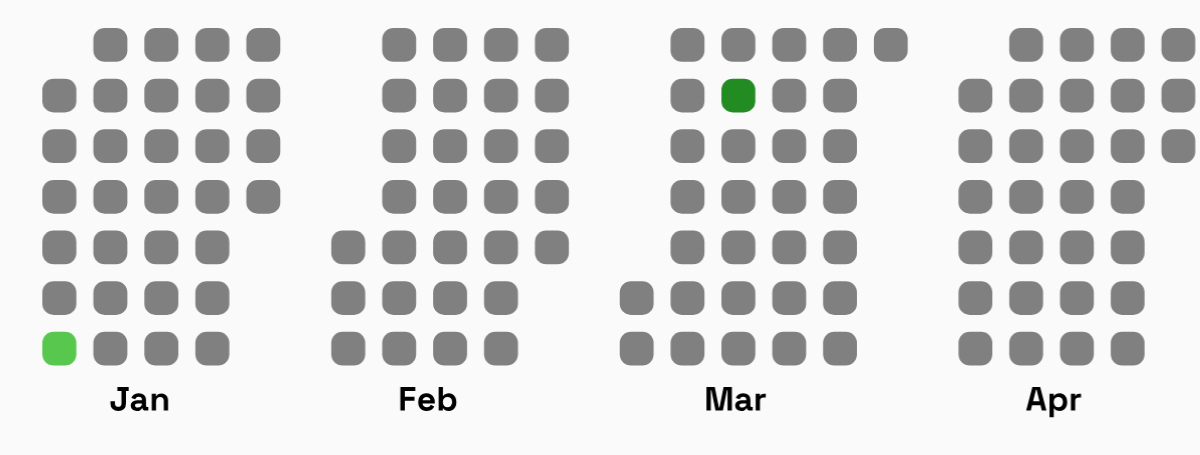
Dark Mode Component
import React from 'react';
import { View } from 'react-native';
import {Heatmap} from 'rn-heatmap';

const DarkModeHeatmap = () => {
  return (
    <View>
      <Heatmap
        year={2024}
        activeDays={[
          {monthIndex: 0, dayIndex: 5, level: 2},
          {monthIndex: 2, dayIndex: 10, level: 3},
          {monthIndex: 5, dayIndex: 20, level: 1},
        ]}
        defaultCellColor="#161b22"
        colorMap={{
          1: '#0e4429',
          2: '#006d32',
          3: '#26a641',
        }}
        cellSize={14}
        dayGap={8}
        monthlyGap={35}
        textPadding={12}
        fontWeight="bold"
        getMonthAnnotation={monthIndex =>
          [
            'Jan',
            'Feb',
            'Mar',
            'Apr',
            'May',
            'Jun',
            'Jul',
            'Aug',
            'Sep',
            'Oct',
            'Nov',
            'Dec',
          ][monthIndex]
        }
        showMonthAnnotation={true}
        monthlyAnnotationFontSize={12}
        monthlyAnnotationColor="white"
        cellBorderRadius={4}
        paddingHorizontal={15}
        paddingVertical={5}
        bottomPadding={15}
        showCurrentFullYear={true}
        showScrollBar={true}
      />
    </View>
  );
};

export default DarkModeHeatmap;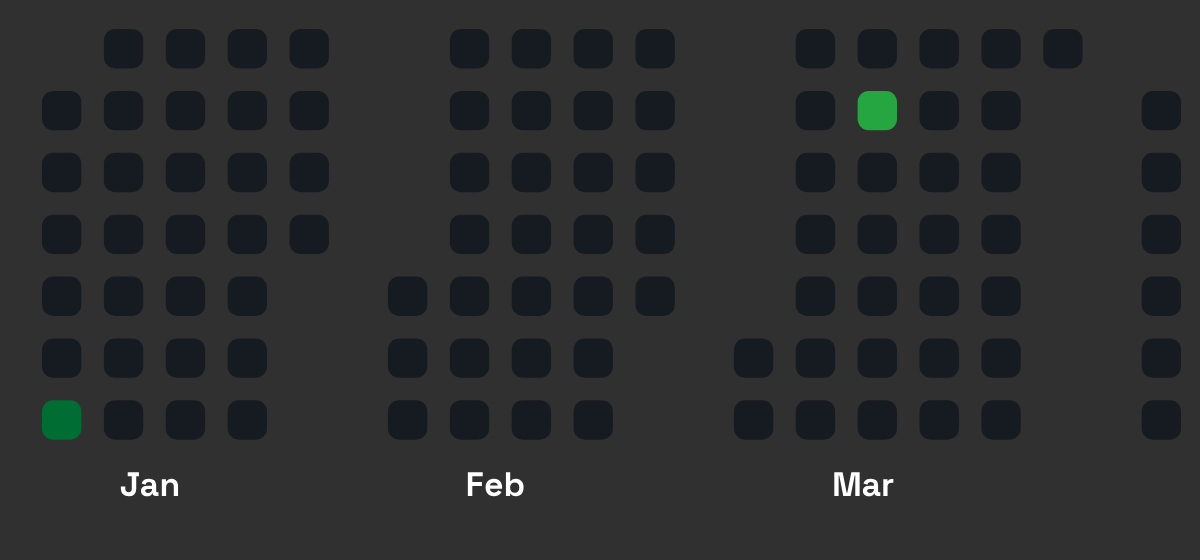
API Reference
Props
| Prop | Type | Default | Description |
|------|------|---------|-------------|
| year | number | Required | The year for which the heatmap is generated. |
| activeDays | Array<Activity> | [] | List of active days with their month, day index, and activity level. |
| defaultCellColor | string | #161b22 | The default background color for inactive days. |
| colorMap | {[key: number]: string} | {1: '#0e4429', 2: '#006d32', 3: '#26a641'} | Color mapping for different activity levels. |
| cellSize | number | 12 | The size of each cell representing a day. |
| dayGap | number | 6 | The gap between each day's cell. |
| monthlyGap | number | 30 | The gap between months. |
| textPadding | number | 10 | Padding for month annotations. |
| fontWeight | FontWeight | 'normal' | Font weight for month labels. |
| getMonthAnnotation | (monthIndex: number) => string | getMonthFromMonthIndex | Function to get month labels. |
| showMonthAnnotation | boolean | true | Whether to display month labels. |
| monthlyAnnotationFontSize | number | 10 | Font size for month labels. |
| monthlyAnnotationColor | string | 'white' | Color of month labels. |
| cellBorderRadius | number | 2 | Border radius for day cells. |
| paddingHorizontal | number | 10 | Horizontal padding for the component. |
| paddingVertical | number | 0 | Vertical padding for the component. |
| bottomPadding | number | 10 | Bottom padding for the heatmap. |
| showCurrentFullYear | boolean | false | Whether to show the entire current year or only past days. |
| showScrollBar | boolean | false | Whether to show the horizontal scrollbar. |
Activity Object Structure
Each Activity object in activeDays should have the following structure:
interface Activity {
  monthIndex: number; // 0-based index (0 = January, 11 = December)
  dayIndex: number;   // 0-based index (0 = first day of the month)
  level: 1 | 2 | 3;   // Activity level, corresponding to `colorMap`
}
Contributing
- Fork the repository.
- Clone the repo:
git clone https://github.com/yourusername/rn-heatmap.git - Install dependencies:
npm install - Run project by :
npm run android or npm run ios etc - Make your changes.
- Submit a pull request.
License
MIT License