
rn16k
v1.2.3
Published
React Native 16 KB page size checker for Google Play. One command scans your packages, resolves Maven SDKs and verifies your APK — and names the packages blocking 16 KB.

Maintainers
 mishalibrar
Readme
rn16k — React Native 16 KB page size checker



rn16k tells you whether your React Native Android app meets Google Play's 16 KB page size
requirement, and names the exact packages blocking it. Run npx rn16k in your project: it
scans your installed packages for prebuilt native libraries, resolves the transitive Maven graph
through your Gradle wrapper, builds a release APK if you don't already have one, verifies that
artifact the way Google Play does, and prints a per-package verdict with the version that fixes
each one. Zero dependencies, no Android SDK required, nothing written to your package.json.
Documentation · npm · Changelog · Common questions
Nothing to install. Open a terminal in your project and run:
npx rn16kThat is the whole workflow. npx fetches and runs it — it is never added to your
package.json, so it cannot conflict with your dependency tree. You do not need
npm i rn16k. (npm's website shows an install box on every package page; that's a template,
not a requirement. See Do I need to install it?)
From that one command it will, by itself:
- scan your installed packages for prebuilt native libraries
- run your Gradle wrapper to resolve the transitive Maven graph — Firebase, ML Kit, Mapbox and
the rest, which never appear in
node_modules - build a release APK/AAB for you if you don't already have one — you do not have to run
assembleReleasefirst, or know where the output lands - verify that artifact the way Google Play does, and print the packages that block 16 KB
Zero dependencies. No network of its own. No Android SDK required.
See it run
One command on a production app — 1314 packages, 293 Maven coordinates resolved through Gradle, the release APK verified, 6 seconds start to verdict. Nothing installed, nothing else typed.
This run reused a build that already existed. With no artifact present it runs the release build itself first, which is what takes the time — the answer at the end is identical.
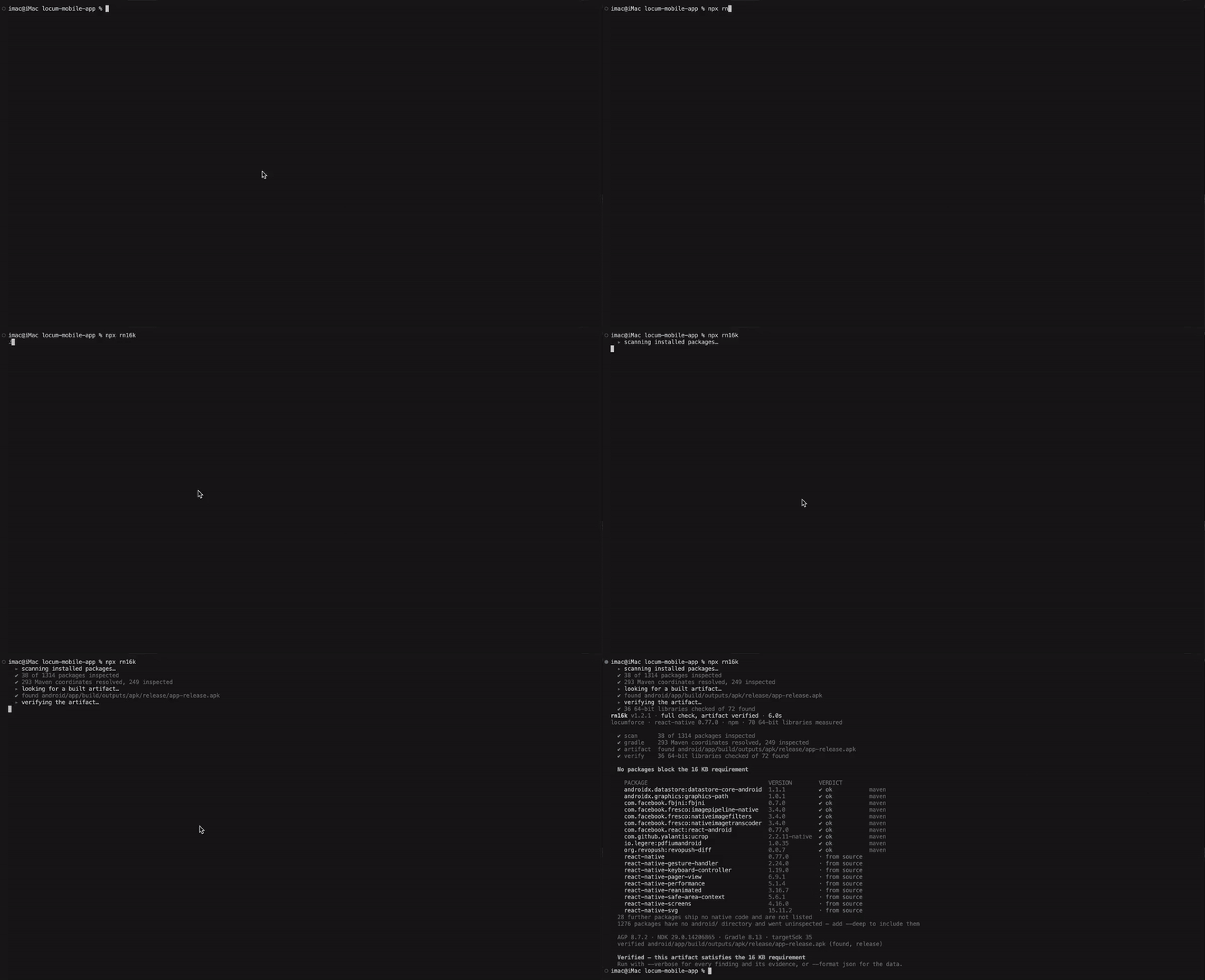
▶ Watch at full quality · still image of the report
Why the 16 KB page size requirement matters
Google Play requires apps targeting Android 15 (API level 35) and higher to support 16 KB memory pages on 64-bit devices. The requirement took effect for new apps and updates on 1 November 2025, and the extension window for existing apps closed on 31 May 2026. Google's current guidance states that from 1 February 2027, updates that do not support 16 KB memory page sizes cannot be released at all. A non-compliant app is rejected at upload, not just at runtime.
Dates checked against developer.android.com on 10 August 2026.
Compliance has two halves, and most tools only check the first:
| | Requirement | Checked by |
|---|---|---|
| A | Every PT_LOAD segment of every 64-bit .so is 16 KB aligned | rn16k, rn16k verify |
| B | Every uncompressed .so starts on a 16 KB ZIP boundary in the APK | rn16k verify |
And an RN app's native code comes from four places, which need entirely different fixes:
| Source | Who controls alignment | How rn16k handles it |
|---|---|---|
| React Native core | your RN version | version rule |
| Packages built from source (Reanimated, MMKV) | your NDK, not the package | classified separately, never falsely blamed |
| Packages shipping prebuilt .so / .aar | the package author | ELF bytes inspected directly |
| Transitive Maven AARs (Firebase, ML Kit, Mapbox) | the SDK vendor | resolved through Gradle and inspected |
That last row is why projects come back clean from other tools and still get rejected.
Do I need to install it?
No. npx rn16k is the intended way to run it, and the only step there is.
| | What happens |
|---|---|
| npx rn16k | Fetched to npm's cache and run. Not written to package.json. No peer resolution, so it cannot collide with your dependency tree. Use this. |
| npm i -D rn16k | Optional. Only worth it to pin a version in CI, or to register npx react-native check-16kb. |
The npm package page shows an npm i rn16k box because
npm renders that on every package —
it has no way to tell a library from a command-line tool. rn16k declares a bin, so it is the
second kind.
If you do install it into a project with existing peer-dependency conflicts, npm may refuse
for reasons that have nothing to do with rn16k — it has zero dependencies and adds no
constraints of its own. npm i -D rn16k --legacy-peer-deps gets past your own tree's
conflicts. Or just use npx and skip the question.
What npx rn16k does, step by step
npx rn16k runs four steps and reports once, at the end:
- Scan installed packages for prebuilt native libraries, and read the toolchain.
- Resolve the transitive Maven graph through your project's Gradle wrapper, and inspect the cached AARs behind it.
- Find a built
.apk/.aabunderandroid/app/build/outputs— or build one for you if there is none. You do not need to run./gradlew assembleReleaseyourself or know where the artifact ends up. A release build is preferred; if it fails — usually a signing config pointing at a keystore that is not in the repo — a debug build is used instead and the report says so, because ZIP alignment can differ between variants. - Verify it the way Play does, then attribute every failing library back to the package that supplies it.
Progress goes to stderr while it works, so --format json still produces one parseable
document and a piped run is never corrupted by the build's output.
Already built your app? It reuses that artifact and skips step 3 — the run takes seconds. Want
it to never build? --no-build. Want it to touch nothing at all? --static.
rn16k v1.2.1 · full check, artifact verified · 2m 14s
myapp · react-native 0.77.0 · yarn · 34 64-bit libraries measured

  ✔ scan      412 of 480 packages inspected
  ✔ gradle    196 Maven coordinates resolved, 41 inspected
  ✔ build     built android/app/build/outputs/apk/release/app-release.apk
  ✔ verify    34 64-bit libraries checked of 68 found

  2 packages block the 16 KB requirement

    PACKAGE                     VERSION  VERDICT
    react-native-mmkv           2.11.0   ✖ blocks       → 3.1.0  in artifact
    com.mapbox.maps:android     10.16.0  ✖ blocks       → 11.0.0 maven
    react-native-reanimated     3.16.1   ✔ ok
    react-native-svg            15.8.0   · from source
  342 further packages ship no native code and are not listed
Commands and options
rn16k [path]                 # everything, in one run (default)
rn16k --static               # Tier 0 only: reads files, executes nothing
rn16k --no-build             # use a build you already made; never make one
rn16k --artifact <file>      # verify this artifact instead of searching
rn16k scan [path]            # the Tier 0 report, as a flat list of findings
rn16k verify app-release.apk # verify one artifact and nothing else
rn16k doctor                 # toolchain only: RN, AGP, NDK, packaging
rn16k explain <package>      # what is known about one package
--format text|json|sarif|markdown --fail-on blocker|warning|unknown|never
--timeout <seconds> --build-timeout <seconds>
--deep --verbose --absolute-paths--timeout bounds dependency resolution (default 600); --build-timeout bounds the build
(default 1800). 0 removes either limit. A first resolve on a cold cache downloads the whole
dependency graph and can take far longer than a warm one; when a limit is hit, or Gradle fails
for any other reason, its own output is quoted back along with the command to re-run by hand.
Exit codes: 0 clean · 1 findings at or above --fail-on (default blocker) · 2 usage error.
Installed in an RN CLI project, it also registers npx react-native check-16kb.
Checking an APK that isn't React Native
rn16k verify <file> takes a path to a built .apk, .aab or .apks and reads it directly.
It judges the bytes — ELF program headers and ZIP entry offsets — so it has no opinion about
which framework produced the artifact. A Flutter, Unity, Cordova or plain Kotlin/Java build
verifies exactly the same way:
npx rn16k verify app-release.apkThe project-scanning commands (rn16k, rn16k scan, rn16k doctor) are the React Native
half: they walk node_modules and run your Gradle wrapper, so they expect a JavaScript project
with an android/ directory — React Native CLI, or Expo after expo prebuild.
Three tiers, three strengths of claim
The tool will never tell you it is compliant on evidence that cannot support the claim.
The default run reaches for the strongest tier available; --static stops it at the first.
| Tier | Reached by | What it proves | Verdict it may give |
|---|---|---|---|
| 0 | rn16k --static | No known blockers in installed packages or config | no-known-blockers |
| 1 | rn16k --no-build | …including every transitive Maven SDK | no-known-blockers |
| 2 | rn16k | Both requirements, on the actual artifact | verified |
verified additionally requires that nothing went unassessed — a single unparseable library
downgrades the verdict, because incomplete evidence must not read as a pass. An .aab can
never be verified, since Play generates the APKs and ZIP alignment is decided there.
The same rule binds the other end. A scan that inspected zero binaries reports
nothing-inspected, not no-known-blockers — a clean result with nothing behind it is an
absence of evidence. This is the normal Tier 0 outcome for a React Native app, because the
core libraries and most vendor SDKs arrive as Maven AARs rather than as files in
node_modules. It is also the reason the default run no longer stops there: reaching Tier 2
is what gives the verdict something to stand on, and leaving that to the user meant the
strongest evidence was the evidence least often obtained.
When Tier 2 does run, its result governs. A verified artifact is not downgraded by Tier 0 findings — it measures the bytes Play measures — but any unaligned library found in the project that did not reach the artifact is still listed, because the same package can reach a different build variant.
Toolchain claims are checked, not assumed
- AGP is resolved the way Gradle resolves it: a
classpathversion, the plugins DSL, a version catalog — and, because the stock RN template declaresclasspath("com.android.tools.build:gradle")with no version at all, React Native's own catalog atnode_modules/@react-native/gradle-plugin/gradle/libs.versions.toml. Without that last step, AGP reads as unknown on a default React Native project. - NDK is checked against the SDK on disk, found via
local.properties,ANDROID_HOME,ANDROID_SDK_ROOTor the platform default. A pinnedndkVersionis a request, not a fact: if it is not installed, no alignment claim is drawn from it. What is installed decides whether that is a warning (everything present is r27 or older, which links to 4 KB) or merely unassessable.
Proof: it agrees with Google's own tools
A checker you cannot check is worth nothing. Every claim rn16k makes is cross-validated against the tools Google ships, on synthetic fixtures in CI and on real production APKs.
On a real production app
A shipping React Native app — 1314 npm packages, 293 resolved Maven coordinates, 72 native libraries, 36 of them 64-bit — checked three independent ways. Same APK, same moment:
| Check | Tool | Result |
|---|---|---|
| ELF segment alignment | llvm-objdump -p (NDK r29) | 36 of 36 64-bit libraries at 2**14, 0 below |
| ZIP alignment | zipalign -c -P 16 4 (build-tools 37) | Verification successful, 72 .so entries |
| Both, in one command | npx rn16k | 0 blockers · 72 ok → verified |
All three agree, library for library. The whole run — scan, Maven resolution, and verification of an existing build — took 10.5 seconds.
That app also demonstrates why the Maven step exists: of the ten dependencies shipping
prebuilt 64-bit binaries, every single one arrived as a Maven AAR — io.legere:pdfiumandroid,
com.github.yalantis:ucrop, com.facebook.fresco:*, androidx.graphics:graphics-path. None
of them exists in node_modules. A scanner that only walks node_modules measures nothing at
all here and still reports a clean project.
Read your own APK Analyzer results carefully. During this validation, Android Studio's APK Analyzer showed "Does not support 16 KB devices" for the same app — but it was displaying a previously opened build (v1.1.5, 43.9 MB), not the current one on disk (v1.1.6, 46.4 MB). The flagged
libpdfiumandroid.sowas 121.9 KB; the one actually shipping was 431 KB and correctly aligned. rn16k reads the artifact on disk at the moment you run it, and prints which file it verified.
On synthetic fixtures, in CI
CI builds real libraries with NDK r26 (4 KB) and NDK r28 (16 KB) and asserts agreement
with llvm-objdump and zipalign on every offset and verdict:
| Library | llvm-objdump | rn16k |
|---|---|---|
| NDK r26 build | align 2**12 | 2**12, rejected |
| NDK r28 build | align 2**14 | 2**14, accepted |
| APK | zipalign -c -P 16 4 | rn16k |
|---|---|---|
| aligned | 16384 lib/arm64-v8a/libapp.so (OK) | offset 16384, aligned |
| misaligned | 106 lib/arm64-v8a/libapp.so (BAD - 106) | offset 106, remainder 106 |
Check it yourself
Don't take the tables on trust — run the same comparison on your own APK. It takes a minute:
# 1. rn16k's answer
npx rn16k --artifact app-release.apk

# 2. Google's ZIP-alignment check (build-tools)
zipalign -c -P 16 -v 4 app-release.apk | tail -1
#   -> "Verification successful"

# 3. Google's ELF check (NDK) — every 64-bit library must be 2**14 or greater
unzip -q app-release.apk 'lib/arm64-v8a/*' 'lib/x86_64/*' -d unpacked
for f in unpacked/lib/*/*.so; do
  echo "$(llvm-objdump -p "$f" | grep -A1 '^ *LOAD ' \
    | grep -o 'align 2\*\*[0-9]*' | sort -u | tr '\n' ' ')  $f"
done
If rn16k ever disagrees with either, that is a bug and worth an issue — the whole point of this tool is that its answer matches the one Play will give you.
p_align alone is not enough
Every PT_LOAD must also satisfy (p_vaddr − p_offset) % 0x4000 == 0. Libraries exist that
advertise 16 KB alignment yet still fail to load because the linker validates congruence too
— checking p_align alone produces false passes. rn16k checks both.
32-bit ABIs (armeabi-v7a, x86) are exempt and never reported. Judgement comes from ELF
content, not directory names.
The compatibility database
data/compat.json ships inside the package, so the tool works offline forever. Entries are
graded by how they were obtained:
measured— derived bytools/derive-db, which downloads every published version of a package and runs this same ELF parser over its binaries. Graded as blockers.reported— from vendor release notes and community guides, not independently verified. Graded as warnings.
Measured evidence from your project outranks both: if rn16k inspected a package's binaries and they passed, a database minimum is reported as information, because the database can be stale and the bytes cannot.
node tools/derive-db/index.js react-native-fast-crypto
#   2.2.1  unaligned (2 64-bit libs of 4 found)
#   3.0.0  aligned   (2 64-bit libs of 4 found)
#   -> first 16 KB safe version: 3.0.0
Running this revealed that most popular RN native modules — Reanimated, Screens, SVG, Realm —
ship no prebuilt 64-bit binaries at all. Their widely-quoted "minimum safe versions"
describe build-configuration changes, not shipped artifacts, and their real alignment comes
from your NDK. Those entries are marked sourceBuilt and say so.
CI: fail the build on 16 KB blockers
- uses: mishalibrar/react-native-16kb-page-support-checker@v1
  with:
    fail-on: blocker
    sarif-file: rn16k.sarif
- uses: github/codeql-action/upload-sarif@v3
  with: { sarif_file: rn16k.sarif }
The action still performs a static scan by default — it does not start running your Gradle
wrapper because you upgraded. Set gradle: true to resolve the Maven graph and verify an
artifact your workflow already built, and build: true on top of that to let rn16k build one
itself. The usual CI shape is to build in your own job and let rn16k check what came out:
- run: ./gradlew :app:assembleRelease
  working-directory: android
- uses: mishalibrar/react-native-16kb-page-support-checker@v1
  with: { gradle: true }        # finds and verifies the APK you just built
Or directly: npx rn16k --no-build --fail-on blocker,
--format markdown >> $GITHUB_STEP_SUMMARY.
Common questions
How do I check whether my app supports 16 KB page sizes?
Run npx rn16k in your React Native project. It reports verified only after checking the two
things Google Play checks: that every PT_LOAD segment of every 64-bit .so is 16 KB aligned,
and that every uncompressed .so starts on a 16 KB boundary inside the APK. To check an
artifact you already have, npx rn16k verify app-release.apk.
Which package is blocking 16 KB in my React Native app? That is the question rn16k exists to answer. Every failing library is attributed back to the package that supplies it — an npm package, a transitive Maven SDK, or your own NDK — and the report prints the first version of that package known to be aligned, so the output is a list of upgrades rather than a list of filenames.
Play Console or APK Analyzer says "Does not support 16 KB devices". What now?
Run npx rn16k verify on the exact artifact you uploaded. Android Studio's APK Analyzer keeps
the previously opened build on screen, so the file it is judging is not always the file on disk
— that happened during this project's own validation (see Proof).
rn16k prints the path and size of the artifact it read, so the answer is attributable to a file.
Do I need Android Studio, or the Android SDK?
No. rn16k parses ELF headers and ZIP central directories itself, in Node. It needs neither
llvm-objdump nor zipalign nor an SDK installed. A default run does invoke your project's own
Gradle wrapper to resolve dependencies and build an artifact; --static and --no-build stop
it doing either.
Does it work with Expo?
Yes, after expo prebuild — rn16k needs the android/ directory and Gradle wrapper that
prebuild generates. In a managed Expo project with no android/ directory there is nothing
local to inspect; verify the build EAS produced instead, with npx rn16k verify <file>.
How is this different from running zipalign myself?
zipalign -c -P 16 checks only ZIP entry alignment, which is half the requirement — a library
can sit on a correct ZIP boundary and still be built with 4 KB segment alignment. rn16k checks
both halves, and adds the part neither Google tool does: attributing each failure to the package
you would have to upgrade. Where they overlap, the answers match, library for library — that is
cross-validated in CI and on production APKs.
Is p_align 2**14 enough?
No. Every PT_LOAD must also satisfy (p_vaddr − p_offset) % 0x4000 == 0. Libraries exist that
advertise 16 KB alignment and still fail to load, because the linker validates congruence too.
Checking p_align alone produces false passes; rn16k checks both.
My app has no native code of its own. Am I affected?
Almost certainly yes, if it is a React Native app. The requirement is about every 64-bit .so
in the APK, not only the ones you wrote — Hermes, the React Native core libraries, and any
vendor SDK that ships prebuilt binaries all count. Apps that genuinely contain no NDK libraries
at all already satisfy the requirement.
What NDK version produces 16 KB aligned libraries?
r28 and later link to 16 KB by default; r27 and earlier link to 4 KB. rn16k checks the NDKs
actually installed in your SDK rather than trusting a pinned ndkVersion, because a version
that is requested but not installed proves nothing. rn16k doctor prints what it found for
React Native, AGP, NDK and packaging.
Security
This runs against source trees, often in CI. It is deliberately boring:
- No install scripts. Installing this package executes nothing.
- Zero runtime dependencies. Only Node built-ins (
fs,path,zlib). - No network access. The scanner is entirely offline; only the repo-side database derivation tool, which is not published, ever fetches anything.
- No telemetry. None, ever.
- Writes nothing of its own. rn16k never modifies your project. A default run does invoke your Gradle wrapper, and Gradle writes its own build outputs — that is your build logic producing its normal artifacts, in the normal place.
- Executes only your Gradle wrapper, and only these two ways. A default run asks it for
the dependency list, and builds a release artifact when none exists.
--staticruns neither,--no-buildruns only the first, and the GitHub Action still defaults to--static. Every invocation goes through an argument array under a timeout and an output cap — never a shell. On Windows the wrapper is a batch file, which only a command interpreter can run, so it is launched throughcmd /d /s /cwith every argument quoted individually. The Gradle configuration name is validated before it is used, and the task names are compile-time constants. - Bounded parsers. All binary reads are bounds-checked; archives are parsed in memory under hard size caps and never extracted to disk; traversal-shaped entries are dropped; symlinks escaping the project root are not followed.
- Privacy-preserving output. Paths are project-relative and
$HOMEis redacted, so a report is safe to paste into a public issue.
CI enforces the first two mechanically — the build fails if a runtime dependency or an install script is ever added, or if tests leak into the published tarball.
Releases are published from CI and carry a signed Sigstore provenance attestation, so you can verify which commit and workflow produced any version. From v1.1.0 onward they go out through npm trusted publishing (OIDC), so no long-lived credential exists anywhere — npm authenticates the workflow itself. v1.0.0 predates that and was published manually.
Not affiliated
Independent open-source project. Not affiliated with, endorsed by, or sponsored by Google, Android, or Meta.
License
MIT