
robot-toast
v2.2.0
Published
A lightweight, framework-agnostic toast notification library with an animated robot character. Tree-shakeable robots, draggable with swipe-to-dismiss, toast.promise(), and an optional React hook.

Maintainers
 pratham-israni
Readme
🤖 robot-toast
Lightweight toast notifications with complete control.
robot-toast gives you a canvas, not a prescription — bring your own robot, colors, buttons, and timing. 16 tree-shakeable robots, fully draggable, zero dependencies.
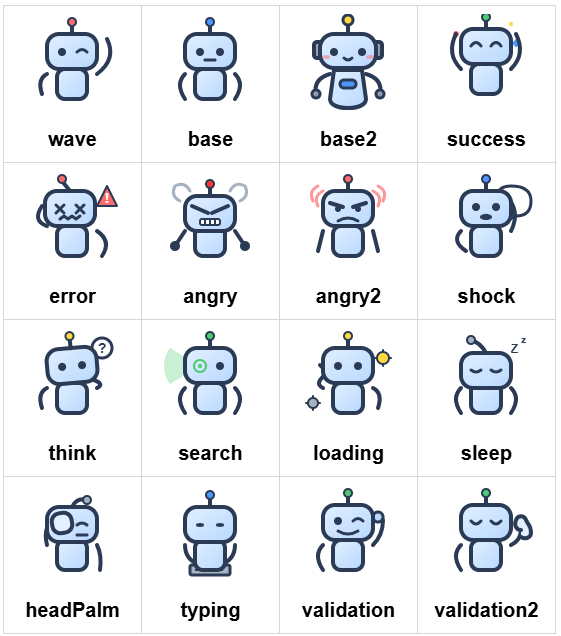
🤖 Built-in Robots
🎨 Features in Action
Install
npm install robot-toastQuick Start
import { toast } from "robot-toast";
import { wave } from "robot-toast/robots";

toast({ message: "Hello! 🤖", robotVariant: wave });
toast.success("Operation successful!");
toast.error("Something went wrong");
Features at a Glance
| Robots | Layout | Styling | Behavior |
| ----------------------- | ------------------ | ------------------------------ | --------------------- |
| 16 built-in variants | 6 position options | 3 themes | Fully draggable |
| Tree-shakeable imports | Auto-queuing | Custom inline styles | Typewriter effect |
| Custom images (SVG/PNG) | Progress bar | Tailwind-friendly className | Promise helpers |
| Custom image paths | Multi-toast queue | CSS overrides | React hook included |
Usage
Basic Usage
import { toast } from "robot-toast";
import { wave, success, error } from "robot-toast/robots";

toast("Simple notification");
toast({ message: "With options", type: "success", robotVariant: wave });
toast.success("Shorthand");
All Options
toast({
  // Content
  message: 'Notification text',

  // Appearance
  type: 'default' | 'info' | 'success' | 'warning' | 'error',
  theme: 'light' | 'dark' | 'colored',
  transition: 'bounce' | 'flip' | 'zoom' | 'slide',
  position: 'top-left' | 'top-center' | 'top-right' |
            'bottom-left' | 'bottom-center' | 'bottom-right',

  // Robot & Styling
  robotVariant: wave | base | success | error | '...' | 'default' | '/path.svg',
  nearScreen: true,
  className: 'bg-emerald-600 text-white rounded-2xl shadow-lg',
  style: { background: '...', color: '...' },
  className: 'bg-emerald-600 text-white',

  // Timing & Behavior
  autoClose: 5000 | false,
  typeSpeed: 30,
  hideProgressBar: false,
  draggable: true,
  pauseOnHover: true,
  pauseOnFocusLoss: true,
  rtl: false,

  // Multi-toast
  limit: 0,
  newestOnTop: false,

  // Buttons & Callbacks
  buttons: [{ label: 'Undo', onClick: () => {...} }],
  onOpen: () => {...},
  onClose: () => {...},
});
Inline Buttons
Add undo/confirm/cancel style buttons to toasts:
toast({
  message: "File deleted",
  buttons: [
    { label: "Undo", onClick: () => restoreFile() },
    { label: "Keep", onClick: () => {}, style: { color: "gray" } },
  ],
});
Promise Lifecycle
Attach loading/success/error messages to any promise:
toast.promise(
  fetch("/api/save").then((r) => r.json()),
  {
    loading: "Saving…",
    success: (data) => `Saved as ${data.name}`,
    error: (err) => `Failed: ${err.message}`,
  },
);
React Bindings
import { useRobotToast, useToastOnMount } from "robot-toast/react";

function App() {
  const toast = useRobotToast();
  return <button onClick={() => toast.success("Saved!")}>Save</button>;
}

function InitBanner() {
  useToastOnMount({ message: "Welcome!", autoClose: false });
  return null;
}
Complete Example
Combine robots, buttons, theming, and promises in one powerful toast:
import { useRobotToast } from "robot-toast/react";
import { success, error, loading } from "robot-toast/robots";

function CompleteExample() {
  const toast = useRobotToast();

  const handleUpload = () => {
    toast.promise(
      fetch("/api/upload").then((r) => r.json()),
      {
        loading: {
          message: "Uploading your file...",
          robotVariant: loading,
          theme: "dark",
        },
        success: {
          message: "File uploaded! Ready to go? 🎉",
          robotVariant: success,
          theme: "colored",
          style: { background: "#10b981", color: "white" },
          buttons: [
            { label: "View", onClick: () => window.open("/files") },
            { label: "Done", onClick: () => {} },
          ],
        },
        error: {
          message: "Upload failed. Try again?",
          robotVariant: error,
          theme: "dark",
          style: { background: "#ef4444" },
          buttons: [{ label: "Retry", onClick: handleUpload }],
        },
      },
    );
  };

  return <button onClick={handleUpload}>Upload File</button>;
}
Programmatic Control
const id = toast("Working…");
toast.closeById(id);
toast.closeAll();
Themes & Custom Styles
toast({ message: "Light", theme: "light" });
toast({ message: "Dark", theme: "dark" });
toast({
  message: "Custom gradient",
  style: {
    background: "linear-gradient(135deg, #667eea, #764ba2)",
    color: "#fff",
    borderRadius: "16px",
  },
});
Tailwind and className
className is applied to the toast message container, so you can use your own
utility classes for surface styling without replacing the toast layout,
animation, buttons, or progress behavior.
When your className or inline style sets surface properties such as
background or color, those user-defined values win over the built-in theme
surface colors. That makes utilities like bg-*, text-*, rounded-*, and
shadow-* work predictably.
toast({
  message: "Build finished",
  theme: "dark",
  className:
    "bg-slate-950 text-slate-50 rounded-2xl border border-slate-700 shadow-2xl",
});
Use className when your app stylesheet or Tailwind tokens should drive the
toast appearance, and use style when you need runtime-calculated values.
Accessibility
error/warningtoasts:role="alert"+aria-live="assertive"- Other types:
role="status"+aria-live="polite" aria-atomic="true"ensures full message re-announcement- Labeled close button for screen readers